
Practice Free PL-900 Exam Online Questions
HOTSPOT
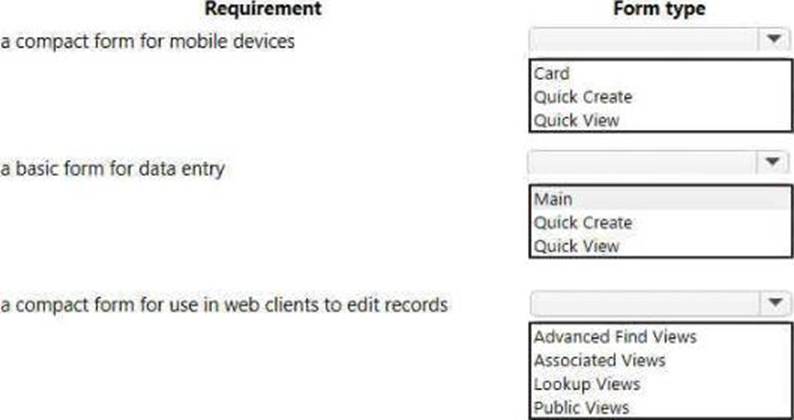
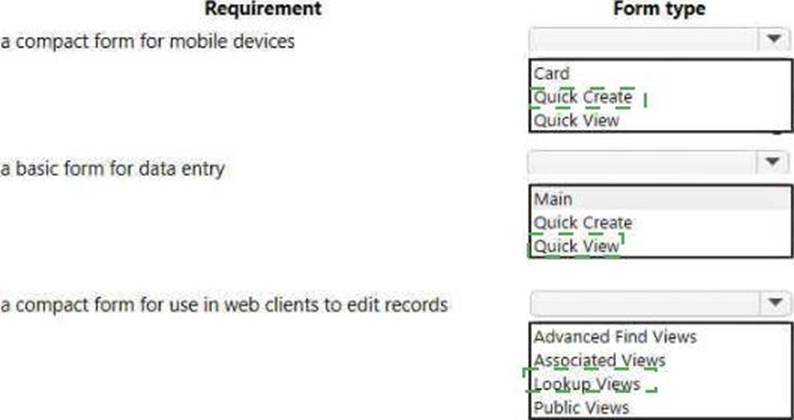
You are creating a model-driven app.
You need to add forms to the app.
Which form types should you use> To answer, select the appropriate options in the answer area. NOTE: Each correct selection is worth one point.
You are editing an existing Power Automate cloud flow. Every day. the flow adds a list of tasks to Microsoft Planner for each email received in a complaints mailbox. The flow then sends a message to you in a Microsoft Teams chat when it completes.
You add an action to the end of the flow to post a Teams message to the central office channel.
You need to update the flow so that tomorrow it will post the message in the central office channel
and in the direct chat to yourself.
Which action should you perform next?
- A . Turn the flow on.
- B . Create a connection.
- C . Add parameters to the action.
- D . Save the flow.
You are added to a dashboard within a workspace.
You need to identify where you can view the dashboard.
In which two places can you view the dashboard? Each correct answer presents a complete solution. NOTE: Each correct selection is worth one point.
- A . Microsoft Power Platform admin center
- B . Microsoft Power BI desktop
- C . Microsoft Power BI service
- D . Microsoft Power BI mobile app
A company uses Power Automate.
Which three items can trigger flows? Each correct answer presents a complete solution. NOTE: Each correct selection is worth one point.
- A . Lifecycle Services
- B . Microsoft 365 Admin center
- C . Common Data Service
- D . Microsoft Outlook 365
- E . Microsoft Windows Desktop
ACD
Explanation:
https://docs.microsoft.com/en-us/power-automate/email-triggers
https://docs.microsoft.com/en-us/power-automate/connection-cds
https://dynamics365.wordpress.com/category/powerapps/
DRAG DROP
You are planning to deploy power Pages websites.
You need to choose the appropriate type of template for each requirement for the websites.
Which types of templates should you use? To answer, drag the appropriate templates to the correct requirements. Each template may be used once, more than once, or not at an. You may need to drag the split bar between panes or scroll to view content. NOTE: Each correct selection is north one point.


A company creates canvas apps that us a data source from its sales team.
To meet company device policies, you must determine the available app formats the sales team can select when the sales team creates the canvas.
You need to determine the available app formats.
Which two app formats should you select? Each correct answer presents a complete solution. NOTE Each correct selection is worth one point.
- A . Mobile
- B . iOS
- C . Desktop
- D . Tablet
- E . Android
A coworker is creating an app in Power Apps and needs to automatically synchronize data from an external source. The coworker is unable to locate a suitable Microsoft approved connector template in AppSource.
You need to recommend a solution for the coworker.
What should you recommend?
- A . Create a custom connector.
- B . Ask the outside source to send you the data once a week.
- C . Use Microsoft Flow to connect to the database.
- D . Open a ticket with Microsoft and request a new connector.
- E . Use Microsoft Azure Service Bus.
A
Explanation:
There are 250 + predefined connectors that you can use in your PowerApps and in your Microsoft Flows. If you do not find any that suits your needs you have the possibility to create a Custom Connector.
Note: A Custom Connector is a wrapper around a REST API (Logic Apps also supports SOAP APIs) that allows Logic Apps, Microsoft Flow, or PowerApps to communicate with that REST or SOAP API.
Reference: https://carinaclaesson.com/2019/09/06/setting-up-a-custom-connector-from-an-openapi-file-and-utilizing-it-in-powerapps-and-flow/
HOTSPOT
Your company wants to create a help desk system and implement Dynamics 365 Customer Service.
The company has the following requirements:
Provide an application to allow support team staff to chat live with a customer.
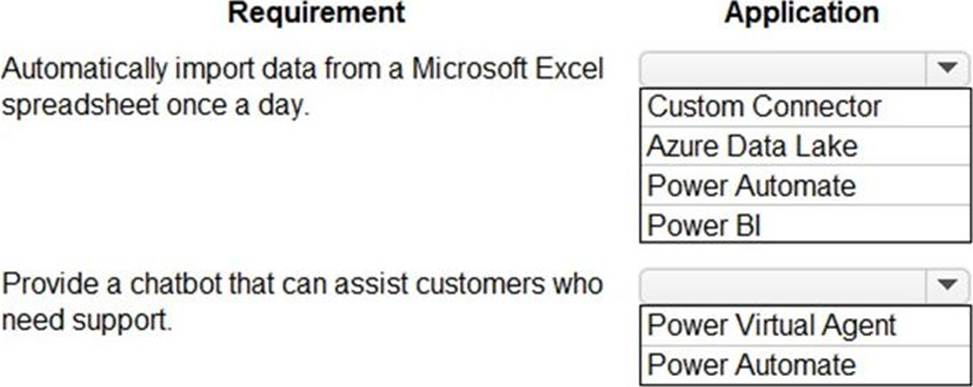
Automatically import data from a Microsoft Excel spreadsheet once a day.
Provide a chatbot that can assist customers who need support.
You need to determine which applications to use to meet the requirements.
Which applications should you use? To answer, select the appropriate options in the answer area. NOTE: Each correct selection is worth one point.
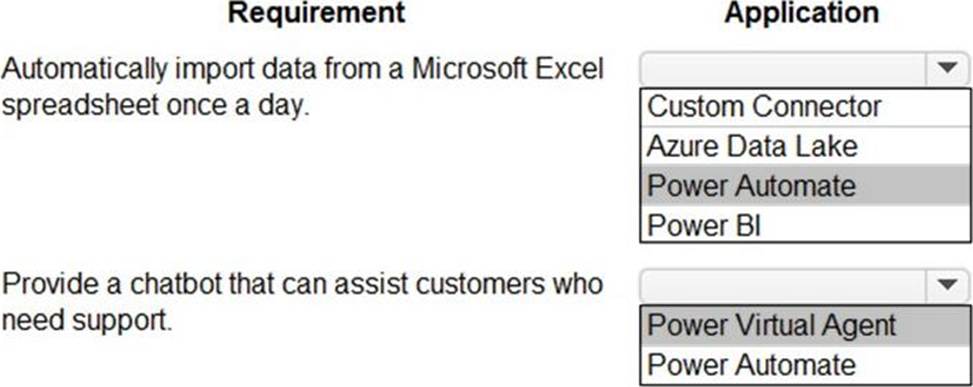
Explanation:
Reference: https://docs.microsoft.com/en-us/power-virtual-agents/fundamentals-what-is-power-virtual-agents
A 10-step Guide to Excel Automation using Power Automate Desktop | by Utkarsh Shahdeo | Medium
HOTSPOT
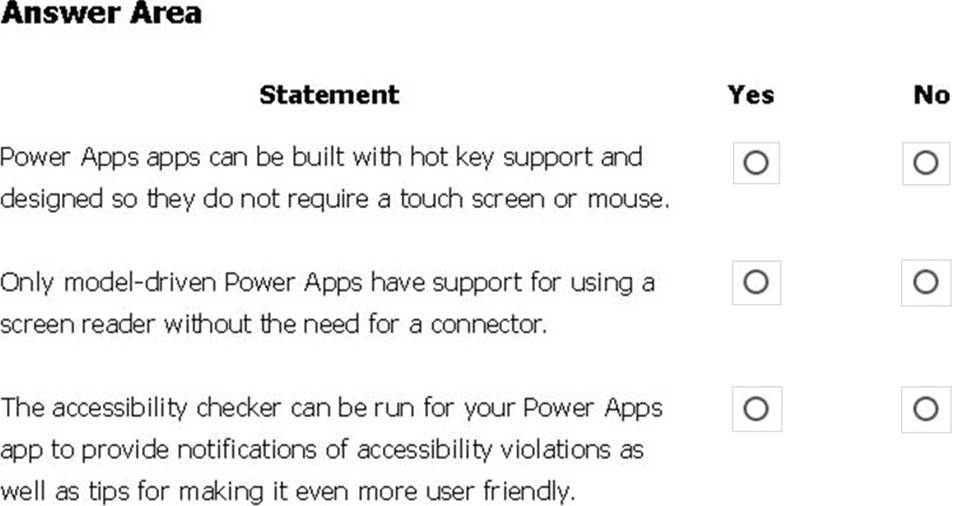
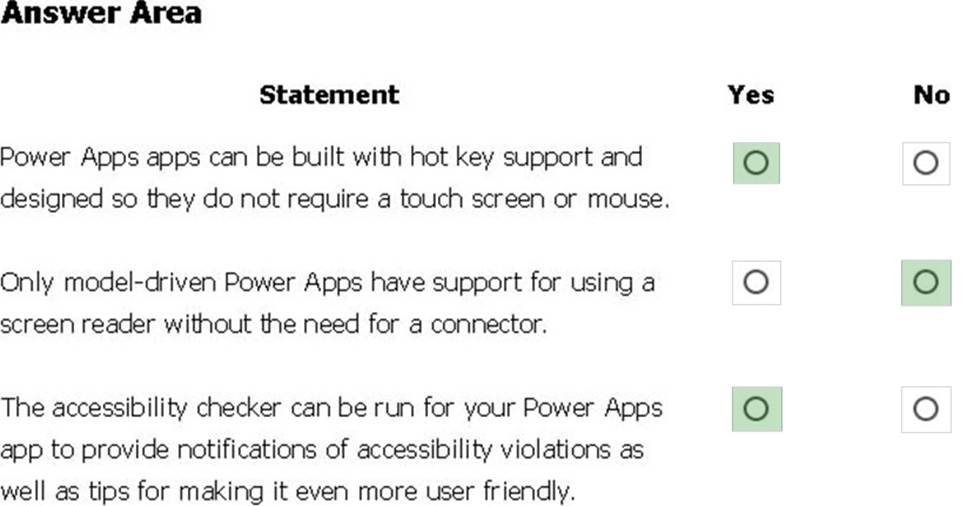
You are creating a model-driven Power Apps app. You want to ensure that the app can be used by individuals who have vision impairments.
For each of the following statements, select Yes if the statement is true. Otherwise, select No. NOTE: Each correct selection is worth one point.
Explanation:
Box 1: Yes
You can use keyboard shortcuts in PowerApps. Keyboard shortcuts give you an alternate way to do common tasks instead of using your mouse or tapping with your finger. They help in seamless navigation of the interface.
Box 2: No
The following software combinations are the supported recommendations for consuming PowerApps with a screen reader:
Windows: Microsoft Edge / Narrator
macOS: Safari / VoiceOver
Android: PowerApps app / Talkback
iOS: PowerApps app / VoiceOver
Box 3: Yes
Users who have vision, hearing, or other impairments can use your canvas app more easily and successfully if you consider accessibility as you design how the app looks and behaves. If you’re not sure how to make your app more accessible, you can run the Accessibility checker in PowerApps Studio. This tool not only finds potential accessibility issues but also explains why each might be a potential problem for users who have a specific disability and offers suggestions on how to resolve each issue. The Accessibility checker detects screen-reader and keyboard issues for you, and you can find information about how to fix color-contrast issues by using accessible colors.
Reference:
https://docs.microsoft.com/en-us/powerapps/user/keyboard-shortcuts
https://docs.microsoft.com/en-us/powerapps/user/screen-reader
https://docs.microsoft.com/en-us/powerapps/maker/canvas-apps/accessibility-checker
You are a sales representative. You create a Power BI report to visualize data from a Microsoft Excel workbook.
Users need to be able to view and share the report.
Which two actions should you perform? Each correct answer presents part of the solution. NOTE: Each correct selection is worth one point.
- A . Pin the report to a dashboard.
- B . Export the data.
- C . Publish the dashboard.
- D . Share the dashboard.
A, D
Explanation:
Reference:
https://docs.microsoft.com/en-us/power-bi/create-reports/service-dashboard-pin-live-tile-from-report
https://docs.microsoft.com/en-us/power-bi/collaborate-share/service-share-dashboards#limitations-andconsiderations