
Practice Free PL-900 Exam Online Questions
You plan to use Power Automate to perform data-management tasks when users interact with sales opportunities in Dynamics 365.
You need to identify the three types of events that can generate a trigger for the tasks.
Which three types of events should you identify? Each correct answer presents a complete solution. NOTE: Each correct selection is worth one point.
- A . when a record is displayed in a view
- B . when a record is deleted
- C . when a record is created
- D . when a record is updated
- E . when a record is read
BCD
Explanation:
Triggers like When a record is created, When a record is updated, and When a record is deleted initiate your flow within a few minutes of the event occurring. In rare cases, your flow can take up to 2 hours to trigger.
Reference: https://docs.microsoft.com/en-us/power-automate/connection-dynamics365
A toy company creates a text classification model in AI Builder to monitor customer feedback for specific key words.
When negative feedback is received for a toy, the company wants to proactively perform engineering reviews for the toy and schedule additional training sessions for workers who produce the toy.
What are two possible ways to achieve the goal? Each correct answer presents a complete solution. NOTE: Each correct selection is worth one point.
- A . Create a canvas app.
- B . Implement the Virtual Agent.
- C . Build a Microsoft Flow.
- D . Use the Common Data Model.
AC
Explanation:
A (not D): AI Builder comes with:
A ready-to-use business card reader available in canvas as well as in model-driven apps. Business card reader (Canvas)
Business card reader (Model-driven)
Additional canvas components to leverage your AI Builder form processing or object detection models canvas apps.
C: Use the results from your AI model across Power Platform to create end-to-end solutions that meet your business needs, even if you have no coding skills. For example, create a flow that automates document processing in Power Automate, or an app created with PowerApps that predicts whether a supplier will be out of compliance.
Reference: https://docs.microsoft.com/en-us/ai-builder/use-in-powerapps-overview
You are using Dynamics 365 Sales.
You need to create a Power BI report that includes customer office locations. The City and State columns
must be combined to form one column on the report.
What should you do?
- A . Use Power Query Editor to merge columns.
- B . Import the data.
- C . Export data to Microsoft Excel.
- D . Create a view.
A
Explanation:
Reference: https://support.microsoft.com/en-us/office/merge-columns-power-query-80ec9e1e-1eb6-4048-b500-d5d42d9f0a8d
DRAG DROP
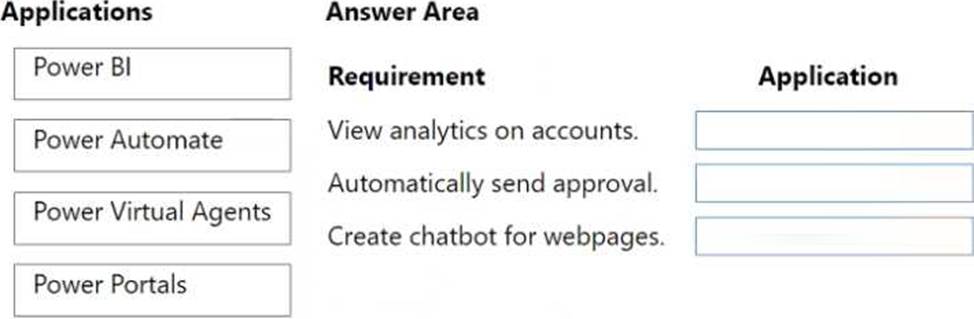
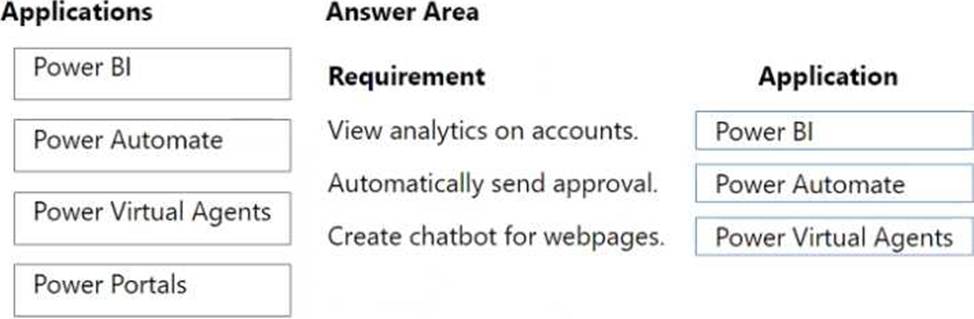
A company uses Dynamics 365 Sales. You have the following requirements:
• View analytics on accounts.
• The model-driven app must automatically send an approval form to a manager when the purchase price is greater than $10,000.
• Create a chatbot for the webpage to interact with customer questions.
You must use Microsoft Power Platform to extend the capabilities of Dynamics 365 Sales. You need to select an application for each requirement.
Which application should you use? To answer, drag the appropriate application to the correct requirement. Each application may be used once, more than once, or not at all. You may need to drag the split bar between panes or scroll to view content. NOTE: Each correct selection is worth one point.
HOTSPOT
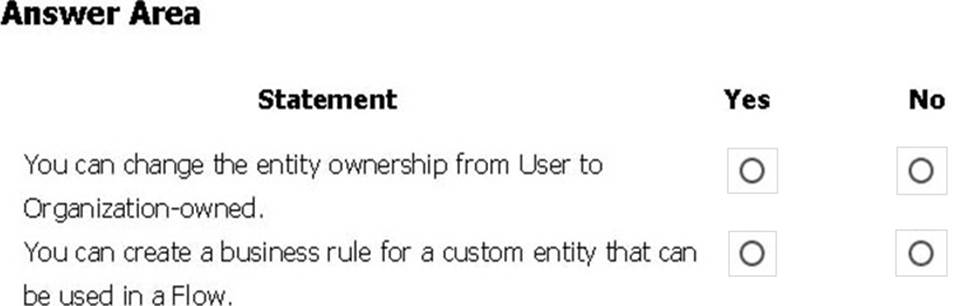
You create a user-owned custom entity by using Common Data Service.
For each of the following statements, select Yes if the statement is true. Otherwise, select No. NOTE: Each correct selection is worth one point.
Explanation:
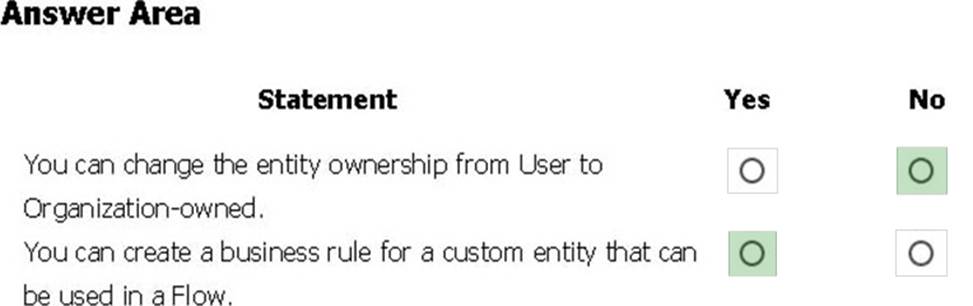
Box 1: No
Common Data Service supports two types of record ownership. Organization owned, and User or Team owned. This is a choice that happens at the time the entity is created and can’t be changed.
Box 2: Yes
By combining conditions and actions, you can do any of the following with business rules:
Set field values
Clear field values
Set field requirement levels
Show or hide fields
Enable or disable fields
Validate data and show error messages
Create business recommendations based on business intelligence.
Reference: https://docs.microsoft.com/en-us/power-platform/admin/wp-security-cds
A carpet cleaning company uses Dynamics 365 Sales.
The process for entering customer information during onsite sales calls is very complicated. The company wants a simplified screen that allows salespeople to capture the customer name, phone number, and other information while speaking to the customer.
You need to recommend a solution that works on various types of mobile devices.
What should you recommend?
- A . Common Data Service
- B . Microsoft Flow
- C . AI Builder
- D . Canvas app
- E . Power BI
D
Explanation:
Reference: https://powerapps.microsoft.com/en-us/build-powerapps/
DRAG DROP
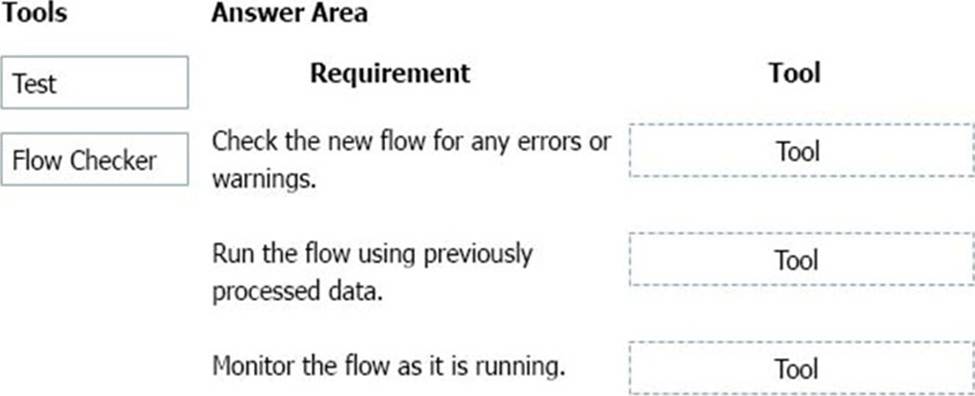
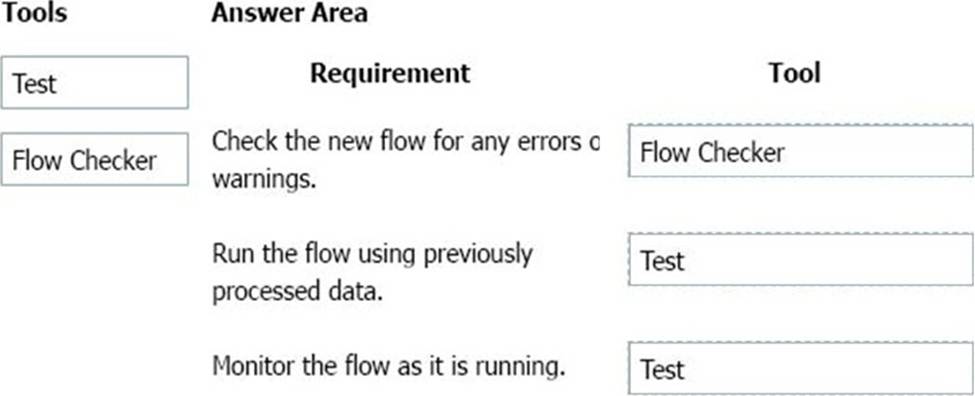
You build a flow using a template. You want to add support for additional business scenarios.
You need to ensure that the new workflow does not break existing functionality.
Which flow editing utilities should you use? To answer, drag the appropriate tools to the correct requirements. Each tool may be used once, more than once, or not at all You may need to drag the split bar between panes or scroll to view content. NOTE: Each correct selection is worth one point.
Explanation:
Box 1: Flow Checker
The Flow checker feature will promote higher quality flows by ensuring you follow best practices. By running the checker, you will be able to get answers to questions like: which areas of my flow implementation pose a performance or reliability risk?
For each issue identified, the Flow checker points to specific occurrences within the flow where improvements may be required. And more importantly, you learn how to implement these improvements by following detailed guidance.
Box 2: Test
Box 3: Test
Reference: https://flow.microsoft.com/en-us/blog/flow-checker-four-connectors/
https://docs.microsoft.com/en-us/power-automate/modern-approvals
DRAG DROP
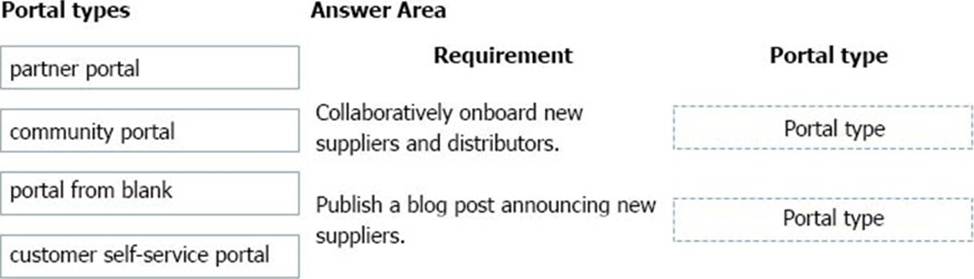
A company is building a Power Apps portal.
You need to select out-of-the-box portal types to meet the company’s requirements.
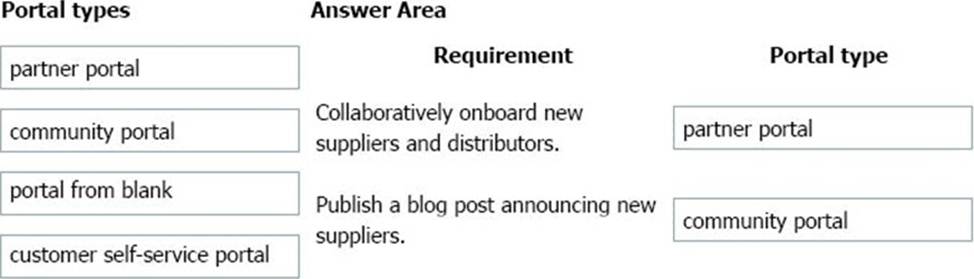
Which portal types should you use? To answer, drag the appropriate portal types to the correct requirements. Each portal type may be used once, more than once, or not at all. You may need to drag the split bar between panes or scroll to view content. NOTE: Each correct selection is worth one point.
Explanation:
Box 1: Partner portal
A partner portal allows every organization with resellers, distributors, suppliers, or partners to have real-time access to every stage of shared activities.
Box 2: Community portal
A community portal leverages peer-to-peer interactions between customers and experts to organically grow the catalog of available knowledge from knowledge base articles, forums, and blogs as well as providing feedback through comments and ratings.
Incorrect Answers:
Portal from blank: Create a website to share data with external and internal users. This template comes with sample pages to get you quickly started.
Customer self-service portal: A customer self-service portal enables customers to access self-service knowledge, support resources, view the progress of their cases, and provide feedback.
Reference: https://docs.microsoft.com/en-us/powerapps/maker/portals/portal-templates
HOTSPOT
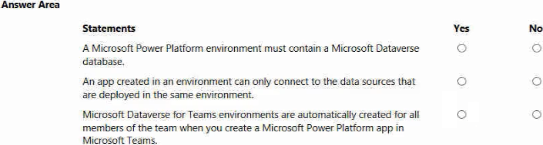
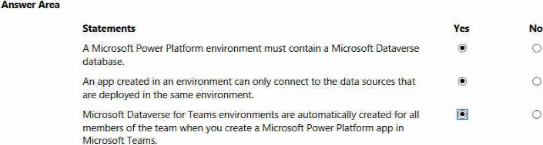
instructions: For each of the following statements, select Yes if the statement is true. Otherwise, select No. NOTE: Each correct selection is worth one point.
DRAG DROP
A company uses a model-driven app for its sales team.
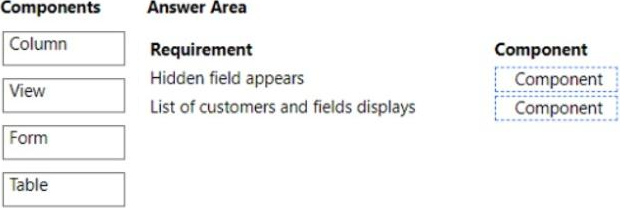
You must customize a form to meet the following requirements:
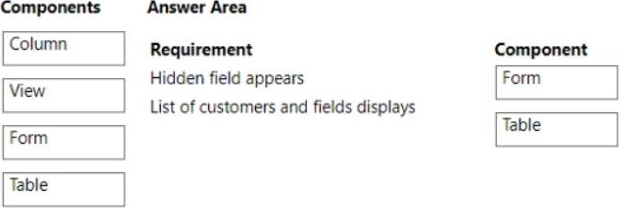
• If a check box is checked, a hidden field must appear.
• The form must display a list of customers and fields about customers.
You need to identify the components a developer must configure to meet the requirements.
What should you identify?
Explanation:
Form
Table