
Practice Free PL-900 Exam Online Questions
You create a Power Virtual Agents chatbot.
You need to share the bot with other team members so that they can try out the bot before you share the bot with customers.
What should you use?
- A . demo website
- B . live production website
- C . test chat feature
C
Explanation:
Reference: https://docs.microsoft.com/en-us/power-virtual-agents/authoring-test-bot
A company uses a model-driven app for their mobile sales activities.
The company wants to modify the view that is used for sales orders. You must apply a new default filter to the view. You must also modify the default sorting for sales orders.
You need to make the changes to the view.
In which three locations can you make the changes? Each correct answer presents a complete solution. NOTE: Each correct selection is worth one point.
- A . Power Apps site
- B . Solution Explorer
- C . Microsoft Azure DevOps
- D . App Designer
ACD
Explanation:
You can edit or remove a filter condition through the Power Apps site.
You can create and edit Analytics views in Azure DevOps.
An alternative to editing views in the tables is to edit views from the app designer.
Reference:
https://docs.microsoft.com/en-us/powerapps/maker/model-driven-apps/create-edit-view-filters
https://docs.microsoft.com/en-us/azure/devops/report/powerbi/analytics-views-create
https://docs.microsoft.com/en-us/powerapps/maker/model-driven-apps/create-edit-views-app-designer
You are a district manager for a large retail organization. You train each store manager to use Power BI to track sales and daily sales targets.
A store manager remembers learning about the Analyze in Excel option but cannot find the option in their Power BI dashboard.
You need to help the user resolve the issue.
How should you advise the user?
- A . Install the Power Bl Desktop app.
- B . Navigate to the report used by the dashboard.
- C . Select the Spotlight button on the dashboard tile.
- D . Subscribe to the dashboard and follow the email link.
B
Explanation:
Reference: https://docs.microsoft.com/en-us/power-bi/collaborate-share/service-analyze-in-excel
DRAG DROP
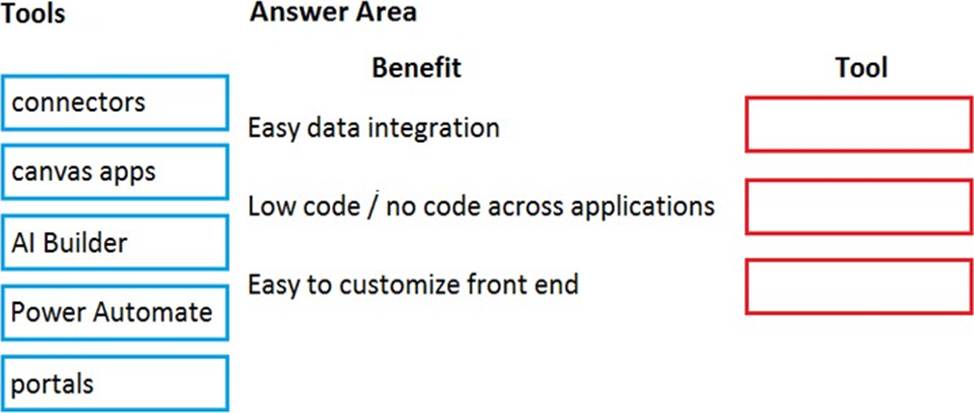
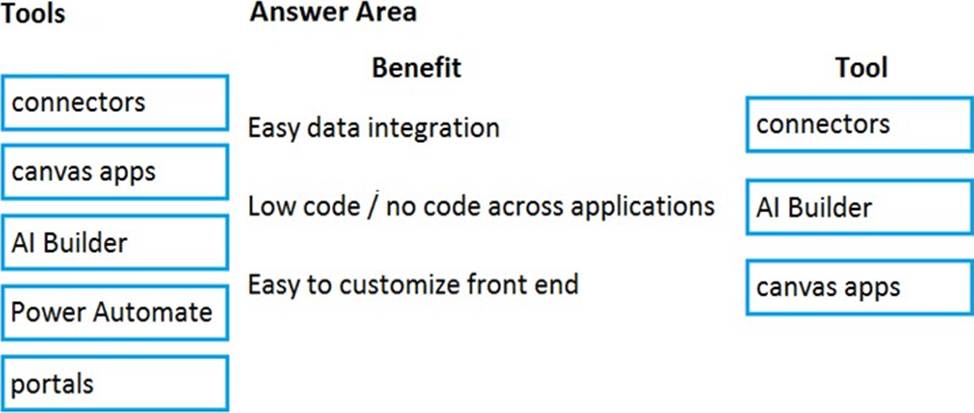
A company is considering implementing PowerApps to help manage business processes. Users are trying to understand the purposes and benefits of PowerApps components.
Match each benefit to its tool. To answer, drag the appropriate benefit from the column on the left to its tool on the right. Each benefit may be used once, more than once, or not at all. NOTE: Each correct selection is worth one point.
Explanation:
Reference:
https://docs.microsoft.com/en-us/power-platform/admin/data-integrator
https://powerapps.microsoft.com/en-us/blog/create-business-apps-using-powerapps-and-azure-functions/
https://www.forbes.com/sites/adrianbridgwater/2019/06/17/microsoft-offers-premade-no-code-artificial-intelligence/#73f5a2be41cd
A company is building an interactive chatbot to answer questions about product and product warranties.
You need to create conversation paths for questions about product warranties.
Which tool should you use?
- A . Authoring canvas
- B . Azure Bot Framework
- C . Power Platform admin center
- D . Power Virtual Agents portal
- E . Conversation node
D
Explanation:
Reference: https://docs.microsoft.com/en-us/power-virtual-agents/authoring-create-edit-topics
DRAG DROP
A company uses Power Apps.
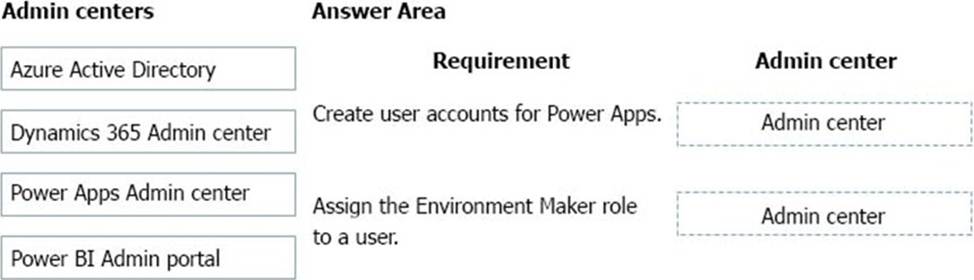
You need to perform administrative tasks for the company.
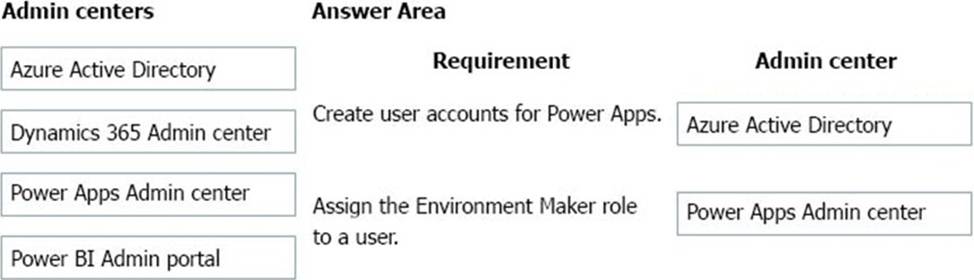
Which admin centers should you use? To answer, drag the appropriate admin centers to the correct requirements. Each admin center may be used once, more than once, or not at all. You may need to drag the split bar between panes or scroll to view content. NOTE: Each correct selection is worth one point.
Explanation:
Box 1: Azure Active Directory
Create the company users in the Azure Active Directory.
Box 2: Power Apps admin center
In the Power Apps Admin center, manage environments that you’ve created and those for which you have been added to the Environment Admin or System Administrator role.
From the admin center, you can perform these administrative actions:
Create environments.
Rename environments.
Add or remove a user or group from either the Environment Admin or Environment Maker role.
Etc.
Incorrect Answers:
Use the Dynamics 365 admin center to review the status of your apps and solutions, apply updates, and manage your Dynamics 365 instances, solutions, and apps.
The Power BI admin portal enables you to manage a Power BI tenant for your organization. The portal includes items such as usage metrics, access to the Microsoft 365 admin center, and settings
Note: You use the Microsoft 365 admin center to create user accounts for every user who needs access to model-driven apps in Dynamics 365, such as Dynamics 365 Sales and Customer Service.
Reference:
https://docs.microsoft.com/en-us/power-platform/admin/environments-administration
https://docs.microsoft.com/en-us/dynamics365/marketing/dynamics-365-admin-center
https://powerapps.microsoft.com/sv-se/blog/introducing-admin-center-for-powerapps/
HOTSPOT
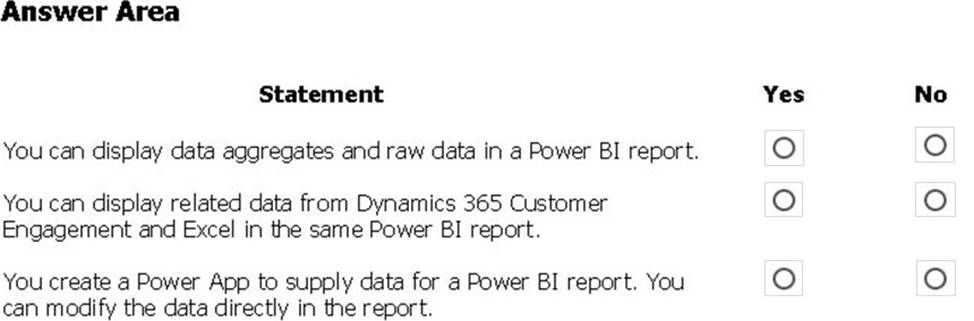
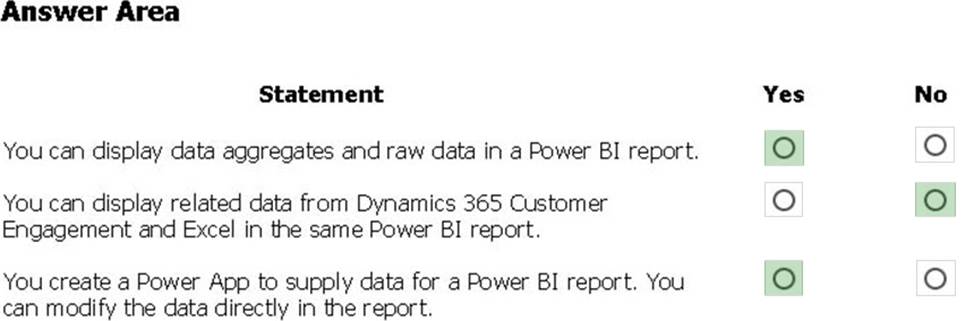
A company plans to use Power BI to visualize data from business systems.
For each of the following statements, select Yes if the statement is true. Otherwise, select No. NOTE: Each correct selection is worth one point.
Explanation:
Box 1: Yes
The following list provides advantages to using aggregations:
Query performance over big data – as users interact with visuals on Power BI reports, DAX queries are submitted to the dataset. Boost query speeds by caching data at the aggregated level, using a fraction of the resources required at the detail level. Unlock big data in a way that would otherwise be impossible.
Box 2: No
You can connect to model-driven apps in Dynamics 365 with Power BI Desktop to create custom reports and dashboards for use with the Power BI service.
You can use similar steps to connect to model-driven apps in Dynamics 365 using Office Excel Power Query by selecting From Other Sources on the Power Query tab in Excel.
Box 3: Yes
Using the PowerApps custom visual, you will be able to pass context aware data to a PowerApps app which updates in real time as you make changes to your report.
Reference:
https://docs.microsoft.com/en-us/power-bi/desktop-aggregations
https://docs.microsoft.com/en-us/power-platform/admin/use-power-bi
https://powerapps.microsoft.com/sv-se/blog/powerbi-powerapps-visual/
You are implement Power Apps tor a company.
Data from an online proprietary accounting system must be automatically updated every four hours in Microsoft Dataverse without creating duplicates. Only changes to the data must be added. Thousands of recants are added per hour.
You need to set up the technology to ensure that the data is Integrated awry four hours.
What should you do
- A . Create a custom connector.
- B . Create a Cloud flow that exports and imports the data.
- C . Export all data Azure Blob storage.
DRAG DROP
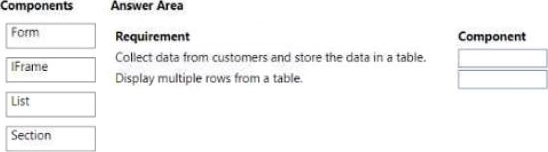
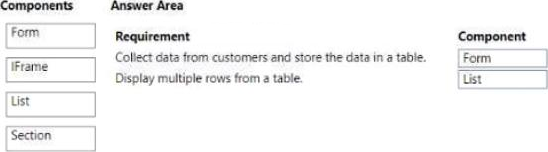
You create a Power Pages site to share Microsoft Dataverse data with external customer.
Customer must be authenticated to view data.
Which component should you use for each requirement? To answer, drag the appropriate component to the correct requirements. Each component may be used more once than once, or not at all. You may need to drag the spilt bar between panes or scroll to view content.
HOTSPOT
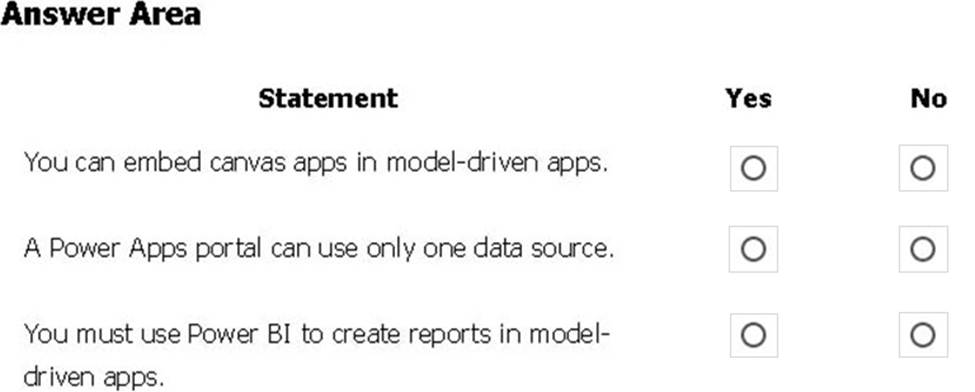
A user is trying to understand the differences between the various ways apps can be built by using Power Apps.
For each of the following statements, select Yes if the statement is true. Otherwise, select No. NOTE: Each correct selection is worth one point.
Explanation:
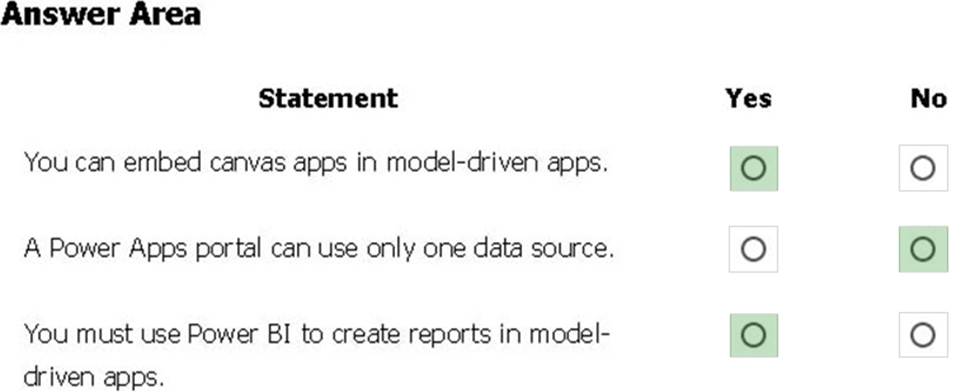
Box 1: Yes
You can create a canvas app and then embed that within a model driven app.
Box 2: No
With the capability to build a portal in PowerApps, you can create a website for external and internal users enabling them to interact with data stored in Common Data Service.
Note: Common Data Service lets you securely store and manage data that’s used by business
applications. Data within Common Data Service is stored within a set of entities. An entity is a set of records used to store data, similar to how a table stores data within a database. Common Data Service includes a base set of standard entities that cover typical scenarios, but you can also create custom entities specific to your organization and populate them with data using Power Query. App makers can then use PowerApps to build rich applications using this data.
Box 3: Yes
To get started building a report you’ll need the latest version of Power BI Desktop and a PowerApps environment with the latest version of the Common Data Service.
Reference:
https://carldesouza.com/how-to-embed-a-canvas-app-in-a-model-driven-app-in-powerapps/
https://docs.microsoft.com/en-us/powerapps/maker/portals/create-portal
https://docs.microsoft.com/en-us/powerapps/maker/common-data-service/data-platform-intro