
Practice Free 220-1202 Exam Online Questions
A user logs in daily and cannot print a report. Help desk fixes it each day, but the issue recurs.
What should be done so the issue doesn’t recur? (Select two)
- A . Set the print spooler to have no dependencies
- B . Set the print spooler recovery to take no action
- C . Start the printer extensions and notifications service
- D . Start the print spooler service
- E . Set the print spooler to Automatic
- F . Set the print spooler log-on to the user’s account
D,E
Explanation:
Comprehensive and Detailed Explanation From Exact Extract:
For persistent printing issues due to spooler service, ensure the print spooler is started and set to Automatic. This maintains print capability across reboots.
From Mike Meyers’ Lab Manual:
“If users lose printing capabilities on reboot, the print spooler service must be configured to start automatically and be confirmed as running.”
A technician needs to disable guest log-ins on domain-joined desktop machines.
Which of the following should the technician use?
- A . Group Policy
- B . Firewall
- C . Microsoft Management Control
- D . MSConfig
A
Explanation:
Comprehensive and Detailed Explanation From Exact Extract:
Group Policy is the standard administrative tool for enforcing security and configuration settings across domain-joined systems, including disabling guest accounts.
From Quentin Docter C CompTIA A+ Study Guide:
“Disabling guest accounts and applying consistent security policies across multiple machines is best achieved through Group Policy on a Windows domain.”
A user’s application only works with a legacy version of the OS. The OS is reaching its end-of-life date. For security reasons, the company is migrating to the current version of the OS.
Which of the following is the most efficient way to complete the migration while maintaining accessibility to the application?
- A . Terminal server
- B . Bare-metal server
- C . Multiboot
- D . Virtualization
D
Explanation:
Comprehensive and Detailed Explanation From Exact Extract:
Virtualization allows the legacy OS to be run in a virtual machine (VM) on top of the newer OS. This method provides backward compatibility without requiring outdated operating systems on physical hardware.
From Quentin Docter C CompTIA A+ Complete Study Guide:
“Using virtualization is a preferred method when legacy applications are needed after migrating to newer operating systems. It allows legacy environments to exist securely within a modern OS framework.”
HOTSPOT
Welcome to your first day as a Fictional Company, LLC helpdesk employee. Please work the tickets in your helpdesk ticket queue.
INSTRUCTIONS
Click on individual tickets to see the ticket details, and view applicable attachments to determine the problem.
Select the appropriate issue from the ‘Issue’ drop-down menu. Then, select the most efficient resolution from the ‘Resolution’ drop-down menu. Finally, select the proper command or verification to remediate or confirm your fix of the issue from the ‘Verify/Resolve’ drop-down menu.
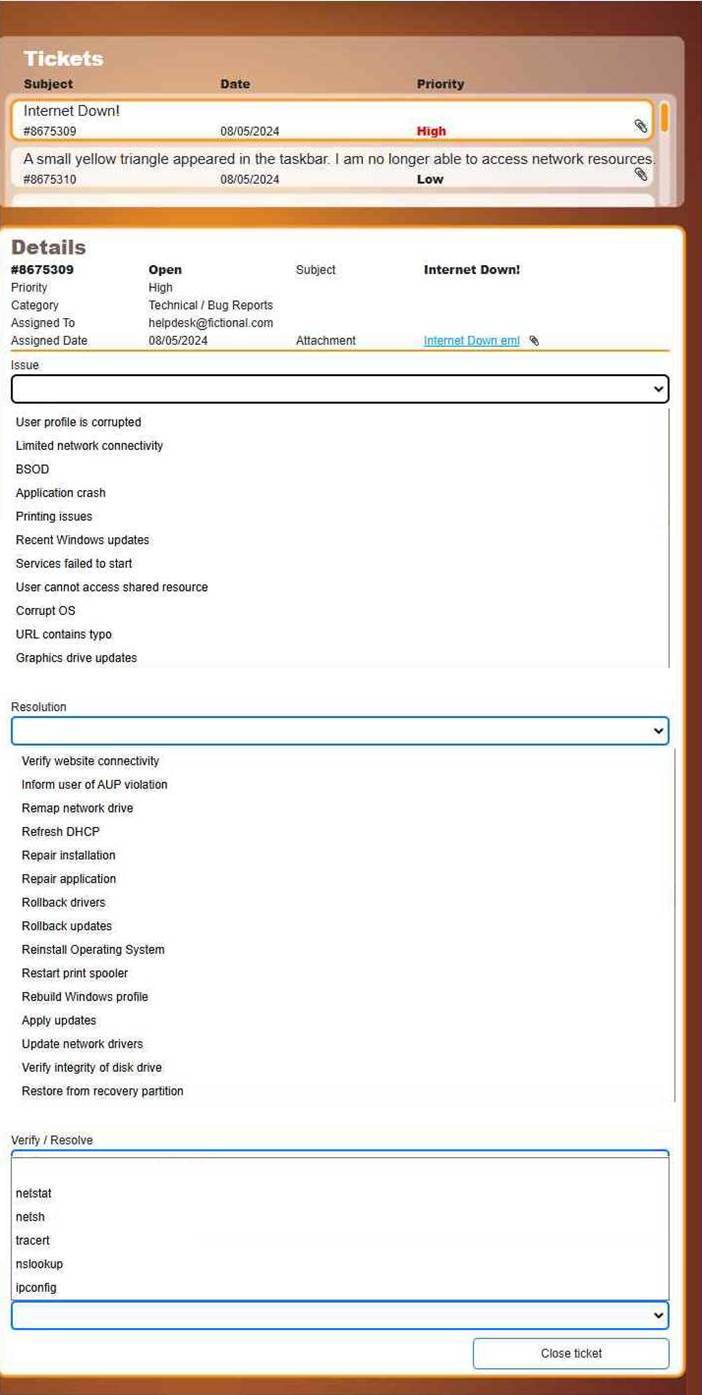
Resolution: Refresh DHCP
Verify/Resolve: ipconfig
Issue (drop-down)
Limited network connectivity
Why this matches:
“Internet Down” most commonly indicates the workstation has lost valid Layer 3 connectivity (bad/expired DHCP lease, APIPA address, wrong gateway, etc.). In CompTIA A+ terms, this aligns best with limited connectivity symptoms (can’t reach internet resources).
Resolution (drop-down)
Refresh DHCP
Why this is the most efficient fix:
If the client has:
an expired lease
an APIPA address (169.254.x.x) because DHCP failed
an incorrect IP/gateway from a bad lease
…then the fastest first remediation is to renew DHCP to obtain a correct IP address, default gateway, and DNS servers. This is a standard CompTIA A+ troubleshooting action (quick, low-risk, high-success).
Verify/Resolve (drop-down)
ipconfig
Why this is the correct verification tool:
ipconfig is the primary Windows CLI tool to:
check current IP settings (ipconfig /all)
release/renew DHCP (ipconfig /release and ipconfig /renew)
confirm you received a valid IP + gateway + DNS, which is required for internet access.
What you would do (mapped to those choices)
Using ipconfig to complete “Refresh DHCP” and confirm the fix:
Check current addressing
ipconfig /all
Look for:
Valid IPv4 (not 169.254.x.x)
Valid Default Gateway
DNS servers present
Refresh the DHCP lease
ipconfig /release
ipconfig /renew
Verify outcome
Run ipconfig again to confirm:
You now have a correct IP for the network
Default gateway is populated
If the gateway/DNS populate correctly, internet access typically returns.
Thousands of compromised machines are attempting to make fake purchases from an online store.
Which of the following is taking place?
- A . Brute-force attack
- B . Spoofing
- C . DDoS
- D . SQL injection
C
Explanation:
The correct answer is C. DDoS (Distributed Denial-of-Service), because the attack involves thousands of compromised machines, commonly referred to as a botnet, generating fraudulent traffic against an online service. Although the activity includes fake purchases, the scale and distributed nature indicate an attempt to overwhelm or disrupt the service.
According to the Quentin Docter C CompTIA A+ Complete Study Guide, DDoS attacks use multiple systems to flood a target with traffic, exhausting server resources and preventing legitimate users from accessing the service. These attacks often involve compromised devices controlled remotely.
The Travis Everett & Andrew Hutz C All-in-One Exam Guide explains that DDoS attacks can take many forms, including HTTP request floods and application-layer attacks that mimic legitimate user actions, such as fake transactions.
The Mike Meyers / Mark Soper Lab Manual clarifies that brute-force attacks focus on credential guessing, spoofing involves identity falsification, and SQL injection targets database queries. None of those specifically require thousands of compromised machines.
Because the defining characteristics here are scale, distribution, and coordinated malicious activity, the correct classification is a DDoS attack, making C the correct answer.
Topic 2, Performance Based Questions (PBQ)
A technician is installing a cloud-based productivity suite and gets an error saying the installation is unavailable.
What should be tried first?
- A . Reinstall the productivity suite
- B . Download an open-source alternative
- C . Check the license device limit
- D . Update the device OS
C
Explanation:
Comprehensive and Detailed Explanation From Exact Extract:
Cloud-based software often enforces device limits per license. Before reinstallation or switching software, checking license allocations is the most logical first step. From Quentin Docter C CompTIA A+ Complete Study Guide:
“Many cloud apps enforce user or device count restrictions. When an install fails, check licensing before troubleshooting other areas.”
A user is attempting to open on a mobile phone a HD video that is hosted on a popular media streaming website. The user is receiving connection timeout errors. The mobile reception icon area is showing two bars next to 3G.
Which of the following is the most likely cause of the issue?
- A . The user does not have Wi-Fi enabled.
- B . The website’s subscription has run out.
- C . The bandwidth is not fast enough.
- D . The mobile device storage is full.
C
Explanation:
Comprehensive and Detailed Explanation From Exact Extract:
3G networks generally do not provide the bandwidth required for seamless HD video streaming. With only two signal bars and a 3G connection, the mobile device likely cannot maintain the necessary data throughput, resulting in timeouts or buffering failures. This is a classic symptom of insufficient network speed or signal strength.
A user recently installed an application that accesses a database from a local server. When launching the application, it does not populate any information.
Which of the following command-line tools is the best to troubleshoot the issue?
- A . ipconfig
- B . nslookup
- C . netstat
- D . curl
D
Explanation:
Comprehensive and Detailed Explanation From Exact Extract:
The scenario involves an application that should retrieve data from a local database server but is failing to do so. This likely indicates a problem in communication between the application and the database server (such as a network issue, port misconfiguration, or service unavailability). The correct troubleshooting approach involves testing the network/service connectivity between the client and the database.
Let’s examine the options:
Which of the following file types would a desktop support technician most likely use to automate tasks for a Windows user log-in?
- A . .bat
- B . .sh
- C . .py
- D . .js
A
Explanation:
Comprehensive and Detailed Explanation From Exact Extract:
A small office reported a phishing attack that resulted in a malware infection.
A technician is investigating the incident and has verified the following:
● All endpoints are updated and have the newest EDR signatures.
● Logs confirm that the malware was quarantined by EDR on one system.
● The potentially infected machine was reimaged.
Which of the following actions should the technician take next?
- A . Install network security tools to prevent downloading infected files from the internet
- B . Discuss the cause of the issue and educate the end user about security hygiene
- C . Flash the firmware of the router to ensure the integrity of network traffic
- D . Suggest alternate preventative controls that would include more advanced security software
B
Explanation:
Comprehensive and Detailed Explanation From Exact Extract:
After containment and remediation, one of the final steps in incident response is user education. Since the root cause was a phishing attack, it is essential to educate users about identifying phishing attempts, safe browsing practices, and how to handle suspicious communications. This improves overall security posture and helps prevent future incidents.