
Practice Free ARA-C01 Exam Online Questions
Which steps are recommended best practices for prioritizing cluster keys in Snowflake? (Choose two.)
- A . Choose columns that are frequently used in join predicates.
- B . Choose lower cardinality columns to support clustering keys and cost effectiveness.
- C . Choose TIMESTAMP columns with nanoseconds for the highest number of unique rows.
- D . Choose cluster columns that are most actively used in selective filters.
- E . Choose cluster columns that are actively used in the GROUP BY clauses.
A, D
Explanation:
According to the Snowflake documentation, the best practices for choosing clustering keys are: Choose columns that are frequently used in join predicates. This can improve the join performance by reducing the number of micro-partitions that need to be scanned and joined.
Choose columns that are most actively used in selective filters. This can improve the scan efficiency by skipping micro-partitions that do not match the filter predicates.
Avoid using low cardinality columns, such as gender or country, as clustering keys. This can result in poor clustering and high maintenance costs.
Avoid using TIMESTAMP columns with nanoseconds, as they tend to have very high cardinality and low correlation with other columns. This can also result in poor clustering and high maintenance costs.
Avoid using columns with duplicate values or NULLs, as they can cause skew in the clustering and reduce the benefits of pruning.
Cluster on multiple columns if the queries use multiple filters or join predicates. This can increase the chances of pruning more micro-partitions and improve the compression ratio.
Clustering is not always useful, especially for small or medium-sized tables, or tables that are not frequently queried or updated. Clustering can incur additional costs for initially clustering the data and maintaining the clustering over time.
Reference: Clustering Keys & Clustered Tables | Snowflake Documentation [Considerations for Choosing Clustering for a Table | Snowflake Documentation]
Which steps are recommended best practices for prioritizing cluster keys in Snowflake? (Choose two.)
- A . Choose columns that are frequently used in join predicates.
- B . Choose lower cardinality columns to support clustering keys and cost effectiveness.
- C . Choose TIMESTAMP columns with nanoseconds for the highest number of unique rows.
- D . Choose cluster columns that are most actively used in selective filters.
- E . Choose cluster columns that are actively used in the GROUP BY clauses.
A, D
Explanation:
According to the Snowflake documentation, the best practices for choosing clustering keys are: Choose columns that are frequently used in join predicates. This can improve the join performance by reducing the number of micro-partitions that need to be scanned and joined.
Choose columns that are most actively used in selective filters. This can improve the scan efficiency by skipping micro-partitions that do not match the filter predicates.
Avoid using low cardinality columns, such as gender or country, as clustering keys. This can result in poor clustering and high maintenance costs.
Avoid using TIMESTAMP columns with nanoseconds, as they tend to have very high cardinality and low correlation with other columns. This can also result in poor clustering and high maintenance costs.
Avoid using columns with duplicate values or NULLs, as they can cause skew in the clustering and reduce the benefits of pruning.
Cluster on multiple columns if the queries use multiple filters or join predicates. This can increase the chances of pruning more micro-partitions and improve the compression ratio.
Clustering is not always useful, especially for small or medium-sized tables, or tables that are not frequently queried or updated. Clustering can incur additional costs for initially clustering the data and maintaining the clustering over time.
Reference: Clustering Keys & Clustered Tables | Snowflake Documentation [Considerations for Choosing Clustering for a Table | Snowflake Documentation]
Which steps are recommended best practices for prioritizing cluster keys in Snowflake? (Choose two.)
- A . Choose columns that are frequently used in join predicates.
- B . Choose lower cardinality columns to support clustering keys and cost effectiveness.
- C . Choose TIMESTAMP columns with nanoseconds for the highest number of unique rows.
- D . Choose cluster columns that are most actively used in selective filters.
- E . Choose cluster columns that are actively used in the GROUP BY clauses.
A, D
Explanation:
According to the Snowflake documentation, the best practices for choosing clustering keys are: Choose columns that are frequently used in join predicates. This can improve the join performance by reducing the number of micro-partitions that need to be scanned and joined.
Choose columns that are most actively used in selective filters. This can improve the scan efficiency by skipping micro-partitions that do not match the filter predicates.
Avoid using low cardinality columns, such as gender or country, as clustering keys. This can result in poor clustering and high maintenance costs.
Avoid using TIMESTAMP columns with nanoseconds, as they tend to have very high cardinality and low correlation with other columns. This can also result in poor clustering and high maintenance costs.
Avoid using columns with duplicate values or NULLs, as they can cause skew in the clustering and reduce the benefits of pruning.
Cluster on multiple columns if the queries use multiple filters or join predicates. This can increase the chances of pruning more micro-partitions and improve the compression ratio.
Clustering is not always useful, especially for small or medium-sized tables, or tables that are not frequently queried or updated. Clustering can incur additional costs for initially clustering the data and maintaining the clustering over time.
Reference: Clustering Keys & Clustered Tables | Snowflake Documentation [Considerations for Choosing Clustering for a Table | Snowflake Documentation]
Which steps are recommended best practices for prioritizing cluster keys in Snowflake? (Choose two.)
- A . Choose columns that are frequently used in join predicates.
- B . Choose lower cardinality columns to support clustering keys and cost effectiveness.
- C . Choose TIMESTAMP columns with nanoseconds for the highest number of unique rows.
- D . Choose cluster columns that are most actively used in selective filters.
- E . Choose cluster columns that are actively used in the GROUP BY clauses.
A, D
Explanation:
According to the Snowflake documentation, the best practices for choosing clustering keys are: Choose columns that are frequently used in join predicates. This can improve the join performance by reducing the number of micro-partitions that need to be scanned and joined.
Choose columns that are most actively used in selective filters. This can improve the scan efficiency by skipping micro-partitions that do not match the filter predicates.
Avoid using low cardinality columns, such as gender or country, as clustering keys. This can result in poor clustering and high maintenance costs.
Avoid using TIMESTAMP columns with nanoseconds, as they tend to have very high cardinality and low correlation with other columns. This can also result in poor clustering and high maintenance costs.
Avoid using columns with duplicate values or NULLs, as they can cause skew in the clustering and reduce the benefits of pruning.
Cluster on multiple columns if the queries use multiple filters or join predicates. This can increase the chances of pruning more micro-partitions and improve the compression ratio.
Clustering is not always useful, especially for small or medium-sized tables, or tables that are not frequently queried or updated. Clustering can incur additional costs for initially clustering the data and maintaining the clustering over time.
Reference: Clustering Keys & Clustered Tables | Snowflake Documentation [Considerations for Choosing Clustering for a Table | Snowflake Documentation]
Which steps are recommended best practices for prioritizing cluster keys in Snowflake? (Choose two.)
- A . Choose columns that are frequently used in join predicates.
- B . Choose lower cardinality columns to support clustering keys and cost effectiveness.
- C . Choose TIMESTAMP columns with nanoseconds for the highest number of unique rows.
- D . Choose cluster columns that are most actively used in selective filters.
- E . Choose cluster columns that are actively used in the GROUP BY clauses.
A, D
Explanation:
According to the Snowflake documentation, the best practices for choosing clustering keys are: Choose columns that are frequently used in join predicates. This can improve the join performance by reducing the number of micro-partitions that need to be scanned and joined.
Choose columns that are most actively used in selective filters. This can improve the scan efficiency by skipping micro-partitions that do not match the filter predicates.
Avoid using low cardinality columns, such as gender or country, as clustering keys. This can result in poor clustering and high maintenance costs.
Avoid using TIMESTAMP columns with nanoseconds, as they tend to have very high cardinality and low correlation with other columns. This can also result in poor clustering and high maintenance costs.
Avoid using columns with duplicate values or NULLs, as they can cause skew in the clustering and reduce the benefits of pruning.
Cluster on multiple columns if the queries use multiple filters or join predicates. This can increase the chances of pruning more micro-partitions and improve the compression ratio.
Clustering is not always useful, especially for small or medium-sized tables, or tables that are not frequently queried or updated. Clustering can incur additional costs for initially clustering the data and maintaining the clustering over time.
Reference: Clustering Keys & Clustered Tables | Snowflake Documentation [Considerations for Choosing Clustering for a Table | Snowflake Documentation]
Which steps are recommended best practices for prioritizing cluster keys in Snowflake? (Choose two.)
- A . Choose columns that are frequently used in join predicates.
- B . Choose lower cardinality columns to support clustering keys and cost effectiveness.
- C . Choose TIMESTAMP columns with nanoseconds for the highest number of unique rows.
- D . Choose cluster columns that are most actively used in selective filters.
- E . Choose cluster columns that are actively used in the GROUP BY clauses.
A, D
Explanation:
According to the Snowflake documentation, the best practices for choosing clustering keys are: Choose columns that are frequently used in join predicates. This can improve the join performance by reducing the number of micro-partitions that need to be scanned and joined.
Choose columns that are most actively used in selective filters. This can improve the scan efficiency by skipping micro-partitions that do not match the filter predicates.
Avoid using low cardinality columns, such as gender or country, as clustering keys. This can result in poor clustering and high maintenance costs.
Avoid using TIMESTAMP columns with nanoseconds, as they tend to have very high cardinality and low correlation with other columns. This can also result in poor clustering and high maintenance costs.
Avoid using columns with duplicate values or NULLs, as they can cause skew in the clustering and reduce the benefits of pruning.
Cluster on multiple columns if the queries use multiple filters or join predicates. This can increase the chances of pruning more micro-partitions and improve the compression ratio.
Clustering is not always useful, especially for small or medium-sized tables, or tables that are not frequently queried or updated. Clustering can incur additional costs for initially clustering the data and maintaining the clustering over time.
Reference: Clustering Keys & Clustered Tables | Snowflake Documentation [Considerations for Choosing Clustering for a Table | Snowflake Documentation]
Maintain low latency
How can these requirements be met with the LEAST amount of operational overhead?
- A . Use a materialized view on top of an external table against the S3 bucket in AWS Singapore.
- B . Use an external table against the S3 bucket in AWS Singapore and copy the data into transient tables.
- C . Copy the data between providers from S3 to Azure Blob storage to collocate, then use Snowpipe for data ingestion.
- D . Use AWS Transfer Family to replicate data between the S3 bucket in AWS Singapore and an Azure Netherlands Blob storage, then use an external table against the Blob storage.
B
Explanation:
Option A is the best design to meet the requirements because it uses a materialized view on top of an external table against the S3 bucket in AWS Singapore. A materialized view is a database object that contains the results of a query and can be refreshed periodically to reflect changes in the underlying data1. An external table is a table that references data files stored in a cloud storage service, such as Amazon S32. By using a materialized view on top of an external table, the company can provide access to frequently changing data, keep egress costs to a minimum, and maintain low latency. This is because the materialized view will cache the query results in Snowflake, reducing the need to access the external data files and incur network charges. The materialized view will also improve the query performance by avoiding scanning the external data files every time. The materialized view can be refreshed on a schedule or on demand to capture the changes in the external data files1.
Option B is not the best design because it uses an external table against the S3 bucket in AWS Singapore and copies the data into transient tables. A transient table is a table that is not subject to the Time Travel and Fail-safe features of Snowflake, and is automatically purged after a period of time3. By using an external table and copying the data into transient tables, the company will incur more egress costs and operational overhead than using a materialized view. This is because the external table will access the external data files every time a query is executed, and the copy operation will also transfer data from S3 to Snowflake. The transient tables will also consume more storage space in Snowflake and require manual maintenance to ensure they are up to date. Option C is not the best design because it copies the data between providers from S3 to Azure Blob storage to collocate, then uses Snowpipe for data ingestion. Snowpipe is a service that automates the loading of data from external sources into Snowflake tables4. By copying the data between providers, the company will incur high egress costs and latency, as well as operational complexity and maintenance of the infrastructure. Snowpipe will also add another layer of processing and storage in Snowflake, which may not be necessary if the external data files are already in a queryable format.
Option D is not the best design because it uses AWS Transfer Family to replicate data between the S3 bucket in AWS Singapore and an Azure Netherlands Blob storage, then uses an external table against the Blob storage. AWS Transfer Family is a service that enables secure and seamless transfer of files over SFTP, FTPS, and FTP to and from Amazon S3 or Amazon EFS5. By using AWS Transfer Family, the company will incur high egress costs and latency, as well as operational complexity and maintenance of the infrastructure. The external table will also access the external data files every time a query is executed, which may affect the query performance.
Reference:
1: Materialized Views
2: External Tables
3: Transient Tables
4: Snowpipe Overview
5: AWS Transfer Family
A table contains five columns and it has millions of records.
The cardinality distribution of the columns is shown below:
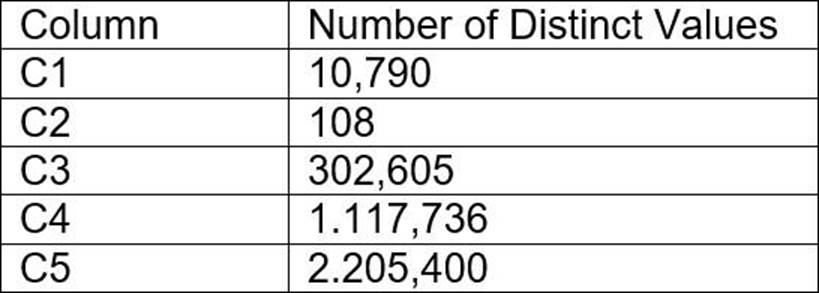
Column C4 and C5 are mostly used by SELECT queries in the GROUP BY and ORDER BY clauses.
Whereas columns C1, C2 and C3 are heavily used in filter and join conditions of SELECT queries.
The Architect must design a clustering key for this table to improve the query performance.
Based on Snowflake recommendations, how should the clustering key columns be ordered while defining the multi-column clustering key?
- A . C5, C4, C2
- B . C3, C4, C5
- C . C1, C3, C2
- D . C2, C1, C3
C
Explanation:
According to the Snowflake documentation, the following are some considerations for choosing
clustering for a table1:
Clustering is optimal when either:
You require the fastest possible response times, regardless of cost.
Your improved query performance offsets the credits required to cluster and maintain the table.
Clustering is most effective when the clustering key is used in the following types of query predicates:
Filter predicates (e.g. WHERE clauses)
Join predicates (e.g. ON clauses)
Grouping predicates (e.g. GROUP BY clauses)
Sorting predicates (e.g. ORDER BY clauses)
Clustering is less effective when the clustering key is not used in any of the above query predicates, or when the clustering key is used in a predicate that requires a function or expression to be applied to the key (e.g. DATE_TRUNC, TO_CHAR, etc.).
For most tables, Snowflake recommends a maximum of 3 or 4 columns (or expressions) per key.
Adding more than 3-4 columns tends to increase costs more than benefits.
Based on these considerations, the best option for the clustering key columns is C. C1, C3, C2, because:
These columns are heavily used in filter and join conditions of SELECT queries, which are the most effective types of predicates for clustering.
These columns have high cardinality, which means they have many distinct values and can help reduce the clustering skew and improve the compression ratio.
These columns are likely to be correlated with each other, which means they can help co-locate similar rows in the same micro-partitions and improve the scan efficiency.
These columns do not require any functions or expressions to be applied to them, which means they can be directly used in the predicates without affecting the clustering.
Reference: 1: Considerations for Choosing Clustering for a Table | Snowflake Documentation
An Architect has designed a data pipeline that Is receiving small CSV files from multiple sources. All
of the files are landing in one location. Specific files are filtered for loading into Snowflake tables using the copy command. The loading performance is poor.
What changes can be made to Improve the data loading performance?
- A . Increase the size of the virtual warehouse.
- B . Create a multi-cluster warehouse and merge smaller files to create bigger files.
- C . Create a specific storage landing bucket to avoid file scanning.
- D . Change the file format from CSV to JSON.
B
Explanation:
According to the Snowflake documentation, the data loading performance can be improved by following some best practices and guidelines for preparing and staging the data files. One of the recommendations is to aim for data files that are roughly 100-250 MB (or larger) in size compressed, as this will optimize the number of parallel operations for a load. Smaller files should be aggregated and larger files should be split to achieve this size range. Another recommendation is to use a multi-cluster warehouse for loading, as this will allow for scaling up or out the compute resources depending on the load demand. A single-cluster warehouse may not be able to handle the load concurrency and throughput efficiently. Therefore, by creating a multi-cluster warehouse and merging smaller files to create bigger files, the data loading performance can be improved.
Reference: Data Loading Considerations
Preparing Your Data Files
Planning a Data Load
Which of the following are characteristics of Snowflake’s parameter hierarchy?
- A . Session parameters override virtual warehouse parameters.
- B . Virtual warehouse parameters override user parameters.
- C . Table parameters override virtual warehouse parameters.
- D . Schema parameters override account parameters.
D
Explanation:
This is the correct answer because it reflects the characteristics of Snowflake’s parameter hierarchy. Snowflake provides three types of parameters that can be set for an account: account parameters, session parameters, and object parameters. All parameters have default values, which can be set and then overridden at different levels depending on the parameter type. The following diagram illustrates the hierarchical relationship between the different parameter types and how individual parameters can be overridden at each level1:
As shown in the diagram, schema parameters are a type of object parameters that can be set for schemas. Schema parameters can override the account parameters that are set at the account level. For example, the LOG_LEVEL parameter can be set at the account level to control the logging level for all objects in the account, but it can also be overridden at the schema level to control the logging level for specific stored procedures and UDFs in that schema2.
The other options listed are not correct because they do not reflect the characteristics of Snowflake’s parameter hierarchy. Session parameters do not override virtual warehouse parameters, because virtual warehouse parameters are a type of session parameters that can be set for virtual warehouses. Virtual warehouse parameters do not override user parameters, because user parameters are a type of session parameters that can be set for users. Table parameters do not override virtual warehouse parameters, because table parameters are a type of object parameters that can be set for tables, and object parameters do not affect session parameters1.
Reference: Snowflake Documentation: Parameters
Snowflake Documentation: Setting Log Level