
Practice Free ARA-C01 Exam Online Questions
A company has built a data pipeline using Snowpipe to ingest files from an Amazon S3 bucket. Snowpipe is configured to load data into staging database tables. Then a task runs to load the data from the staging database tables into the reporting database tables.
The company is satisfied with the availability of the data in the reporting database tables, but the reporting tables are not pruning effectively. Currently, a size 4X-Large virtual warehouse is being used to query all of the tables in the reporting database.
What step can be taken to improve the pruning of the reporting tables?
- A . Eliminate the use of Snowpipe and load the files into internal stages using PUT commands.
- B . Increase the size of the virtual warehouse to a size 5X-Large.
- C . Use an ORDER BY <cluster_key (s) > command to load the reporting tables.
- D . Create larger files for Snowpipe to ingest and ensure the staging frequency does not exceed 1 minute.
C
Explanation:
Effective pruning in Snowflake relies on the organization of data within micro-partitions. By using an ORDER BY clause with clustering keys when loading data into the reporting tables, Snowflake can better organize the data within micro-partitions. This organization allows Snowflake to skip over irrelevant micro-partitions during a query, thus improving query performance and reducing the amount of data scanned12.
Reference: =
• Snowflake Documentation on micro-partitions and data clustering2
• Community article on recognizing unsatisfactory pruning and improving it1
What is a key consideration when setting up search optimization service for a table?
- A . Search optimization service works best with a column that has a minimum of 100 K distinct values.
- B . Search optimization service can significantly improve query performance on partitioned external tables.
- C . Search optimization service can help to optimize storage usage by compressing the data into a GZIP format.
- D . The table must be clustered with a key having multiple columns for effective search optimization.
A
Explanation:
Search optimization service is a feature of Snowflake that can significantly improve the performance of certain types of lookup and analytical queries on tables. Search optimization service creates and maintains a persistent data structure called a search access path, which keeps track of which values of the table’s columns might be found in each of its micro-partitions, allowing some micro-partitions to be skipped when scanning the table1.
Search optimization service can significantly improve query performance on partitioned external tables, which are tables that store data in external locations such as Amazon S3 or Google Cloud Storage. Partitioned external tables can leverage the search access path to prune the partitions that do not contain the relevant data, reducing the amount of data that needs to be scanned and transferred from the external location2.
The other options are not correct because:
A) Search optimization service works best with a column that has a high cardinality, which means that the column has many distinct values. However, there is no specific minimum number of distinct values required for search optimization service to work effectively. The actual performance improvement depends on the selectivity of the queries and the distribution of the data1.
C) Search optimization service does not help to optimize storage usage by compressing the data into a GZIP format. Search optimization service does not affect the storage format or compression of the data, which is determined by the file format options of the table. Search optimization service only creates an additional data structure that is stored separately from the table data1.
D) The table does not need to be clustered with a key having multiple columns for effective search optimization. Clustering is a feature of Snowflake that allows ordering the data in a table or a partitioned external table based on one or more clustering keys. Clustering can improve the performance of queries that filter on the clustering keys, as it reduces the number of micro-partitions that need to be scanned. However, clustering is not required for search optimization service to work, as search optimization service can skip micro-partitions based on any column that has a search access path, regardless of the clustering key3.
Reference:
1: Search Optimization Service | Snowflake Documentation
2: Partitioned External Tables | Snowflake Documentation
3: Clustering Keys | Snowflake Documentation
A media company needs a data pipeline that will ingest customer review data into a Snowflake table, and apply some transformations. The company also needs to use Amazon Comprehend to do sentiment analysis and make the de-identified final data set available publicly for advertising companies who use different cloud providers in different regions.
The data pipeline needs to run continuously ang efficiently as new records arrive in the object storage leveraging event notifications. Also, the operational complexity, maintenance of the infrastructure, including platform upgrades and security, and the development effort should be minimal.
Which design will meet these requirements?
- A . Ingest the data using COPY INTO and use streams and tasks to orchestrate transformations. Export the data into Amazon S3 to do model inference with Amazon Comprehend and ingest the data back into a Snowflake table. Then create a listing in the Snowflake Marketplace to make the data available to other companies.
- B . Ingest the data using Snowpipe and use streams and tasks to orchestrate transformations. Create an external function to do model inference with Amazon Comprehend and write the final records to a Snowflake table. Then create a listing in the Snowflake Marketplace to make the data available to other companies.
- C . Ingest the data into Snowflake using Amazon EMR and PySpark using the Snowflake Spark connector. Apply transformations using another Spark job. Develop a python program to do model inference by leveraging the Amazon Comprehend text analysis API. Then write the results to a Snowflake table and create a listing in the Snowflake Marketplace to make the data available to other companies.
- D . Ingest the data using Snowpipe and use streams and tasks to orchestrate transformations. Export the data into Amazon S3 to do model inference with Amazon Comprehend and ingest the data back into a Snowflake table. Then create a listing in the Snowflake Marketplace to make the data available to other companies.
B
Explanation:
This design meets all the requirements for the data pipeline. Snowpipe is a feature that enables continuous data loading into Snowflake from object storage using event notifications. It is efficient, scalable, and serverless, meaning it does not require any infrastructure or maintenance from the user. Streams and tasks are features that enable automated data pipelines within Snowflake, using change data capture and scheduled execution. They are also efficient, scalable, and serverless, and they simplify the data transformation process. External functions are functions that can invoke external services or APIs from within Snowflake. They can be used to integrate with Amazon Comprehend and perform sentiment analysis on the data. The results can be written back to a Snowflake table using standard SQL commands. Snowflake Marketplace is a platform that allows data providers to share data with data consumers across different accounts, regions, and cloud platforms. It is a secure and easy way to make data publicly available to other companies.
Reference: Snowpipe Overview | Snowflake Documentation Introduction to Data Pipelines | Snowflake Documentation External Functions Overview | Snowflake Documentation Snowflake Data Marketplace Overview | Snowflake Documentation
An Architect needs to design a data unloading strategy for Snowflake, that will be used with the COPY INTO <location> command.
Which configuration is valid?
- A . Location of files: Snowflake internal location
. File formats: CSV, XML
. File encoding: UTF-8
. Encryption: 128-bit - B . Location of files: Amazon S3
. File formats: CSV, JSON
. File encoding: Latin-1 (ISO-8859)
. Encryption: 128-bit - C . Location of files: Google Cloud Storage
. File formats: Parquet
. File encoding: UTF-8
・ Compression: gzip - D . Location of files: Azure ADLS
. File formats: JSON, XML, Avro, Parquet, ORC
. Compression: bzip2
. Encryption: User-supplied key
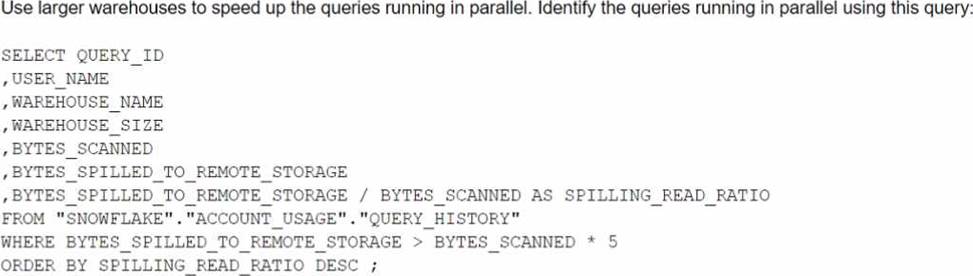
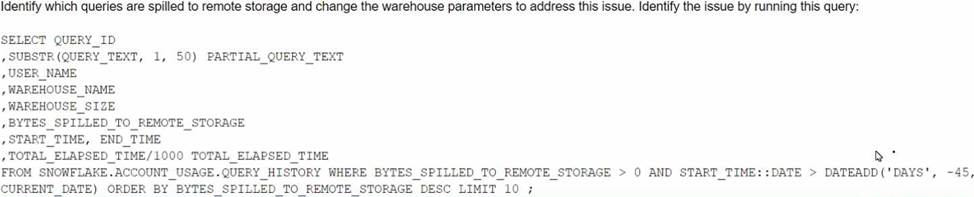
The Business Intelligence team reports that when some team members run queries for their dashboards in parallel with others, the query response time is getting significantly slower.
What can a Snowflake Architect do to identify what is occurring and troubleshoot this issue?
A)
B)

C)

D)
- A . Option A
- B . Option B
- C . Option C
- D . Option D
A
Explanation:
The image shows a SQL query that can be used to identify which queries are spilled to remote storage and suggests changing the warehouse parameters to address this issue. Spilling to remote storage occurs when the memory allocated to a warehouse is insufficient to process a query, and Snowflake uses disk or cloud storage as a temporary cache. This can significantly slow down the query performance and increase the cost. To troubleshoot this issue, a Snowflake Architect can run the query shown in the image to find out which queries are spilling, how much data they are spilling, and which warehouses they are using. Then, the architect can adjust the warehouse size, type, or scaling policy to provide enough memory for the queries and avoid spilling12.
Reference: Recognizing Disk Spilling
Managing the Kafka Connector
How can the Snowflake context functions be used to help determine whether a user is authorized to see data that has column-level security enforced? (Select TWO).
- A . Set masking policy conditions using current_role targeting the role in use for the current session.
- B . Set masking policy conditions using is_role_in_session targeting the role in use for the current account.
- C . Set masking policy conditions using invoker_role targeting the executing role in a SQL statement.
- D . Determine if there are ownership privileges on the masking policy that would allow the use of any function.
- E . Assign the accountadmin role to the user who is executing the object.
A, C
Explanation:
Snowflake context functions are functions that return information about the current session, user, role, warehouse, database, schema, or object. They can be used to help determine whether a user is authorized to see data that has column-level security enforced by setting masking policy conditions based on the context functions. The following context functions are relevant for column-level security:
current_role: This function returns the name of the role in use for the current session. It can be used to set masking policy conditions that target the current session and are not affected by the execution context of the SQL statement. For example, a masking policy condition using current_role can allow or deny access to a column based on the role that the user activated in the session.
invoker_role: This function returns the name of the executing role in a SQL statement. It can be used to set masking policy conditions that target the executing role and are affected by the execution context of the SQL statement. For example, a masking policy condition using invoker_role can allow or deny access to a column based on the role that the user specified in the SQL statement, such as using the AS ROLE clause or a stored procedure.
is_role_in_session: This function returns TRUE if the user’s current role in the session (i.e. the role returned by current_role) inherits the privileges of the specified role. It can be used to set masking policy conditions that involve role hierarchy and privilege inheritance. For example, a masking policy condition using is_role_in_session can allow or deny access to a column based on whether the user’s current role is a lower privilege role in the specified role hierarchy.
The other options are not valid ways to use the Snowflake context functions for column-level security:
Set masking policy conditions using is_role_in_session targeting the role in use for the current account. This option is incorrect because is_role_in_session does not target the role in use for the current account, but rather the role in use for the current session. Also, the current account is not a role, but rather a logical entity that contains users, roles, warehouses, databases, and other objects. Determine if there are ownership privileges on the masking policy that would allow the use of any function. This option is incorrect because ownership privileges on the masking policy do not affect the use of any function, but rather the ability to create, alter, or drop the masking policy. Also, this is not a way to use the Snowflake context functions, but rather a way to check the privileges on the masking policy object.
Assign the accountadmin role to the user who is executing the object. This option is incorrect because assigning the accountadmin role to the user who is executing the object does not involve using the Snowflake context functions, but rather granting the highest-level role to the user. Also, this is not a recommended practice for column-level security, as it would give the user full access to all objects and data in the account, which could compromise data security and governance.
Reference: Context Functions
Advanced Column-level Security topics
Snowflake Data Governance: Column Level Security Overview Data Security Snowflake Part 2 – Column Level Security
What is the MOST efficient way to design an environment where data retention is not considered critical, and customization needs are to be kept to a minimum?
- A . Use a transient database.
- B . Use a transient schema.
- C . Use a transient table.
- D . Use a temporary table.
A user is executing the following command sequentially within a timeframe of 10 minutes from start to finish:

What would be the output of this query?
- A . Table T_SALES_CLONE successfully created.
- B . Time Travel data is not available for table T_SALES.
- C . The offset -> is not a valid clause in the clone operation.
- D . Syntax error line 1 at position 58 unexpected ‘at’.
A
Explanation:
The query is executing a clone operation on an existing table t_sales with an offset to account for the retention time. The syntax used is correct for cloning a table in Snowflake, and the use of the at(offset => -60*30) clause is valid. This specifies that the clone should be based on the state of the table 30 minutes prior (60 seconds * 30). Assuming the table t_sales exists and has been modified within the last 30 minutes, and considering the data_retention_time_in_days is set to 1 day (which enables time travel queries for the past 24 hours), the table t_sales_clone would be successfully created based on the state of t_sales 30 minutes before the clone command was issued.
An Architect needs to automate the daily Import of two files from an external stage into Snowflake.
One file has Parquet-formatted data, the other has CSV-formatted data.
How should the data be joined and aggregated to produce a final result set?
- A . Use Snowpipe to ingest the two files, then create a materialized view to produce the final result set.
- B . Create a task using Snowflake scripting that will import the files, and then call a User-Defined Function (UDF) to produce the final result set.
- C . Create a JavaScript stored procedure to read. join, and aggregate the data directly from the external stage, and then store the results in a table.
- D . Create a materialized view to read, Join, and aggregate the data directly from the external stage, and use the view to produce the final result set
B
Explanation:
According to the Snowflake documentation, tasks are objects that enable scheduling and execution of SQL statements or JavaScript user-defined functions (UDFs) in Snowflake. Tasks can be used to automate data loading, transformation, and maintenance operations. Snowflake scripting is a feature that allows writing procedural logic using SQL statements and JavaScript UDFs. Snowflake scripting can be used to create complex workflows and orchestrate tasks. Therefore, the best option to automate the daily import of two files from an external stage into Snowflake, join and aggregate the data, and produce a final result set is to create a task using Snowflake scripting that will import the files using the COPY INTO command, and then call a UDF to perform the join and aggregation logic. The UDF can return a table or a variant value as the final result set.
Reference: Tasks
Snowflake Scripting
User-Defined Functions
An Architect needs to automate the daily Import of two files from an external stage into Snowflake.
One file has Parquet-formatted data, the other has CSV-formatted data.
How should the data be joined and aggregated to produce a final result set?
- A . Use Snowpipe to ingest the two files, then create a materialized view to produce the final result set.
- B . Create a task using Snowflake scripting that will import the files, and then call a User-Defined Function (UDF) to produce the final result set.
- C . Create a JavaScript stored procedure to read. join, and aggregate the data directly from the external stage, and then store the results in a table.
- D . Create a materialized view to read, Join, and aggregate the data directly from the external stage, and use the view to produce the final result set
B
Explanation:
According to the Snowflake documentation, tasks are objects that enable scheduling and execution of SQL statements or JavaScript user-defined functions (UDFs) in Snowflake. Tasks can be used to automate data loading, transformation, and maintenance operations. Snowflake scripting is a feature that allows writing procedural logic using SQL statements and JavaScript UDFs. Snowflake scripting can be used to create complex workflows and orchestrate tasks. Therefore, the best option to automate the daily import of two files from an external stage into Snowflake, join and aggregate the data, and produce a final result set is to create a task using Snowflake scripting that will import the files using the COPY INTO command, and then call a UDF to perform the join and aggregation logic. The UDF can return a table or a variant value as the final result set.
Reference: Tasks
Snowflake Scripting
User-Defined Functions