
Practice Free ARA-C01 Exam Online Questions
Company A has recently acquired company B. The Snowflake deployment for company B is located in the Azure West Europe region.
As part of the integration process, an Architect has been asked to consolidate company B’s sales data into company A’s Snowflake account which is located in the AWS us-east-1 region.
How can this requirement be met?
- A . Replicate the sales data from company B’s Snowflake account into company A’s Snowflake account using cross-region data replication within Snowflake. Configure a direct share from company B’s account to company A’s account.
- B . Export the sales data from company B’s Snowflake account as CSV files, and transfer the files to company A’s Snowflake account. Import the data using Snowflake’s data loading capabilities.
- C . Migrate company B’s Snowflake deployment to the same region as company A’s Snowflake deployment, ensuring data locality. Then perform a direct database-to-database merge of the sales data.
- D . Build a custom data pipeline using Azure Data Factory or a similar tool to extract the sales data from company B’s Snowflake account. Transform the data, then load it into company A’s Snowflake account.
A
Explanation:
The best way to meet the requirement of consolidating company B’s sales data into company A’s Snowflake account is to use cross-region data replication within Snowflake. This feature allows data providers to securely share data with data consumers across different regions and cloud platforms.
By replicating the sales data from company B’s account in Azure West Europe region to company A’s account in AWS us-east-1 region, the data will be synchronized and available for consumption. To enable data replication, the accounts must be linked and replication must be enabled by a user with the ORGADMIN role. Then, a replication group must be created and the sales database must be added to the group. Finally, a direct share must be configured from company B’s account to company A’s account to grant access to the replicated data. This option is more efficient and secure than exporting and importing data using CSV files or migrating the entire Snowflake deployment to another region or cloud platform. It also does not require building a custom data pipeline using external tools.
Reference: Sharing data securely across regions and cloud platforms
Introduction to replication and failover
Replication considerations
Replicating account objects
An Architect is designing a file ingestion recovery solution. The project will use an internal named stage for file storage. Currently, in the case of an ingestion failure, the Operations team must manually download the failed file and check for errors.
Which downloading method should the Architect recommend that requires the LEAST amount of operational overhead?
- A . Use the Snowflake Connector for Python, connect to remote storage and download the file.
- B . Use the get command in SnowSQL to retrieve the file.
- C . Use the get command in Snowsight to retrieve the file.
- D . Use the Snowflake API endpoint and download the file.
B
Explanation:
The get command in SnowSQL is a convenient way to download files from an internal stage to a local directory. The get command can be used in interactive mode or in a script, and it supports wildcards and parallel downloads. The get command also allows specifying the overwrite option, which determines how to handle existing files with the same name2
The Snowflake Connector for Python, the Snowflake API endpoint, and the get command in Snowsight are not recommended methods for downloading files from an internal stage, because they require more operational overhead than the get command in SnowSQL. The Snowflake Connector for Python and the Snowflake API endpoint require writing and maintaining code to handle the connection, authentication, and file transfer. The get command in Snowsight requires using the web interface and manually selecting the files to download34
Reference:
1: SnowPro Advanced: Architect | Study Guide
2: Snowflake Documentation | Using the GET Command
3: Snowflake Documentation | Using the Snowflake Connector for Python
4: Snowflake Documentation | Using the Snowflake API
: Snowflake Documentation | Using the GET Command in Snowsight
: SnowPro Advanced: Architect | Study Guide
: Using the GET Command
: Using the Snowflake Connector for Python
: Using the Snowflake API
: [Using the GET Command in Snowsight]
An Architect is designing a file ingestion recovery solution. The project will use an internal named stage for file storage. Currently, in the case of an ingestion failure, the Operations team must manually download the failed file and check for errors.
Which downloading method should the Architect recommend that requires the LEAST amount of operational overhead?
- A . Use the Snowflake Connector for Python, connect to remote storage and download the file.
- B . Use the get command in SnowSQL to retrieve the file.
- C . Use the get command in Snowsight to retrieve the file.
- D . Use the Snowflake API endpoint and download the file.
B
Explanation:
The get command in SnowSQL is a convenient way to download files from an internal stage to a local directory. The get command can be used in interactive mode or in a script, and it supports wildcards and parallel downloads. The get command also allows specifying the overwrite option, which determines how to handle existing files with the same name2
The Snowflake Connector for Python, the Snowflake API endpoint, and the get command in Snowsight are not recommended methods for downloading files from an internal stage, because they require more operational overhead than the get command in SnowSQL. The Snowflake Connector for Python and the Snowflake API endpoint require writing and maintaining code to handle the connection, authentication, and file transfer. The get command in Snowsight requires using the web interface and manually selecting the files to download34
Reference:
1: SnowPro Advanced: Architect | Study Guide
2: Snowflake Documentation | Using the GET Command
3: Snowflake Documentation | Using the Snowflake Connector for Python
4: Snowflake Documentation | Using the Snowflake API
: Snowflake Documentation | Using the GET Command in Snowsight
: SnowPro Advanced: Architect | Study Guide
: Using the GET Command
: Using the Snowflake Connector for Python
: Using the Snowflake API
: [Using the GET Command in Snowsight]
The following table exists in the production database:
A regulatory requirement states that the company must mask the username for events that are older than six months based on the current date when the data is queried.
How can the requirement be met without duplicating the event data and making sure it is applied when creating views using the table or cloning the table?
- A . Use a masking policy on the username column using a entitlement table with valid dates.
- B . Use a row level policy on the user_events table using a entitlement table with valid dates.
- C . Use a masking policy on the username column with event_timestamp as a conditional column.
- D . Use a secure view on the user_events table using a case statement on the username column.
C
Explanation:
A masking policy is a feature of Snowflake that allows masking sensitive data in query results based
on the role of the user and the condition of the data. A masking policy can be applied to a column in a table or a view, and it can use another column in the same table or view as a conditional column. A conditional column is a column that determines whether the masking policy is applied or not based on its value1.
In this case, the requirement can be met by using a masking policy on the username column with event_timestamp as a conditional column. The masking policy can use a function that masks the username if the event_timestamp is older than six months based on the current date, and returns the original username otherwise. The masking policy can be applied to the user_events table, and it will also be applied when creating views using the table or cloning the table2. The other options are not correct because:
A) Using a masking policy on the username column using an entitlement table with valid dates would require creating another table that stores the valid dates for each username, and joining it with the user_events table in the masking policy function. This would add complexity and overhead to the masking policy, and it would not use the event_timestamp column as the condition for masking.
B) Using a row level policy on the user_events table using an entitlement table with valid dates would require creating another table that stores the valid dates for each username, and joining it with the user_events table in the row access policy function. This would filter out the rows that have event_timestamp older than six months based on the valid dates, instead of masking the username column. This would not meet the requirement of masking the username, and it would also reduce the visibility of the event data.
D) Using a secure view on the user_events table using a case statement on the username column would require creating a view that uses a case expression to mask the username column based on the event_timestamp column. This would meet the requirement of masking the username, but it would not be applied when cloning the table. A secure view is a view that prevents the underlying data from being exposed by queries on the view. However, a secure view does not prevent the underlying data from being exposed by cloning the table3.
Reference:
1: Masking Policies | Snowflake Documentation
2: Using Conditional Columns in Masking Policies | Snowflake Documentation
3: Secure Views | Snowflake Documentation
A Developer is having a performance issue with a Snowflake query. The query receives up to 10 different values for one parameter and then performs an aggregation over the majority of a fact table. It then joins against a smaller dimension table. This parameter value is selected by the different query users when they execute it during business hours. Both the fact and dimension tables are loaded with new data in an overnight import process.
On a Small or Medium-sized virtual warehouse, the query performs slowly. Performance is acceptable on a size Large or bigger warehouse. However, there is no budget to increase costs. The Developer needs a recommendation that does not increase compute costs to run this query.
What should the Architect recommend?
- A . Create a task that will run the 10 different variations of the query corresponding to the 10 different parameters before the users come in to work. The query results will then be cached and ready to respond quickly when the users re-issue the query.
- B . Create a task that will run the 10 different variations of the query corresponding to the 10 different parameters before the users come in to work. The task will be scheduled to align with the users’ working hours in order to allow the warehouse cache to be used.
- C . Enable the search optimization service on the table. When the users execute the query, the search optimization service will automatically adjust the query execution plan based on the frequently-used parameters.
- D . Create a dedicated size Large warehouse for this particular set of queries. Create a new role that has USAGE permission on this warehouse and has the appropriate read permissions over the fact and dimension tables. Have users switch to this role and use this warehouse when they want to access this data.
C
Explanation:
Enabling the search optimization service on the table can improve the performance of queries that have selective filtering criteria, which seems to be the case here. This service optimizes the execution of queries by creating a persistent data structure called a search access path, which allows some micro-partitions to be skipped during the scanning process. This can significantly speed up query performance without increasing compute costs1.
Reference: • Snowflake Documentation on Search Optimization Service1.
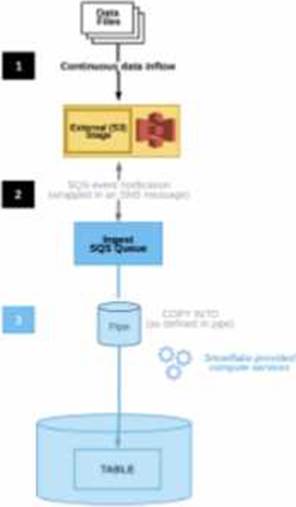
The diagram shows the process flow for Snowpipe auto-ingest with Amazon Simple Notification Service (SNS) with the following steps:
Step 1: Data files are loaded in a stage.
Step 2: An Amazon S3 event notification, published by SNS, informs Snowpipe ― by way of Amazon Simple Queue Service (SQS) – that files are ready to load. Snowpipe copies the files into a queue.
Step 3: A Snowflake-provided virtual warehouse loads data from the queued files into the target table based on parameters defined in the specified pipe.
If an AWS Administrator accidentally deletes the SQS subscription to the SNS topic in Step 2, what will happen to the pipe that references the topic to receive event messages from Amazon S3?
- A . The pipe will continue to receive the messages as Snowflake will automatically restore the subscription to the same SNS topic and will recreate the pipe by specifying the same SNS topic name in the pipe definition.
- B . The pipe will no longer be able to receive the messages and the user must wait for 24 hours from the time when the SNS topic subscription was deleted. Pipe recreation is not required as the pipe will reuse the same subscription to the existing SNS topic after 24 hours.
- C . The pipe will continue to receive the messages as Snowflake will automatically restore the subscription by creating a new SNS topic. Snowflake will then recreate the pipe by specifying the new SNS topic name in the pipe definition.
- D . The pipe will no longer be able to receive the messages. To restore the system immediately, the user needs to manually create a new SNS topic with a different name and then recreate the pipe by specifying the new SNS topic name in the pipe definition.
D
Explanation:
If an AWS Administrator accidentally deletes the SQS subscription to the SNS topic in Step 2, the pipe
that references the topic to receive event messages from Amazon S3 will no longer be able to receive the messages. This is because the SQS subscription is the link between the SNS topic and the Snowpipe notification channel. Without the subscription, the SNS topic will not be able to send notifications to the Snowpipe queue, and the pipe will not be triggered to load the new files. To restore the system immediately, the user needs to manually create a new SNS topic with a different name and then recreate the pipe by specifying the new SNS topic name in the pipe definition. This will create a new notification channel and a new SQS subscription for the pipe. Alternatively, the user can also recreate the SQS subscription to the existing SNS topic and then alter the pipe to use the same SNS topic name in the pipe definition. This will also restore the notification channel and the pipe functionality.
Reference: Automating Snowpipe for Amazon S3
Enabling Snowpipe Error Notifications for Amazon SNS
HowTo: Configuration steps for Snowpipe Auto-Ingest with AWS S3 Stages
Files arrive in an external stage every 10 seconds from a proprietary system. The files range in size from 500 K to 3 MB. The data must be accessible by dashboards as soon as it arrives.
How can a Snowflake Architect meet this requirement with the LEAST amount of coding? (Choose two.)
- A . Use Snowpipe with auto-ingest.
- B . Use a COPY command with a task.
- C . Use a materialized view on an external table.
- D . Use the COPY INTO command.
- E . Use a combination of a task and a stream.
A, C
Explanation:
These two options are the best ways to meet the requirement of loading data from an external stage and making it accessible by dashboards with the least amount of coding.
Snowpipe with auto-ingest is a feature that enables continuous and automated data loading from an external stage into a Snowflake table. Snowpipe uses event notifications from the cloud storage service to detect new or modified files in the stage and triggers a COPY INTO command to load the data into the table. Snowpipe is efficient, scalable, and serverless, meaning it does not require any infrastructure or maintenance from the user. Snowpipe also supports loading data from files of any size, as long as they are in a supported format1.
A materialized view on an external table is a feature that enables creating a pre-computed result set from an external table and storing it in Snowflake. A materialized view can improve the performance and efficiency of querying data from an external table, especially for complex queries or dashboards. A materialized view can also support aggregations, joins, and filters on the external table data. A materialized view on an external table is automatically refreshed when the underlying data in the external stage changes, as long as the AUTO_REFRESH parameter is set to true2.
Reference: Snowpipe Overview | Snowflake Documentation
Materialized Views on External Tables | Snowflake Documentation
A company wants to deploy its Snowflake accounts inside its corporate network with no visibility on the internet. The company is using a VPN infrastructure and Virtual Desktop Infrastructure (VDI) for its Snowflake users. The company also wants to re-use the login credentials set up for the VDI to eliminate redundancy when managing logins.
What Snowflake functionality should be used to meet these requirements? (Choose two.)
- A . Set up replication to allow users to connect from outside the company VPN.
- B . Provision a unique company Tri-Secret Secure key.
- C . Use private connectivity from a cloud provider.
- D . Set up SSO for federated authentication.
- E . Use a proxy Snowflake account outside the VPN, enabling client redirect for user logins.
C, D
Explanation:
According to the SnowPro Advanced: Architect documents and learning resources, the Snowflake functionality that should be used to meet these requirements are:
Use private connectivity from a cloud provider. This feature allows customers to connect to Snowflake from their own private network without exposing their data to the public Internet. Snowflake integrates with AWS PrivateLink, Azure Private Link, and Google Cloud Private Service Connect to offer private connectivity from customers’ VPCs or VNets to Snowflake endpoints. Customers can control how traffic reaches the Snowflake endpoint and avoid the need for proxies or public IP addresses123.
Set up SSO for federated authentication. This feature allows customers to use their existing identity provider (IdP) to authenticate users for SSO access to Snowflake. Snowflake supports most SAML 2.0-compliant vendors as an IdP, including Okta, Microsoft AD FS, Google G Suite, Microsoft Azure Active Directory, OneLogin, Ping Identity, and PingOne. By setting up SSO for federated authentication, customers can leverage their existing user credentials and profile information, and provide stronger security than username/password authentication4.
The other options are incorrect because they do not meet the requirements or are not feasible. Option A is incorrect because setting up replication does not allow users to connect from outside the company VPN. Replication is a feature of Snowflake that enables copying databases across accounts in different regions and cloud platforms. Replication does not affect the connectivity or visibility of the accounts5. Option B is incorrect because provisioning a unique company Tri-Secret Secure key does not affect the network or authentication requirements. Tri-Secret Secure is a feature of Snowflake that allows customers to manage their own encryption keys for data at rest in Snowflake, using a combination of three secrets: a master key, a service key, and a security password. Tri-Secret Secure provides an additional layer of security and control over the data encryption and decryption process, but it does not enable private connectivity or SSO6. Option E is incorrect because using a proxy Snowflake account outside the VPN, enabling client redirect for user logins, is not a supported or recommended way of meeting the requirements. Client redirect is a feature of Snowflake that allows customers to connect to a different Snowflake account than the one specified in the connection string. This feature is useful for scenarios such as cross-region failover, data sharing, and account migration, but it does not provide private connectivity or SSO7.
Reference: AWS PrivateLink
& Snowflake | Snowflake Documentation, Azure Private Link & Snowflake | Snowflake Documentation, Google Cloud Private Service Connect & Snowflake | Snowflake Documentation, Overview of Federated Authentication and SSO | Snowflake Documentation, Replicating Databases Across Multiple Accounts | Snowflake Documentation, Tri-Secret Secure | Snowflake Documentation, Redirecting Client Connections | Snowflake Documentation
A group of Data Analysts have been granted the role analyst role. They need a Snowflake database where they can create and modify tables, views, and other objects to load with their own data. The Analysts should not have the ability to give other Snowflake users outside of their role access to this data.
How should these requirements be met?
- A . Grant ANALYST_R0LE OWNERSHIP on the database, but make sure that ANALYST_ROLE does not have the MANAGE GRANTS privilege on the account.
- B . Grant SYSADMIN ownership of the database, but grant the create schema privilege on the database to the ANALYST_ROLE.
- C . Make every schema in the database a managed access schema, owned by SYSADMIN, and grant create privileges on each schema to the ANALYST_ROLE for each type of object that needs to be created.
- D . Grant ANALYST_ROLE ownership on the database, but grant the ownership on future [object type] s in database privilege to SYSADMIN.
A
Explanation:
Granting ANALYST_ROLE OWNERSHIP on the database allows the analysts to create and modify tables, views, and other objects within the database. However, to prevent the analysts from giving other Snowflake users outside of their role access to this data, the ANALYST_ROLE should not have the MANAGE GRANTS privilege on the account. The MANAGE GRANTS privilege enables a role to grant or revoke privileges on any object in the account, regardless of the ownership of the object1. Therefore, by removing this privilege from the ANALYST_ROLE, the analysts can only grant or revoke privileges on the objects that they own within the database, and not on any other objects in the account2.
The other options are not correct because:
B) Granting SYSADMIN ownership of the database and granting the create schema privilege on the database to the ANALYST_ROLE would allow the analysts to create schemas within the database, but not to create or modify tables, views, or other objects within those schemas. The analysts would need to have the create [object type] privilege on each schema to create or modify objects within the schema3.
C) Making every schema in the database a managed access schema, owned by SYSADMIN, and granting create privileges on each schema to the ANALYST_ROLE for each type of object that needs to be created would allow the analysts to create and modify objects within the schemas, but not to grant or revoke privileges on those objects. A managed access schema is a schema that requires explicit grants for any access to the objects within the schema, regardless of the ownership of the objects4. Therefore, the analysts would need to have the grant privilege on each schema to grant or revoke privileges on the objects within the schema.
D) Granting ANALYST_ROLE ownership on the database and granting the ownership on future [object type] s in database privilege to SYSADMIN would allow the analysts to create and modify objects within the database, but also to grant or revoke privileges on those objects. The ownership on future [object type] s in database privilege enables a role to automatically become the owner of any new object of the specified type that is created in the database. Therefore, by granting this privilege to SYSADMIN, the analysts would not be able to prevent SYSADMIN from accessing or modifying the objects that they create within the database.
Reference:
1: MANAGE GRANTS Privilege | Snowflake Documentation
2: Access Control Privileges | Snowflake Documentation
3: CREATE SCHEMA | Snowflake Documentation
4: Managed Access | Snowflake Documentation
: GRANT | Snowflake Documentation
: Ownership on Future Objects | Snowflake Documentation
: Ownership and Revoking Privileges | Snowflake Documentation
A user has the appropriate privilege to see unmasked data in a column.
If the user loads this column data into another column that does not have a masking policy, what will occur?
- A . Unmasked data will be loaded in the new column.
- B . Masked data will be loaded into the new column.
- C . Unmasked data will be loaded into the new column but only users with the appropriate privileges will be able to see the unmasked data.
- D . Unmasked data will be loaded into the new column and no users will be able to see the unmasked data.
A
Explanation:
According to the SnowPro Advanced: Architect documents and learning resources, column masking policies are applied at query time based on the privileges of the user who runs the query. Therefore, if a user has the privilege to see unmasked data in a column, they will see the original data when they query that column. If they load this column data into another column that does not have a masking policy, the unmasked data will be loaded in the new column, and any user who can query the new column will see the unmasked data as well. The masking policy does not affect the underlying data in the column, only the query results.
Reference: Snowflake Documentation: Column Masking
Snowflake Learning: Column Masking