
Practice Free ARA-C01 Exam Online Questions
How can the Snowpipe REST API be used to keep a log of data load history?
- A . Call insertReport every 20 minutes, fetching the last 10,000 entries.
- B . Call loadHistoryScan every minute for the maximum time range.
- C . Call insertReport every 8 minutes for a 10-minute time range.
- D . Call loadHistoryScan every 10 minutes for a 15-minute time range.
D
Explanation:
Snowpipe is a service that automates and optimizes the loading of data from external stages into Snowflake tables. Snowpipe uses a queue to ingest files as they become available in the stage. Snowpipe also provides REST endpoints to load data and retrieve load history reports1. The loadHistoryScan endpoint returns the history of files that have been ingested by Snowpipe within a specified time range. The endpoint accepts the following parameters2: pipe: The fully-qualified name of the pipe to query.
startTimeInclusive: The start of the time range to query, in ISO 8601 format. The value must be within the past 14 days.
endTimeExclusive: The end of the time range to query, in ISO 8601 format. The value must be later than the start time and within the past 14 days.
recentFirst: A boolean flag that indicates whether to return the most recent files first or last. The default value is false, which means the oldest files are returned first.
showSkippedFiles: A boolean flag that indicates whether to include files that were skipped by Snowpipe in the response. The default value is false, which means only files that were loaded are returned.
The loadHistoryScan endpoint can be used to keep a log of data load history by calling it periodically with a suitable time range. The best option among the choices is D, which is to call loadHistoryScan every 10 minutes for a 15-minute time range. This option ensures that the endpoint is called frequently enough to capture the latest files that have been ingested, and that the time range is wide enough to avoid missing any files that may have been delayed or retried by Snowpipe. The other options are either too infrequent, too narrow, or use the wrong endpoint3.
Reference:
1: Introduction to Snowpipe | Snowflake Documentation
2: loadHistoryScan | Snowflake Documentation
3: Monitoring Snowpipe Load History | Snowflake Documentation
When using the Snowflake Connector for Kafka, what data formats are supported for the messages? (Choose two.)
- A . CSV
- B . XML
- C . Avro
- D . JSON
- E . Parquet
C, D
Explanation:
The data formats that are supported for the messages when using the Snowflake Connector for Kafka are Avro and JSON. These are the two formats that the connector can parse and convert into Snowflake table rows. The connector supports both schemaless and schematized JSON, as well as Avro with or without a schema registry1. The other options are incorrect because they are not supported data formats for the messages. CSV, XML, and Parquet are not formats that the connector can parse and convert into Snowflake table rows. If the messages are in these formats, the connector will load them as VARIANT data type and store them as raw strings in the table2.
Reference: Snowflake Connector for Kafka | Snowflake Documentation, Loading Protobuf Data using the Snowflake Connector for Kafka | Snowflake Documentation
When using the Snowflake Connector for Kafka, what data formats are supported for the messages? (Choose two.)
- A . CSV
- B . XML
- C . Avro
- D . JSON
- E . Parquet
C, D
Explanation:
The data formats that are supported for the messages when using the Snowflake Connector for Kafka are Avro and JSON. These are the two formats that the connector can parse and convert into Snowflake table rows. The connector supports both schemaless and schematized JSON, as well as Avro with or without a schema registry1. The other options are incorrect because they are not supported data formats for the messages. CSV, XML, and Parquet are not formats that the connector can parse and convert into Snowflake table rows. If the messages are in these formats, the connector will load them as VARIANT data type and store them as raw strings in the table2.
Reference: Snowflake Connector for Kafka | Snowflake Documentation, Loading Protobuf Data using the Snowflake Connector for Kafka | Snowflake Documentation
Role A has the following permissions:
. USAGE on db1
. USAGE and CREATE VIEW on schemal in db1
. SELECT on tablel in schemal
Role B has the following permissions:
. USAGE on db2
. USAGE and CREATE VIEW on schema2 in db2
. SELECT on table2 in schema2
A user has Role A set as the primary role and Role B as a secondary role.
What command will fail for this user?
- A . use database db1;
use schema schemal;
create view v1 as select * from db2.schema2.table2; - B . use database db2;
use schema schema2;
create view v2 as select * from dbl.schemal. tablel; - C . use database db2;
use schema schema2;
select * from db1.schemal.tablel union select * from table2; - D . use database db1;
use schema schemal;
select * from db2.schema2.table2;
Refer to the exhibit.
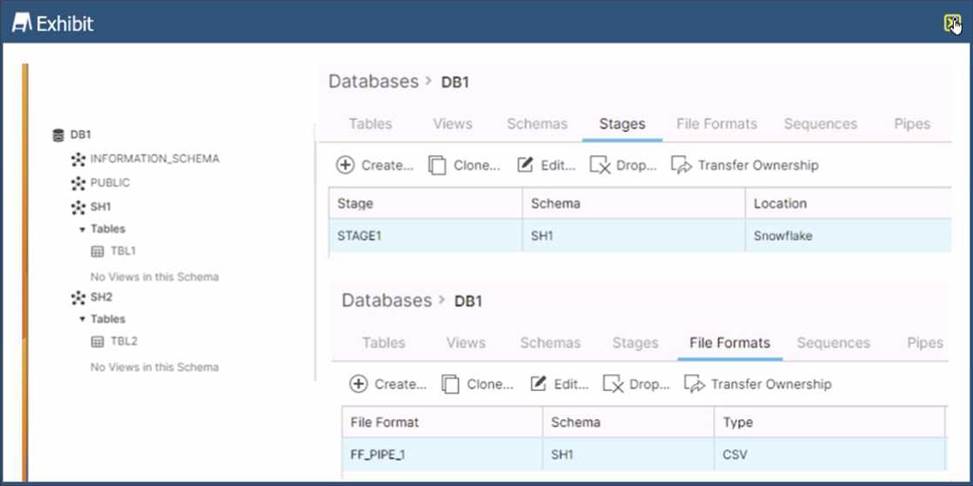
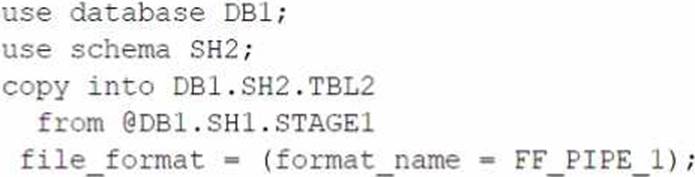
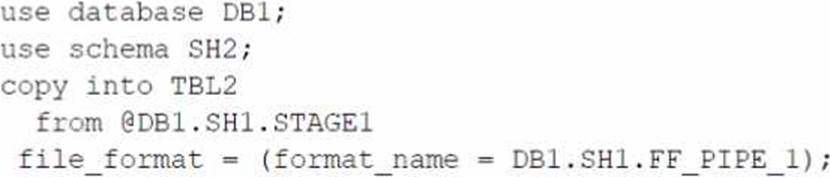
Based on the architecture in the image, how can the data from DB1 be copied into TBL2? (Select TWO).
A)
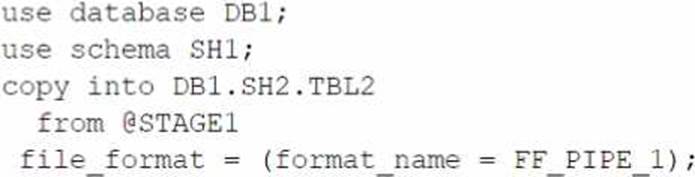
B)
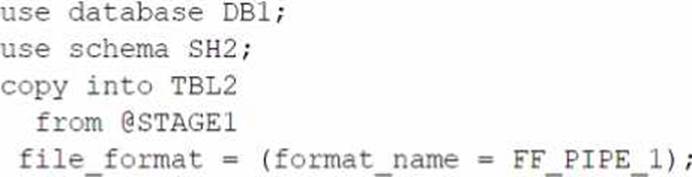
C)
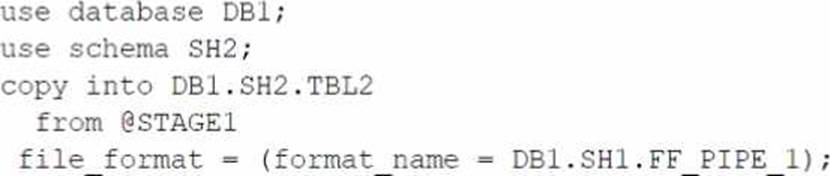
D)
E)
- A . Option A
- B . Option B
- C . Option C
- D . Option D
- E . Option E
B,E
Explanation:
The architecture in the image shows a Snowflake data platform with two databases, DB1 and DB2, and two schemas, SH1 and SH2. DB1 contains a table TBL1 and a stage STAGE1. DB2 contains a table TBL2. The image also shows a snippet of code written in SQL language that copies data from STAGE1 to TBL2 using a file format FF PIPE 1.
To copy data from DB1 to TBL2, there are two possible options among the choices given:
Option B: Use a named external stage that references STAGE1. This option requires creating an external stage object in DB2.SH2 that points to the same location as STAGE1 in DB1.SH1. The external stage can be created using the CREATE STAGE command with the URL parameter specifying the location of STAGE11. For example:
SQLAI-generated code. Review and use carefully. More info on FAQ.
use database DB2;
use schema SH2;
create stage EXT_STAGE1
url = @DB1.SH1.STAGE1;
Then, the data can be copied from the external stage to TBL2 using the COPY INTO command with the FROM parameter specifying the external stage name and the FILE FORMAT parameter specifying the file format name2.
For example:
SQLAI-generated code. Review and use carefully. More info on FAQ.
copy into TBL2
from @EXT_STAGE1
file format = (format name = DB1.SH1.FF PIPE 1);
Option E: Use a cross-database query to select data from TBL1 and insert into TBL2. This option requires using the INSERT INTO command with the SELECT clause to query data from TBL1 in DB1.SH1 and insert it into TBL2 in DB2.SH2. The query must use the fully-qualified names of the tables, including the database and schema names3. For example: SQLAI-generated code. Review and use carefully. More info on FAQ.
use database DB2;
use schema SH2;
insert into TBL2
select * from DB1.SH1.TBL1;
The other options are not valid because:
Option A: It uses an invalid syntax for the COPY INTO command. The FROM parameter cannot specify a table name, only a stage name or a file location2.
Option C: It uses an invalid syntax for the COPY INTO command. The FILE FORMAT parameter cannot specify a stage name, only a file format name or options2.
Option D: It uses an invalid syntax for the CREATE STAGE command. The URL parameter cannot
specify a table name, only a file location1.
Reference:
1: CREATE STAGE | Snowflake Documentation
2: COPY INTO table | Snowflake Documentation
3: Cross-database Queries | Snowflake Documentation
Is it possible for a data provider account with a Snowflake Business Critical edition to share data with an Enterprise edition data consumer account?
- A . A Business Critical account cannot be a data sharing provider to an Enterprise consumer. Any consumer accounts must also be Business Critical.
- B . If a user in the provider account with role authority to create or alter share adds an Enterprise account as a consumer, it can import the share.
- C . If a user in the provider account with a share owning role sets share_restrictions to False when adding an Enterprise consumer account, it can import the share.
- D . If a user in the provider account with a share owning role which also has override share restrictions privilege share_restrictions set to False when adding an Enterprise consumer account, it can import the share.
D
Explanation:
Data sharing is a feature that allows Snowflake accounts to share data with each other without the need for data movement or copying1. Data sharing is enabled by creating shares, which are collections of database objects (tables, views, secure views, and secure UDFs) that can be accessed by other accounts, called consumers2.
By default, Snowflake does not allow sharing data from a Business Critical edition account to a non-Business Critical edition account. This is because Business Critical edition offers higher levels of data protection and encryption than other editions, and sharing data with lower editions may compromise the security and compliance of the data3.
However, Snowflake provides the OVERRIDE SHARE RESTRICTIONS global privilege, which allows a user to override the default restriction and share data from a Business Critical edition account to a non-Business Critical edition account. This privilege is granted to the ACCOUNTADMIN role by default, and can be granted to other roles as well4.
To enable data sharing from a Business Critical edition account to an Enterprise edition account, the following steps are required34:
A user in the provider account with the OVERRIDE SHARE RESTRICTIONS privilege must create or alter a share and add the Enterprise edition account as a consumer. The user must also set the share_restrictions parameter to False when adding the consumer. This parameter indicates whether the share is restricted to Business Critical edition accounts only. Setting it to False allows the share to be imported by lower edition accounts.
A user in the consumer account with the IMPORT SHARE privilege must import the share and grant access to the share objects to other roles in the account. The user must also set the share_restrictions parameter to False when importing the share. This parameter indicates whether the consumer account accepts shares from Business Critical edition accounts only. Setting it to False allows the consumer account to import shares from lower edition accounts.
Reference:
1: Introduction to Secure Data Sharing | Snowflake Documentation
2: Creating Secure Data Shares | Snowflake Documentation
3: Enable Data Share:Business Critical Account to Lower Edition | Medium
4: Enabling sharing from a Business critical account to a non-business … | Snowflake Documentation
Is it possible for a data provider account with a Snowflake Business Critical edition to share data with an Enterprise edition data consumer account?
- A . A Business Critical account cannot be a data sharing provider to an Enterprise consumer. Any consumer accounts must also be Business Critical.
- B . If a user in the provider account with role authority to create or alter share adds an Enterprise account as a consumer, it can import the share.
- C . If a user in the provider account with a share owning role sets share_restrictions to False when adding an Enterprise consumer account, it can import the share.
- D . If a user in the provider account with a share owning role which also has override share restrictions privilege share_restrictions set to False when adding an Enterprise consumer account, it can import the share.
D
Explanation:
Data sharing is a feature that allows Snowflake accounts to share data with each other without the need for data movement or copying1. Data sharing is enabled by creating shares, which are collections of database objects (tables, views, secure views, and secure UDFs) that can be accessed by other accounts, called consumers2.
By default, Snowflake does not allow sharing data from a Business Critical edition account to a non-Business Critical edition account. This is because Business Critical edition offers higher levels of data protection and encryption than other editions, and sharing data with lower editions may compromise the security and compliance of the data3.
However, Snowflake provides the OVERRIDE SHARE RESTRICTIONS global privilege, which allows a user to override the default restriction and share data from a Business Critical edition account to a non-Business Critical edition account. This privilege is granted to the ACCOUNTADMIN role by default, and can be granted to other roles as well4.
To enable data sharing from a Business Critical edition account to an Enterprise edition account, the following steps are required34:
A user in the provider account with the OVERRIDE SHARE RESTRICTIONS privilege must create or alter a share and add the Enterprise edition account as a consumer. The user must also set the share_restrictions parameter to False when adding the consumer. This parameter indicates whether the share is restricted to Business Critical edition accounts only. Setting it to False allows the share to be imported by lower edition accounts.
A user in the consumer account with the IMPORT SHARE privilege must import the share and grant access to the share objects to other roles in the account. The user must also set the share_restrictions parameter to False when importing the share. This parameter indicates whether the consumer account accepts shares from Business Critical edition accounts only. Setting it to False allows the consumer account to import shares from lower edition accounts.
Reference:
1: Introduction to Secure Data Sharing | Snowflake Documentation
2: Creating Secure Data Shares | Snowflake Documentation
3: Enable Data Share:Business Critical Account to Lower Edition | Medium
4: Enabling sharing from a Business critical account to a non-business … | Snowflake Documentation
An Architect would like to save quarter-end financial results for the previous six years.
Which Snowflake feature can the Architect use to accomplish this?
- A . Search optimization service
- B . Materialized view
- C . Time Travel
- D . Zero-copy cloning
- E . Secure views
D
Explanation:
Zero-copy cloning is a Snowflake feature that can be used to save quarter-end financial results for the previous six years. Zero-copy cloning allows creating a copy of a database, schema, table, or view without duplicating the data or metadata. The clone shares the same data files as the original object, but tracks any changes made to the clone or the original separately. Zero-copy cloning can be used to create snapshots of data at different points in time, such as quarter-end financial results, and preserve them for future analysis or comparison. Zero-copy cloning is fast, efficient, and does not consume any additional storage space unless the data is modified1.
Reference: Zero-Copy Cloning | Snowflake Documentation
A company’s daily Snowflake workload consists of a huge number of concurrent queries triggered between 9pm and 11pm. At the individual level, these queries are smaller statements that get completed within a short time period.
What configuration can the company’s Architect implement to enhance the performance of this workload? (Choose two.)
- A . Enable a multi-clustered virtual warehouse in maximized mode during the workload duration.
- B . Set the MAX_CONCURRENCY_LEVEL to a higher value than its default value of 8 at the virtual warehouse level.
- C . Increase the size of the virtual warehouse to size X-Large.
- D . Reduce the amount of data that is being processed through this workload.
- E . Set the connection timeout to a higher value than its default.
A, B
Explanation:
These two configuration options can enhance the performance of the workload that consists of a huge number of concurrent queries that are smaller and faster.
Enabling a multi-clustered virtual warehouse in maximized mode allows the warehouse to scale out automatically by adding more clusters as soon as the current cluster is fully loaded, regardless of the number of queries in the queue. This can improve the concurrency and throughput of the workload by minimizing or preventing queuing. The maximized mode is suitable for workloads that require high performance and low latency, and are less sensitive to credit consumption1.
Setting the MAX_CONCURRENCY_LEVEL to a higher value than its default value of 8 at the virtual warehouse level allows the warehouse to run more queries concurrently on each cluster. This can improve the utilization and efficiency of the warehouse resources, especially for smaller and faster queries that do not require a lot of processing power. The MAX_CONCURRENCY_LEVEL parameter can be set when creating or modifying a warehouse, and it can be changed at any time2.
Reference: Snowflake Documentation: Scaling Policy for Multi-cluster Warehouses
Snowflake Documentation: MAX_CONCURRENCY_LEVEL
A company’s daily Snowflake workload consists of a huge number of concurrent queries triggered between 9pm and 11pm. At the individual level, these queries are smaller statements that get completed within a short time period.
What configuration can the company’s Architect implement to enhance the performance of this workload? (Choose two.)
- A . Enable a multi-clustered virtual warehouse in maximized mode during the workload duration.
- B . Set the MAX_CONCURRENCY_LEVEL to a higher value than its default value of 8 at the virtual warehouse level.
- C . Increase the size of the virtual warehouse to size X-Large.
- D . Reduce the amount of data that is being processed through this workload.
- E . Set the connection timeout to a higher value than its default.
A, B
Explanation:
These two configuration options can enhance the performance of the workload that consists of a huge number of concurrent queries that are smaller and faster.
Enabling a multi-clustered virtual warehouse in maximized mode allows the warehouse to scale out automatically by adding more clusters as soon as the current cluster is fully loaded, regardless of the number of queries in the queue. This can improve the concurrency and throughput of the workload by minimizing or preventing queuing. The maximized mode is suitable for workloads that require high performance and low latency, and are less sensitive to credit consumption1.
Setting the MAX_CONCURRENCY_LEVEL to a higher value than its default value of 8 at the virtual warehouse level allows the warehouse to run more queries concurrently on each cluster. This can improve the utilization and efficiency of the warehouse resources, especially for smaller and faster queries that do not require a lot of processing power. The MAX_CONCURRENCY_LEVEL parameter can be set when creating or modifying a warehouse, and it can be changed at any time2.
Reference: Snowflake Documentation: Scaling Policy for Multi-cluster Warehouses
Snowflake Documentation: MAX_CONCURRENCY_LEVEL