
Practice Free XK0-006 Exam Online Questions
Which of the following commands can be used to display current CPU utilization in real time on a Linux system?
- A . uptime
- B . top
- C . df
- D . lsblk
B
Explanation:
The correct answer is B. top because it provides a real-time, continuously updating view of system performance, including CPU utilization. The top command is one of the most widely used monitoring tools in Linux and is essential for system administrators when analyzing performance issues.
When executed, top displays a dynamic interface showing CPU usage percentages, memory consumption, load averages, running processes, and other critical system metrics. The CPU usage section is particularly useful because it breaks down usage into categories such as user space, system (kernel), idle time, and I/O wait. This allows administrators to quickly identify whether the CPU is under heavy load and which processes are consuming the most resources.
Option A (uptime) is incorrect because it provides load averages but does not give detailed or real-time CPU utilization percentages.
Option C (df) is incorrect because it reports disk space usage, not CPU activity.
Option D (lsblk) is incorrect because it lists block devices and storage structure, not CPU performance.
From a Linux+ system management perspective, tools like top, htop, and vmstat are critical for monitoring system health. Among these, top is the most fundamental and widely available tool for real-time CPU analysis. It enables administrators to detect performance bottlenecks, identify runaway processes, and take corrective action such as terminating processes or reallocating
resources.
Which of the following commands should an administrator use to convert a KVM disk file to a different format?
- A . qemu-kvm
- B . qemu-nq
- C . qemu-io
- D . qemu-img
D
Explanation:
The correct answer is D. qemu-img because it is the standard utility used to create, convert, and
manage disk image files used by virtualization platforms such as KVM (Kernel-based Virtual Machine). One of its primary functions is converting disk images between different formats, such as qcow2, raw, vmdk, and vdi.
For example, an administrator can convert a disk image using a command like:
qemu-img convert -f qcow2 -O raw disk.qcow2 disk.raw
This capability is essential when migrating virtual machines between different hypervisors or when optimizing storage formats.
Option A (qemu-kvm) is incorrect because it is used to run virtual machines using KVM acceleration, not for managing or converting disk images.
Option B (qemu-nq) is incorrect because it is not a valid or commonly used QEMU command.
Option C (qemu-io) is incorrect because it is primarily used for debugging and testing disk I/O operations, not for format conversion.
From a Linux+ system management perspective, virtualization is a key topic, and tools like qemu-img are essential for managing virtual disk storage. Administrators frequently use it to resize images, check integrity, and convert formats when working in cloud, containerized, or virtualized environments. Understanding this command ensures efficient handling of virtual machine storage and supports interoperability across virtualization platforms.
A Linux user needs to authenticate to a Windows Active Directory domain.
Which of the following configuration files contains the domain configuration details?
- A . sssd.conf
- B . krb5.conf
- C . pam.conf
- D . smb.conf
A
Explanation:
In modern Linux enterprise environments, integrating with Windows Active Directory (AD) is a
common requirement for centralized identity management. According to CompTIA Linux+ V8, the System Security Services Daemon (SSSD) is the recommended way to handle authentication and authorization against remote providers like AD or LDAP.
The sssd.conf file (typically located in /etc/sssd/) is the primary configuration file for this service.
It contains the essential "domain configuration details," including:
The AD domain name.
The authentication provider (e.g., id_provider = ad).
The URI of the domain controllers.
Caching settings for offline login.
SSSD provides a unified interface that manages the communication between the Linux system and the AD domain, simplifying the authentication stack.
The other options are related but do not serve as the primary domain configuration file. krb5.conf (Option B) configures Kerberos, which is used for the underlying ticket-based authentication, but SSSD often manages these details automatically or relies on it as a sub-component. pam.conf (Option C) manages the Pluggable Authentication Modules stack but does not store domain-specific details.
smb.conf (Option D) is the configuration for Samba; while Samba is used for file sharing and can assist in joining a domain, sssd.conf is the verified location for modern identity integration details in Linux+ V8 environments.
Which of the following most accurately describes a webhook?
- A . An authentication method for web-server communication
- B . An SNMP-based API for network device monitoring
- C . A means to transmit sensitive information between systems
- D . An HTTP-based callback function
D
Explanation:
The correct answer is D. An HTTP-based callback function. A webhook is a mechanism that allows one system to automatically send real-time data to another system via HTTP when a specific event occurs. Instead of continuously polling an API for updates, a webhook enables event-driven communication, making automation more efficient and responsive.
In practical Linux and DevOps environments, webhooks are widely used in automation, orchestration, and integration workflows. For example, a version control system like GitHub can trigger a webhook to notify a CI/CD pipeline whenever new code is pushed. The receiving system exposes an HTTP endpoint (URL), and when the event occurs, the webhook sends an HTTP POST request with relevant data payload. This design significantly reduces overhead compared to polling mechanisms.
Option A is incorrect because webhooks are not authentication mechanisms. While authentication (such as tokens or signatures) may be used to secure webhook communication, it is not their primary purpose.
Option B is incorrect because SNMP (Simple Network Management Protocol) is unrelated to webhooks. SNMP is used for monitoring and managing network devices, whereas webhooks operate over HTTP/HTTPS protocols.
Option C is incorrect because although webhooks can transmit data (including sensitive information if not properly secured), their purpose is not specifically to transmit sensitive data but to notify systems of events through automated callbacks.
From a Linux+ perspective, understanding webhooks is essential in automation and orchestration tasks. They are commonly integrated into scripts, configuration management tools, and cloud-native workflows to enable reactive, event-driven system behavior, improving efficiency and scalability in modern infrastructure environments.
Which of the following Ansible components contains a list of hosts and host groups?
- A . Fact
- B . Inventory
- C . Playbook
- D . Collection
B
Explanation:
Ansible architecture and core components are part of the Automation, Orchestration, and Scripting domain in CompTIA Linux+ V8. Among these components, the inventory plays a foundational role in defining the infrastructure Ansible manages.
An Ansible inventory is a file (or set of files) that contains a list of managed hosts and optionally organizes them into logical groups. These hosts can be defined by IP address, fully qualified domain
name (FQDN), or hostname. Inventories may be written in INI, YAML, or dynamically generated formats. Grouping hosts allows administrators to apply configurations, roles, and tasks to multiple systems simultaneously.
Option B, Inventory, is correct because it explicitly defines which systems Ansible will target. Without an inventory, Ansible does not know where to execute tasks. Linux+ V8 documentation emphasizes inventories as the starting point for all Ansible operations.
The other options are incorrect. Facts are system variables automatically collected by Ansible about managed hosts, such as OS version or IP address. Playbooks define what actions to perform but rely on the inventory to know where to perform them. Collections are distribution units that package roles, modules, and plugins, not host definitions.
Therefore, the correct answer is B. Inventory.
An administrator must secure an account for a user who is going on extended leave.
Which of the following steps should the administrator take? (Choose two)
- A . Set the user’s files to immutable.
- B . Instruct the user to log in once per week.
- C . Delete the user’s /home folder.
- D . Run the command passwd -l user.
- E . Change the date on the /home folder to that of the expected return date.
- F . Change the user’s shell to /sbin/nologin.
D,F
Explanation:
Securing dormant or temporarily unused user accounts is a best practice emphasized in the Security domain of CompTIA Linux+ V8. When a user goes on extended leave, the goal is to prevent unauthorized access while preserving the user’s data and account for future use.
The most effective approach is to disable authentication and interactive login access without deleting the account.
Option D, running passwd -l user, locks the user’s password by prepending an invalid
character to the encrypted password in /etc/shadow. This prevents password-based authentication while retaining the account, files, and ownership information. Linux+ V8 documentation highlights password locking as a standard method for temporarily disabling accounts.
Option F, changing the user’s shell to /sbin/nologin, further strengthens account security by preventing interactive shell access entirely. Even if another authentication mechanism were attempted, the user would be denied a login shell. This is a common defense-in-depth measure and is explicitly referenced in Linux+ V8 objectives for access control and account hardening.
The other options are incorrect or inappropriate.
Option A (immutable files) does not prevent account access and may interfere with system operations.
Option B defeats the purpose of securing an inactive account.
Option C deletes user data, which is unnecessary and risky.
Option E has no security effect, as filesystem timestamps do not control access.
Linux+ V8 stresses that secure account management should be reversible, auditable, and minimally disruptive. Locking the password and disabling the login shell meet these criteria and are commonly used together in enterprise environments.
On a Kubernetes cluster, which of the following resources should be created in order to expose a port so it is publicly accessible on the internet?
- A . Deployment
- B . Network
- C . Service
- D . Pod
C
Explanation:
Container orchestration concepts are part of the Automation and Orchestration domain in Linux+ V8. In Kubernetes, workloads run inside Pods, but Pods are not directly accessible from outside the cluster.
To expose an application externally, a Service resource must be created. Services provide a stable network endpoint and can be configured as NodePort, LoadBalancer, or ClusterIP. Public exposure is typically achieved using NodePort or LoadBalancer types.
Option C, Service, is correct. Deployments manage Pods, but they do not handle networking exposure. Pods represent running containers but lack external accessibility by default. “Network” is not a valid Kubernetes resource type.
Linux+ V8 documentation highlights Services as the mechanism for exposing containerized applications.
Therefore, the correct answer is C.
A systems administrator needs to set the IP address of a new DNS server.
Which of the following files should the administrator modify to complete this task?
- A . /etc/whois.conf
- B . /etc/resolv.conf
- C . /etc/nsswitch.conf
- D . /etc/dnsmasq.conf
B
Explanation:
DNS client configuration is a foundational Linux networking task covered in Linux+ V8 system management objectives. When an administrator needs to specify the IP address of a DNS server that the system should use for name resolution, the correct file to modify is /etc/resolv.conf.
The /etc/resolv.conf file defines DNS resolver settings, including one or more nameserver entries that specify the IP addresses of DNS servers. Applications and system services rely on this file to resolve hostnames to IP addresses.
The other options are incorrect. /etc/whois.conf configures WHOIS queries. /etc/nsswitch.conf controls the order of name resolution sources but does not define DNS server IP addresses. /etc/dnsmasq.conf configures a local DNS caching service, not the system-wide resolver directly.
Linux+ V8 documentation highlights /etc/resolv.conf as the authoritative DNS client configuration file, though it may be dynamically managed by tools such as NetworkManager or systemd-resolved.
Therefore, the correct answer is B. /etc/resolv.conf.
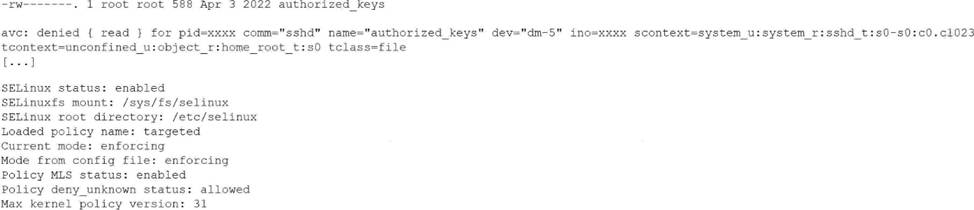
A Linux administrator just finished setting up passwordless SSH authentication between two nodes.
However, upon test validation, the remote host prompts for a password.
Given the following logs:
Which of the following is the most likely cause of the issue?
- A . The SELinux policy is incorrectly targeting the unconf ined_u context.
- B . The administrator forgot to restart the SSHD after creating the authorizedjceys file.
- C . The authorized_keys file has the incorrect root permissions assigned.
- D . The authorized_keys file does not have the correct security context to match SELinux policy.
D
Explanation:
This issue is directly related to SELinux enforcement, which is a key topic in the Security domain of CompTIA Linux+ V8. The logs clearly indicate that SSH key-based authentication is failing due to an SELinux access control violation rather than a traditional file permission or SSH configuration problem.
The most important clue is the AVC denial message, which shows that the sshd process is being denied read access to the authorized_keys file. The security context of the file is listed as unconfined_u:object_r:home_root_t:s0. Under a targeted SELinux policy, SSH is only permitted to read authorized_keys files that are labeled with the correct SELinux type, typically ssh_home_t.
Because SELinux is running in enforcing mode, it actively blocks access that violates policy rules, even if standard UNIX permissions are correct. Although the file permissions (600) are acceptable for an authorized_keys file, SELinux does not rely solely on traditional permissions. The mismatch between the expected SELinux context and the actual context prevents sshd from accessing the file, causing SSH to fall back to password authentication.
Option D correctly identifies the root cause: the authorized_keys file does not have the correct SELinux security context. This is a well-documented Linux+ V8 troubleshooting scenario, commonly resolved by restoring the correct context using commands such as restorecon or by ensuring the file resides in a properly labeled home directory.
The other options are incorrect. Restarting sshd does not fix SELinux labeling issues. The policy itself is functioning as intended, and file ownership alone does not override SELinux access controls.
Linux+ V8 documentation emphasizes that SELinux denials must be addressed by correcting file contexts rather than weakening security controls.
Therefore, the correct answer is D.
A systems administrator needs to integrate a new storage array into the company’s existing storage pool. The administrator wants to ensure that the server is able to detect the new storage array.
Which of the following commands should the administrator use to ensure that the new storage array is presented to the systems?
- A . lsscsi
- B . lsusb
- C . lsipc
- D . lshw
A
Explanation:
Comprehensive and Detailed Explanation From Exact Extract:
The lsscsi command is used to list information about SCSI devices (including storage arrays) that are attached to the system. This is critical when integrating a new storage array because it allows the
administrator to verify that the operating system detects the new device at the SCSI layer, which is the underlying interface for most enterprise storage solutions. lsscsi outputs a list of recognized SCSI devices, their device nodes, and associated information.
Other options:
B. lsusb: Lists USB devices, not storage arrays on SCSI/SATA/SAS.
C. lsipc: Displays information on IPC (inter-process communication) facilities, unrelated to hardware detection.
D. lshw: Lists hardware details and can show storage, but lsscsi is specifically designed for SCSI device detection and is the most direct method for this task.
Reference: CompTIA Linux+ Study Guide: Exam XK0-006, Sybex, Chapter 7: "Managing Storage", Section:
"Identifying and Accessing Storage Devices"
CompTIA Linux+ XK0-006 Objectives: Domain 4.0 C Storage and Filesystems