
Practice Free XK0-006 Exam Online Questions
Which of the following commands should an administrator run to check for errors during startup?
- A . modinfo
- B . dmesg
- C . dracut
- D . lshw
B
Explanation:
The correct answer is B. dmesg because it displays the kernel ring buffer, which contains messages generated during system boot and runtime. These messages include hardware initialization details, driver loading status, and error or warning messages that occur during startup. This makes dmesg
one of the most important tools for troubleshooting boot-related issues in Linux.
When a Linux system boots, the kernel initializes hardware components and loads drivers. Any issues encountered during this process―such as missing drivers, hardware failures, or misconfigurations― are logged in the kernel ring buffer. By running dmesg, administrators can review these messages and identify the root cause of startup problems. It is common to combine dmesg with tools like grep (e.g., dmesg | grep -i error) to filter relevant error messages.
Option A (modinfo) is incorrect because it provides information about kernel modules, such as version and dependencies, but does not display boot errors.
Option C (dracut) is incorrect because it is used to create or regenerate initramfs images, not to check system logs or startup errors.
Option D (lshw) is incorrect because it lists detailed hardware information but does not show boot-time errors or logs.
From a Linux+ troubleshooting perspective, analyzing boot logs is critical for diagnosing system issues. The dmesg command provides immediate access to kernel-level messages, making it an essential tool for identifying hardware and driver-related problems that occur during system startup.
Which of the following commands should a Linux administrator use to determine the version of a kernel module?
- A . modprobe bluetooth
- B . lsmod bluetooth
- C . depmod bluetooth
- D . modinfo bluetooth
D
Explanation:
Kernel module management is an important part of Linux system administration and is covered in the Linux+ V8 objectives. When an administrator needs to determine metadata about a kernel module―such as its version, author, description, license, filename, and dependencies―the correct tool is modinfo.
The command modinfo bluetooth displays detailed information about the specified kernel module, including the module version if it is defined. This makes it the correct and intended command for retrieving version details of kernel modules, whether or not the module is currently loaded.
The other options are incorrect. modprobe bluetooth is used to load or unload kernel modules and does not display version information. lsmod lists loaded modules but does not show version details and does not accept module names as arguments in that manner. depmod is used to generate module dependency information and does not provide module metadata to the administrator.
Linux+ V8 documentation specifically references modinfo as the utility for inspecting kernel module properties. This command is essential for troubleshooting driver issues, verifying compatibility, and auditing kernel components.
Therefore, the correct answer is D. modinfo bluetooth.
A DevOps engineer needs to create a local Git repository.
Which of the following commands should the engineer use?
- A . git init
- B . git clone
- C . git config
- D . git add
A
Explanation:
The correct answer is A. git init because it is the command used to initialize a new local Git repository in a directory. When executed, git init creates a hidden .git directory that contains all the necessary metadata and configuration files required for version control. This action effectively turns the current directory into a Git repository, allowing the user to begin tracking changes.
In a DevOps and automation context, initializing repositories is a foundational task. It enables version control for scripts, configuration files, and infrastructure-as-code, which are critical components in modern Linux environments. Once the repository is initialized, the engineer can proceed with adding files (git add) and committing changes (git commit).
Option B (git clone) is incorrect because it is used to copy an existing remote repository to a local system. It does not create a new repository from scratch but instead duplicates an already initialized one.
Option C (git config) is incorrect because it is used to configure Git settings such as username, email, and preferences. It does not initialize a repository.
Option D (git add) is incorrect because it stages changes for commit within an already initialized repository. It cannot be used before a repository is created.
From a Linux+ perspective, understanding Git operations is essential under automation and orchestration topics. Tools like Git support collaboration, change tracking, and deployment workflows. The git init command represents the starting point for managing code and configuration in a controlled and versioned manner, making it a critical skill for system administrators and DevOps engineers.
A Linux administrator installed a new program inside $HOME/.local/bin and is trying to execute it without using an absolute path.
Which of the following should the administrator use for this task?
- A . export PATH=PATH:$HOME/.local/bin
- B . export $PATH=PATH:$HOME/.local/bin
- C . export PATH=$PATH:$HOME/.local/bin
- D . export $PATH=$PATH:$HOME/.local/bin
C
Explanation:
The correct answer is C. export PATH=$PATH:$HOME/.local/bin because it correctly appends the directory $HOME/.local/bin to the existing PATH environment variable. The PATH variable defines a list of directories that the shell searches when a user enters a command without specifying its full path. By adding a directory to PATH, executables within that directory can be run directly from the command line.
In this case, the administrator installed a program in $HOME/.local/bin, which is not always included in the default PATH for all systems or users. By using export PATH=$PATH:$HOME/.local/bin, the existing PATH is preserved and extended to include the new directory. The use of $PATH ensures that previously defined directories remain accessible, while the colon (:) separates multiple directory entries.
Option A is incorrect because it literally assigns the string “PATH” instead of referencing the current PATH variable, effectively breaking command lookup.
Option B and D are incorrect because they attempt to assign a value to $PATH, which is invalid syntax.
Environment variables should be assigned using their name (PATH), not with a dollar sign.
From a Linux+ perspective, managing environment variables is a fundamental skill in user and system configuration. Properly configuring the PATH variable ensures efficient command execution and usability, especially when installing custom or user-specific applications. For persistence, this change is typically added to shell configuration files like ~/.bashrc or ~/.profile.
A Linux administrator is configuring a CUPS print service on a Linux machine and needs to allow only connections from a local network (192.168.100.0/24).
Which of the following commands should the administrator use?
- A . iptables -A OUTPUT -d 192.168.100.0/24 –sport 631 -p tcp -j ACCEPT
- B . iptables -A OUTPUT -s 192.168.100.0/24 –dport 631 -p tcp -j ACCEPT
- C . iptables -A INPUT -s 192.168.100.0/24 –dport 631 -p tcp -j ACCEPT
- D . iptables -D INPUT -d 192.168.100.0/24 –dport 631 -p tcp -j ACCEPT
C
Explanation:
Firewall management is a core competency in Linux+ V8, and iptables remains a fundamental tool for defining network access rules. In this scenario, the administrator needs to control traffic directed to the local CUPS service. CUPS (Common Unix Printing System) typically listens on TCP port 631.
To allow external clients from a specific network to connect to this server, the rule must be added to the INPUT chain, as the traffic is coming into the host. The correct command is iptables -A INPUT -s 192.168.100.0/24 –dport 631 -p tcp -j ACCEPT.
Breaking down the command:
-A INPUT: Appends the rule to the Input chain (for incoming traffic).
-s 192.168.100.0/24: Specifies the source network that is permitted.
–dport 631: Targets the destination port where the CUPS service is listening.
-p tcp: Specifies the protocol.
-j ACCEPT: Defines the action to take (allow the packet).
The other options are incorrect.
Options A and B target the OUTPUT chain, which controls traffic leaving the server; this would not prevent unauthorized incoming connections.
Option D uses the -D flag, which is used to delete an existing rule rather than add one, and it also uses the -d (destination) flag incorrectly for a source restriction.
Therefore, Option C is the verified method for implementing this security requirement using iptables.
A Linux administrator is configuring a CUPS print service on a Linux machine and needs to allow only connections from a local network (192.168.100.0/24).
Which of the following commands should the administrator use?
- A . iptables -A OUTPUT -d 192.168.100.0/24 –sport 631 -p tcp -j ACCEPT
- B . iptables -A OUTPUT -s 192.168.100.0/24 –dport 631 -p tcp -j ACCEPT
- C . iptables -A INPUT -s 192.168.100.0/24 –dport 631 -p tcp -j ACCEPT
- D . iptables -D INPUT -d 192.168.100.0/24 –dport 631 -p tcp -j ACCEPT
C
Explanation:
Firewall management is a core competency in Linux+ V8, and iptables remains a fundamental tool for defining network access rules. In this scenario, the administrator needs to control traffic directed to the local CUPS service. CUPS (Common Unix Printing System) typically listens on TCP port 631.
To allow external clients from a specific network to connect to this server, the rule must be added to the INPUT chain, as the traffic is coming into the host. The correct command is iptables -A INPUT -s 192.168.100.0/24 –dport 631 -p tcp -j ACCEPT.
Breaking down the command:
-A INPUT: Appends the rule to the Input chain (for incoming traffic).
-s 192.168.100.0/24: Specifies the source network that is permitted.
–dport 631: Targets the destination port where the CUPS service is listening.
-p tcp: Specifies the protocol.
-j ACCEPT: Defines the action to take (allow the packet).
The other options are incorrect.
Options A and B target the OUTPUT chain, which controls traffic leaving the server; this would not prevent unauthorized incoming connections.
Option D uses the -D flag, which is used to delete an existing rule rather than add one, and it also uses the -d (destination) flag incorrectly for a source restriction.
Therefore, Option C is the verified method for implementing this security requirement using iptables.
Which of the following commands is used to display detailed information about block devices on a Linux system?
- A . lsblk
- B . mount
- C . df
- D . fdisk
A
Explanation:
The correct answer is A. lsblk because it is specifically designed to display detailed information about block devices such as hard drives, SSDs, partitions, and their mount points in a structured, hierarchical format. The lsblk (list block devices) command provides a clear overview of how storage devices are organized, including relationships between disks and their partitions.
When executed, lsblk shows important details such as device names (e.g., sda, sdb), sizes, types (disk or partition), and mount points. This makes it extremely useful for system administrators when managing storage, troubleshooting disk issues, or verifying newly attached devices.
Option B (mount) is incorrect because it is used to mount filesystems, not to display a comprehensive list of all block devices.
Option C (df) is incorrect because it shows disk space usage of mounted filesystems, not detailed device-level information.
Option D (fdisk) is partially related but incorrect in this context. While fdisk can be used to view and manage partition tables, it is more interactive and not as convenient for simply displaying a structured overview of all block devices.
From a Linux+ system management perspective, lsblk is an essential tool for storage administration. It allows administrators to quickly assess disk layouts, identify mounted and unmounted devices, and verify configurations. Its readability and efficiency make it a preferred command for everyday disk management and troubleshooting tasks in Linux environments.
A systems administrator is preparing a Linux system for application setup. The administrator needs to create an environment variable with a persistent value in one of the user accounts.
Which of the following commands should the administrator use for this task?
- A . export "VAR=SomeValue" >> ~/.ssh/profile
- B . export VAR=value
- C . VAR=value
- D . echo "export VAR=value" >> ~/.bashrc
D
Explanation:
Environment variables are widely used in Linux systems to configure application behavior, and Linux+ V8 emphasizes the distinction between temporary and persistent variables. A variable is persistent only if it is defined in a shell initialization file.
The correct approach is echo "export VAR=value" >> ~/.bashrc. This command appends the variable definition to the user’s .bashrc file, ensuring the variable is set automatically every time the user starts a new shell session. This makes the variable persistent for that specific user.
Options B and C only define variables in the current shell session and are lost when the session ends.
Option A incorrectly targets the SSH configuration directory and is not appropriate for defining shell environment variables.
Linux+ V8 documentation highlights .bashrc, .bash_profile, and /etc/profile as correct locations for persistent environment variables.
Therefore, the correct answer is D.
A Linux administrator needs to change the server name to comptia1.
Which of the following commands should the administrator use?
- A . export HOSTNAME=comptia1
- B . echo "comptia1" >> /etc/resolv.conf
- C . hostnamectl set-hostname comptia1
- D . systemctl daemon-reload -H comptia1
C
Explanation:
The standard tool for managing the system hostname on modern Linux distributions using systemd is hostnamectl. According to the CompTIA Linux+ V8 objectives, the command hostnamectl set-hostname <name> is the correct and permanent way to change the server’s identity.
When an administrator runs hostnamectl set-hostname comptia1, the utility updates the various types of hostnames recognized by the system:
Static Hostname: This is stored in /etc/hostname and persists across reboots.
Transient Hostname: A temporary name received via network configuration (like DHCP).
Pretty Hostname: A high-level, human-readable name that can include special characters.
Using hostnamectl is preferred over manually editing /etc/hostname because it immediately notifies the kernel and running services of the change, often without requiring a reboot to take effect system-wide.
The other options are incorrect.
Option A, export HOSTNAME=comptia1, only changes the environment variable for the current shell session; it does not change the system’s actual hostname and is lost when the session ends.
Option B, adding the name to /etc/resolv.conf, is incorrect because that file is used for DNS resolver settings (nameservers and search domains), not for the local system’s hostname.
Option D, systemctl daemon-reload, is used to refresh systemd after configuration changes to unit files and has no functionality for changing a hostname.
Therefore, hostnamectl is the verified command for this task.
While hardening a system, an administrator runs a port scan with Nmap, which returned the following output:
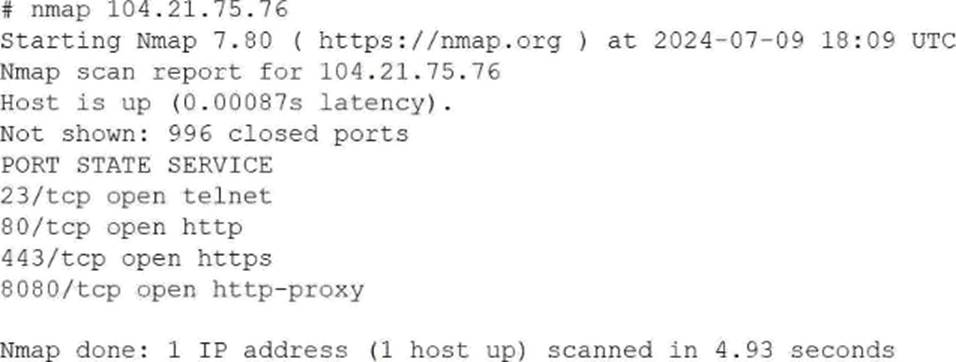
Which of the following is the best way to address this security issue?
- A . Configuring a firewall to block traffic on port 23 on the server
- B . Changing the system administrator’s password to prevent unauthorized access
- C . Closing port 80 on the network switch to block traffic
- D . Disabling and removing the Telnet service on the server
D
Explanation:
This scenario falls under the Security domain of the CompTIA Linux+ V8 objectives and focuses on system hardening and service minimization. The Nmap scan output reveals that port 23 (Telnet) is open on the system, which represents a significant security risk.
Telnet is an insecure, legacy protocol that transmits authentication credentials and session data in plaintext, making it vulnerable to interception through packet sniffing or man-in-the-middle attacks. Linux+ V8 documentation explicitly emphasizes the principle of least functionality, which states that unnecessary or insecure services should be disabled and removed entirely rather than merely restricted.
Option D, disabling and removing the Telnet service on the server, is the best and most secure solution. This action eliminates the vulnerable service completely, ensuring that it cannot be exploited internally or externally. In secure Linux environments, Telnet should be replaced with SSH, which provides encrypted communication and strong authentication mechanisms.
Option A, blocking port 23 with a firewall, reduces exposure but does not eliminate the underlying risk. If the firewall rules are misconfigured or bypassed, the Telnet service would still be available. Linux+ V8 best practices recommend removing insecure services rather than relying solely on perimeter controls.
Option B is unrelated, as changing passwords does not address the risk of plaintext credential transmission.
Option C is incorrect because closing ports at the network switch level is not an appropriate or scalable solution for host-level service hardening and does not address internal access risks.
Linux+ V8 documentation consistently highlights service auditing, port scanning, and removal of insecure protocols as essential system hardening steps. Therefore, the most effective and secure remediation is to disable and remove the Telnet service.