
Practice Free XK0-006 Exam Online Questions
Users cannot access a server after it has been restarted.
At the server console, the administrator runs the following commands;
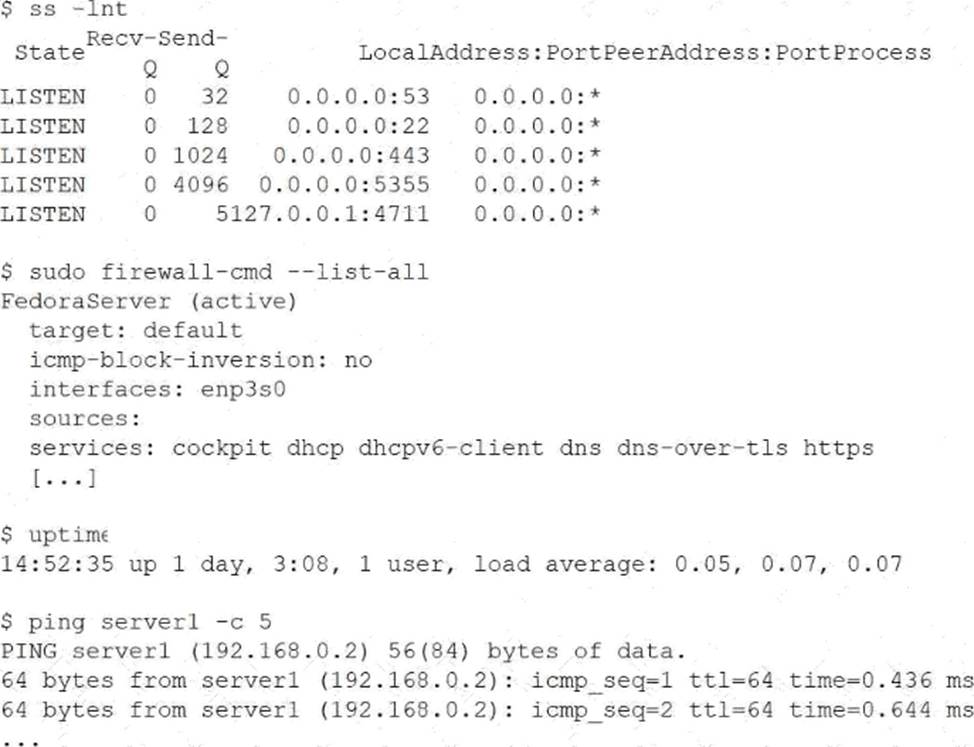
Which of the following is the cause of the issue?
- A . The DNS entry does not have a valid IP address.
- B . The SSH service has not been allowed on the firewall.
- C . The server load average is too high.
- D . The wrong protocol is being used to connect to the web server.
B
Explanation:
This issue is a classic example of post-reboot connectivity troubleshooting, which falls under the Troubleshooting domain of CompTIA Linux+ V8. The administrator has correctly gathered evidence using multiple diagnostic tools, allowing the root cause to be identified through correlation.
The ss -lnt output confirms that the SSH daemon is running and listening on TCP port 22. This eliminates the possibility that the SSH service failed to start after reboot. Additionally, the uptime output shows a very low load average, indicating that system performance is not a limiting factor. The successful ping test confirms that the server is reachable at the network layer and that DNS resolution and basic connectivity are functioning correctly.
The critical clue comes from the firewall configuration. The output of firewall-cmd –list-all shows that only specific services are allowed through the firewall, such as https, dns, and cockpit. The SSH service is notably absent. On systems using firewalld, services must be explicitly allowed, even if the daemon itself is running and listening on the correct port.
As a result, incoming SSH connection attempts are being blocked by the firewall, preventing users from accessing the server remotely after reboot. This aligns precisely with option B.
The other options are incorrect. DNS is functioning, as shown by successful ping responses. System load is low and not contributing to the issue. There is no indication that users are attempting to access the web server using an incorrect protocol.
Linux+ V8 documentation emphasizes that administrators must verify both service status and firewall rules when diagnosing access issues. In this case, allowing SSH with a command such as firewall-cmd –add-service=ssh –permanent followed by a reload would resolve the problem.
An administrator needs to verify the user ID, home directory, and assigned shell for the user named "accounting."
Which of the following commands should the administrator use to retrieve this information?
- A . getent passwd accounting
- B . id accounting
- C . grep accounting /etc/shadow
- D . who accounting
A
Explanation:
User account information is centrally stored in the system’s account databases, and Linux+ V8 emphasizes the use of standard tools to query this data safely and consistently.
The getent passwd accounting command retrieves the user’s entry from the passwd database, which may be sourced from local files or network services such as LDAP. This entry includes the username, user ID (UID), group ID (GID), home directory, and assigned login shell. Therefore, option A provides all the requested information in a single command.
Option B, id accounting, displays the UID and group memberships but does not show the home directory or assigned shell.
Option C is incorrect because /etc/shadow contains password hashes and expiration data, not shell or home directory information.
Option D, who accounting, only shows login sessions and does not provide account configuration details.
Linux+ V8 documentation highlights getent passwd as the preferred method for retrieving comprehensive user account information because it works across different authentication backends.
Thus, the correct answer is A.
An administrator needs to remove the directory /home/user1/data and all of its contents.
Which of the following commands should the administrator use?
- A . rmdir -p /home/user1/data
- B . ln -d /home/user1/data
- C . rm -r /home/user1/data
- D . cut -d /home/user1/data
C
Explanation:
File and directory management is a core system administration skill addressed in Linux+ V8. When an administrator needs to delete a directory that contains files or subdirectories, a recursive deletion is required.
The correct command is rm -r /home/user1/data. The rm command removes files, and the -r (recursive) option allows it to delete directories and all of their contents, including nested files and subdirectories. This is the standard and correct method for removing non-empty directories.
The other options are incorrect. rmdir -p only removes empty directories and will fail if the directory contains files. ln -d is used to create directory hard links, not remove directories. cut -d is a text-processing command unrelated to filesystem operations.
Linux+ V8 documentation stresses caution when using rm -r, as it permanently deletes data without recovery unless backups exist.
Therefore, the correct answer is C.
An administrator wants to search a file named myFile and look for all occurrences of strings containing at least five characters, where characters two and five are i, but character three is not b.
Which of the following commands should the administrator execute to get the intended result?
- A . grep .a*^b-.a myFile
- B . grep .a., [a] myFile
- C . grepa^b*a myFile
- D . grep .i[^b].i myFile
D
Explanation:
Pattern matching using regular expressions is a key troubleshooting and text-processing skill covered in CompTIA Linux+ V8. The grep command, combined with regular expressions, allows administrators to search for complex string patterns within files.
The requirement specifies:
The string must contain at least five characters
Character 2 must be i
Character 3 must not be b
Character 5 must be i
To meet these conditions, the correct regular expression structure is:
→ any character (position 1)
i → literal i (position 2)
[^b] → any character except b (position 3)
→ any character (position 4) i → literal i (position 5)
This results in the expression: i[^b].i
Option D, grep .i[^b].i myFile, correctly implements this logic. It ensures positional matching and excludes unwanted characters using a negated character class ([^b]), which is explicitly covered in Linux+ V8 regular expression objectives.
The other options contain invalid or malformed regular expressions and do not meet the positional or exclusion requirements. Linux+ V8 emphasizes understanding anchors, character classes, and position-based matching when troubleshooting log files or configuration data.
Therefore, the correct answer is D.
A systems administrator wants to review the amount of time the Network Manager service took to start.
Which of the following commands accomplishes this goal?
- A . resolvectl
- B . journalctl
- C . systemctl daemon-reload
- D . systemd-analyze blame
D
Explanation:
System boot performance analysis is an important system management task included in Linux+ V8. When administrators need to determine how long services take to start during boot, systemd analysis tools are required.
The correct command is systemd-analyze blame. This command lists all systemd services and shows how long each one took to initialize during the boot process. It is commonly used to identify slow-starting services that may impact system startup performance, including Network Manager.
The other options are incorrect. resolvectl is used for DNS resolution management and provides no service timing information. journalctl can display logs but does not provide a clear, summarized service startup timing report. systemctl daemon-reload only reloads systemd unit files and does not perform analysis.
Linux+ V8 documentation explicitly references systemd-analyze blame as the correct tool for diagnosing service startup delays.
Therefore, the correct answer is D.
Which of the following commands is used to ensure a service starts automatically at boot on a system using systemd?
- A . systemctl start httpd
- B . systemctl enable httpd
- C . systemctl status httpd
- D . systemctl reload httpd
B
Explanation:
The correct answer is B. systemctl enable httpd because it configures a service to start automatically during system boot in systems that use systemd as the init system. The enable command creates the necessary symbolic links between the service unit file and the appropriate target (such as multi-user.target), ensuring the service is launched when the system starts.
In Linux systems managed by systemd, services are controlled using the systemctl command. While systemctl start httpd (Option A) will immediately start the service, it does not persist across reboots. This means that after a system restart, the service would not automatically run unless it has been explicitly enabled.
Option C (systemctl status httpd) is used to check the current status of the service, including whether it is running, stopped, or failed, along with logs and other diagnostic information. It does not modify the service behavior.
Option D (systemctl reload httpd) is used to reload the service configuration without stopping it, typically after making configuration changes. It does not affect whether the service starts at boot.
From a Linux+ Services and User Management perspective, understanding the distinction between starting and enabling services is critical. Administrators must ensure that essential services, such as web servers or databases, are configured to start automatically to maintain system availability. The systemctl enable command is the correct method for achieving persistent service startup behavior in systemd-based systems.
A Linux administrator needs to create accounts for a list of new users.
The user account names have been defined in the USER_LIST variable by executing the following:
USER_LIST="alice bob charles"
Which of the following commands should the administrator use to successfully create the user accounts?
- A . echo "$USER_LIST" | while username; do useradd -m "$username"; done
- B . echo "$USER_LIST" | until username; do useradd -m "$username"; done
- C . select username in "$USER_LIST"; do useradd -m "$username"; done
- D . for username in $USER_LIST; do useradd -m "$username"; done
D
Explanation:
The correct answer is D. for username in $USER_LIST; do useradd -m "$username"; done because it correctly iterates through each value in the USER_LIST variable and executes the useradd command for each user. In Bash scripting, a for loop is the most appropriate and commonly used construct for iterating over a list of space-separated values stored in a variable.
The variable USER_LIST="alice bob charles" contains three usernames separated by spaces. When used in a for loop, Bash automatically splits the string into individual words, assigning each value to the variable username during each iteration. The useradd -m command then creates a new user account and also generates a home directory for each user, which is standard practice in Linux system administration.
Option A is incorrect because the syntax is invalid; a while loop requires a conditional expression or a read statement to process input, which is missing here.
Option B is also incorrect because until loops require a condition and are not suitable for iterating over lists in this way.
Option C is incorrect because the select statement is used for interactive menu-based selection, not for non-interactive batch processing, and quoting $USER_LIST would treat the entire string as a single item.
From a Linux+ perspective, understanding shell scripting constructs such as loops is essential for automation and user management tasks. The for loop provides a simple and efficient way to perform repetitive administrative operations, such as creating multiple user accounts, ensuring consistency and saving time in system provisioning.
A systems administrator wants to review the logs from an Apache 2 error.log file in real time and save the information to another file for later review.
Which of the following commands should the administrator use?
- A . tail -f /var/log/apache2/error.log > logfile.txt
- B . tail -f /var/log/apache2/error.log | logfile.txt
- C . tail -f /var/log/apache2/error.log >> logfile.txt
- D . tail -f /var/log/apache2/error.log | tee logfile.txt
D
Explanation:
Log monitoring is a common troubleshooting task in Linux system administration, and Linux+ V8 covers command-line tools for real-time log analysis. The requirement in this scenario is twofold: view log entries as they occur and simultaneously save them to another file.
The command tail -f /var/log/apache2/error.log | tee logfile.txt fulfills both requirements. The tail -f command follows the log file in real time, displaying new entries as they are written. The pipe (|) sends this output to the tee command, which writes the data to logfile.txt while also displaying it on standard output.
The other options are insufficient.
Option A redirects output to a file but prevents real-time viewing.
Option C appends output but still suppresses terminal display.
Option B is syntactically invalid and does not use a proper command for writing output.
Linux+ V8 documentation specifically references tee as a useful utility for duplicating command output streams. This makes option D the correct and most effective solution.
Which of the following is the first step when starting a new Python project on a Linux system?
- A . python -m venv /path/to/project
- B . python -m pip install -r /path/to/project
- C . export PYTHON_PATH=/path/to/project
- D . python -m source /path/to/project
A
Explanation:
The correct answer is A. python -m venv /path/to/project because creating a virtual environment is the recommended first step when starting a new Python project. A virtual environment isolates project dependencies from the system-wide Python installation, ensuring that libraries and package versions do not conflict with other projects or system components.
The command python -m venv /path/to/project creates a self-contained directory that includes its own Python interpreter, libraries, and scripts. This allows developers and administrators to install packages specific to the project without affecting the global environment. After creating the virtual environment, the next steps typically include activating it (e.g., source /path/to/project/bin/activate) and then installing dependencies using pip.
Option B (python -m pip install -r /path/to/project) is incorrect because installing dependencies from a requirements file assumes that a virtual environment or project structure is already in place. It is not the first step.
Option C (export PYTHON_PATH=/path/to/project) is incorrect because setting PYTHONPATH only modifies where Python looks for modules. It does not create an isolated environment or manage dependencies.
Option D (python -m source /path/to/project) is incorrect because source is a shell built-in command used to activate environments, not a Python module, and this syntax is invalid.
From a Linux+ perspective, using virtual environments aligns with best practices in automation and scripting. It ensures consistency, reproducibility, and isolation of development environments, which is critical for deployment, testing, and maintaining Python-based applications.
An administrator added a new disk to expand the current storage.
Which of the following commands should the administrator run first to add the new disk to the LVM?
- A . vgextend
- B . lvextend
- C . pvcreate
- D . pvresize
C
Explanation:
Comprehensive and Detailed Explanation From Exact Extract:
To add a new physical disk to LVM, the disk must first be initialized as a physical volume using the pvcreate command. This prepares the new disk for use by the LVM subsystem. After initializing with pvcreate, you would use vgextend to add the new physical volume to an existing volume group.
Other options: