Practice Free PL-400 Exam Online Questions
A company uses a model-driven app to record details of laboratory test.
You are asked to create a custom component that makes it easier to capture multiple values from lab test results on mobile devices.
You need to create the interface for the dataset in case the mobile devices lose connection to the network.
Which method should you use?
- A . SaveData
- B . updateView
- C . init
- D . getClient
A
Explanation:
Use LoadData and SaveData for basic data storage while offline.
Note:
When building mobile apps, one of the most common scenarios app makers face is how to enable their users be productive in situations where there is limited or no connectivity at all. This has been one of the most requested features for PowerApps to allow running apps while being disconnected and to provide some support for offline data caching. In this release of PowerApps, we are delivering the first set of improvements for app makers to achieve that by enabling: Launching the PowerApps mobile player app offline
Running apps while being offline
Determine when your app is online or offline or in a metered connection by using the Connection signal object.
Leverage existing formulas such as LoadData and SaveData for basic data storage while offline.
Reference: https://powerapps.microsoft.com/sv-se/blog/build-offline-apps-with-new-powerapps-capabilities/
DRAG DROP
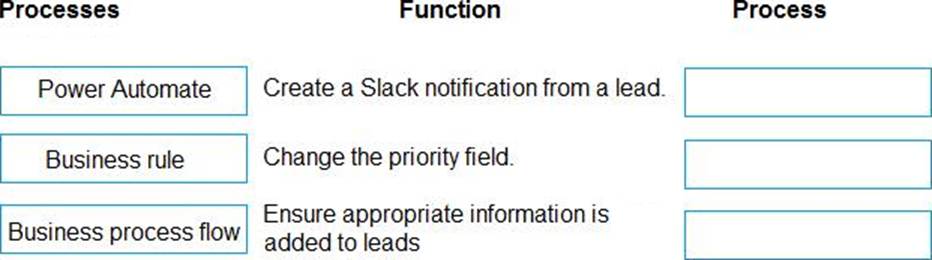
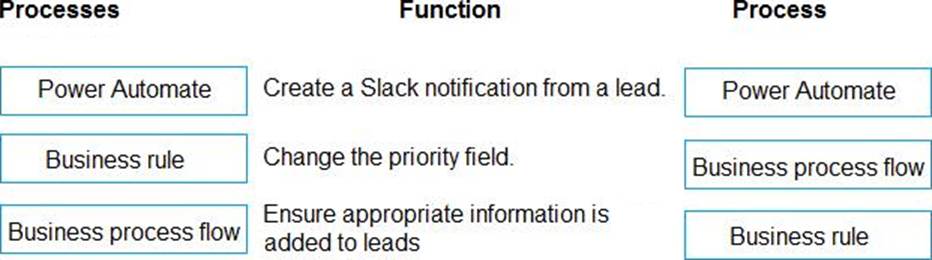
You need to select a process to create each function.
Which process should you use? To answer, drag the appropriate processes to the correct functions. Each process may be used once, more than once, or not at all. You may need to drag the split bar between panes or scroll to view content. NOTE: Each correct selection is worth one point.
Explanation:
Box 1: Power Automate
Ensure that notifications are sent to the sales team when a lead is added by using Slack
Power Automate is a service that helps you create automated workflows between your favorite apps and services to synchronize files, get notifications, collect data, and more.
Box 2: Business rule
A trigger must be created that changes the Priority field to 1 in the Account record 10 days after an account record is created.
A field named Priority_Trigger must be created to trigger the Priority field.
Business rules provide a simple interface to implement and maintain fast-changing and commonly used rules.
Box 3: Business process flow
Ensure that leads have a review stage added to the sales process.
Use business process flows to define a set of steps for people to follow to take them to a desired outcome. These steps provide a visual indicator that tells people where they are in the business process.
Reference:
https://docs.microsoft.com/en-us/power-automate/
https://docs.microsoft.com/en-us/dynamics365/customerengagement/on-premises/customize/create-business-rules-recommendations-apply-logic-form
https://docs.microsoft.com/en-us/power-automate/business-process-flows-overview
You need to connect to the background check API.
Which mechanism should you use?
- A . JavaScript
- B . Flow with a custom connector
- C . Azure Function
- D . Plug-in
A bank uses a Common Data Service solution to manage clients.
Bank representatives perform client credit checks while the client is present. Credit checks may take up to five minutes to complete.
Bank policy dictates that the bank representative’s app must stay blocked until credit checks are complete.
You need to display a model-driven app while credit checks run to ask the bank representative and client to wait for the credit check to complete.
Which function should you use?
- A . Xrm.Navigation.openWebResource("prefix.myPoliteMessage.html")
- B . Xrm.Navigation.openAlertDialog(myPoliteMessage)
- C . Xrm.Utility.openWebResource("prefix_myPoliteMessage.html")
- D . Xrm.Utility.showProgressIndicator(myPoliteMessage)
D
Explanation:
showProgressIndicator displays a progress dialog with the specified message.
Any subsequent call to this method will update the displayed message in the existing progress dialog with the message specified in the latest method call.
The progress dialog blocks the UI until it is closed using the closeProgressIndicator method. So, you must use this method with caution.
Reference: https://docs.microsoft.com/en-us/powerapps/developer/model-driven-apps/clientapi/reference/xrm-utility/showprogressindicator
A manufacturing company uses a Common Data Service (CDS) environment to manage their parts inventory across two warehouses modeled as business units and named WH1 and WH2.
Data from the two warehouses is processed separately for each part that has its inventory quantities updates.
The company must automate this process, pushing inventory updates from orders submitted to the warehouses.
You need to build the automation using Power Automate flows against the CDS database. You must achieve this goal by using the least amount of administrative effort.
Which flow or flows should you recommend?
- A . Two automated flows with scope Business Unit, with triggers on Create/Update/Delete on orders.
- B . Two automated flows with scope Business Unit, with triggers on Create/Update/Delete and each flow filtering updates from each business unit.
- C . Two scheduled flows, each querying and updating the parts included in orders from each business unit.
- D . One scheduled flow, querying the parts included in orders in both business units.
- E . One automated flow, querying the orders in both business units.
- F . Two scheduled flows, each querying the orders from each business unit.
- G . Two automated flows with scope Organization, with triggers on Create/Update/Delete and filters on WH1 and WH2.
- H . Two automated flow with scope Business Unit, with triggers on Create/Update/Delete on orders and filters on WH1 and WH2.
H
Explanation:
With the Common Data Service connector, you can create Power Automate flows that are initiated by create and update events within Dataverse. Additionally, you can perform create, update, retrieve, and delete actions on records within Dataverse.
You can use scopes to determine if your flow runs if you create a new record, if a new record is created by a user within your business unit, or if a new record is created by any user in your organization.
Reference: https://docs.microsoft.com/en-us/power-automate/connection-cds
DRAG DROP
You are a Power Platform developer.
Users report several access issues.
You need to resolve the user access issues.
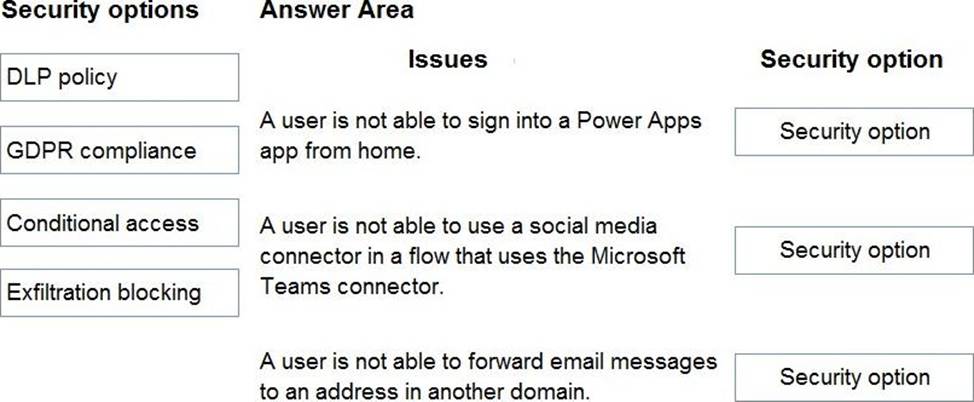
What should you use? To answer, drag the appropriate security options to the correct scenarios. Each security option may be used once, more than once, or not at all. You may need to drag the split bar between panes or scroll to view content. NOTE: Each correct selection is worth one point.
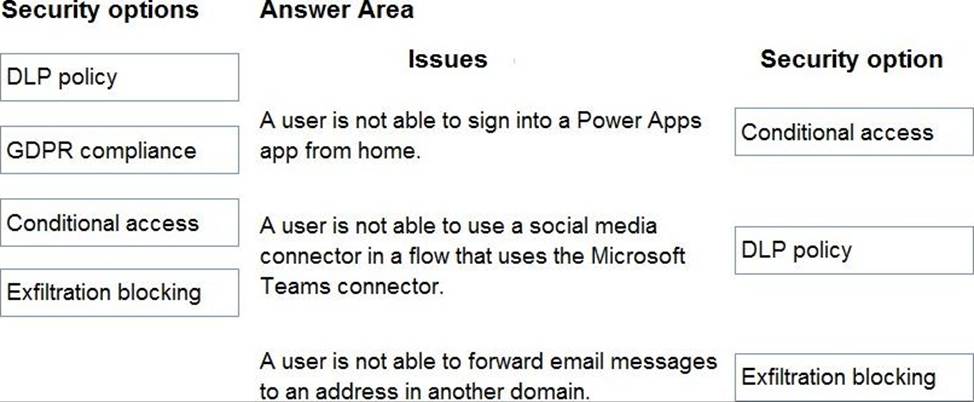
Explanation:
Box 1: Conditional access
You can limit access to users with block access by location to reduce unauthorized access. By using Conditional Access policies, you can apply the right access controls when needed to help keep your organization secure and stay out of your user’s way when not needed. Conditional Access analyses signals such as user, device, and location to automate decisions and enforce organizational access policies for resources.
Box 2: DLP policy
DLP policies enforce rules for which connectors can be used together by classifying connectors as either Business or Non-Business. If you put a connector in the Business group, it can only be used with other connectors from that group in any given app or flow. Sometimes you might want to block the usage of certain connectors altogether by classifying them as Blocked.
Box 3: Exfiltration blocking
Email exfiltration controls for connectors
Microsoft Exchange enables admins to disable email auto forwards and autoreplies to remote domains for external recipients. Exchange does this by using message-type headers, such as Auto Forward received from Outlook and Outlook on web clients.
Reference:
https://docs.microsoft.com/en-us/power-platform/admin/restrict-access-online-trusted-ip-rules
https://docs.microsoft.com/en-us/power-platform/admin/wp-data-loss-prevention
https://docs.microsoft.com/en-us/power-platform/admin/wp-data-loss-prevention
https://docs.microsoft.com/en-us/power-platform/admin/block-forwarded-email-from-power-automate
https://docs.microsoft.com/en-us/power-platform/admin/block-forwarded-email-from-power-automate
HOTSPOT
A company updates their client contact information periodically. The contact entity has alternate keys defined.
You have the following code. (Line numbers are included for reference only.)
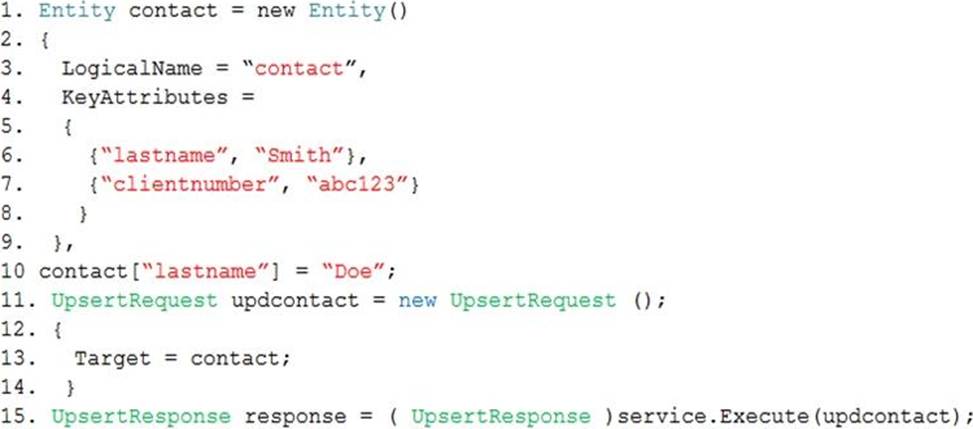
For each of the following statements, select Yes if the statement is true. Otherwise, select No. NOTE: Each correct selection is worth one point.
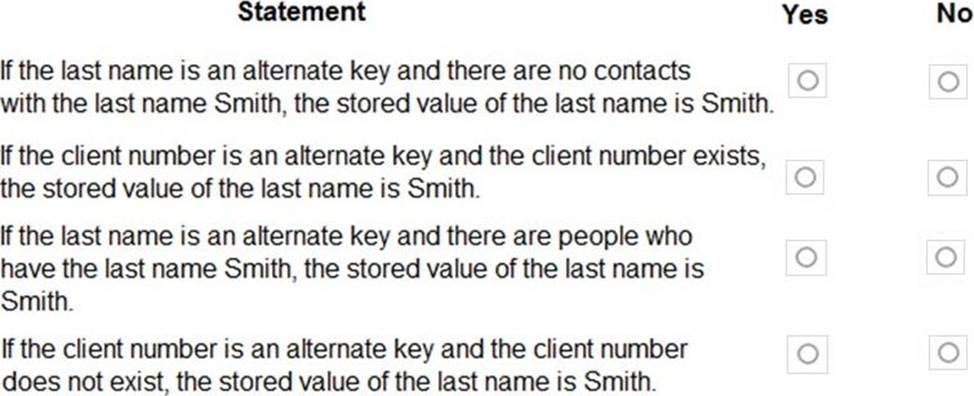
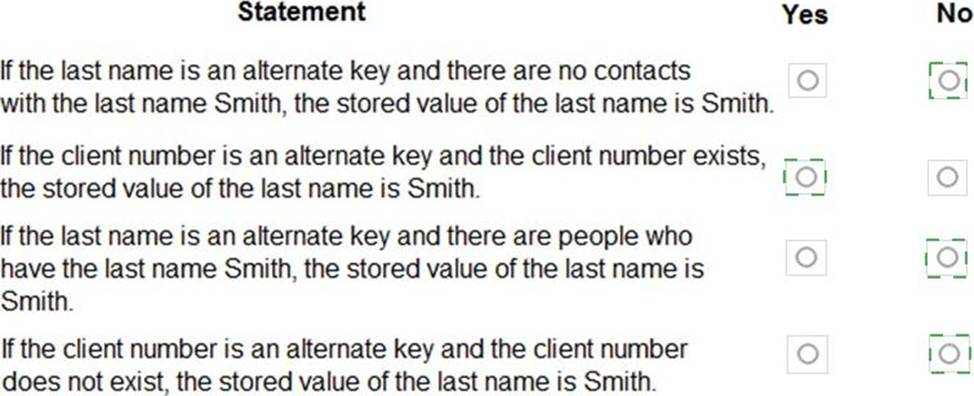
Explanation:
Reference: https://docs.microsoft.com/en-us/powerapps/developer/common-data-service/use-alternate-key-create-record
A company has a model-driven app form. Many users use the form.
Users state that the form takes too long to fully load.
You need to evaluate the form design to improve loading performance.
Which three control types can you use? Each correct answer presents a complete solution. NOTE: Each correct selection is worth one point.
- A . timeline
- B . quick view form
- C . iFrame
- D . lookup
- E . subgrid
You are configuring a custom connector for a web service. The web service is hosted in two different regions. The web service URL includes a common domain name and a unique sub-domain for each
region.
The custom connector must allow the region to be entered for additional regions when creating the connection.
You need to create a policy template.
Which template type should you use?
- A . Route request
- B . Set query string parameter
- C . Set host URL
- D . Set HTTP header
DRAG DROP
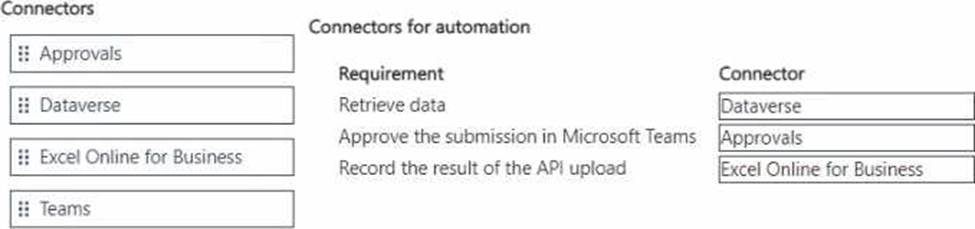
You need to build the automation for the Planning Hub application.
Which connector should you use? To answer, move the appropriate connectors to the correct requirements. You may use each connector once, more than once, or not at all. You may need to move the split bar between panes or scroll to view content. NOTE: Each correct selection is worth one point.