
Practice Free PL-400 Exam Online Questions
You need to create the model-driven app for referral.
Which function should you add?
- A . Flow
- B . Workflow
- C . Business rule
- D . Chart
- E . Subgrid
C
Explanation:
Scenario: When the account is entered into the system, extra fields must appear if the referral customer box is selected. If the box is not selected, the extra fields must not appear.
HOTSPOT
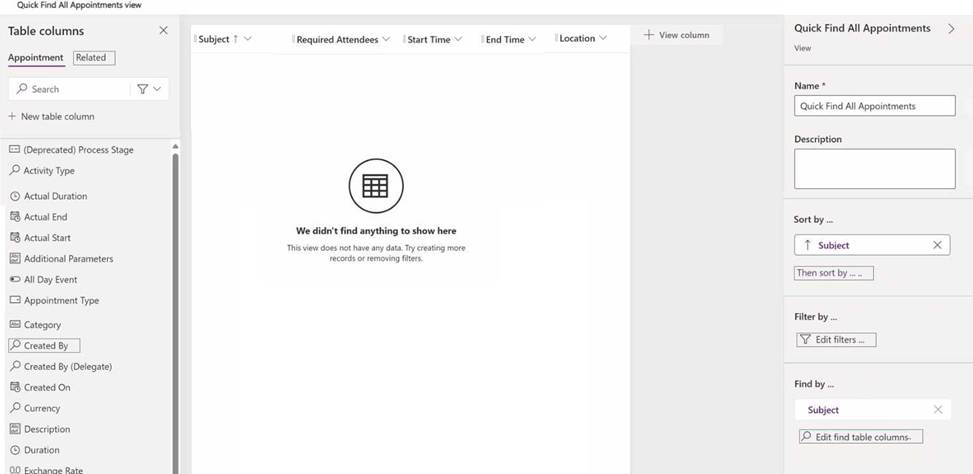
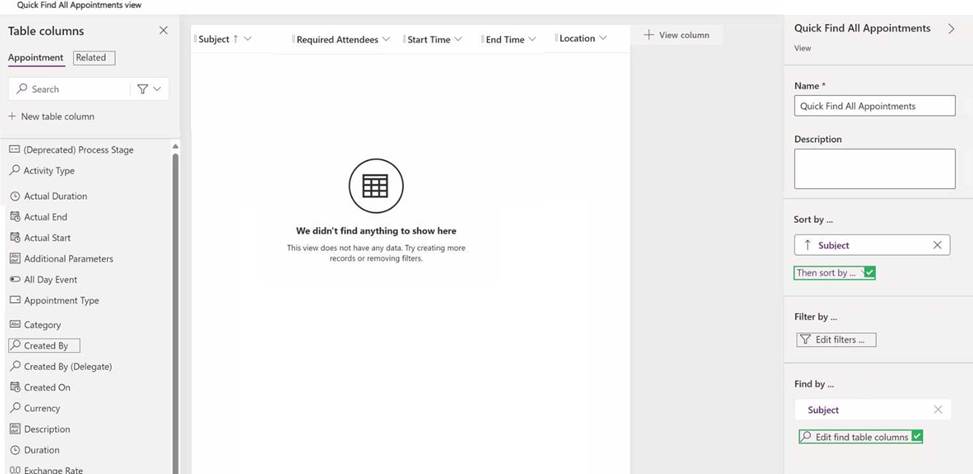
You need to resolve the issues with the appointment data.
What should you change on the view? To answer, select the appropriate interface components in the answer area. NOTE: Each correct selection is worth one point.
HOTSPOT
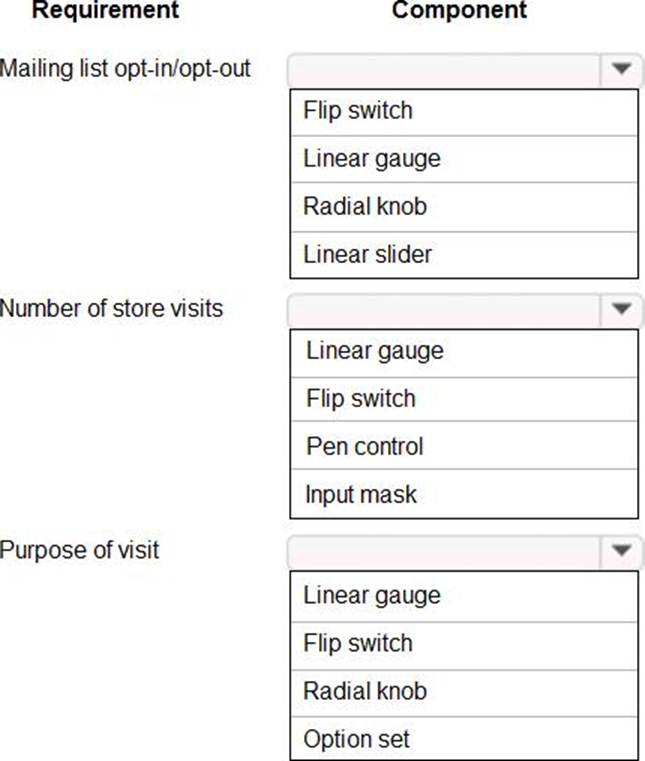
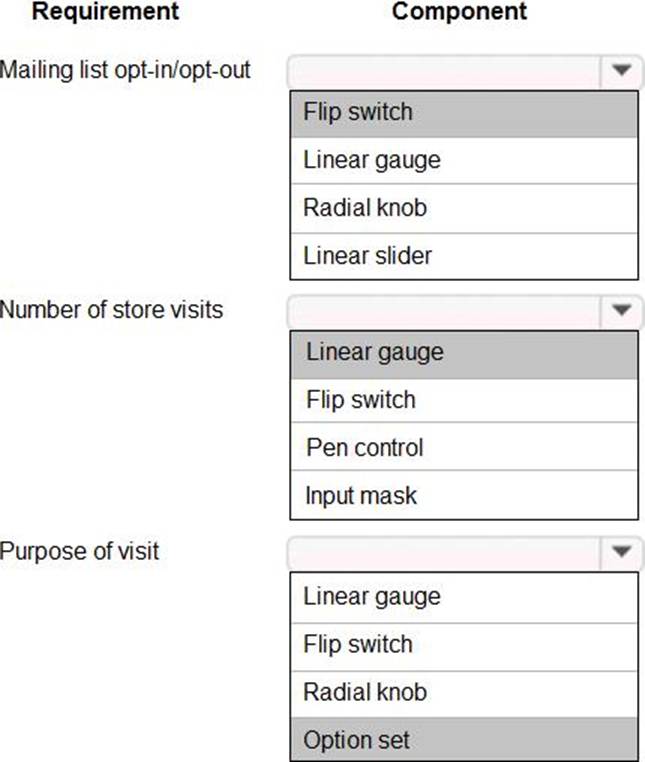
You need to select the visualization component.
What should you use? To answer, select the appropriate options in the answer area. NOTE: Each correct selection is worth one point.
Explanation:
Box 1: Flip switch
The Field Type to use Flip Switch would be ‘Two options’.
If you go by UI perspective, Flip switch control- Yes/No (Boolean) options would give the nice field look in the web, mobile app and Tablet. Instead of using check boxes and radio buttons, this control adds a visual effect like the On/Off switch way.
Box 2: Linear gauge
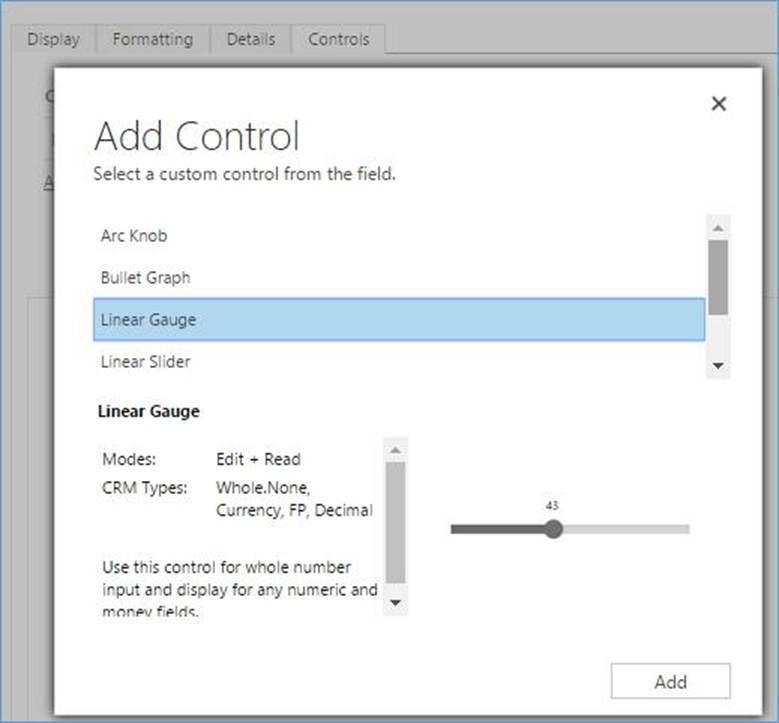
Box 3: Option Set
Option sets are the ideal choice for offering users a list of defined options for a field selection.
Reference:
https://www.inogic.com/blog/2018/04/controls-in-dynamics-365-for-mobile-app-flip-switch/
https://community.dynamics.com/365/sales/b/crminogic/posts/new-controls-for-phones-and-tablets-in-dynamics-crm-2016-update-1
A client uses a model-driven app that is deployed by using a managed solution in the production environment. The app contains only entities and UI components and has no custom code or extensions to the platform.
The client needs an exact copy of the app with a different name in the production environment.
You need to recreate this app in production without disrupting the end users.
What should you do?
- A . Select the original model-driven app, select Edit, and then select Save As.
- B . Create a new model-driven app. Select the Use existing solution to create the App check box, and then
select the solution that contains the original app. - C . Select the managed solution and select Clone.
- D . Create a new model-driven app, manually add each component, and then recreate its original functions.
- E . Add the original app to a solution, export it as unmanaged, import it into a test environment and rename it, and then deploy it back into production.
B
Explanation:
The option Use existing solution allow users to select a specific solution for this app. Users can create a whole new design from scratch by not checking check box of use existing solution.
Reference: https://www.inogic.com/blog/2019/02/create-model-driven-app-cds-environment/
DRAG DROP
You are developing a Power Platform solution.
You must add a custom control slider to a specific step in a business process flow.
You need to add the custom control.
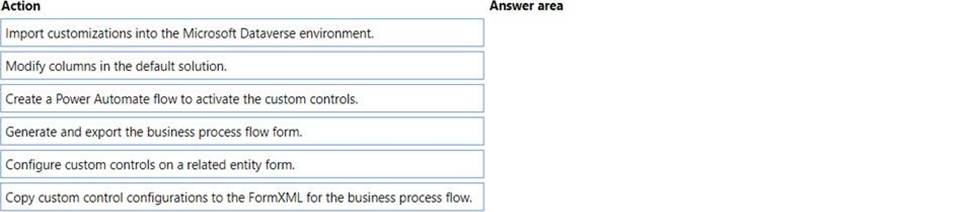
Which four actions should you perform in sequence? To answer, move the appropriate actions from the list of actions to the answer area and arrange them in the correct order.
Explanation:
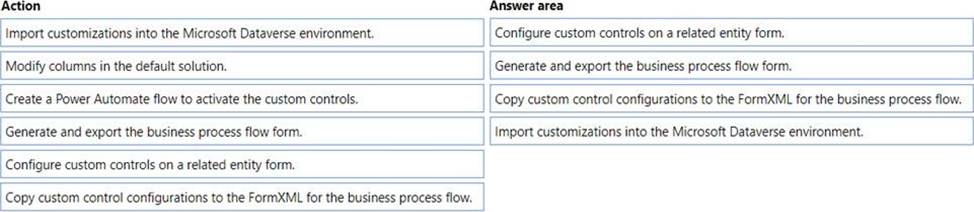
Here are the steps you must follow to add custom controls to a business process flow:
Step 1: Configure custom controls on a related entity.
Step 2: Generate and exporting the business process flow form.
Step 3: Copy custom control configurations to the FormXML for the business process flow.
Step 4: Import customizations into the Microsoft Dataverse environment.
Note:
Configure custom controls on a related table form.
Generate and exporting the business process flow form.
Copy custom control configurations to the business process flow form from the related table form.
Import the customizations back into Microsoft Dataverse.
Reference: https://docs.microsoft.com/en-us/power-automate/custom-controls-business-process-flows
You manage a Microsoft Power Automate cloud flow. The cloud flow queries Microsoft Dataverse data by using the List rows action.
You need to configure the cloud flow to process 10,000 records in a single run.
What should you do? Each correct answer presents a complete solution. NOTE: Each correct selection is worth one point.
- A . Create the query by using FetchXML and set the top parameter to 10.000.
- B . Turn on pagination and set the threshold to 10,000.
- C . Return the first 5,000 records and use the @odata.nextlink in the response to return the remaining records.
- D . Set the row count parameter to 10,000.
DRAG DROP
You need to select the appropriate methods using Azure Event Grid.
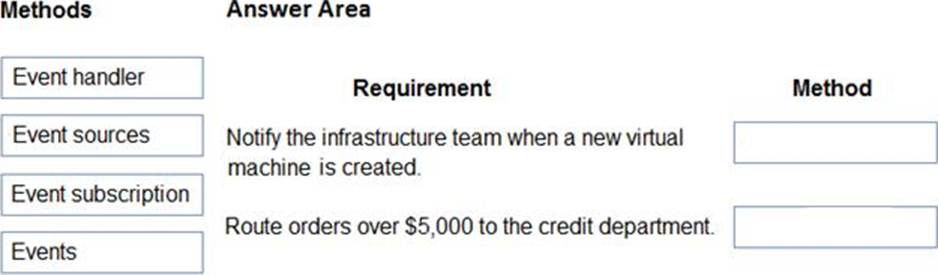
Which method should you use for each requirement? To answer, drag the appropriate methods to the correct requirements. Each method may be used once, more than once, or not at all. You may need to drag the split bar between panes or scroll to view content. NOTE: Each correct selection is worth one point.
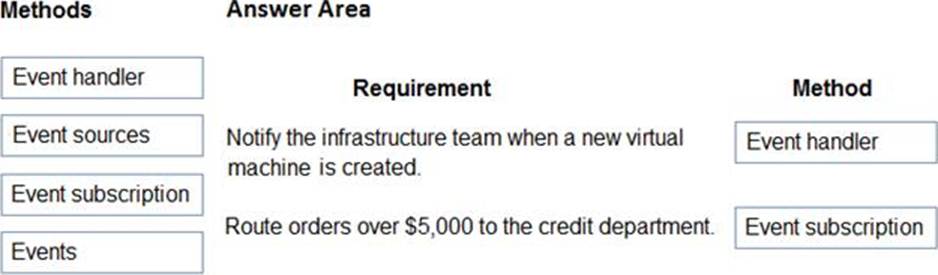
Explanation:
Box 1: Event handler
An event handler is the place where the event is sent. The handler takes some further action to process the event.
Box 2: Event subscription
Event subscriptions – The endpoint or built-in mechanism to route events, sometimes to more than one handler. Subscriptions are also used by handlers to intelligently filter incoming events.
Incorrect Answers:
Events – What happened.
Event sources – Where the event took place.
Reference:
https://docs.microsoft.com/en-us/azure/event-grid/event-handlers
https://docs.microsoft.com/en-us/azure/event-grid/overview
HOTSPOT
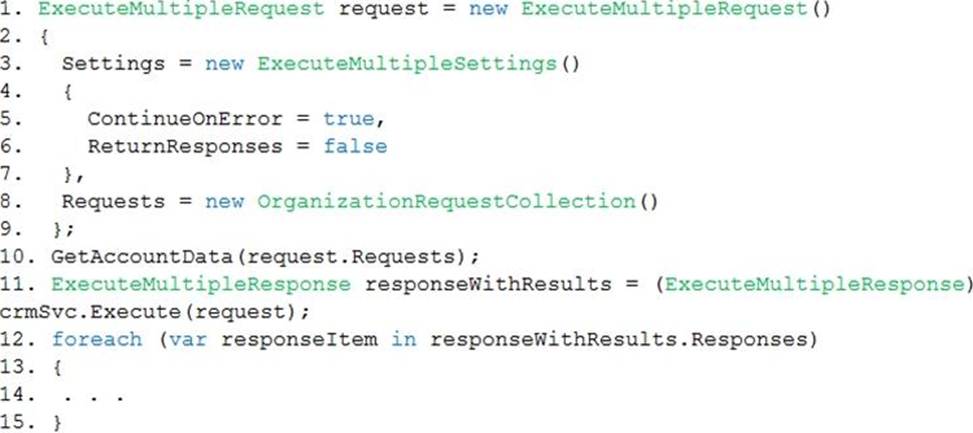
A company is preparing to go live with their Dynamics 365Sales solution, but first they need to migrate data from a legacy system. The company is migrating accounts in batches of 1,000.
When the data is saved to Dynamics 365 Sales, the IDs for the new accounts must be output to a log file.
You have the following code:
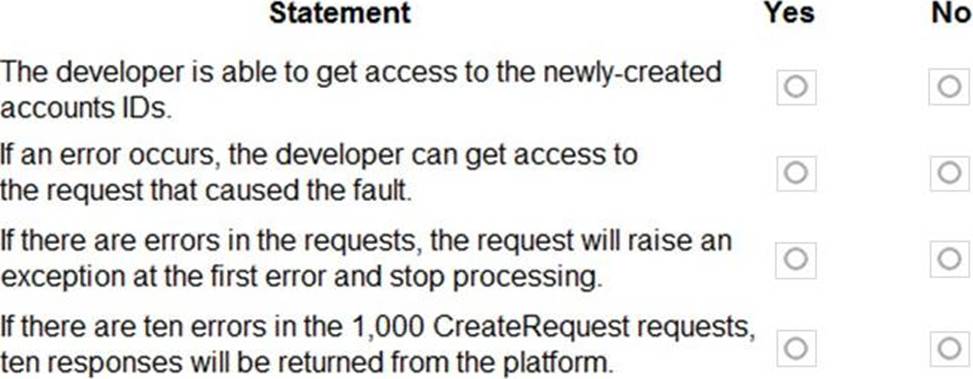
For each of the following statements, select Yes if the statement is true. Otherwise, select No.
Explanation:
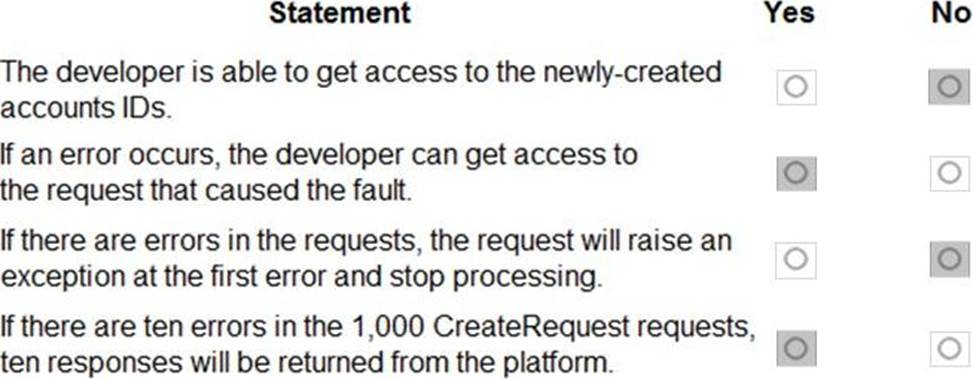
Box 1: No
Box 2: Yes
ContinueOnError: When true, continue processing the next request in the collection even if a fault has been returned from processing the current request in the collection. When false, do not continue processing the next request.
ReturnResponses: When true, return responses from each message request processed. When false, do not return responses.
When false, the Responses collection will not be empty if errors are returned. If errors are returned, there will be one response item in the collection for each processed request that returned a fault and Fault will be set to the actual fault that occurred.
Box 3: No
Box 4: Yes
For example, in a request collection that contains six requests where the third and fifth request return faults, the following table indicates what the Responses collection would contain.
ContinueOnError=true, ReturnResponses=false: 2 response items: 2 have Fault set to a value.
Reference: https://docs.microsoft.com/en-us/powerapps/developer/common-data-service/org-service/execute-multiple-requests
Topic 3, Contoso Pharmaceuticals
Case study
Overview
This is a case study. Case studies are not timed separately. You can use as much exam time as you would like to complete each case. However, there may be additional case studies and sections on this exam. You must manage your time to ensure that you are able to complete all questions included on this exam in the time provided.
To answer the questions included in a case study, you will need to reference information that is provided in the case study. Case studies might contain exhibits and other resources that provide more information about the scenario that is described in the case study. Each question is independent of the other questions in this case study.
At the end of this case study, a review screen will appear. This screen allows you to review your answers and to make changes before you move to the next section of the exam. After you begin a new section, you cannot return to this section.
To start the case study
To display the first question in this case study, click the Next button. Use the buttons in the left pane to explore the content of the case study before you answer the questions. Clicking these buttons displays information such as business requirements, existing environment, and problem statements. If the case study has an All Information tab, note that the information displayed is identical to the information displayed on the subsequent tabs. When you are ready to answer a question, click the Question button to return to the question.
Background
Contoso Pharmaceuticals manufactures and sells drugs to retail and wholesale pharmacies, hospitals, and research facilities.
The company plans to implement Dynamics 365 Sales and Dynamics 365 Finance.
Current environment
✑ Contoso maintains a Microsoft Excel workbook that lists all drugs they supply.
✑ Pharmacies submit order requests through email.
✑ All information at customer locations is handwritten by customer representatives.
✑ Contoso uses Cerner, which is a medical industry application that uses a proprietary database.
✑ Some accounts are referrals from other pharmacies.
✑ Every pharmacy has its own Dynamics 365 Sales instance.
Requirements
General
Contoso wants to ensure that there is minimal custom code and custom connectors in the system.
Accounts
✑ Ensure that the names of the pharmacies are synced between the accounting and the customer management systems.
✑ Account numbers should be entered automatically into the pharmaceutical system that is in a Cerner database and kept in sync.
✑ When the account is entered into the system, extra fields must appear if the referral customer box is selected. If the box is not selected, the extra fields must not appear.
✑ A trigger must be created that changes the Priority field to 1 in the Account record 10 days after an Account record is created.
✑ A field named Priority_Trigger must be created to trigger the Priority field.
✑ A field named Facility type field must be added in order to select whether a
customer is a retail pharmacy, wholesale pharmacy, research facility, or hospital.
Users
✑ UserA must be able to create and publish Power Apps apps.
✑ UserB must be the owner of all the systems and be able to provide permissions and create all new environments.
✑ UserC must be able to create apps connected to the systems and update the security roles and entities.
✑ Pharmacy representatives must only be able to run the apps and access their own records.
✑ Access to the accounting Power Apps app must be restricted to accounting team members.
✑ End users must have minimum access to the required systems.
✑ Only supervisors must be able to view phone numbers in the Accounts form.
✑ Developers must be able to create new apps for all users.
✑ Sales users must only have access to their own records.
Reporting
Pharmacy orders must be displayed in four graphs as follows:
✑ Annual revenue over $100,000
✑ Annual revenues under $100,000
✑ Research facilities
✑ Hospitals
The graphs must be interactive, and users must be able to drill down on any dimension.
Customizations
✑ Ensure that notifications are sent to the sales team when a lead is added by using Slack.
✑ Ensure that leads have a review stage added to the sales process.
✑ Doctors must be manually added to a custom entity named Doctor if the doctor is not listed.
✑ Refill dates for customer prescriptions should be automatically determined and a notification should be sent to the customer.
✑ Fields for the doctor’s name and phone number must be displayed in the customer record.
✑ The doctor entered on the customer’s record must be validated against doctors that exist in the system.
✑ The new solution will be sold to other pharmacies for use. The application must not allow changes to be made.
✑ The solution must be error free so that when it is installed in other environments it does not cause issues.
✑ A custom mobile app must be created to allow salespeople to add or search by pharmacy name.
✑ Pharmacy records must be uniquely identified by pharmacy name, address, contact name, and phone number.
✑ When a pharmacy is added by using the mobile app, the phone number must be validated to be all digits.
HOTSPOT
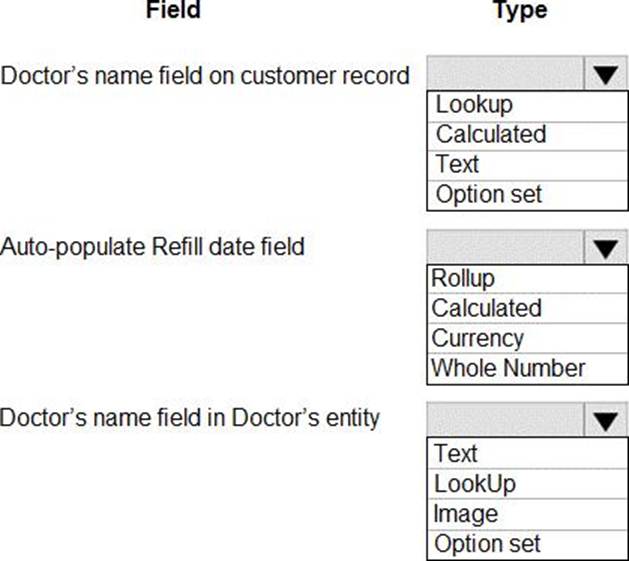
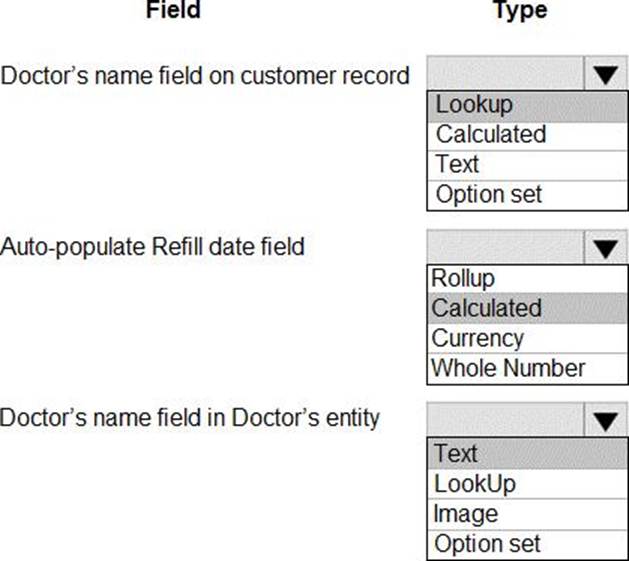
You need to configure the fields with the appropriate type.
Which type should you use? To answer, select the appropriate options in the answer area. NOTE: Each correct selection is worth one point.
Explanation:
Box 1: Lookup
Fields for the doctor’s name and phone number must be displayed in the customer record.
Lookup: A field that allows setting a reference to a single record of a specific type of entity.
Box 2: Calculated
Refill dates for customer prescriptions should be automatically determined and a notification should be sent to the customer.
Calculated field: Contains calculations that use fields from the current entity or related parent entities.
Box 3: Text
Field data type: Single Line of Text:
This field can contain up to 4,000 text characters. You can set the maximum length to be less than this. This field has several format options that will change the presentation of the text. These options are Email, Text, Text Area, URL, Ticker Symbol, and Phone.
Reference: https://docs.microsoft.com/en-us/dynamics365/customerengagement/on-premises/customize/types-of-fields
HOTSPOT
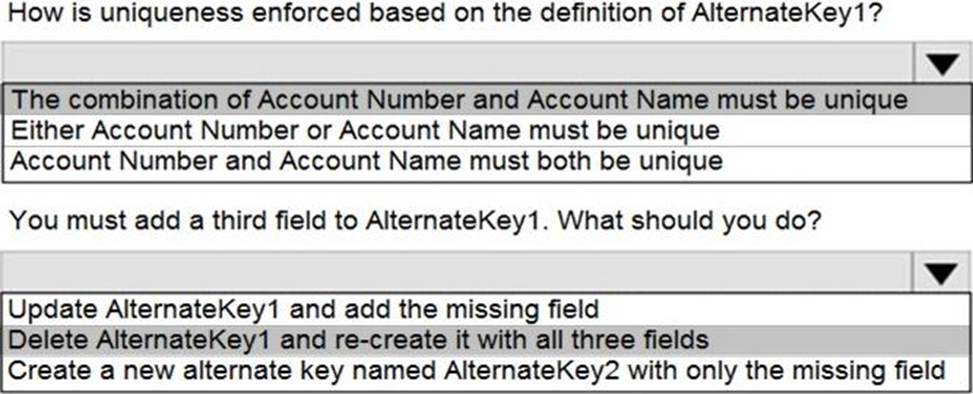
You create an alternate key named AlternateKey1 on the Account entity.
The definition for AlternateKey1 is shown in the following exhibit:
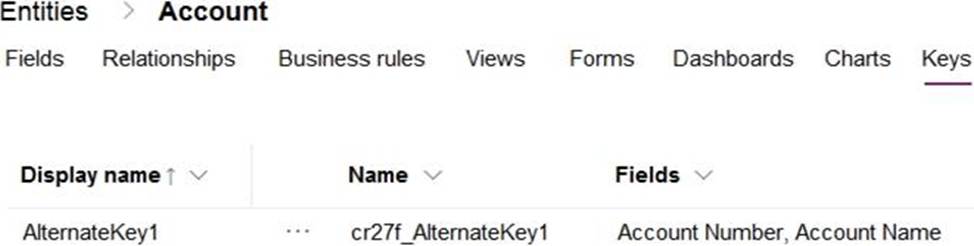
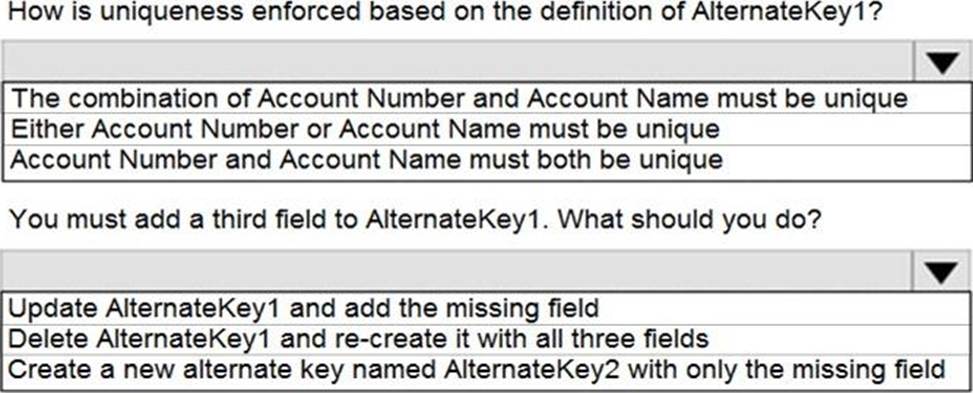
Use the drop-down menus to select the answer choice that answers each question based on the information presented in the graphic. NOTE: Each correct selection is worth one point.
Explanation:
Box 1: The combination of Account Number and Account Name must be unique
With alternate keys you can now define a column in a Dataverse table to correspond to a unique identifier or unique combination of columns.
Box 2: Delete AlternateKey1 and re-create it with all three fields
Reference: https://docs.microsoft.com/en-us/powerapps/developer/data-platform/define-alternate-keys-entity