
Practice Free PL-400 Exam Online Questions
Note: This question is part of a series of questions that present the same scenario. Each question in the series contains a unique solution that might meet the stated goals. Some question sets might have more than one correct solution, while others might not have a correct solution.
After you answer a question in this section, you will NOT be able to return to it. As a result, these questions will not appear in the review screen.
A company develops a new custom connector for a Microsoft Entra ID-protected Azure Function that was created as a single tenant a pp.
The custom connector must be moved to a production environment. The connector must be visible and accessible only to users in the tenant.
You need to deploy the custom connector.
Solution: Use Postman to export the custom connector. Then use Postman to import the connector into the production environment.
Does the solution meet the goal?
- A . Yes
- B . No
A company plans to create an order processing app. When orders are created, the app will perform complex business logic and integrate with several external systems.
Orders that have a large number of line items may take up to six minutes to complete. Processing for each order must be completed in one operation to avoid leaving records in an incomplete state.
You need to recommend a solution for the company.
What should you recommend?
- A . an asynchronous workflow that uses a custom workflow activity
- B . a real-time workflow that uses a custom action
- C . a webhook that connects to an Azure Function
- D . an asynchronous plug-in
B
Explanation:
Real-time Workflows roll back all changes if it fails. As the Workflow is going through the process itself, if it fails, it will roll back all of the prior steps taken.
Reference: https://ledgeviewpartners.com/blog/what-are-the-differences-between-real-time-and-background-workflows-in-microsoft-dynamics-365-crm/
HOTSPOT
A company is building a new model-driven app.
The app must integrate with a number of on-premises and cloud solutions. No VPNs are in place.
You need to determine the method for each integration.
Which methods should you use? To answer, select the appropriate options in the answer area. NOTE: Each correct selection is worth one point.
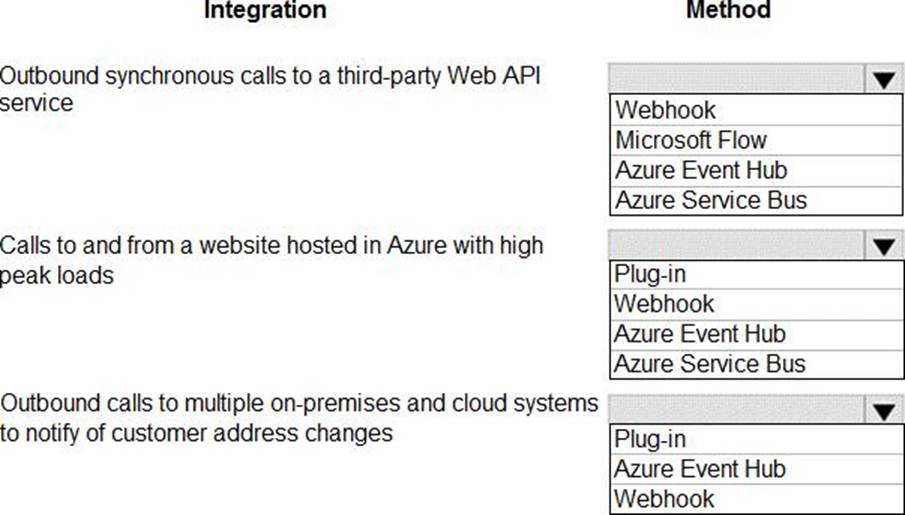
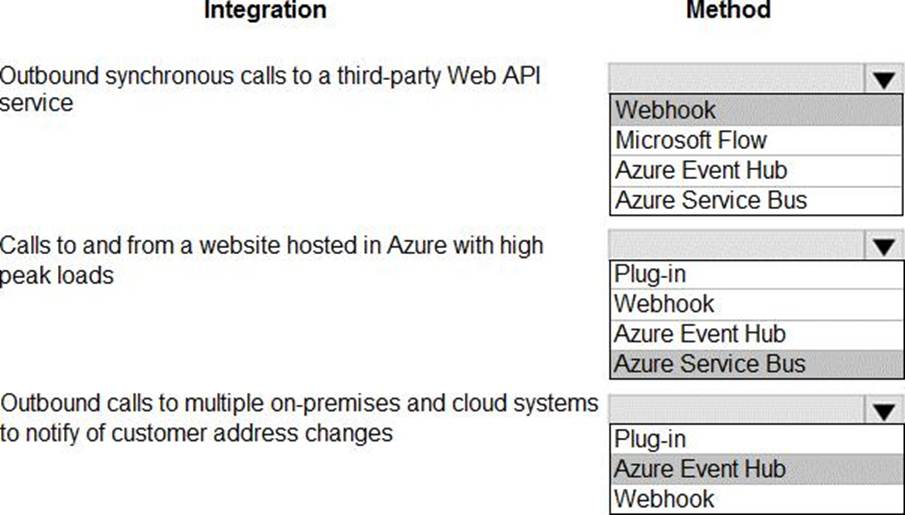
Explanation:
Box 1: Webhook
With Dataverse, you can send data about events that occur on the service to a web app by using webhooks. A webhook is a lightweight HTTP pattern for connecting web APIs and services with a publish-and-subscribe model. Webhook senders notify receivers about events by making requests to receiver endpoints with some information about the events.
Webhooks enable developers and ISVs to integrate Dataverse data with their own custom code
hosted on external services.
Box 2: Azure Service Bus
Service Bus provides a secure and reliable communication channel between Dataverse runtime data and external, cloud-based line-of-business apps. This capability is especially useful in keeping disparate Dataverse systems or other Dataverse servers synchronized with business data changes.
Box 3: Azure Event hub
Azure Event Hubs is a big data streaming platform and event ingestion service. It can receive and process millions of events per second. Data sent to an event hub can be transformed and stored by using any real-time analytics provider or batching/storage adapters.
Note: The most popular approaches in Dataverse involve webhooks, Azure messaging (Service Bus, Event Hubs), Azure Logic Apps, or Power Automate.
Reference: https://docs.microsoft.com/en-us/powerapps/maker/common-data-service/why-cds-any-type-app
HOTSPOT
You need to correct the portal query issues.
Which code should you use? To answer, select the appropriate options in the answer area. NOTE: Each correct selection is worth one point.
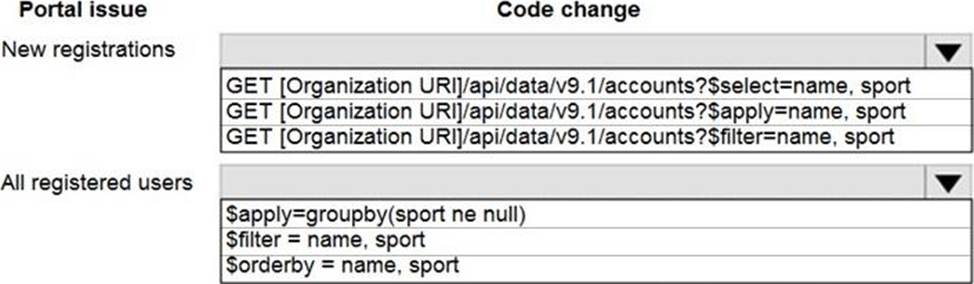
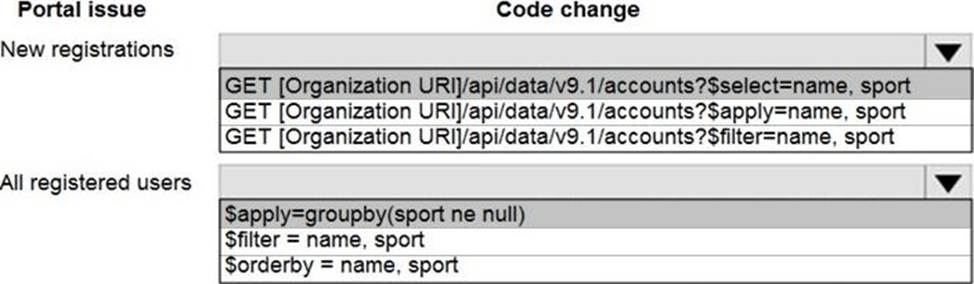
Explanation:
Scenario: The query for all registered users must return the data categorized by division. Queries must return only the Name and Sport fields. Queries return all fields.
The query is as follows:

Box 1: GET ..$select=name, sport
Use select to return only the Name and Sport fields.
Box 2: $apply(groupby(sport ne null)
Categorize by division, that is to sports.
Note: This question is part of a series of questions that present the same scenario. Each question in the series contains a unique solution that might meet the stated goals. Some question sets might have more than once correct solution, while others might not have a correct solution.
After you answer a question in this section, you will NOT be able to return to it. As a result, these questions will not appear in the review screen.
You are developing a model-driven app for a company.
When you create a new Account record, you must automatically display a form to collect data that is needed to create a Contact record. The form must switch to the appropriate form layout based on the contact type.
You open the Contact form by using JavaScript. You pass the contact type information to the form by using the Xrm.Navigation.openForm function. An OnLoad event handler in the Contact form processes the data and shows only the appropriate sections of the form for the given contact type.
You need to configure the receiving form to accept the data parameter.
Solution: In the form editor, add a query string parameter for the data parameter.
Does the solution meet the goal?
- A . Yes
- B . No
A
Explanation:
By default, model-driven apps allows a specified set of query string parameters to be passed to a form. You use these parameters to set default values when you create a new record in the application. Each parameter must use a standard naming convention that includes a reference to the column logical name.
There are two ways to specify which query string parameters will be accepted by the form:
Edit form properties
Edit form XML
Reference: https://docs.microsoft.com/en-us/powerapps/developer/model-driven-apps/configure-form-accept-
custom-querystring-parameters
Topic 4, Proseware, Inc
Background
Proseware, Inc. is an industry leading software company with several thousand employees. The company has had some trouble recruiting talented employees. Top-level candidates interview with the company but go on to work for competitors.
Feedback from candidates show that some offers were not accepted because the interview scheduling process was unpleasant. The company does not have a system to keep track of the candidates that were not selected.
Current environment
The recruiting process starts when an individual applies for a position on the company website. The individual may have found the position on their own, they may have been officially referred by an employee, or in some cases were contacted directly by a hiring manager and encouraged to apply. Recruiters schedule an interview with a hiring manager and interviews with two senior team members. Each interview results in feedback about the candidate and a recommendation whether to hire or not.
The recruiting team manages all information by using a model-driven application.
The company has the following Microsoft Dataverse tables and columns:
• JobPosting
o Hiring Manager – lookup to SystemUser
o Recruiter Assigned – lookup to SystemUser
• Contact (Job Applicant) o Contact identifier
o First name o Last name
o Time-Zone Offset
o Person of Interest – Yes/No (default)
• Application proapplication
o Contact identifier, Contact – lookup to Contact o Job Posting – lookup to JobPosting
o pro_recruiterassignedid
• Interview
o Application – lookup to Application o Job Posting – lookup to JobPosting o Recommend – Choice (Yes (0), No (1), and null (default) are the available values) o Person of Interest – Yes/No, No is the de’aul: value
• Referral
o Contact – lookup to Contact o Referrer – lookup to SystemUser o Job Posting – lookup to JobPosting
• SystemUser
o Manger – lookup to SystemUser o Time-Zone Offset
• Recruiter
o Recruiter identifier o Recruiter name
Applications
There may be multiple applications associated with each job posting. Applications are linked to an employee record if an employee referred the applicant for a position. The same individual can be an applicant for multiple job postings.
Interviews
Each interview is performed by an employee and is related to a single application.
The interview scheduling process may force potential candidates to accept interviews at unusual times with the senior team members due to time-zone differences.
Interview scheduling
The system must provide recruiters with a list of team members and their time-zone information.
You must create a Microsoft Power Apps Component Framework (PCF) control for the Job Application form to display a list of senior team members who report directly to a hiring manager.
• The control must display the current time in each team members local time.
• The control must be bound so that it minimizes the amount of code that must be written.
• You must display the list of team members and sort the list to show team members who reside in time zones closest to the applicant’s time zone first.
You must develop a second PCF control that displays the time-zone name and current time on the Job Application form. You must display the data in the candidate’s local time.
Historical information tracking
You must create a process to identify individuals as a person of interest that the company should consider hiring. You must assign each individual a score based on their past interactions.
• You must be able to determine the following information about a candidate:
o The number of interviews in the past two years and whether team members provided recommendations
o The number of hiring manager referrals and employee referrals in the past two years
o Whether the individual has any of the 12 designations or certifications that the company considers significant
• Only a single referral can be made per job application. The system must be able to support multiple referrals for a candidate.
• The system must track referrals even if an application is not completed.
Historical information scoring
The automated process must run weekly to assess all candidates. The process must also run automatically when historical information is updated. You must be able to perform scoring by selecting a command button on the contact form.
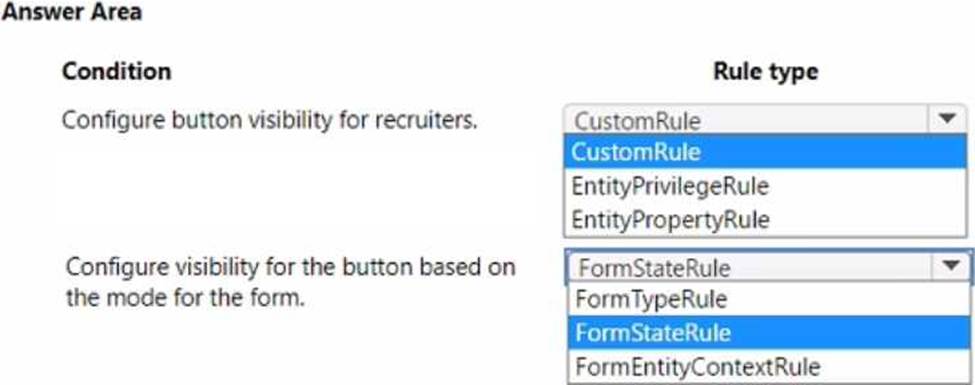
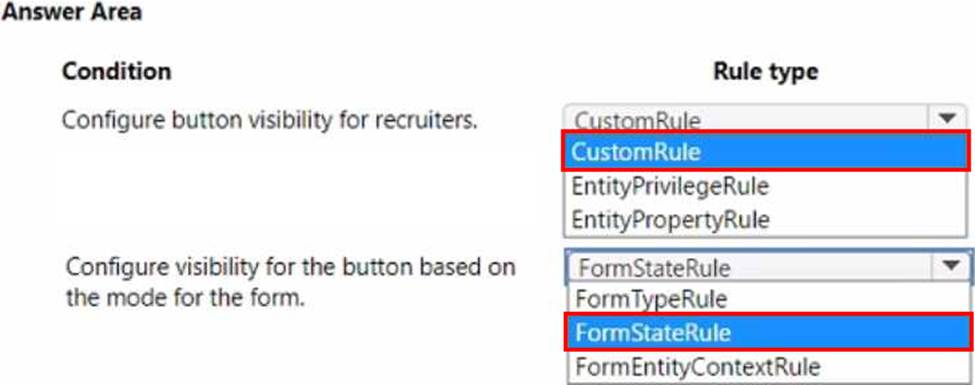
• This new command button must only be visible to employees who belong to a security role assigned named Recruiter. The command button must not be visible to anyone unless the contact form is in Update mode.
• A person of interest is defined as having a score of 15 or more based on the following historical information criteria:
o Each interview with a recommendation adds two to the score.
o Each interview without a recommendation subtracts two from the score.
o Each employee or manager referral adds one to the score.
o Each designation or certification adds one to the score.
• All scoring elements must be recalculated when changes occur. You must assign the score to the Person of Interest field.
• Values representing totals or scores must be stored in their own numeric fields.
• Plug-ins must be used to keep the Person of Interest field on active interview records associated with the Contact.
• Plug-ins registered on the update of the Person of Interest field must send an email notification when the candidate named in the email is a person of interest. Recruiters must receive the message when the field is updated on the Contact record.
• Interviewers must get an email notification when the Person of Interest field on the interview record is successfully updated.
Design guidelines
The following design guidelines must be followed:
• Schema changes must be made using the method requiring the least amount of storage to meet the requirement.
• Out-of-the-box functionality must be used when possible.
• Any code required to calculate scores must be able to be run from a single point.
• Email notifications need to be kept to a minimum.
Issues
• Recruiters report that the command button to score a candidate is not working. You debug the code and observe that the context input parameter is null.
• The system does not support associating designations and certifications with candidates.
• The value for the field used by the PCF control to display local time is saved to Microsoft Dataverse each time an active application record is opened.
• Interviewers report that they do not receive email notifications when interview records are created for an existing person of interest.
HOTSPOT
You need to implement ribbon display rules to control availability for the scoring command button.
Which rule types should you use? To answer, select the appropriate options in the answer area. NOTE: Each correct selection is worth one point.
DRAG DROP
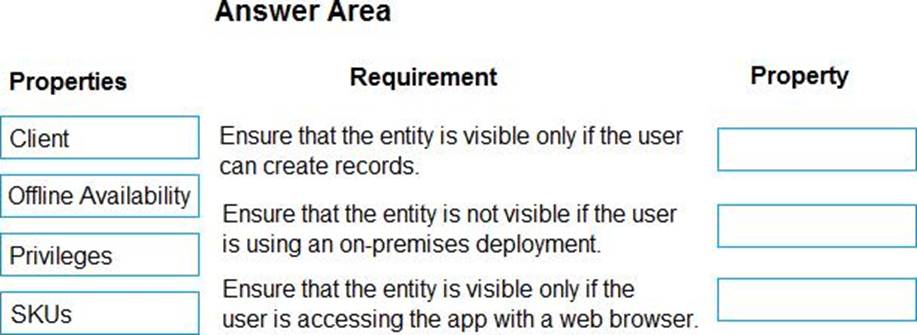
You are creating a model-driven app.
Users need to see only the entities in the app navigation that are relevant to their role and their method of accessing the app.
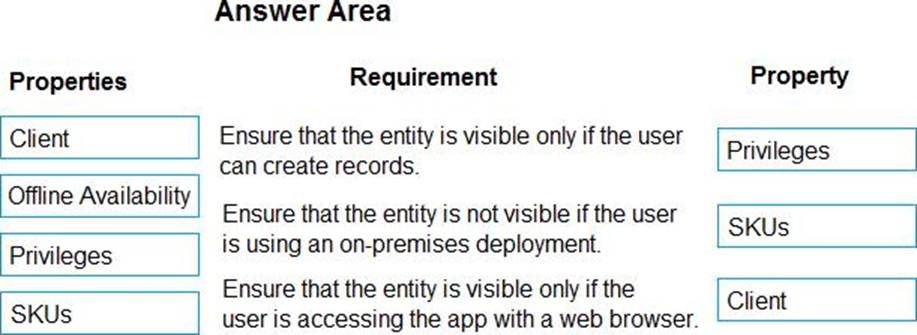
You need to restrict entities on the sub-areas in the SiteMap.
Which properties should you use? To answer, drag the appropriate properties to the correct requirements. Each property may be used once, more than once, or not at all. You may need to drag the split bar between panes or scroll to view content. NOTE: Each correct selection is worth one point.
Explanation:
Box 1: Privileges
Privileges: This defines whether a subarea is displayed based on privileges available in any security
roles that are assigned to the user.
Box 2: SKU
SKUs: Select the versions of Dynamics 365 that display this subarea.
Box 3: Client
Client: Select the type of client that displays this subarea.
Incorrect Answers:
Offline Availability: Select this check box to make this subarea available to users when they are offline in Dynamics 365 for Outlook.
Reference: https://docs.microsoft.com/en-us/powerapps/maker/model-driven-apps/create-site-map-app
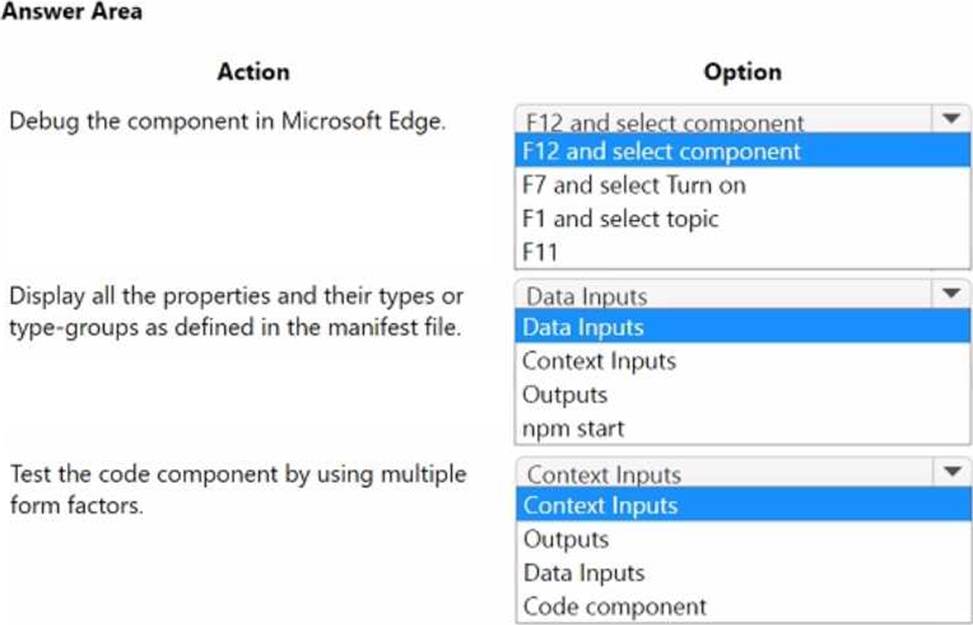
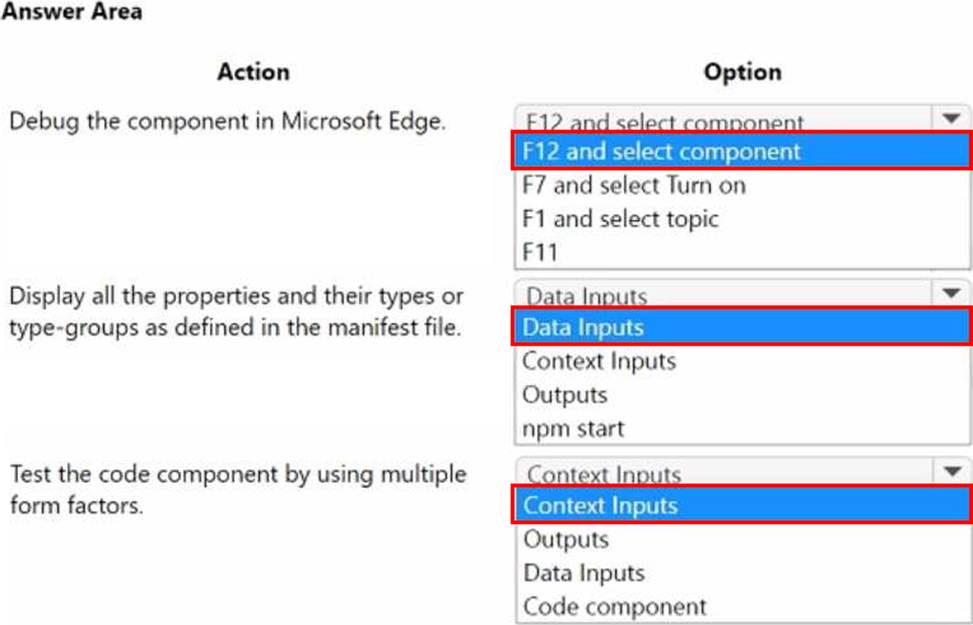
HOTSPOT
You create a Power Apps component framework component.
You need to test the component.
Which option should you use? To answer, select the appropriate options in the answer area. NOTE: Each correct selection is worth one point.
DRAG DROP
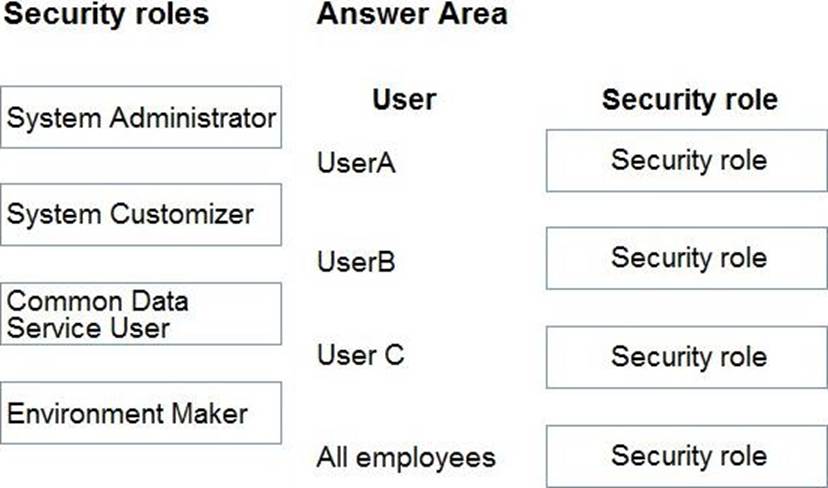
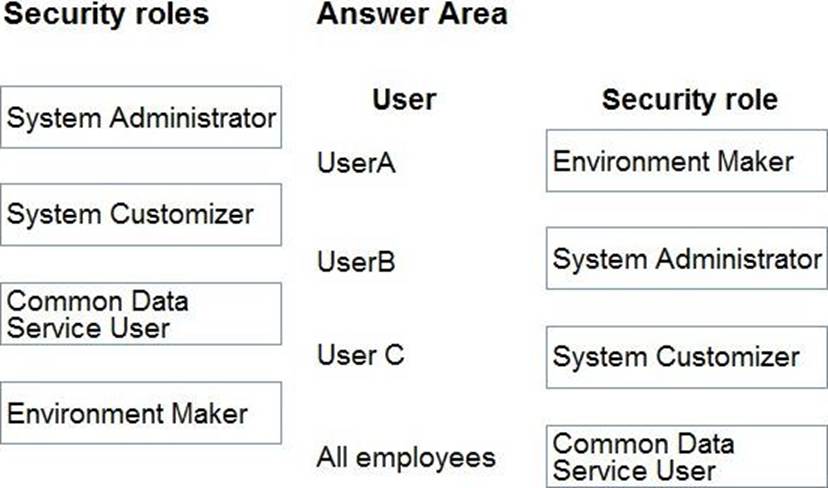
You need to assign the minimum environmental security role to the appropriate users.
Which security roles should you use? To answer, drag the appropriate security roles to the correct users. Each security role may be used once, more than once, or not at all. You may need to drag the split bar between panes or scroll to view content. NOTE: Each correct selection is worth one point.
Explanation:
Box 1: Environment Maker
UserA must be able to create and publish Power Apps apps.
The Environment Maker role can create resources within an environment including apps, connections, custom connectors, gateways, and flows using Power Automate.
Box 2: System Administrator
User B must be the owner of all the systems and be able to provide permissions and create all new environments.
The System Administrator has full permission to customize the system. Can view all data in the system.
Box 3: System Customizer
User C must be able to create apps connected to the systems and update the security roles and entities.
The System Customizer has full permission to customize the system. Can only view rows for system tables that they create.
The difference between the System Administrator and System Customizer security roles is that a system administrator has read privileges on most rows in the system and can see everything. Assign the System Customizer role to someone who needs to perform customization tasks but shouldn’t see any data in the system tables.
Box 4: Common Data Service User
To stay consistent with our product rebranding effort, the security role Common Data Service User is being changed to Basic User.
The Basic User security role primarily contains Basic privileges for core entities where the user can write, update, and delete records that they created or owned.
Reference:
https://docs.microsoft.com/en-us/power-platform/admin/environments-overview
https://docs.microsoft.com/en-us/powerapps/maker/model-driven-apps/privileges-required-customization – system-administrator-and-system-customizer-security-roles
https://docs.microsoft.com/en-us/powerapps/maker/model-driven-apps/privileges-required-customization#system-administrator-and-system-customizer-security-roles
https://docs.microsoft.com/en-us/power-platform-release-plan/2020wave2/data-platform/common-data-service-user-security-role-renamed-basic-user
https://docs.microsoft.com/en-us/power-platform-release-plan/2020wave2/data-platform/common-data-service-user-security-role-renamed-basic-user
You are designing an integration that sends created records from a custom Dataverse table to an exposed REST API. When the REST API is unavailable, you must be able to retry if the response status code is 500. You need to select a solution that meets the requirement.
Solution: Register a webhook by using the REST API as the endpoint. Wait for the webhook to automatically retry when a failure occurs.
Does the solution meet the goal?
- A . Yes
- B . No