
Practice Free MB-800 Exam Online Questions
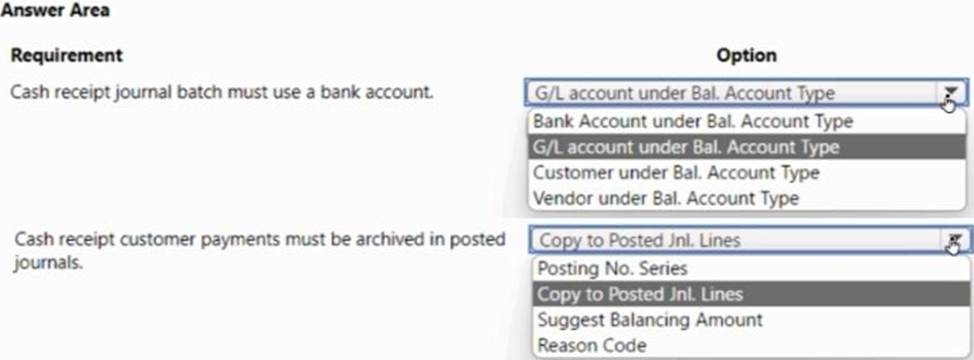
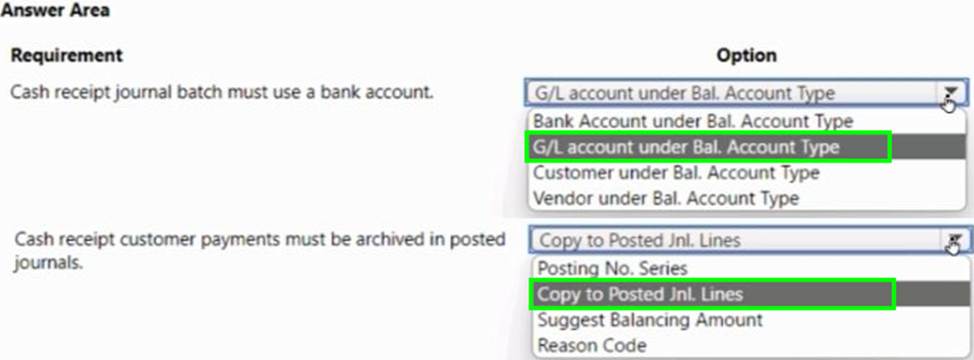
HOTSPOT
A company uses Dynamics 365 Business Central.
The company plans to implement a cash receipt journal batch based on the following requirements:
• The cash receipt journal batch must use a bank account by default.
• The cash receipt customer payments must be archived automatically in the posted journals.
The company uses the accrual basis for accounting.
You need to configure the cash receipt journal batch.
Which options should you use? To answer, select the appropriate options in the answer area. NOTE: Each correct selection is worth one point.
You have a Microsoft Excel file that includes journal entry data that must be imported into Dynamics 365 Business Central. This file was previously imported into a General Journal batch.
You receive an updated version of the file that includes corrections, deletions, and new journal entries.
Which three actions can you perform by using the Edit in Excel feature? Each correct answer presents a complete solution. NOTE: Each correct selection is worth one point.
- A . Modify an existing line in a General Journal batch
- B . Insert a new line in a General Journal batch
- C . Post one or more lines in a General Journal batch
- D . Request Approval for one or more lines in a General Journal batch
- E . Delete an existing line from a General Journal batch
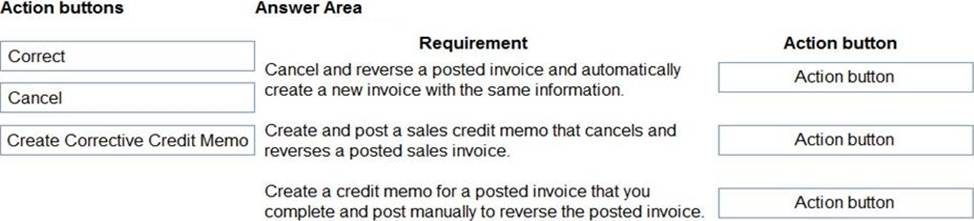
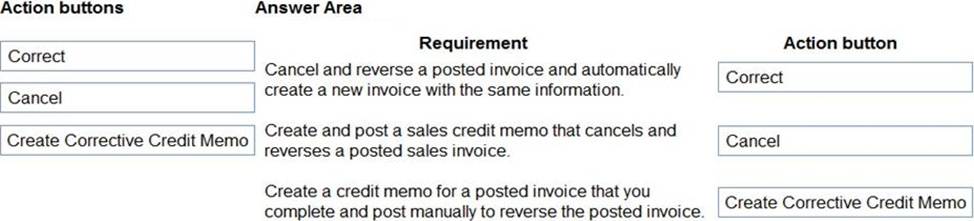
DRAG DROP
You are performing actions on posted sales invoices.
You need to correct any identified errors.
Which actions should you perform? To answer, drag the action buttons to the correct requirements. Each action button may be used once, or not at all. You may need to drag the split bar between panes or scroll to view content. NOTE: Each correct selection is worth one point.
Explanation:
Reference: https://docs.microsoft.com/en-gb/dynamics365/business-central/sales-how-correct-cancel-sales-invoice
DRAG DROP
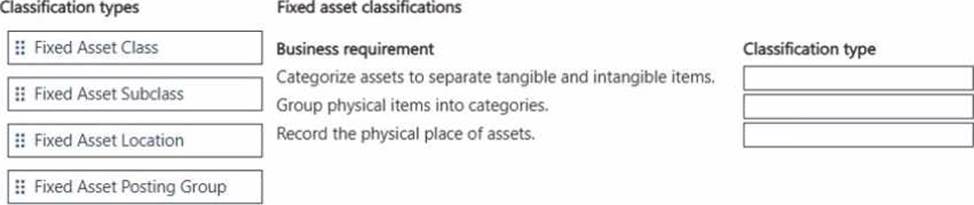
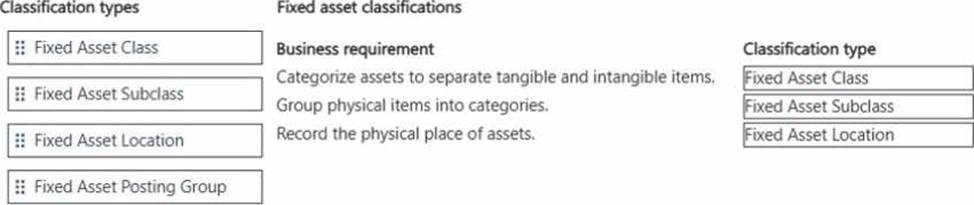
A company is selling up fixed asset tracking in Dynamics 365 Business Central.
The finance team must be able to track fixed assets in the following ways:
• Categorize assets to separate tangible and intangible items.
• Group physical assets into specific categories based on their type or usage.
• Track the storage of each asset.
You need to configure the fixed asset tracking.
Which classification type should you use? To answer, move the appropriate classification types to the correct business requirements. You may use each classification type once, more than once, or not at all. You may need to move the split bar between panes or scroll to view content. NOTE: Each correct selection is worth one point.
A company uses Dynamics 365 Business Central.
The company wants to print financial statements by using a cloud-based printer.
You need to recommend the type of printer the customer should install.
Which type of printer should you recommend?
- A . Email
- B . System
- C . Client default
- D . Server default
A company uses Dynamics 365 Business Central.
A customer wants to sell items that are not normally counted in the company’s warehouse.
You need to configure the system to meet this requirement.
What should you set up?
- A . Non-Inventory Item type
- B . Item charge
- C . Inventory Item type
- D . Resource
A
Explanation:
Reference: https://docs.microsoft.com/en-gb/dynamics365/business-central/inventory-about-item-types
A company uses Dynamics 365 Business Central.
You must create a general ledger account and define the general ledger account as a purchase account for general journal transactions.
You need to configure the system.
- A . Select Purchase as the value for the Gen. Posting Type field.
- B . Assign a general product posting group that is linked to a purchase account.
- C . Link combination of the general business posting group and general product posting group to a purchase account.
- D . Assign a general business posting group that is linked to a purchase account.
C
Explanation:
Reference: https://docs.microsoft.com/en-gb/dynamics365/business-central/finance-posting-groups
You are configuring default reports and layouts in Dynamics 365 Business Central.
You must add new data items to the report and change the layout associated with the default Purchase Order report.
A developer creates and deploys a new report object that includes the new data items and layout
You need to configure Business Central to use the new report object as the system default when printing purchase orders.
Solution: On the Report Layout Selection page, select the new report object. Update the value to Custom Layout and select the updated layout.
Does the solution meet the goal?
- A . No
- B . Yes
Note: This question is part of a series of questions that present the same scenario. Each question in the series contains a unique solution that might meet the stated goals. Some question sets might have more than one correct solution, while others might not have a correct solution.
After you answer a question in this section, you will NOT be able to return to it. As a result these questions will not appear in the review screen.
A company uses Dynamics 365 Business Central. The company works with physical goods.
The system must automatically populate the Type field on the document line when a user creates a purchase order.
You need to configure the system.
Solution: On the Report Selection – Purchase page, select a purchase order document type, and then select a custom report.
Does the solution meet the goal?
- A . Yes
- B . No
An accounting manager provides you with a chart of accounts.
The accounting manager wants you to configure the General Posting Setup.
You need to complete the configuration as efficiently as possible.
What are three ways to complete the configuration? Each correct answer presents a complete solution. NOTE: Each correct selection is worth one point.
- A . Use the Copy action to create a new General Posting Setup Card
- B . Import a configuration package that contains the General Posting Setup
- C . Use the Suggest Accounts action to create all possible posting setup combinations
- D . Create a new General Posting Setup Card, and then use the Suggest Accounts action
- E . Create a new General Posting Setup Card, and then use the Copy action
BDE
Explanation:
Reference: https://docs.microsoft.com/en-us/learn/modules/posting-groups-dynamics-365-business-central/4-configure