
Practice Free MB-800 Exam Online Questions
You are implementing Dynamics 365 Business Central for a customer.
The customer wants to manually add many similar items.
You need to help the customer create copies of existing items.
Which three actions must be performed? Each correct answer presents part of the solution. NOTE: Each correct selection is worth one point.
- A . On the Set up Customer/Vendor/Item Templates page, create a new item template
- B . Open an existing item, and then click the Save as Template action on the item card
- C . On the Set Up Customer/Vendor/Item Templates page, edit the information in the newly created item template
- D . On the Configuration Templates page, create a new template for item table
- E . Create a new item, and then select the new template name to copy the information to the item
BCE
Explanation:
Reference: https://usedynamics.com/business-central/product-dev/item-templates/
A customer is using Dynamics 365 Business Central.
The customer is currently sending quotes and invoices using postal services. The customer wants to begin sending quotes and invoices by email directly from Business Central.
You need to configure outbound email.
What are two possible ways to achieve the goal? Each correct answer presents a complete solution. NOTE: Each correct selection is worth one point.
- A . Configure SMTP Mail Setup options.
- B . Run the Set up your Business Inbox in Outlook assisted setup tool.
- C . Run the Set up email logging assisted setup tool.
- D . Run the Email setup assisted setup tool.
AD
Explanation:
Reference: https://docs.microsoft.com/en-gb/dynamics365/business-central/admin-how-setup-email
A company operates from India. The company procures materials from Sweden.
You need to set up invoice discount terms for a vendor based in Sweden.
Which three pieces of information should you enter? Each correct answer presents part of the solution. NOTE: Each correct selection is worth one point.
- A . currency code
- B . minimum amount
- C . discount percentage
- D . starting date
- E . minimum quantity
ABC
Explanation:
Reference: https://docs.microsoft.com/en-us/learn/modules/customer-discounts-dynamics-365-business-central/3-invoice
Topic 4, Fabrilcam. Inc.
Background
Fabrilcam. Inc.. is a manufacturer of products for the gift industry. The company plans to implement Business Central as its new enterprise resource planning (ERP) system.
The company sells to two types of customers: wholesale and retail. Retail customers order at special events and online. Wholesale customers send in orders by email.
Current Environment
Order processing
• The company uses a purchase order (PO) workflow for any PO over 1500
• The system has been fully configured for sales order prepayments and will check for a prepayment invoice at posting.
• Customers can special order products with a prepayment that is due on receipt.
Invoicing
• Wholesale customer payment terms are net 30. with a 2% discount if paid within 10 days.
• Retail customer payment terms are payable on receipt or shipment
Reporting
• The company uses headcount (number of employees) and square footage for statistical accounts.
Integrations
The company currently uses Outlook, Excel. Word, and Teams to communicate internally and externally with customers and vendors.
Requirements
Order processing
• The company must be able to combine multiple purchase receipts into one vendor invoice.
• Posted vendor invokes must be reverted when damages are reported or a product is returned to the vendor.
• Fully invoiced POs must not appear on the PO list page
• Customer prepayments vary based on customer relationship. Special orders from new customers
have a 25% prepayment. Established customers have only a 15% prepayment.
• The company must be able to approve POs by email without opening Business Central.
• Customers often reorder the same items with similar quantities. The system must be configured to ask the user if recurring lines should be added to sales orders.
Invoicing
• Customer revenue must be posted to separate general ledger (G/L) accounts based on customer type. The G/L account must have subcategories for wholesale and retail revenue.
• Accounts receivable must be posted to separate G/l accounts based on customer type. The G/L account must have subcategories for wholesale and retail accounts receivable.
• Currently, Inventory Is sold at a cost based on purchase and sales over a period.
Reporting
• Financial reports must include statistical accounts.
• The financial report structure must map to account categories.
Integrations
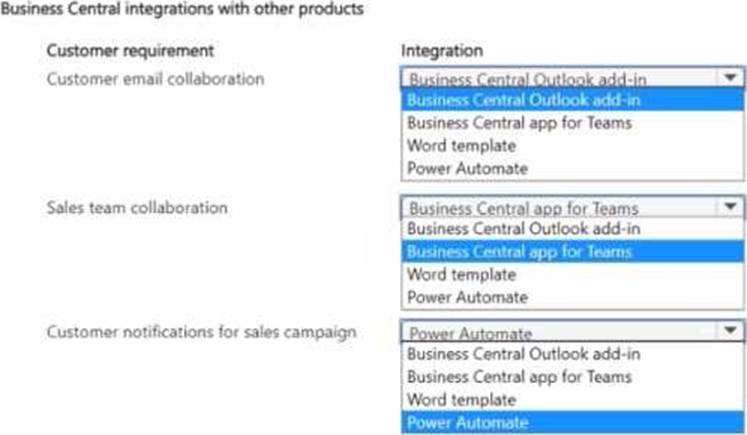
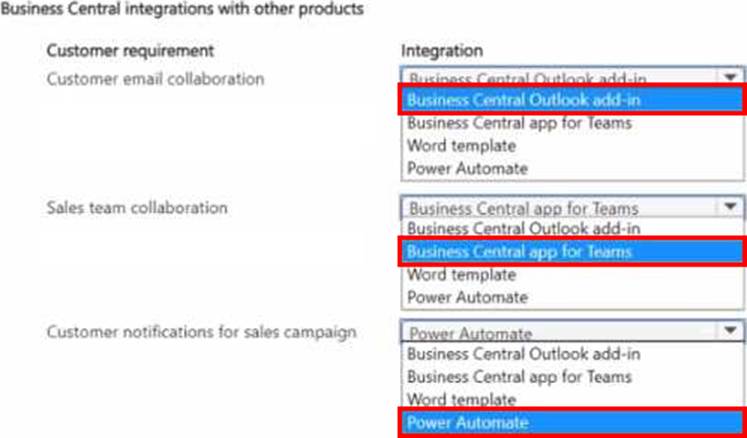
The company requires the following integration capabilities:
• Create sales orders while collaborating with customers by email.
• Edit customer information while messaging the sales team in a group chat.
• Communicate a brochure to all customers at once about a sales campaign.
General ledger posting accounts
The company requires the following G/L posting accounts:
• Retail Receivables = 13100
• Wholesale Receivables = 13200
• Payment Discount = S4800
• Retail Sales = 44100
• Wholesale Sales = 44200 Sales Prepayments = 22160
Issues
• Order entry lakes too long for wholesale customers.
• Vendors ship partial orders but send one monthly invoice. The company is unable to associate one invoice with multiple POs in the current environment
• Inventory reconciliation was difficult m the company’s old system because it allowed users to sell more inventory than was physically available.
• Users must log in to the system to provide workflow approvals.
HOTSPOT
You need to recommend integration solutions to fulfill the company requirements.
Which Microsoft integration aligns with each requirement? To answer, select the appropriate options in the answer area. NOTE: Each correct selection is worth one point.
HOTSPOT
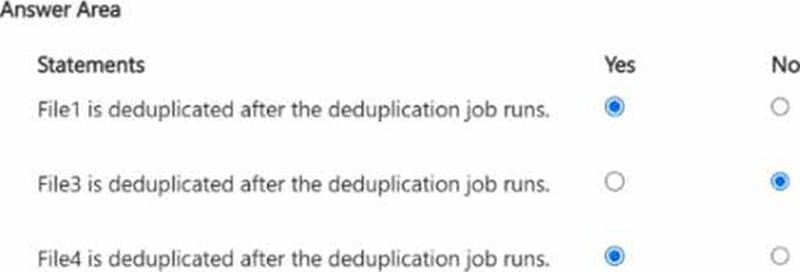
You have a server named Server1 that runs Windows Server and contains three volumes named C, D, and E.
Files are stored on Server1 as shown in the following table.
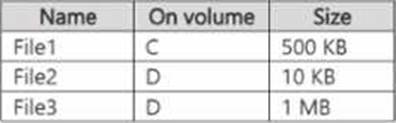
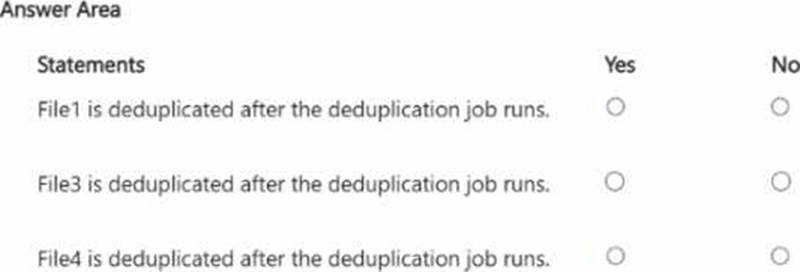
For volume D, Data Deduplication is enabled and set to General purpose file server You perform the following actions:
• Move File1 to volume D.
• Copy File2 to volume D and name the copy File4.
• Move File3 to volume E.
For each of the following statements, select Yes if the statement is true. Otherwise, select No. NOTE: Each correct selection is worth one point.
DRAG DROP
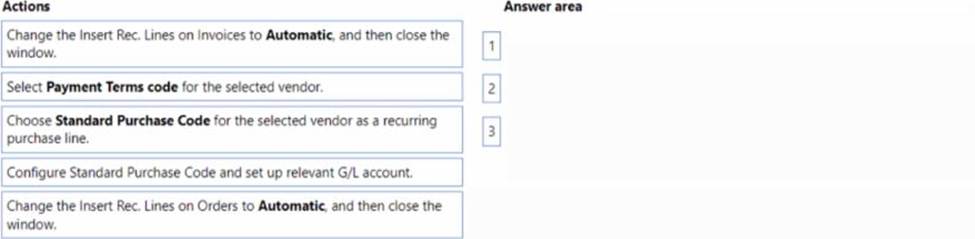
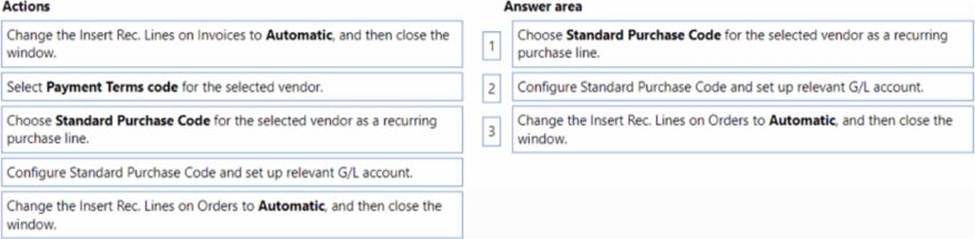
A company uses Dynamics 365 Business Central
A maintenance manager buys weekly cleaning supplies from a local hardware store and would like to automate purchase order entries.
You need to configure the system to add a default general ledger (G/L) account to the hardware store purchase orders.
Which three actions should you perform in sequence? To answer, move the appropriate actions from the list of actions to the answer area and arrange them in the correct order.
DRAG DROP
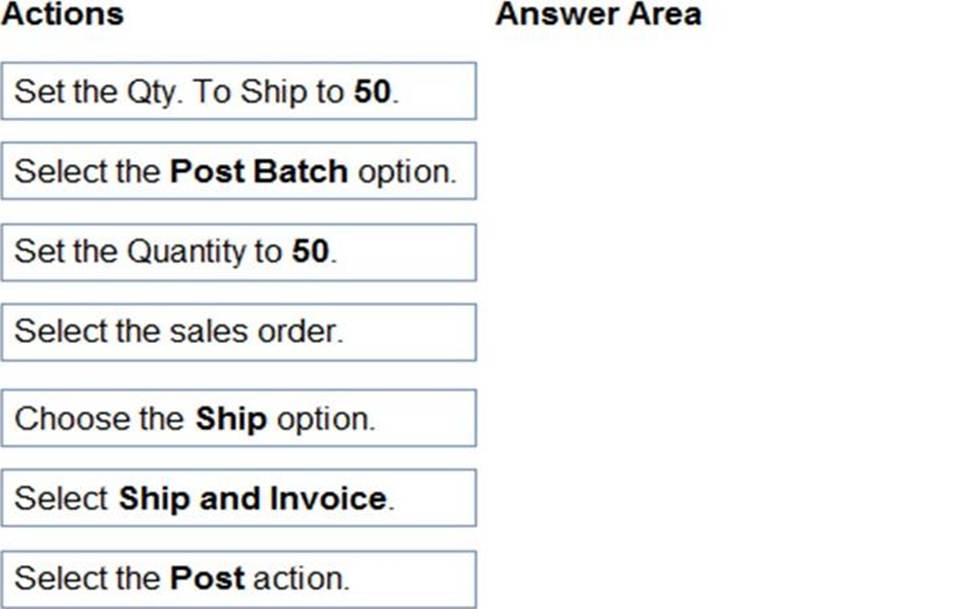
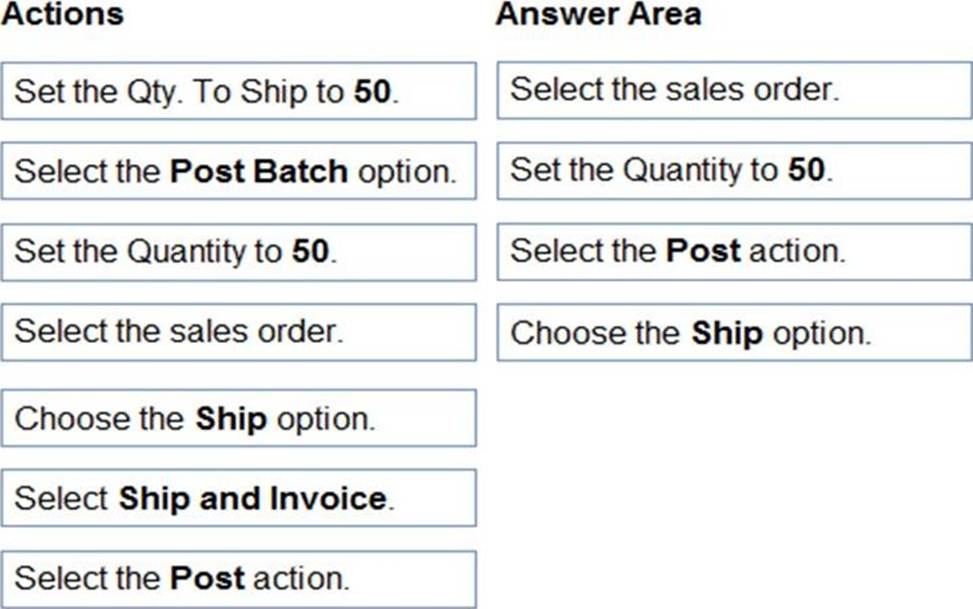
You have a sales order with a quantity of 100 items.
You need to post a shipment with a quantity of 50 items from the sales order.
Which four actions should you perform in sequence? To answer, move the appropriate actions from the list of actions to the answer area and arrange them in the correct order.
Explanation:
Reference: https://usedynamics.com/intercompany/posting-partial-shipments/
DRAG DROP
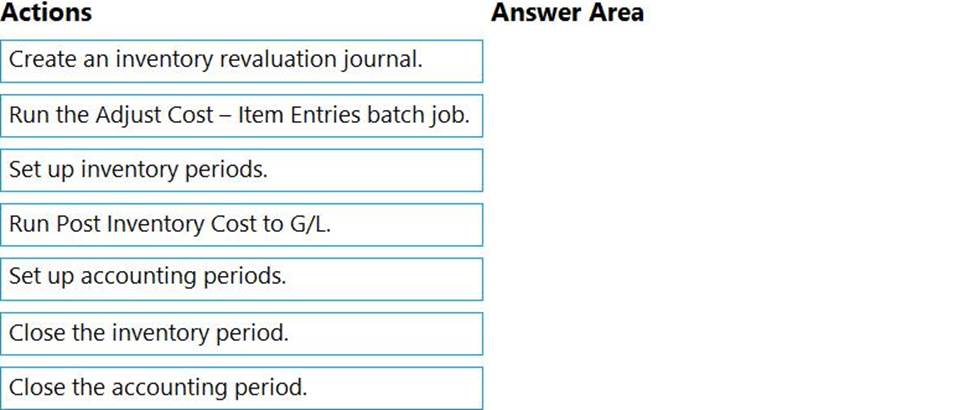
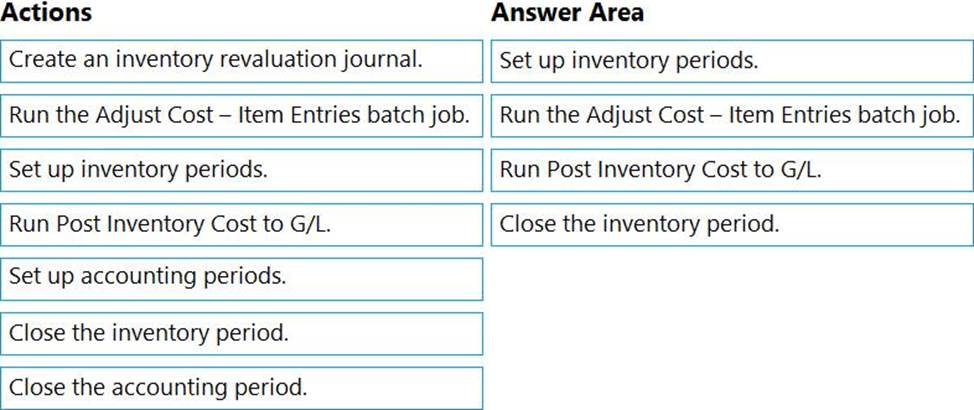
You need to configure the system to address the costing adjustment concerns.
Which four actions should you perform in sequence? To answer, move the appropriate actions from the list of actions to the answer area and arrange them in the correct order.
Explanation:
Reference: https://docs.microsoft.com/en-gb/dynamics365/business-central/finance-how-to-work-with-inventory-periods
DRAG DROP
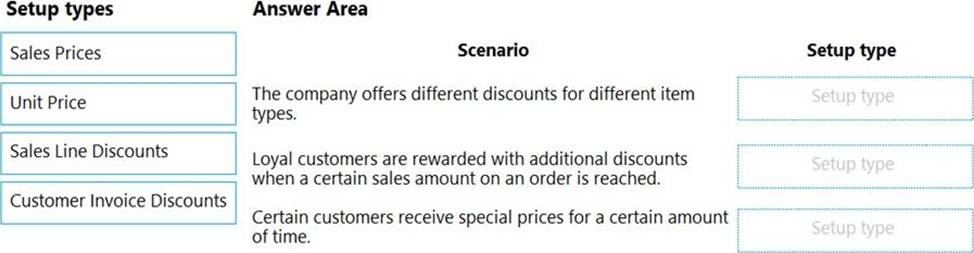
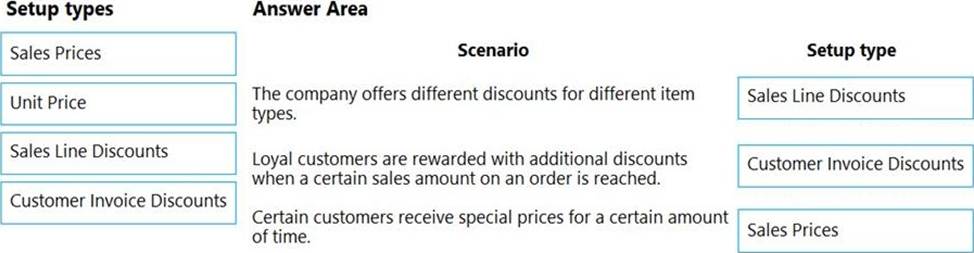
You set up a sales module for a company. The manager provides you with the company sales price list.
The correct net price for products must display when the sales team creates sales orders.
You need to configure the system.
Which setup types should you use? To answer, drag the appropriate setup types to the correct scenarios. Each setup type may be used once, more than once, or not at all. You may need to drag the split bar between panes or scroll to view content. NOTE: Each correct selection is worth one point.
Explanation:
Reference: https://usedynamics.com/business-central/sales/item-sales-prices/
DRAG DROP
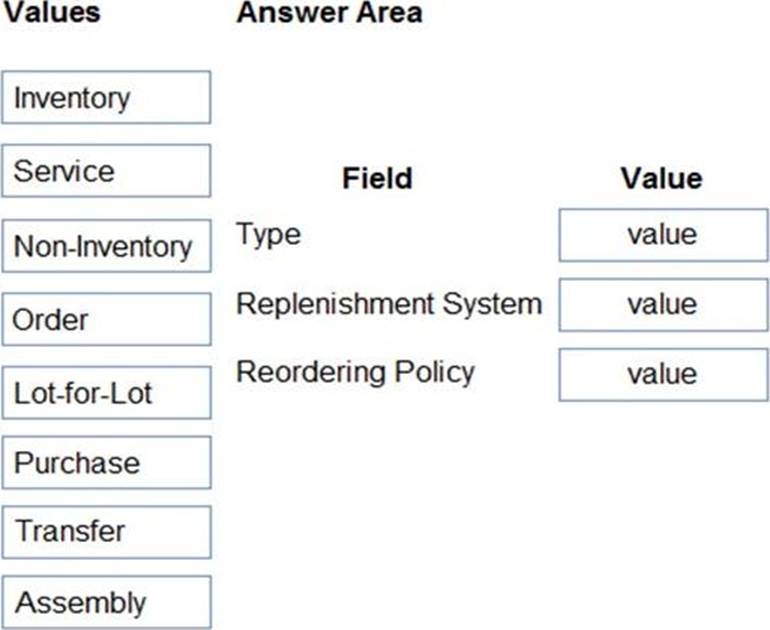
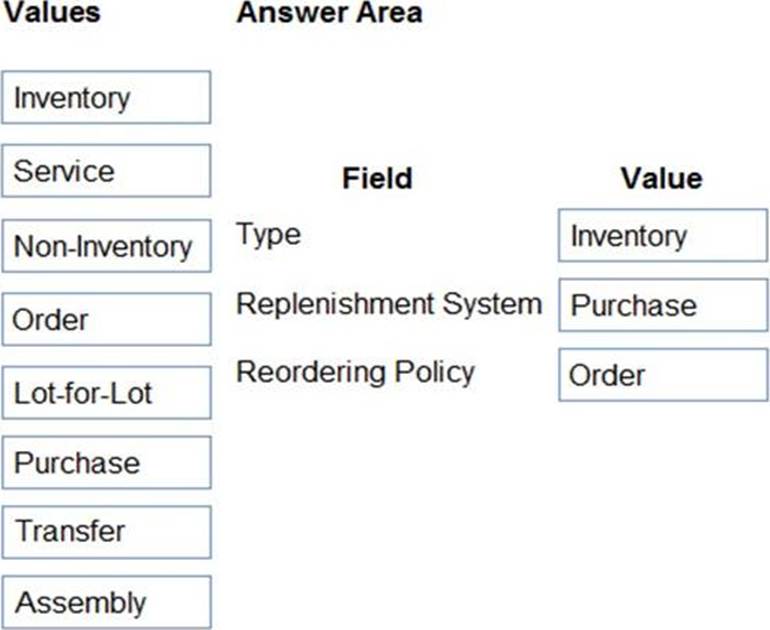
You are setting up a new item in Dynamics 365 Business Central. The item is a tangible good with an inventory asset value. The item is acquired by purchase specifically for each new instance of demand from an order.
You need to configure the Type, Replenishment System, and Reordering Policy fields on the item card to achieve the stated requirements.
How should you configure each field? To answer, drag the appropriate values to the correct fields. Each value may be used once, more than once, or not at all. You may need to drag the split bar between panes or scroll to view content. NOTE: Each correct selection is worth one point.
Explanation:
Inventory
Purchase
Order
Reference:
https://usedynamics.com/business-central/product-dev/replenishment-system/
https://usedynamics.com/business-central/product-dev/reordering-policy/