
Practice Free MB-800 Exam Online Questions
You are implementing Dynamics 365 Business Central. You create a role center page for all users.
Users must not be allowed to personalize the page.
You need to configure the system.
Which three actions should you perform? Each correct answer presents part of the solution. NOTE: Each correct selection is worth one point.
- A . On the Profiles (Role) page, select the profile and select the User as the default profile option.
- B . On the User card, set the status to Disabled.
- C . On the Profiles (Role) page, select the profile and select the Show in Role Explorer column.
- D . On the Profiles (Role) page, select Enable the profile. Disable all other profiles.
- E . On the Profiles (Role) page, select the profile and select the Disable Personalization option.
ACE
Explanation:
Reference: https://docs.microsoft.com/en-us/dynamics365/business-central/admin-users-profiles-roles
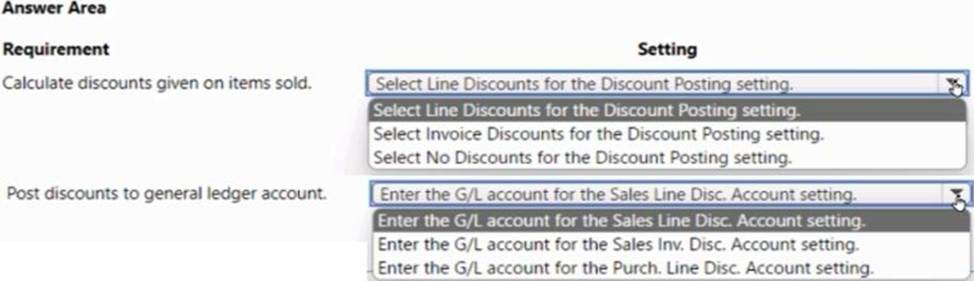
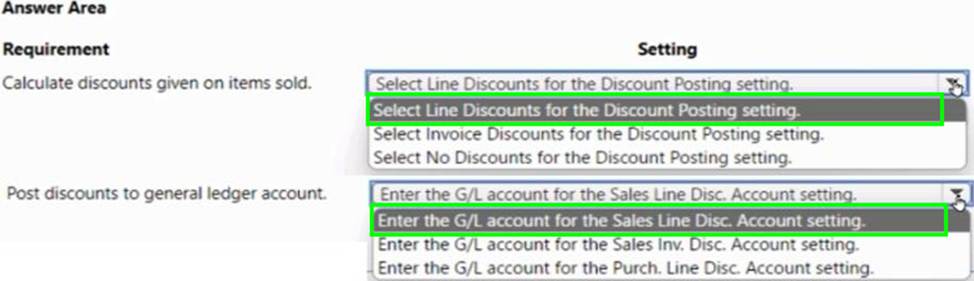
HOTSPOT
A company uses Dynamics 365 Business Central.
The company requires the following discount setup:
• The system must calculate the discounts given on individual items that are sold.
• The system must post the discounts to a specific general ledger account.
You need to configure the system.
DRAG DROP
A company uses Dynamics 365 Business Central.
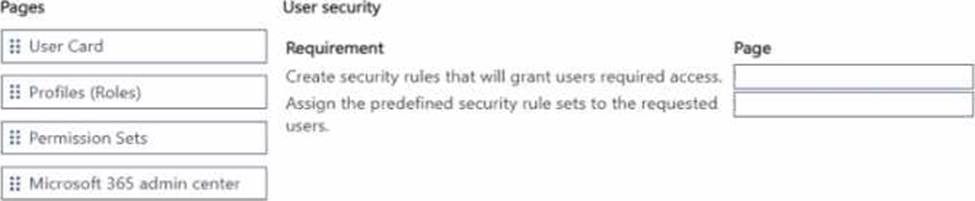
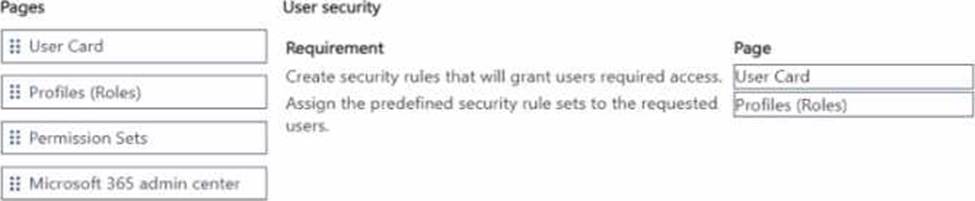
The finance manager requires a specific group of operating team users to have access only to a particular set of customer data.
You need to configure and enforce the security requirements.
Which pages should you configure? To answer, move the appropriate pages to the correct requirements. You may use each page once, more than once, or not at all. You may need to move the split bar between panes or scroll to view content. NOTE: Each correct selection is worth one point.
HOTSPOT
A company uses Dynamics 365 Business Central.
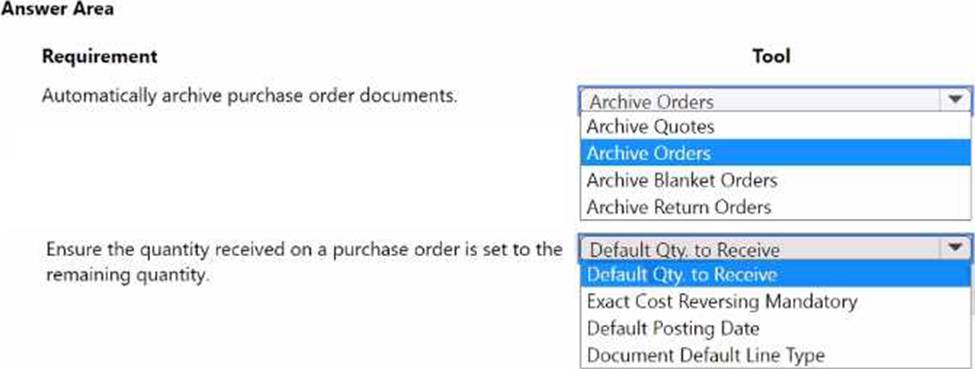
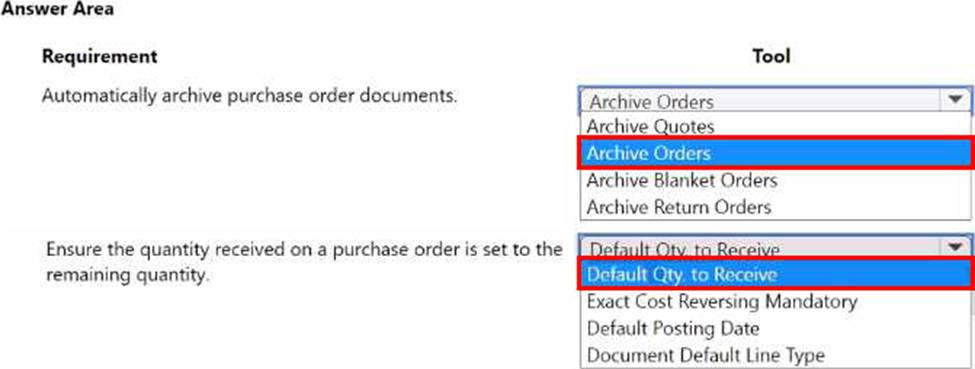
The company plans to process purchase order documents based on the following requirements:
• The system must automatically archive purchase order documents.
• The system must ensure the default value of the quantity received on a purchase order is set to the remaining quantity on the purchase order.
You need to configure purchases and payables options.
Which tools should you use? To answer, select the appropriate options in the answer area. NOTE: Each correct selection is worth one point.
You must streamline monthly invoicing by automating repetitive entries for monthly charges when managing subscriptions. You need to add default general ledger (GL) accounts to a Customer Card.
Solution: Configure a Document Layout on the Customer Card.
Does the solution meet the goal?
- A . Yes
- B . No
You have an Azure subscription that contains a virtual machine named VM1 as shown in the following exhibit.
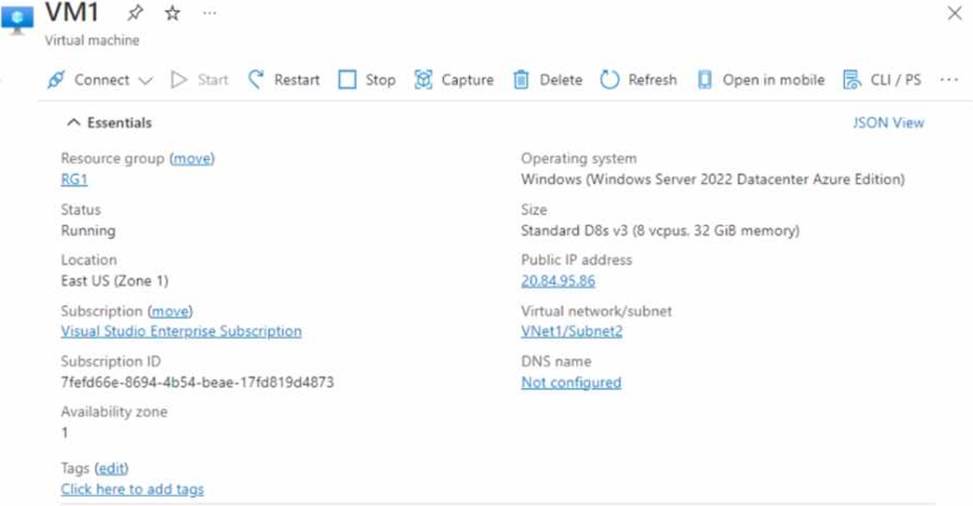
The subscription has the disks shown in the following table.
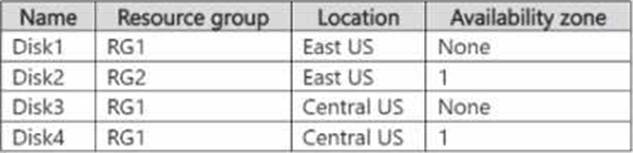
Which disks can you attach as data disks to VM1?
- A . Disk2 only
- B . Disk4 only
- C . Disk1 and Disk2 only
- D . Disk2 and Disk4 only
- E . Disk1, Disk3, and Disk4 only
- F . Disk1, Disk2, Disk3, and Disk4
DRAG DROP
A company uses Business Central.
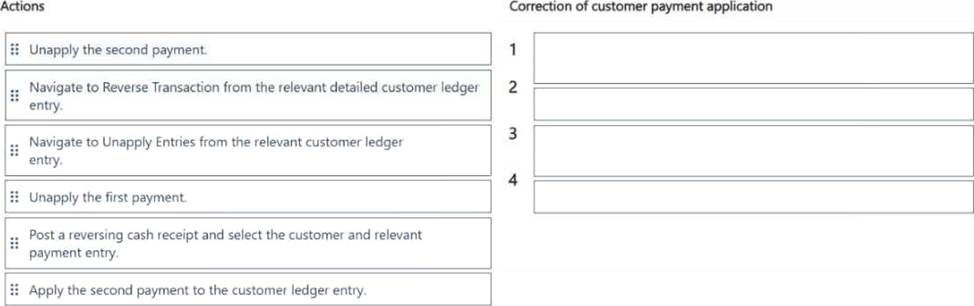
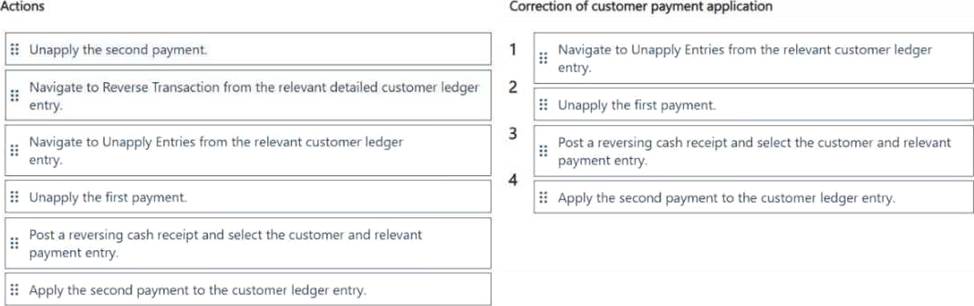
A user mistakenly partly applied two cash receipts to a posted sales transaction.
You need to remove the first cash receipt from the posted sales transaction to correct the mistake.
Which four actions should you perform in sequence? To answer, move the appropriate actions from the list of actions to the answer area and arrange them in the correct order.
Topic 3, Northwind Traders
Overview
Northwind Traders is an independent, family-owned business. The company distributes natural pet products in the Northwest region of the country/region. Products are purchased directly from manufacturers and distributed by using its own fleet of trucks.
When the company started, deliveries were within a three-hour radius of the warehouse. Due to regional growth, current deliveries require drivers to stay overnight on some routes. The company plans to open a second warehouse to expand the region and eliminate overnights for route drivers. The company also plans to hire a second group of employees to run operations in this new location. The finance and accounting teams will remain in the original location.
The company uses a third-party system for financials and order management. The finance department stated that the company’s fiscal year begins on July 1 and ends on June 30. The mm/dd/yyyy date format is used.
As part of the expansion, the owner plans to upgrade to an ERP system and use Business Central to fulfill the company requirements and manage growth.
Orders
• Orders are emailed to customer service and manually keyed into the inventory system. Pricing and discounts
• Customer pricing is determined by the customer market type. Customer market types are Retail, Veterinarian, and Breeder. Each customer is associated with only one market type.
• Vendors offer monthly promotions to customers by item, brand, or item category.
• Invoices should show each customer’s base price, the discount amount, and the net price. Accounts payable
• The company wants to expand vendor payment options in the new system.
Customers
• The sales team must be able to do the following:
o Quickly set up new customers with the proper settings based on customer type.
o Identify customers by market type. Customer posting groups will be used to identify which market the customer belongs to.
• Base price is determined by the customer market type.
• The sales department should receive a warning when entering the order if a customer is over their credit limit.
Sales
• Customer discounts are offered for specific time frames by item, brand, or product category. Discounts should be added to sales lines automatically.
• Discounts must post to a unique general ledger (G/L) account.
• The business needs to be able to track revenue by location, market, and product category dimensions. Locations 100 and 200 will be set as default dimensions on the two warehouse locations. Food, treats, toys, and supplies are the required product categories, which will be set as default dimensions on the item cards. Each customer card will have a default market dimension.
• The sales manager wants to delete canceled orders and automatically archive them. Warehouse
• Orders will be fulfilled from two possible warehouse locations.
• Product will be transferred between locations by using transfer orders.
Sales invoices
• Invoices will be posted after delivery.
• Invoices will be emailed to the customer.
• The sales department must be able to quickly correct posted invoices for the following scenarios:
o Posted invoices that have not been paid
o Posted invoices that have been paid.
o Posted invoices created from sales orders.
o Posted invoices not created from sales orders.
Accounting
• The finance department requires that the company has 12 monthly accounting periods per fiscal year.
• Finance department users must be able to reconcile the accounts receivable (AR) subledger to the G/L account at month end.
• AR department users need the ability to settle and close invoices when customers take payment discounts after the payment discount date has passed. AR users should be allowed to accept or reject the payment tolerance.
• Accounts payable (AP) department users must be able to pay vendors by electronic funds transfer (EFT) and use a payment journal batch named EFT to process payments.
• When viewing G/L entries, the finance and accounting teams must be able to see debits and credits instead of a positive or negative amount.
• The company needs to be able to track expenses by department and location. The departments
are sales, operations, and administration.
• AR must be able to correct cash application entries.
You need to configure Business Central to display G/L entries as required by the accounting team.
Which configuration should you use?
- A . Debit/Credit
- B . Show Amounts
- C . Check G/L Account Usage
- D . G/L Account Card
DRAG DROP
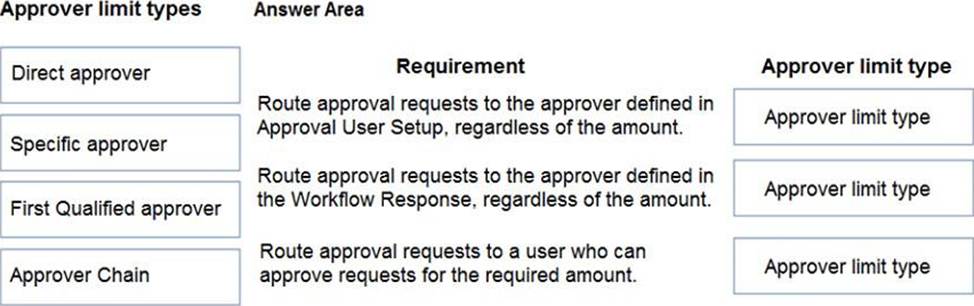
You are setting up approval workflows in Dynamics 365 Business Central.
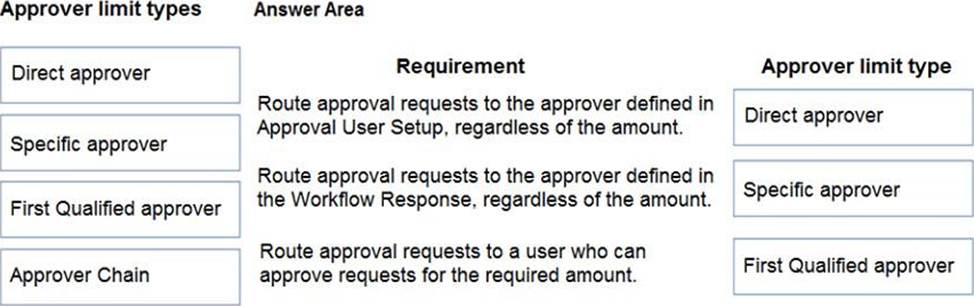
You need to configure approval limits.
Which approver limit types should you use? To answer, drag the appropriate approver limit types to the correct requirements. Each approver limit type may be used once, or not at all. You may need to drag the split bar between panes or scroll to view content. NOTE: Each correct selection is worth one point.
Explanation:
Reference: https://ebs.com.au/blog/how-approver-limit-type-works-for-purchase-order-workflows-in-microsoft-dynamics-365
A company is using Dynamics 365 Business Central. The finance manager creates a new general ledger (G/L) account. You need to configure the system to include the G/L account in the general journal reconciliation window.
What should you do?
- A . Enable the Reconciliation Account field in the GA account card.
- B . Enable the Direct Posting field in the G/L account card.
- C . Add this G/L account to the Bank Account Posting Group.
- D . Create a new payment reconciliation journal.