
Practice Free DVA-C02 Exam Online Questions
A company hosts a batch processing application on AWS Elastic Beanstalk with instances that run the most recent version of Amazon Linux. The application sorts and processes large datasets. In recent weeks, the application’s performance has decreased significantly during a peak period for traffic. A developer suspects that the application issues are related to the memory usage. The developer checks the Elastic Beanstalk console and notices that memory usage is not being tracked.
How should the developer gather more information about the application performance issues?
- A . Configure the Amazon CloudWatch agent to push logs to Amazon CloudWatch Logs by using port 443.
- B . Configure the Elastic Beanstalk .ebextensions directory to track the memory usage of the instances.
- C . Configure the Amazon CloudWatch agent to track the memory usage of the instances.
- D . Configure an Amazon CloudWatch dashboard to track the memory usage of the instances.
C
Explanation:
To monitor memory usage in Amazon Elastic Beanstalk environments, it’s important to understand that default Elastic Beanstalk monitoring capabilities in Amazon CloudWatch do not track memory usage, as memory metrics are not collected by default. Instead, the Amazon CloudWatch agent must be configured to collect memory usage metrics.
Why Option C is Correct:
The Amazon CloudWatch agent can be installed and configured to monitor system-level metrics such as memory and disk utilization.
To enable memory tracking, developers need to install the CloudWatch agent on the Amazon Elastic Compute Cloud (EC2) instances associated with the Elastic Beanstalk environment.
After installation, the agent can be configured to collect memory metrics, which can then be sent to CloudWatch for further analysis.
How to Implement This Solution:
Install the CloudWatch Agent:Use .ebextensions or AWS Systems Manager to install and configure the CloudWatch agent on the EC2 instances running in the Elastic Beanstalk environment.
Modify CloudWatch Agent Configuration:Create a config.json file that specifies memory usage tracking and other desired metrics.
Enable Metrics Reporting:The CloudWatch agent can push the metrics to CloudWatch, where they can be monitored.
Why Other Options are Incorrect:
Option A: Configuring the agent to push logs is not sufficient to track memory metrics. This option addresses logging but not system-level metrics like memory usage.
Option B: The .ebextensions directory is used to customize Elastic Beanstalk environments but does not directly track memory metrics without additional configuration of the CloudWatch agent.
Option D: Configuring a CloudWatch dashboard will only visualize the metrics that are already being collected. It will not enable memory usage tracking.
AWS Documentation
Reference: Amazon CloudWatch Agent Overview
Elastic Beanstalk Customization Using .ebextensions
Monitoring Custom Metrics
A developer has created an AWS Lambda function to provide notification through Amazon Simple Notification Service (Amazon SNS) whenever a file is uploaded to Amazon S3 that is larger than 50 MB. The developer has deployed and tested the Lambda function by using the CLI. However, when the event notification is added to the S3 bucket and a 3.000 MB file is uploaded, the Lambda function does not launch.
Which of the following Is a possible reason for the Lambda function’s inability to launch?
- A . The S3 event notification does not activate for files that are larger than 1.000 MB.
- B . The resource-based policy for the Lambda function does not have the required permissions to be invoked by Amazon S3.
- C . Lambda functions cannot be invoked directly from an S3 event.
- D . The S3 bucket needs to be made public.
A company has an application that stores data in Amazon RDS instances. The application periodically experiences surges of high traffic that cause performance problems.
During periods of peak traffic, a developer notices a reduction in query speed in all database queries.
The team’s technical lead determines that a multi-threaded and scalable caching solution should be used to offload the heavy read traffic. The solution needs to improve performance.
Which solution will meet these requirements with the LEAST complexity?
- A . Use Amazon ElastiCache for Memcached to offload read requests from the main database.
- B . Replicate the data to Amazon DynamoDB. Set up a DynamoDB Accelerator (DAX) cluster.
- C . Configure the Amazon RDS instances to use Multi-AZ deployment with one standby instance.
Offload read requests from the main database to the standby instance. - D . Use Amazon ElastiCache for Redis to offload read requests from the main database.
D
Explanation:
Amazon ElastiCache for Memcached is a fully managed, multithreaded, and scalable in-memory key-value store that can be used to cache frequently accessed data and improve application performance1. By using Amazon ElastiCache for Memcached, the developer can reduce the load on the main database and handle high traffic surges more efficiently.
To use Amazon ElastiCache for Memcached, the developer needs to create a cache cluster with one or more nodes, and configure the application to store and retrieve data from the cache cluster2. The developer can use any of the supported Memcached clients to interact with the cache cluster3. The developer can also use Auto Discovery to dynamically discover and connect to all cache nodes in a cluster4.
Amazon ElastiCache for Memcached is compatible with the Memcached protocol, which means that the developer can use existing tools and libraries that work with Memcached1. Amazon ElastiCache for Memcached also supports data partitioning, which allows the developer to distribute data among multiple nodes and scale out the cache cluster as needed.
Using Amazon ElastiCache for Memcached is a simple and effective solution that meets the requirements with the least complexity. The developer does not need to change the database schema, migrate data to a different service, or use a different caching model. The developer can leverage the existing Memcached ecosystem and easily integrate it with the application.
A developer needs to give a new application the ability to retrieve configuration data.
The application must be able to retrieve new configuration data values without the need to redeploy the application code. If the application becomes unhealthy because of a bad configuration change, the developer must be able to automatically revert the configuration change to the previous value.
- A . Use AWS Secrets Manager to manage and store the configuration data. Integrate Secrets Manager with a custom AWS Config rule that has remediation actions to track changes in the application and to roll back any bad configuration changes.
- B . Use AWS Secrets Manager to manage and store the configuration data. Integrate Secrets Manager with a custom AWS Config rule. Attach a custom AWS Systems Manager document to the rule that automatically rolls back any bad configuration changes.
- C . Use AWS AppConfig to manage and store the configuration data. Integrate AWS AppConfig with Amazon CloudWatch to monitor changes to the application. Set up an alarm to automatically roll back any bad configuration changes.
- D . Use AWS AppConfig to manage and store the configuration data. Integrate AWS AppConfig with Amazon CloudWatch to monitor changes to the application. Set up CloudWatch Application Signals to roll back any bad configuration changes.
D
Explanation:
Comprehensive and Detailed Step-by-Step
Option D: AWS AppConfig with CloudWatch Application Signals
AWS AppConfig is designed for managing and deploying application configurations dynamically, without redeployment.
CloudWatch Application Signals provide automatic rollback mechanisms in case of an unhealthy application state due to bad configuration changes.
This solution meets the requirements with minimal operational overhead by ensuring both dynamic updates and rollback functionality.
Why Other Options Are Incorrect:
Option A and B: AWS Secrets Manager is designed for secrets management, not dynamic application configuration. Custom Config rules add unnecessary complexity.
Option C: While CloudWatch alarms can monitor application changes, using alarms for rollback requires manual setup and lacks the automatic rollback provided by Application Signals.
Reference: AWS AppConfig Documentation
A company has a multi-node Windows legacy application that runs on premises. The application uses a network shared folder as a centralized configuration repository to store configuration files in .xml format. The company is migrating the application to Amazon EC2 instances. As part of the migration to AWS, a developer must identify a solution that provides high availability for the repository.
Which solution will meet this requirement MOST cost-effectively?
- A . Mount an Amazon Elastic Block Store (Amazon EBS) volume onto one of the EC2 instances. Deploy a file system on the EBS volume. Use the host operating system to share a folder. Update the application code to read and write configuration files from the shared folder.
- B . Deploy a micro EC2 instance with an instance store volume. Use the host operating system to share a folder. Update the application code to read and write configuration files from the shared folder.
- C . Create an Amazon S3 bucket to host the repository. Migrate the existing .xml files to the S3 bucket. Update the application code to use the AWS SDK to read and write configuration files from Amazon S3.
- D . Create an Amazon S3 bucket to host the repository. Migrate the existing .xml files to the S3 bucket.
Mount the S3 bucket to the EC2 instances as a local volume. Update the application code to read and write configuration files from the disk.
C
Explanation:
Amazon S3 is a service that provides highly scalable, durable, and secure object storage. The developer can create an S3 bucket to host the repository and migrate the existing .xml files to the S3 bucket. The developer can update the application code to use the AWS SDK to read and write configuration files from S3. This solution will meet the requirement of high availability for the repository in a cost-effective way.
Reference: [Amazon Simple Storage Service (S3)]
[Using AWS SDKs with Amazon S3]
A company has an online web application that includes a product catalog. The catalog is stored in an Amazon S3 bucket that is named DOC-EXAMPLE-BUCKET. The application must be able to list the objects in the S3 bucket and must be able to download objects through an 1AM policy.
Which policy allows MINIMUM access to meet these requirements?
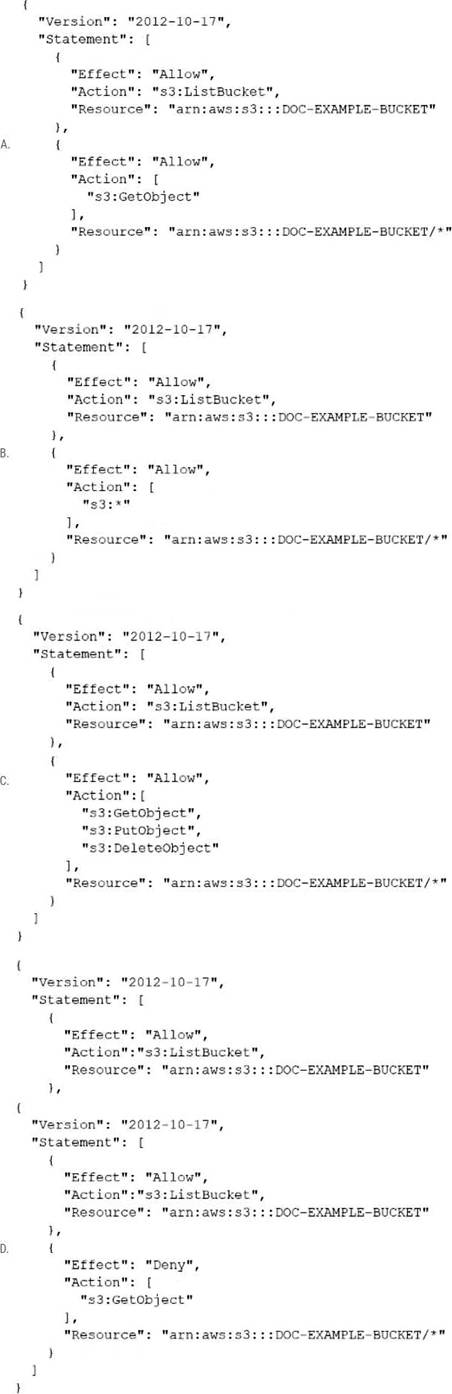
- A . Option A
- B . Option B
- C . Option C
- D . Option D
A developer is testing a new file storage application that uses an Amazon CloudFront distribution to serve content from an Amazon S3 bucket. The distribution accesses the S3 bucket by using an origin access identity (OAI). The S3 bucket’s permissions explicitly deny access to all other users.
The application prompts users to authenticate on a login page and then uses signed cookies to allow users to access their personal storage directories. The developer has configured the distribution to use its default cache behavior with restricted viewer access and has set the origin to point to the S3 bucket. However, when the developer tries to navigate to the login page, the developer receives a 403 Forbidden error.
The developer needs to implement a solution to allow unauthenticated access to the login page. The solution also must keep all private content secure.
Which solution will meet these requirements?
- A . Add a second cache behavior to the distribution with the same origin as the default cache behavior. Set the path pattern for the second cache behavior to the path of the login page, and make viewer access unrestricted. Keep the default cache behavior’s settings unchanged.
- B . Add a second cache behavior to the distribution with the same origin as the default cache behavior. Set the path pattern for the second cache behavior to *, and make viewer access restricted. Change the default cache behavior’s path pattern to the path of the login page, and make viewer access unrestricted.
- C . Add a second origin as a failover origin to the default cache behavior. Point the failover origin to the S3 bucket. Set the path pattern for the primary origin to *, and make viewer access restricted. Set the path pattern for the failover origin to the path of the login page, and make viewer access unrestricted.
- D . Add a bucket policy to the S3 bucket to allow read access. Set the resource on the policy to the Amazon Resource Name (ARN) of the login page object in the S3 bucket. Add a CloudFront function to the default cache behavior to redirect unauthorized requests to the login page’s S3 URL.
A
Explanation:
The solution that will meet the requirements is to add a second cache behavior to the distribution with the same origin as the default cache behavior. Set the path pattern for the second cache behavior to the path of the login page, and make viewer access unrestricted. Keep the default cache behavior’s settings unchanged. This way, the login page can be accessed without authentication, while all other content remains secure and requires signed cookies. The other options either do not allow unauthenticated access to the login page, or expose private content to unauthorized users.
Reference: Restricting Access to Amazon S3 Content by Using an Origin Access Identity
A company has an AWS Step Functions state machine named myStateMachine. The company configured a service role for Step Functions. The developer must ensure that only the myStateMachine state machine can assume the service role.
Which statement should the developer add to the trust policy to meet this requirement?
- A . "Condition": { "ArnLike": { "aws:SourceArn":"urn:aws:states:ap-south-1:111111111111:stateMachine:myStateMachine" } }
- B . "Condition": { "ArnLike": { "aws:SourceArn":"arn:aws:states:ap-south-1:*:stateMachine:myStateMachine" } }
- C . "Condition": { "StringEquals": { "aws:SourceAccount": "111111111111" } }
- D . "Condition": { "StringNotEquals": { "aws:SourceArn":"arn:aws:states:ap-south-1:111111111111:stateMachine:myStateMachine" } }
A
Explanation:
Why Option A is Correct:
The ArnLike condition with the specific ARN for myStateMachine ensures that only this state machine can assume the role. The format urn:aws:states is correct for specifying Step Functions resources.
Why Other Options are Incorrect:
Option B: Wildcards (*) in the ARN allow more resources to assume the role, which violates the requirement.
Option C: This condition restricts the account but not the specific state machine.
Option D: A StringNotEquals condition is used to deny specific values, which does not ensure exclusivity for the desired state machine.
AWS Documentation
Reference: IAM Trust Policies for Step Functions
A developer has written a distributed application that uses micro services. The microservices are running on Amazon EC2 instances. Because of message volume, the developer is unable to match log output from each microservice to a specific transaction. The developer needs to analyze the message flow to debug the application.
Which combination of steps should the developer take to meet this requirement? (Select TWO.)
- A . Download the AWS X-Ray daemon. Install the daemon on an EC2 instance. Ensure that the EC2 instance allows UDP traffic on port 2000.
- B . Configure an interface VPC endpoint to allow traffic to reach the global AWS X-Ray daemon on TCP port 2000.
- C . Enable AWS X-Ray. Configure Amazon CloudWatch to push logs to X-Ray.
- D . Add the AWS X-Ray software development kit (SDK) to the microservices. Use X-Ray to trace requests that each microservice makes.
- E . Set up Amazon CloudWatch metric streams to collect streaming data from the microservices.
A company uses an AWS Lambda function to perform natural language processing (NLP) tasks. The company has attached a Lambda layer to the function. The Lambda layer contain scientific libraries that the function uses during processing.
The company added a large, pre-trained text-classification model to the Lambda layer. The addition increased the size of the Lambda layer to 8.7 GB. After the addition and a recent deployment, the Lambda function returned a RequestEntityTooLargeException error.
The company needs to update the Lambda function with a high-performing and portable solution to decrease the initialization time for the function.
Which solution will meet these requirements?
- A . Store the large pre-trained model in an Amazon S3 bucket. Use the AWS SDK to access the model.
- B . Create an Amazon EFS file system to store the large pre-trained model. Mount the file system to an Amazon EC2 instance. Configure the Lambda function to use the EFS file system.
- C . Split the components of the Lambda layer into five new Lambda layers. Zip the new layers, and attach the layers to the Lambda function. Update the function code to use the new layers.
- D . Create a Docker container that includes the scientific libraries and the pre-trained model. Update the Lambda function to use the container image.
D
Explanation:
Requirement Summary:
NLP Lambda function with a large pre-trained model
Lambda layer became 8.7 GB → Exceeds AWS limits
Function returns RequestEntityTooLargeException
Need: High-performing, portable, low initialization time
Important AWS Limits:
Lambda Layers size limit (combined across all layers): 250 MB (unzipped)
Deployment package size (unzipped): 250 MB
Lambda container image support allows up to 10 GB image size
Evaluate Options:
A: Store model in S3 and load during execution Leads to cold start latency every time
Model loading from S3 is slower and not suitable for real-time NLP Not optimal for performance
B: Use EFS mounted to Lambda
⚠️ Valid for large models, but adds latency during cold start as model loads from EFS Requires EFS setup, VPC, and has added network I/O overhead Still slower than bundling in container image
C: Split into five Lambda layers
Still violates the total layer size limit of 250 MB (unzipped)
You cannot exceed that even with multiple layers
D: Use Docker container image
Allows bundling up to 10 GB of dependencies and models High portability and performance
Avoids latency of downloading models at runtime
Ideal for scientific/NLP models
Lambda container image support: https://docs.aws.amazon.com/lambda/latest/dg/images-create.html
Lambda limits: https://docs.aws.amazon.com/lambda/latest/dg/gettingstarted-limits.html
Using large models with Lambda: https://aws.amazon.com/blogs/machine-learning/deploying-large-machine-learning-models-on-aws-lambda-with-container-images/