
Practice Free DVA-C02 Exam Online Questions
A company wants to use AWS AppConfig to gradually deploy a new feature to 15% of users to test the feature before a full deployment.
Which solution will meet this requirement with the LEAST operational overhead?
- A . Set up a custom script within the application to randomly select 15% of users. Assign a flag for the new feature to the selected users.
- B . Create separate AWS AppConfig feature flags for both groups of users. Configure the flags to target 15% of users.
- C . Create an AWS AppConfig feature flag. Define a variant for the new feature, and create a rule to target 15% of users.
- D . Use AWS AppConfig to create a feature flag without variants. Implement a custom traffic-splitting mechanism in the application code.
C
Explanation:
AWS AppConfig Feature Flags are designed to release features safely with minimal code changes. The lowest operational overhead approach is to use a single feature flag and configure it to deliver the feature to a percentage of users through built-in targeting rules and variants.
With option C, the developer creates one AppConfig feature flag and defines a variant that represents the new feature behavior (for example, enabled=true or a “newExperience” variant). Then the developer creates a rule in AppConfig to target 15% of users. AppConfig feature flags support rules that can evaluate attributes (such as user IDs or other contextual attributes supplied by the application) and apply percentage-based rollout. This avoids building and maintaining custom rollout logic in the application.
Option A and D both require implementing and maintaining custom traffic splitting in code, which increases complexity and operational burden, and risks inconsistent behavior across clients/services.
Option B adds extra configuration overhead and complexity by managing multiple feature flags for “groups” instead of using a single flag with a variant and rule. A single flag with variants is the clean, scalable pattern.
Therefore, create one AppConfig feature flag, define a variant, and configure a rule to target 15% of users.
A developer is creating a microservices application that runs across multiple compute environments. The application must securely access secrets that are stored in AWS Secrets Manager with minimal network latency. The developer wants a solution that reduces the number of direct calls to Secrets Manager and simplifies secrets management across environments.
Which solution will meet these requirements with the LEAST operational overhead?
- A . Create a custom script that retrieves secrets directly from Secrets Manager and caches the secrets in a local database for each compute environment.
- B . Install the Secrets Manager Agent in each compute environment. Configure the agent to cache
secrets locally. Securely retrieve the secrets from Secrets Manager as needed. - C . Implement lazy loading logic in the application to fetch secrets directly from Secrets Manager and to cache the secrets in Redis.
- D . Store the secrets in an Amazon S3 bucket. Retrieve and load the secrets as environment variables during application startup for each compute environment.
B
Explanation:
The Secrets Manager Agent provides an out-of-the-box solution for securely caching secrets locally, reducing latency and operational overhead.
Why Option B is Correct:
Caching: The agent securely caches secrets locally, minimizing Secrets Manager API calls.
Security: Secrets remain secure during retrieval and storage.
Low Operational Overhead: Managed solution eliminates the need for custom logic.
Why Not Other Options:
Option A: Custom scripts introduce complexity and require ongoing maintenance.
Option C: Using Redis requires managing an additional service, increasing overhead.
Option D: Storing secrets in S3 lacks the fine-grained security controls of Secrets Manager.
Caching Secrets in AWS Secrets Manager
A company has developed a new serverless application using AWS Lambda functions that will be deployed using the AWS Serverless Application Model (AWS SAM) CLI.
Which step should the developer complete prior to deploying the application?
- A . Compress the application to a zip file and upload it into AWS Lambda.
- B . Test the new AWS Lambda function by first tracing it m AWS X-Ray.
- C . Bundle the serverless application using a SAM package.
- D . Create the application environment using the eb create my-env command.
C
Explanation:
This step should be completed prior to deploying the application because it prepares the application artifacts for deployment. The AWS Serverless Application Model (AWS SAM) is a framework that simplifies building and deploying serverless applications on AWS. The AWS SAM CLI is a command-line tool that helps you create, test, and deploy serverless applications using AWS SAM templates. The sam package command bundles the application artifacts, such as Lambda function code and API definitions, and uploads them to an Amazon S3 bucket. The command also returns a CloudFormation template that is ready to be deployed with the sam deploy command. Compressing the application to a zip file and uploading it to AWS Lambda will not work because it does not use AWS SAM templates or CloudFormation. Testing the new Lambda function by first tracing it in AWS X-Ray will not prepare the application for deployment, but only monitor its performance and errors. Creating the application environment using the eb create my-env command will not work because it is a command for AWS Elastic Beanstalk, not AWS SAM.
A company has an application that runs as a series of AWS Lambda functions. Each Lambda function receives data from an Amazon Simple Notification Service (Amazon SNS) topic and writes the data to an Amazon Aurora DB instance.
To comply with an information security policy, the company must ensure that the Lambda functions all use a single securely encrypted database connection string to access Aurora.
Which solution will meet these requirements’?
- A . Use IAM database authentication for Aurora to enable secure database connections for ail the Lambda functions.
- B . Store the credentials and read the credentials from an encrypted Amazon RDS DB instance.
- C . Store the credentials in AWS Systems Manager Parameter Store as a secure string parameter.
- D . Use Lambda environment variables with a shared AWS Key Management Service (AWS KMS) key for encryption.
A
Explanation:
This solution will meet the requirements by using IAM database authentication for Aurora, which enables using IAM roles or users to authenticate with Aurora databases instead of using passwords or other secrets. The developer can use IAM database authentication for Aurora to enable secure database connections for all the Lambda functions that access Aurora DB instance. The developer can create an IAM role with permission to connect to Aurora DB instance and attach it to each Lambda function. The developer can also configure Aurora DB instance to use IAM database authentication and enable encryption in transit using SSL certificates. This way, the Lambda functions can use a single securely encrypted database connection string to access Aurora without needing any secrets or passwords.
Option B is not optimal because it will store the credentials and read them from an encrypted Amazon RDS DB instance, which may introduce additional costs and complexity for managing and accessing another RDS DB instance.
Option C is not optimal because it will store the credentials in AWS Systems Manager Parameter Store as a secure string parameter, which may require additional steps or permissions to retrieve and decrypt the credentials from Parameter Store.
Option D is not optimal because it will use Lambda environment variables with a shared AWS Key Management Service (AWS KMS) key for encryption, which may not be secure or scalable as environment variables are stored as plain text unless encrypted with AWS KMS.
Reference: [IAM Database Authentication for MySQL and PostgreSQL], [Using SSL/TLS to Encrypt a Connection to a DB Instance]
A company is building a serverless application that uses AWS Lambda functions. The company needs to create a set of test events to test Lambda functions in a development environment. The test events will be created once and then will be used by all the developers in an 1AM developer group. The test events must be editable by any of the 1AM users in the 1AM developer group.
Which solution will meet these requirements?
- A . Create and store the test events in Amazon S3 as JSON objects. Allow S3 bucket access to all 1AM users.
- B . Create the test events. Configure the event sharing settings to make the test events shareable.
- C . Create and store the test events in Amazon DynamoDB. Allow access to DynamoDB by using 1AM roles.
- D . Create the test events. Configure the event sharing settings to make the test events private.
A company runs a new application on AWS Elastic Beanstalk. The company needs to deploy updates to the application. The updates must not cause any downtime for application users. The deployment must forward a specified percentage of incoming client traffic to a new application version during an evaluation period.
Which deployment type will meet these requirements?
- A . Rolling
- B . Traffic-splitting
- C . In-place
- D . Immutable
B
Explanation:
AWS Elastic Beanstalk supports several deployment policies, and in this case, the requirement is to forward a specific percentage of traffic to the new version without causing downtime. The Traffic-splitting deployment policy is the most appropriate choice.
Traffic-splitting Deployment: This deployment method allows you to gradually shift a specified percentage of incoming traffic from the old environment version to the new one. During the evaluation period, if any issues are detected, the traffic can be redirected back to the old version.
No Downtime: This method ensures no downtime since both versions of the application run concurrently, and traffic is split between them.
Alternatives:
Rolling deployments (Option A): These gradually replace instances but may result in partial downtime if some instances fail during deployment.
In-place deployments (Option C): In-place deployments replace instances without creating new ones, which can lead to downtime.
Immutable deployments (Option D): While this ensures no downtime by creating entirely new instances, it doesn’t provide traffic splitting during the evaluation phase.
Elastic Beanstalk Deployment Policies
A developer is building an image-processing application that includes an AWS Lambda function. The Lambda function moves images from one AWS service to another AWS service for image processing.
For images that are larger than 2 MB, the Lambda function returns the following error: "Task timed out after 3.01 seconds."
The developer needs to resolve the error without modifying the Lambda function code.
Which solution will meet these requirements?
- A . Increase the Lambda function’s timeout value.
- B . Configure the Lambda function to not move images that are larger than 2 MB.
- C . Request a concurrency quota increase for the Lambda function.
- D . Configure provisioned concurrency for the Lambda function.
A
Explanation:
The error message "Task timed out after 3.01 seconds" indicates that the Lambda invocation exceeded the function’s configured timeout setting, which appears to be set to approximately 3 seconds. Larger images (>2 MB) take longer to transfer between services (due to network latency, throughput, and downstream service response time), so the runtime crosses the timeout threshold and Lambda forcibly terminates the execution. This is a configuration problem, not necessarily a code defect.
To resolve the issue without modifying the function code, the developer should increase the Lambda function’s timeout value. Lambda allows configuring the maximum runtime per invocation (up to the service limit). By increasing the timeout to a value that comfortably covers the expected transfer and processing initiation time for larger payloads, the function can complete its work successfully. This directly addresses the failure mode while keeping the existing implementation unchanged.
Option D (provisioned concurrency) reduces cold start latency by keeping execution environments initialized, but it does not extend the allowed runtime for a single invocation. If the function consistently needs more than 3 seconds for larger images, provisioned concurrency will not prevent timeouts.
Option C (concurrency quota increase) increases the number of concurrent executions allowed, which can help throughput under load, but again does not affect per-invocation runtime limits.
Option B avoids the problem by skipping large images, but it violates the functional need to process them and is not a general solution.
Therefore, the correct solution is A: increase the Lambda timeout so the function has sufficient time to move larger images between AWS services.
An application interacts with Amazon Aurora to store and track customer information. The primary database is set up with multiple read replicas for improving the performance of the read queries. However, one of the Aurora replicas is receiving most or all of the traffic, while the other Aurora replica remains idle.
How can this issue be resolved?
- A . Disable application-level DNS caching.
- B . Enable application-level DNS caching.
- C . Enable application pooling.
- D . Disable application pooling.
A developer has written the following IAM policy to provide access to an Amazon S3 bucket:
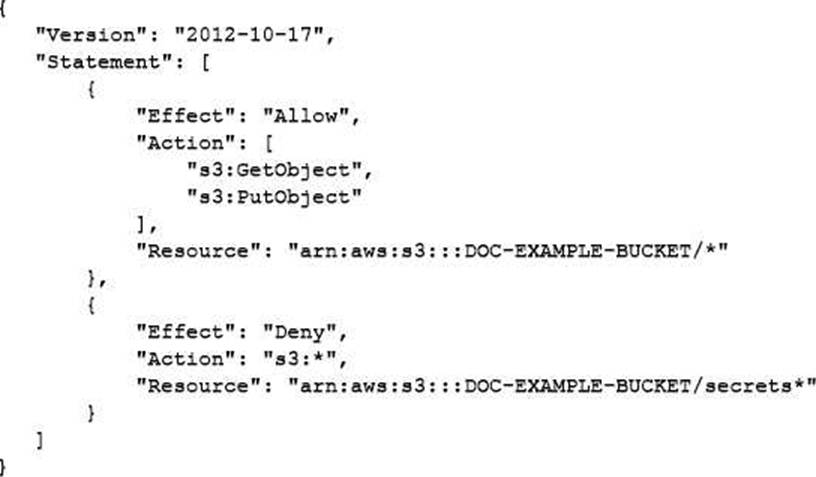
Which access does the policy allow regarding the s3: GetObject and s3: PutObject actions?
- A . Access on all buckets except the “DOC-EXAMPLE-BUCKET” bucket
- B . Access on all buckets that start with “DOC-EXAMPLE-BUCKET” except the “DOC-EXAMPLE-BUCKET/secrets” bucket
- C . Access on all objects in the “DOC-EXAMPLE-BUCKET” bucket along with access to all S3 actions for objects in the “DOC-EXAMPLE-BUCKET” bucket that start with “secrets”
- D . Access on all objects in the “DOC-EXAMPLE-BUCKET” bucket except on objects that start with “secrets”
D
Explanation:
The IAM policy shown in the image is a resource-based policy that grants or denies access to an S3 bucket based on certain conditions. The first statement allows access to any S3 action on any object in the “DOC-EXAMPLE-BUCKET” bucket when the request is made over HTTPS (the value of aws: SecureTransport is true). The second statement denies access to the s3: GetObject and s3: PutObject actions on any object in the “DOC-EXAMPLE-BUCKET/secrets” prefix when the request is made over HTTP (the value of aws: SecureTransport is false). Therefore, the policy allows access on all objects in the “DOC-EXAMPLE-BUCKET” bucket except on objects that start with “secrets”.
Reference: Using IAM policies for Amazon S3
A developer is deploying an application on Amazon EC2 instances that run in Account A. The application needs to read data from an existing Amazon Kinesis data stream in Account B.
Which actions should the developer take to provide the application with access to the stream? (Select TWO.)
- A . Update the instance profile role in Account A with stream read permissions.
- B . Create an IAM role with stream read permissions in Account B.
- C . Add a trust policy to the instance profile role and IAM role in Account B to allow the instance profile role to assume the IAM role.
- D . Add a trust policy to the instance profile role and IAM role in Account B to allow reads from the stream.
- E . Add a resource-based policy in Account B to allow read access from the instance profile role.
B, C
Explanation:
For cross-account access from EC2 in Account A to a Kinesis data stream in Account B, the recommended secure pattern is to use STS AssumeRole into a role in the resource-owning account (Account B). This ensures Account B retains control over what permissions are granted to external principals and allows Account A workloads to obtain temporary credentials scoped to the required actions.
First, create an IAM role in Account B that has the necessary Kinesis read permissions (such as kinesis: GetRecords, kinesis: GetShardIterator, kinesis: DescribeStream, and related read actions as required). That corresponds to option B. This role represents the permission boundary controlled by Account B for accessing its stream.
Second, configure the role’s trust policy in Account B to allow the instance profile role (or another IAM principal) from Account A to assume it. In practice, the trust relationship is defined on the Account B role and specifies the Account A role as the trusted principal, enabling sts: AssumeRole. This corresponds to option C (the intent is “allow the instance profile role to assume the IAM role in Account B”).
Option A alone is insufficient because permissions in Account A do not grant access to resources owned by Account B without an explicit cross-account authorization path.
Option D is incorrect because trust policies do not “allow reads from the stream”; they allow principals to assume roles, and permissions policies allow service actions.
Option E (resource-based policy) is not the primary mechanism for Kinesis Data Streams cross-account access in this scenario compared with the standard role assumption model; the secure and common approach is to assume a role in the owning account.
Therefore, the correct actions are B (create the role with read permissions in Account B) and C (configure trust to allow Account A’s instance role to assume it).