
Practice Free DVA-C02 Exam Online Questions
An application runs on multiple EC2 instances behind an ELB.
Where is the session data best written so that it can be served reliably across multiple requests?
- A . Write data to Amazon ElastiCache
- B . Write data to Amazon Elastic Block Store
- C . Write data to Amazon EC2 instance Store
- D . Wide data to the root filesystem
A
Explanation:
The solution that will meet the requirements is to write data to Amazon ElastiCache. This way, the application can write session data to a fast, scalable, and reliable in-memory data store that can be served reliably across multiple requests. The other options either involve writing data to persistent storage, which is slower and more expensive than in-memory storage, or writing data to the root filesystem, which is not shared among multiple EC2 instances.
Reference: Using ElastiCache for session management
A developer manages an AWS Lambda function written in the latest version of .NET. The function processes data from an Amazon S3 bucket sporadically throughout the day. The function experiences cold start times of up to 10 seconds, negatively affecting latency-sensitive downstream workloads.
The developer needs to improve the function’s performance.
Which solution will meet this requirement?
- A . Publish the function and create an alias. Enable Lambda SnapStart on the published version.
- B . Enable reserved concurrency on the function.
- C . Configure Lambda layers to separate .NET dependencies from the function code.
- D . Add the Lambda function to a VPC and configure an S3 gateway endpoint.
A
Explanation:
AWS Lambda SnapStart is designed specifically to reduce cold start latency for Java and .NET runtimes. SnapStart works by initializing the function once, taking a snapshot of the execution environment, and then reusing that snapshot for future cold starts. This dramatically reduces startup time, often from several seconds to milliseconds.
SnapStart requires the function to be published as a version, and an alias must reference that version. AWS documentation clearly states that SnapStart is the recommended solution for latency-sensitive Lambda workloads with infrequent invocations.
Reserved concurrency (Option B) limits scaling but does not eliminate cold starts. Lambda layers (Option C) improve code organization but have minimal impact on cold start latency. Adding the function to a VPC (Option D) typically increases cold start time due to network interface initialization.
Therefore, enabling SnapStart on a published .NET Lambda function is the correct and AWS-endorsed solution.
A company is building a serverless application on AWS. The application uses an AWS Lambda function to process customer orders 24 hours a day, 7 days a week. The Lambda function calls an external vendor’s HTTP API to process payments.
During load tests, a developer discovers that the external vendor payment processing API occasionally times out and returns errors. The company expects that some payment processing API calls will return errors.
The company wants the support team to receive notifications in near real time only when the payment processing external API error rate exceed 5% of the total number of transactions in an hour. Developers need to use an existing Amazon Simple Notification Service (Amazon SNS) topic that is configured to notify the support team.
Which solution will meet these requirements?
- A . Write the results of payment processing API calls to Amazon CloudWatch. Use Amazon CloudWatch Logs Insights to query the CloudWatch logs. Schedule the Lambda function to check the CloudWatch logs and notify the existing SNS topic.
- B . Publish custom metrics to CloudWatch that record the failures of the external payment processing API calls. Configure a CloudWatch alarm to notify the existing SNS topic when error rate exceeds the specified rate.
- C . Publish the results of the external payment processing API calls to a new Amazon SNS topic.
Subscribe the support team members to the new SNS topic. - D . Write the results of the external payment processing API calls to Amazon S3. Schedule an Amazon Athena query to run at regular intervals. Configure Athena to send notifications to the existing SNS topic when the error rate exceeds the specified rate.
B
Explanation:
Amazon CloudWatch is a service that monitors AWS resources and applications. The developer can publish custom metrics to CloudWatch that record the failures of the external payment processing API calls. The developer can configure a CloudWatch alarm to notify the existing SNS topic when the error rate exceeds 5% of the total number of transactions in an hour. This solution will meet the requirements in a near real-time and scalable way.
Reference: [What Is Amazon CloudWatch? – Amazon CloudWatch]
[Publishing Custom Metrics – Amazon CloudWatch]
[Creating Amazon CloudWatch Alarms – Amazon CloudWatch]
A company is building a serverless application on AWS. The application uses an AWS Lambda function to process customer orders 24 hours a day, 7 days a week. The Lambda function calls an external vendor’s HTTP API to process payments.
During load tests, a developer discovers that the external vendor payment processing API occasionally times out and returns errors. The company expects that some payment processing API calls will return errors.
The company wants the support team to receive notifications in near real time only when the payment processing external API error rate exceed 5% of the total number of transactions in an hour. Developers need to use an existing Amazon Simple Notification Service (Amazon SNS) topic that is configured to notify the support team.
Which solution will meet these requirements?
- A . Write the results of payment processing API calls to Amazon CloudWatch. Use Amazon CloudWatch Logs Insights to query the CloudWatch logs. Schedule the Lambda function to check the CloudWatch logs and notify the existing SNS topic.
- B . Publish custom metrics to CloudWatch that record the failures of the external payment processing API calls. Configure a CloudWatch alarm to notify the existing SNS topic when error rate exceeds the specified rate.
- C . Publish the results of the external payment processing API calls to a new Amazon SNS topic.
Subscribe the support team members to the new SNS topic. - D . Write the results of the external payment processing API calls to Amazon S3. Schedule an Amazon Athena query to run at regular intervals. Configure Athena to send notifications to the existing SNS topic when the error rate exceeds the specified rate.
B
Explanation:
Amazon CloudWatch is a service that monitors AWS resources and applications. The developer can publish custom metrics to CloudWatch that record the failures of the external payment processing API calls. The developer can configure a CloudWatch alarm to notify the existing SNS topic when the error rate exceeds 5% of the total number of transactions in an hour. This solution will meet the requirements in a near real-time and scalable way.
Reference: [What Is Amazon CloudWatch? – Amazon CloudWatch]
[Publishing Custom Metrics – Amazon CloudWatch]
[Creating Amazon CloudWatch Alarms – Amazon CloudWatch]
A real-time messaging application uses Amazon API Gateway WebSocket APIs with backend HTTP service. A developer needs to build a feature in the application to identify a client that keeps connecting to and disconnecting from the WebSocket connection. The developer also needs the ability to remove the client
Which combination of changes should the developer make to the application to meet these requirements? (Select TWO.)
- A . Switch to HTTP APIs in the backend service.
- B . Switch to REST APIs in the backend service.
- C . Use the callback URL to disconnect the client from the backend service.
- D . Add code to track the client status in Amazon ElastiCache in the backend service.
- E . Implement $connect and $disconnect routes in the backend service.
D,E
Explanation:
Requirement Summary:
WebSocket-based messaging app using API Gateway WebSocket APIs
Need to:
Identify clients repeatedly connecting/disconnecting
Be able to remove problematic clients
Evaluate Options:
A developer is trying get data from an Amazon DynamoDB table called demoman-table. The developer configured the AWS CLI to use a specific IAM use’s credentials and ran the following command.
The command returned errors and no rows were returned.
What is the MOST likely cause of these issues?
- A . The command is incorrect; it should be rewritten to use put-item with a string argument
- B . The developer needs to log a ticket with AWS Support to enable access to the demoman-table
- C . Amazon DynamoOB cannot be accessed from the AWS CLI and needs to called via the REST API
- D . The IAM user needs an associated policy with read access to demoman-table
D
Explanation:
This solution will most likely solve the issues because it will grant the IAM user the necessary permission to access the DynamoDB table using the AWS CLI command. The error message indicates that the IAM user does not have sufficient access rights to perform the scan operation on the table.
Option A is not optimal because it will change the command to use put-item instead of scan, which will not achieve the desired result of getting data from the table.
Option B is not optimal because it will involve contacting AWS Support, which may not be necessary or efficient for this issue.
Option C is not optimal because it will state that DynamoDB cannot be accessed from the AWS CLI, which is incorrect as DynamoDB supports AWS CLI commands.
Reference: AWS CLI for DynamoDB, [IAM Policies for DynamoDB]
A developer is receiving HTTP 400: ThrottlingException errors intermittently when calling the Amazon CloudWatch API. When a call fails, no data is retrieved.
What best practice should first be applied to address this issue?
- A . Contact AWS Support for a limit increase.
- B . Use the AWS CLI to get the metrics.
- C . Analyze the applications and remove the API call.
- D . Retry the call with exponential backoff.
A developer is troubleshooting an application mat uses Amazon DynamoDB in the uswest-2 Region.
The application is deployed to an Amazon EC2 instance. The application requires read-only permissions to a table that is named Cars The EC2 instance has an attached IAM role that contains the following IAM policy.
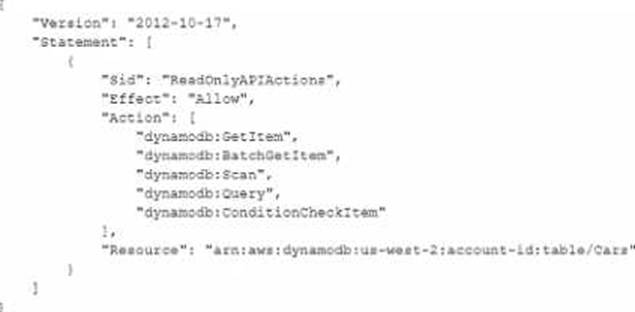
When the application tries to read from the Cars table, an Access Denied error occurs.
How can the developer resolve this error?
- A . Modify the IAM policy resource to be "arn aws dynamo* us-west-2 account-id table/*"
- B . Modify the IAM policy to include the dynamodb * action
- C . Create a trust policy that specifies the EC2 service principal. Associate the role with the policy.
- D . Create a trust relationship between the role and dynamodb Amazonas com.
C
Explanation:
https: //docs.aws.amazon.com/amazondynamodb/latest/developerguide/access-control-overview.html#access-control-resource-ownership
A developer is building an application on a fleet of Amazon EC2 Linux instances that run the Apache web server. The application must send API calls that contain sensitive customer data to a second fleet of Linux instances that also run Apache. The two fleets are deployed in peered VPCs within the same AWS account and AWS Region.
All sensitive data must be encrypted in transit.
Which solution will meet these requirements in the MOST operationally efficient way?
- A . Create security groups in each VPC that allow traffic only from the other fleet’s security group.
- B . Create an AWS Site-to-Site VPN connection between the two peered VPCs and route the API traffic through the VPN.
- C . Encrypt all Amazon EBS volumes with a customer managed AWS KMS key and attach an IAM instance profile that allows access to the key.
- D . Request a certificate through AWS Certificate Manager (ACM) and redeploy both fleets by using TLS for Apache with the ACM-issued certificate.
D
Explanation:
The requirement in this scenario is encryption in transit for sensitive data exchanged between two EC2-based application fleets. AWS best practices clearly distinguish between network isolation and transport-layer encryption. Security groups (Option A) restrict traffic but do not encrypt it. EBS encryption (Option C) protects data at rest and does not affect data transmitted over the network.
Although a Site-to-Site VPN (Option B) would encrypt traffic, AWS documentation considers this approach unnecessary and operationally heavy when both workloads run inside AWS and application-level encryption is sufficient.
The most efficient and AWS-recommended approach is to use TLS (HTTPS) for application communication. AWS Certificate Manager (ACM) allows developers to provision and manage TLS certificates without manual certificate handling. Apache can be configured to use HTTPS with ACM-issued certificates, ensuring that all API traffic between the fleets is encrypted in transit using industry-standard TLS.
AWS documentation consistently recommends TLS for service-to-service communication within AWS when sensitive data is transmitted. This approach minimizes operational overhead, avoids additional networking infrastructure, and integrates natively with existing EC2-based applications.
Therefore, using ACM-issued certificates and HTTPS for Apache communication is the correct and most efficient solution.
A developer is creating an application that will give users the ability to store photos from their cellphones in the cloud. The application needs to support tens of thousands of users. The application uses an Amazon API Gateway REST API that is integrated with AWS Lambda functions to process the photos. The application stores details about the photos in Amazon DynamoDB.
Users need to create an account to access the application. In the application, users must be able to upload photos and retrieve previously uploaded photos. The photos will range in size from 300 KB to 5 MB.
Which solution will meet these requirements with the LEAST operational overhead?
- A . Use Amazon Cognito user pools to manage user accounts. Create an Amazon Cognito user pool authorizer in API Gateway to control access to the API. Use the Lambda function to store the photos and details in the DynamoDB table. Retrieve previously uploaded photos directly from the DynamoDB table.
- B . Use Amazon Cognito user pools to manage user accounts. Create an Amazon Cognito user pool authorizer in API Gateway to control access to the API. Use the Lambda function to store the photos in Amazon S3. Store the object’s S3 key as part of the photo details in the DynamoDB table. Retrieve previously uploaded photos by querying DynamoDB for the S3 key.
- C . Create an IAM user for each user of the application during the sign-up process. Use IAM authentication to access the API Gateway API. Use the Lambda function to store the photos in Amazon S3. Store the object’s S3 key as part of the photo details in the DynamoDB table. Retrieve previously uploaded photos by querying DynamoDB for the S3 key.
- D . Create a users table in DynamoDB. Use the table to manage user accounts. Create a Lambda authorizer that validates user credentials against the users table. Integrate the Lambda authorizer with API Gateway to control access to the API. Use the Lambda function to store the photos in Amazon S3. Store the object’s S3 key as par of the photo details in the DynamoDB table. Retrieve previously uploaded photos by querying DynamoDB for the S3 key.
B
Explanation:
Amazon Cognito user pools is a service that provides a secure user directory that scales to hundreds of millions of users. The developer can use Amazon Cognito user pools to manage user accounts and create an Amazon Cognito user pool authorizer in API Gateway to control access to the API. The developer can use the Lambda function to store the photos in Amazon S3, which is a highly scalable, durable, and secure object storage service. The developer can store the object’s S3 key as part of the photo details in the DynamoDB table, which is a fast and flexible NoSQL database service. The developer can retrieve previously uploaded photos by querying DynamoDB for the S3 key and fetching the photos from S3. This solution will meet the requirements with the least operational overhead.
Reference: [Amazon Cognito User Pools]
[Use Amazon Cognito User Pools – Amazon API Gateway]
[Amazon Simple Storage Service (S3)]
[Amazon DynamoDB]