
Practice Free DP-300 Exam Online Questions
You have an Azure SQL managed instance named SQLMI1 that hosts 10 databases.
You need to implement alerts by using Azure Monitor. The solution must meet the following requirements:
Minimize costs.
Aggregate Intelligent Insights telemetry from each database.
What should you do?
- A . From the Diagnostic settings of each database, select Send to Log Analytics.
- B . From the Diagnostic settings of each database, select Stream to an event hub.
- C . From the Diagnostic settings of SQLMI1. select Send to Log Analytics.
- D . From the Diagnostic settings of SQLMI1. select Stream to an event hub.
A
Explanation:
Reference: https://docs.microsoft.com/en-us/azure/azure-sql/database/metrics-diagnostic-telemetry-logging-streaming-export-configure?tabs=azure-portal#configure-the-streaming-export-of-diagnostic-telemetry
You need to recommend a solution to ensure that the performance of DB3 is optimized after the migration to Azure SQL Database. The solution must meet availability requirements.
What should you include in the recommendation?
- A . Resource Governor
- B . a custom resource pool
- C . vertical scaling
- D . horizontal scaling
You have 40 Azure SQL databases, each for a different customer. All the databases reside on the same Azure SQL Database server.
You need to ensure that each customer can only connect to and access their respective database.
Which two actions should you perform? Each correct answer presents part of the solution. NOTE: Each correct selection is worth one point.
- A . Implement row-level security (RLS).
- B . Create users in each database.
- C . Configure the database firewall.
- D . Configure the server firewall.
- E . Create logins in the master database.
- F . Implement Always Encrypted.
B, E
Explanation:
Manage database access by adding users to the database, or allowing user access with secure connection strings.
Database-level firewall rules only apply to individual databases.
Reference: https://docs.microsoft.com/en-us/azure/azure-sql/database/secure-database-tutorial
Note: This question is part of a series of questions that present the same scenario. Each question in the series contains a unique solution that might meet the stated goals. Some question sets might have more than one correct solution, while others might not have a correct solution.
After you answer a question in this section, you will NOT be able to return to it. As a result, these questions will not appear in the review screen.
You have two Azure SQL Database servers named Server1 and Server2. Each server contains an Azure SQL database named Database1.
You need to restore Database1 from Server1 to Server2. The solution must replace the existing Database1 on Server2.
Solution: You run the Remove-AzSqlDatabase PowerShell cmdlet for Database1 on Server2. You run the Restore-AzSqlDatabase PowerShell cmdlet for Database1 on Server2.
Does this meet the goal?
- A . Yes
- B . No
B
Explanation:
Instead restore Database1 from Server1 to the Server2 by using the RESTORE Transact-SQL command and the REPLACE option.
Note: REPLACE should be used rarely and only after careful consideration. Restore normally prevents accidentally overwriting a database with a different database. If the database specified in a RESTORE statement already exists on the current server and the specified database family GUID differs from the database family GUID recorded in the backup set, the database is not restored. This is an important safeguard.
Reference: https://docs.microsoft.com/en-us/sql/t-sql/statements/restore-statements-transact-sql
You create five Azure SQL Database instances on the same logical server.
In each database, you create a user for an Azure Active Directory (Azure AD) user named User1.
User1 attempts to connect to the logical server by using Azure Data Studio and receives a login error.
You need to ensure that when User1 connects to the logical server by using Azure Data Studio, User1 can see all the databases.
What should you do?
- A . Create User1 in the master database.
- B . Assign User1 the db_datareader role for the master database.
- C . Assign User1 the db_datareader role for the databases that Userl creates.
- D . Grant select on sys.databases to public in the master database.
A
Explanation:
Reference: https://docs.microsoft.com/en-us/azure/azure-sql/database/logins-create-manage
You have a Microsoft SQL Server 2019 instance in an on-premises datacenter. The instance contains a 4-TB database named DB1.
You plan to migrate DB1 to an Azure SQL Database managed instance.
What should you use to minimize downtime and data loss during the migration?
- A . database mirroring
- B . distributed availability groups
- C . Always On Availability Group
- D . Azure Database Migration Service
You have an Azure subscription that contain an Azure SQL managed instance named SQLMI1 and a Log Analytics workspace named Workspace1.
You need to collect performance metrics for SQLMI1 and stream the metrics to Workspace1.
- A . Create the private endpoint connection on SQLMI1.
- B . Configure Azure SQL Analytics to use Workspace1.
- C . Modify the Computer + storage settings for SQLMI1.
- D . Modify the diagnostic settings for SQLMI1.
SIMULATION
Task 7
You plan to create an automation runbook that will create database users in db1 from Azure AD identities. You need to configure sq1370O6895 to support the creation of new database users.
Set up a Microsoft Entra tenant and associate it with your Azure subscription. You can use the Microsoft Entra portal or the Azure portal to create and manage your Microsoft Entra users and groups12.
Configure a Microsoft Entra admin for sq1370O6895. You can use the Azure portal or the Azure CLI to set a Microsoft Entra user as the admin for the server34. The Microsoft Entra admin can create other database users from Microsoft Entra identities5.
Connect to db1 using the Microsoft Entra admin account and run the following Transact-SQL statement to create a new database user from a Microsoft Entra identity: CREATE USER [Microsoft Entra user name] FROM EXTERNAL PROVIDER;6 You can replace the Microsoft Entra user name with the name of the user or group that you want to create in the database.
Grant the appropriate permissions to the new database user by adding them to a database role or granting them specific privileges. For example, you can run the following Transact-SQL statement to add the new user to the db_datareader role: ALTER ROLE db_datareader ADD MEMBER [Microsoft Entra user name];
These are the steps to configure sq1370O6895 to support the creation of new database users from Azure AD identities.
HOTSPOT
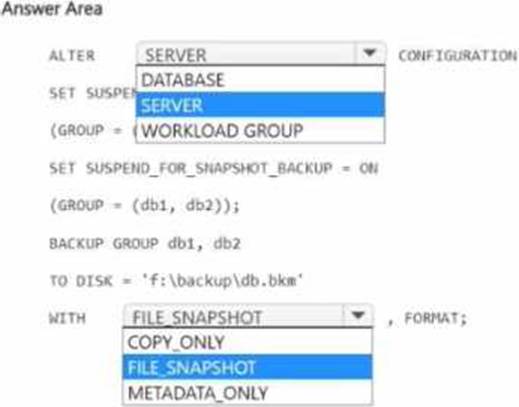
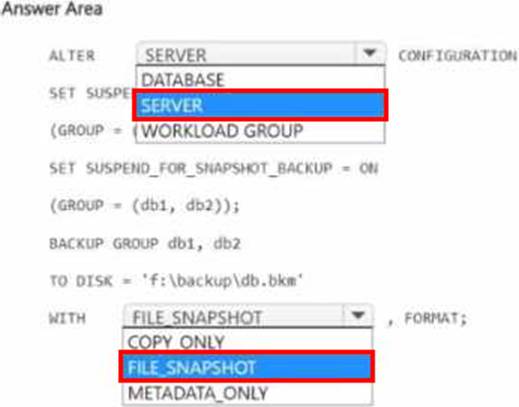
You have a SQL Server on Azure Virtual Machines instance named SQLVM1 that contains two databases named DB1 and DB2. The database and log files for DB1 and DB2 are hosted on managed disks.
You need to perform a snapshot backup of DB1 and DB2
How should you complete the I SQL statements? To answer, select the appropriate options in the answer area. NOTE: Each correct selection is worth one point.
You are planning a solution that will use Azure SQL Database. Usage of the solution will peak from October 1 to January 1 each year.
During peak usage, the database will require the following:
✑ 24 cores
✑ 500 GB of storage
✑ 124 GB of memory
✑ More than 50,000 IOPS
During periods of off-peak usage, the service tier of Azure SQL Database will be set to Standard.
Which service tier should you use during peak usage?
- A . Business Critical
- B . Premium
- C . Hyperscale
A
Explanation:
Reference: https://docs.microsoft.com/en-us/azure/azure-sql/database/resource-limits-vcore-single-databases#business-critical—provisioned-compute—gen4