
Practice Free AI-102 Exam Online Questions
You have a custom agent named Agent1.
You need to control access to and monitor activity for Agent1 by using Microsoft Foundry.
What should you do first?
- A . Provision an Application Insights resource.
- B . Create a Microsoft Foundry project.
- C . Add Agent1 to a Microsoft Foundry project.
- D . Add Agent1 to the Microsoft Foundry playground.
You plan create an index for an Azure Cognitive Search service by using the Azure portal. The Cognitive Search service will connect to an Azure SQL database
The Azure SQL database contains a table named UserMessages. Each row m User Messages has a field named MessageCopy that contains the text of social media messages sent by a user
Users win perform full text searches against the MessageCopy field, and the values of the field will be shown to the users-
You need to configure the properties of the index for the MessageCopy field to support the solution.
Winch attributes should you enable for the field?
- A . Searchable arc Retrievable
- B . Sortable and Retrievable
- C . Searchable arc Facetable
- D . Filterable and Retrievable
You are building an app that will process scanned expense claims and extract and label the following
data:
• Merchant information
• Time of transaction
• Date of transaction
• Taxes paid
• Total cost
You need to recommend an Azure Al Document Intelligence model for the app. The solution must minimize development effort.
What should you use?
- A . the prebuilt Read model
- B . the prebuilt receipt model
- C . a custom template model
- D . a custom neural model
You are building an app that will process scanned expense claims and extract and label the following
data:
• Merchant information
• Time of transaction
• Date of transaction
• Taxes paid
• Total cost
You need to recommend an Azure Al Document Intelligence model for the app. The solution must minimize development effort.
What should you use?
- A . the prebuilt Read model
- B . the prebuilt receipt model
- C . a custom template model
- D . a custom neural model
You have an Azure subscription. The subscription contains an Azure OpenAI resource that hosts a GPT-3.5 Turbo model named Model1.
You configure Model1 to use the following system message: "You are an Al assistant that helps people solve mathematical puzzles. Explain your answers as if the request is by a 4-year-old."
Which type of prompt engineering technique is this an example of?
- A . few-shot learning
- B . affordance
- C . chain of thought
- D . priming
You are building an image sharing app that will use Azure AI to prevent users from sharing sexually explicit images.
You need to ensure that inappropriate images are identified correctly. The solution must minimize development effort.
What should you use?
- A . Visual Studio
- B . Vision Studio in Azure AI Vision
- C . Azure AI Content Safety Studio
- D . Azure AI Studio
You are building an image sharing app that will use Azure AI to prevent users from sharing sexually explicit images.
You need to ensure that inappropriate images are identified correctly. The solution must minimize development effort.
What should you use?
- A . Visual Studio
- B . Vision Studio in Azure AI Vision
- C . Azure AI Content Safety Studio
- D . Azure AI Studio
DRAG DROP
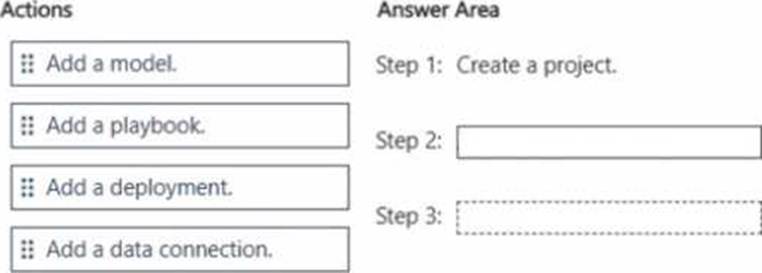
You plan to use Microsoft Foundry to implement a Retrieval Augmented Generation (RAG) pattern.
You have grounding data stored in an Azure Files share.
You need to configure a Microsoft Foundry project to ensure that a model can use the grounding data.
Which actions should you perform in sequence? To answer, drag the appropriate actions to the correct order. Each action may be used once, more than once, or not at all. You may need to drag the split bar between panes or scroll to view content. NOTE: Each correct selection is worth one point.
Explanation:
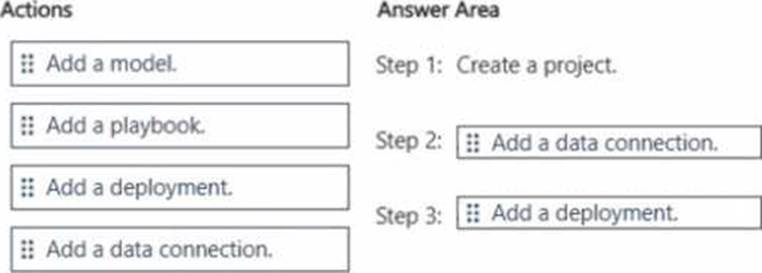
Step 1: Create a project. (Given)
Step 2: Add a data connection.
Step 3: Add a deployment.
Add a data connection: Before the model can "see" your grounding data stored in an Azure Files share, you must establish a connection. This step allows the project to securely access and index the
external data source so it can be used for retrieval.
Add a deployment: In Microsoft Foundry, you don’t just "add a model" in a vacuum; you must deploy a specific model (such as a GPT-4 chat model or an embedding model) to make it active and available to interact with your data and respond to queries.
DRAG DROP
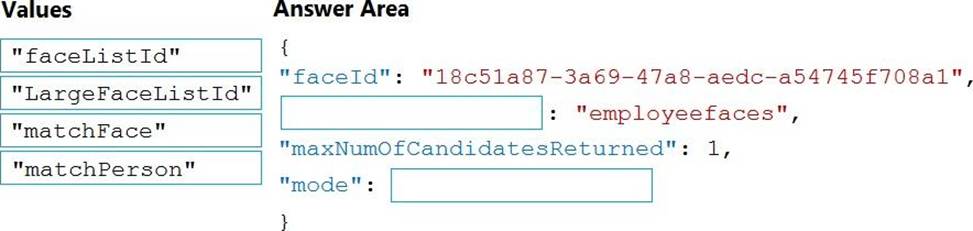
You are developing a call to the Face API. The call must find similar faces from an existing list named employee faces. The employee faces list contains 60,000 images.
How should you complete the body of the HTTP request? To answer, drag the appropriate values to the correct targets. Each value may be used once, more than once, or not at all. You may need to drag the split bar between panes or scroll to view content. NOTE: Each correct selection is worth one point.
Explanation:
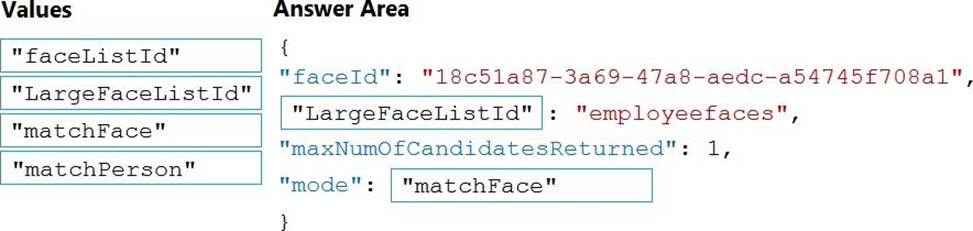
Box 1: LargeFaceListID
LargeFaceList: Add a face to a specified large face list, up to 1,000,000 faces.
Note: Given query face’s faceId, to search the similar-looking faces from a faceId array, a face list or a large face list. A "faceListId" is created by FaceList – Create containing persistedFaceIds that will not expire. And a "largeFaceListId" is created by LargeFaceList – Create containing persistedFaceIds that will also not expire.
Incorrect Answers:
Not "faceListId": Add a face to a specified face list, up to 1,000 faces.
Box 2: matchFace
Find similar has two working modes, "matchPerson" and "matchFace". "matchPerson" is the default mode that it tries to find faces of the same person as possible by using internal same-person thresholds. It is useful to find a known person’s other photos. Note that an empty list will be returned if no faces pass the internal thresholds. "matchFace" mode ignores same-person thresholds and returns ranked similar faces anyway, even the similarity is low. It can be used in the cases like searching celebrity-looking faces.
Reference: https://docs.microsoft.com/en-us/rest/api/faceapi/face/findsimilar
DRAG DROP
You are developing a call to the Face API. The call must find similar faces from an existing list named employee faces. The employee faces list contains 60,000 images.
How should you complete the body of the HTTP request? To answer, drag the appropriate values to the correct targets. Each value may be used once, more than once, or not at all. You may need to drag the split bar between panes or scroll to view content. NOTE: Each correct selection is worth one point.
Explanation:
Box 1: LargeFaceListID
LargeFaceList: Add a face to a specified large face list, up to 1,000,000 faces.
Note: Given query face’s faceId, to search the similar-looking faces from a faceId array, a face list or a large face list. A "faceListId" is created by FaceList – Create containing persistedFaceIds that will not expire. And a "largeFaceListId" is created by LargeFaceList – Create containing persistedFaceIds that will also not expire.
Incorrect Answers:
Not "faceListId": Add a face to a specified face list, up to 1,000 faces.
Box 2: matchFace
Find similar has two working modes, "matchPerson" and "matchFace". "matchPerson" is the default mode that it tries to find faces of the same person as possible by using internal same-person thresholds. It is useful to find a known person’s other photos. Note that an empty list will be returned if no faces pass the internal thresholds. "matchFace" mode ignores same-person thresholds and returns ranked similar faces anyway, even the similarity is low. It can be used in the cases like searching celebrity-looking faces.
Reference: https://docs.microsoft.com/en-us/rest/api/faceapi/face/findsimilar