
Practice Free AI-102 Exam Online Questions
You have a 20-GB video file named File1.avi that is stored on a local drive.
You need to index File1.avi by using the Azure AI Video Indexer website.
What should you do first?
- A . Upload File1.avi to the Azure AI Video Indexer website.
- B . Upload File1.avi to the www.youtube.com webpage.
- C . Upload File1.avi to Microsoft OneDrive.
- D . Upload File1.avi to an Azure Storage queue.
You need to measure the public perception of your brand on social media messages.
Which Azure Cognitive Services service should you use?
- A . Text Analytics
- B . Content Moderator
- C . Computer Vision
- D . Form Recognizer
A
Explanation:
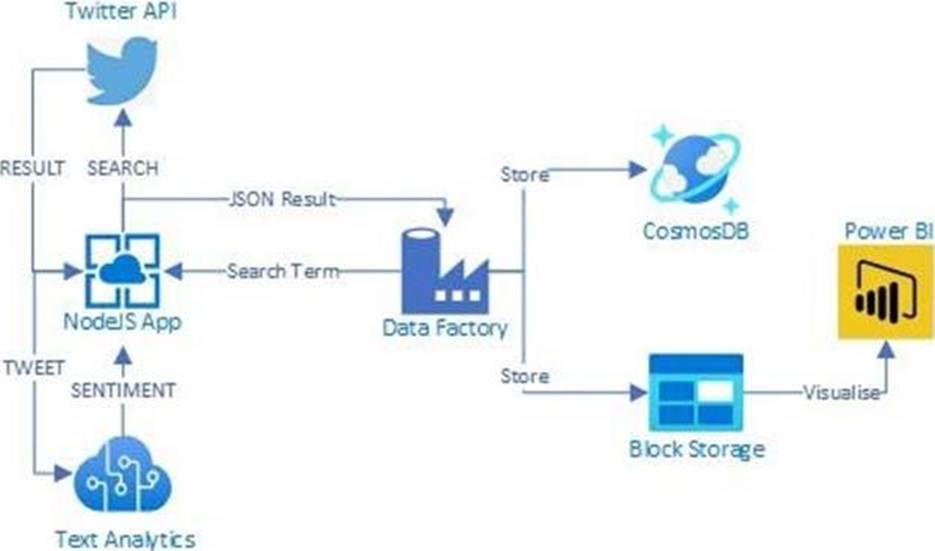
Text Analytics Cognitive Service could be used to quickly determine the public perception for a specific topic, event or brand.
Example: A NodeJS app which pulls Tweets from Twitter using the Twitter API based on a specified search term. Then pass these onto Text Analytics for sentiment scoring before storing the data and building a visualisation in PowerBI.
The Architecture looked something like this:
Reference: https://www.linkedin.com/pulse/measuring-public-perception-azure-cognitive-services-steve-dalai
HOTSPOT
You are developing an internet-based training solution for remote learners.
Your company identifies that during the training, some learners leave their desk for long periods or become distracted.
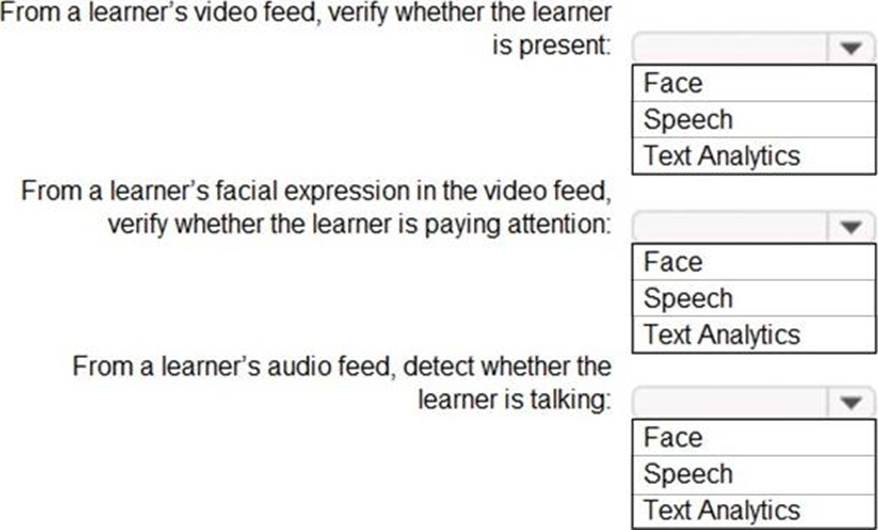
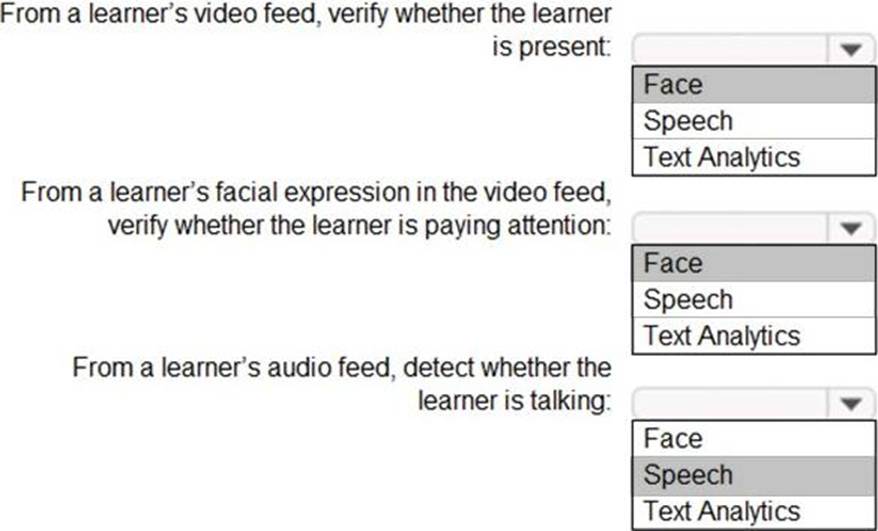
You need to use a video and audio feed from each learner’s computer to detect whether the learner is present and paying attention. The solution must minimize development effort and identify each learner.
Which Azure Cognitive Services service should you use for each requirement? To answer, select the appropriate options in the answer area. NOTE: Each correct selection is worth one point.
Explanation:
Reference: https://docs.microsoft.com/en-us/azure/cognitive-services/what-are-cognitive-services
HOTSPOT
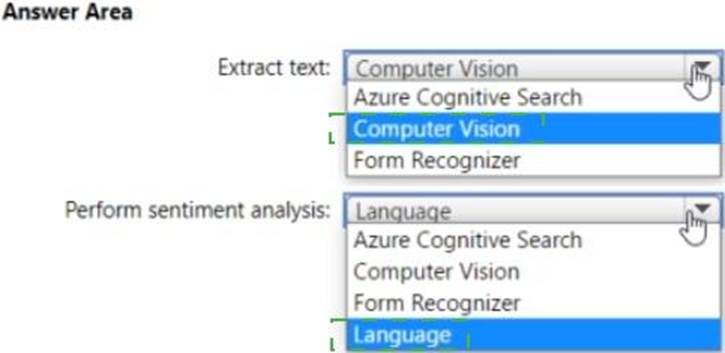
You have a collection of press releases stored as PDF files.
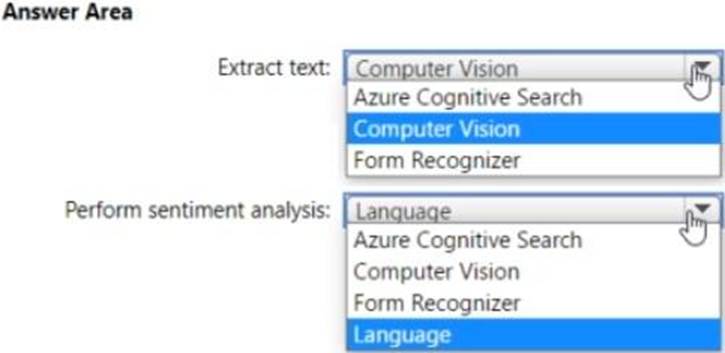
You need to extract text from the files and perform sentiment analysis.
Which service should you use for each task? To answer, select the appropriate options in the answer area. NOTE: Each correct selection is worth one point.
HOTSPOT
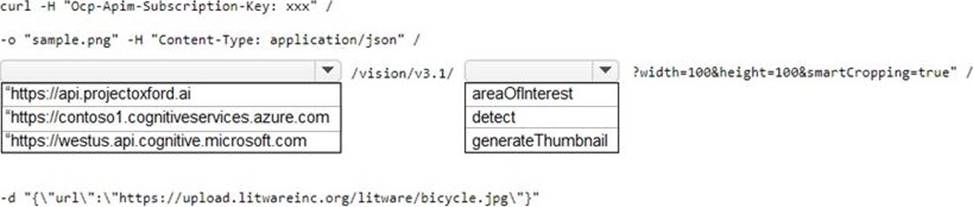
You have a Computer Vision resource named contoso1 that is hosted in the West US Azure region.
You need to use contoso1 to make a different size of a product photo by using the smart cropping feature.
How should you complete the API URL? To answer, select the appropriate options in the answer area. NOTE: Each correct selection is worth one point.
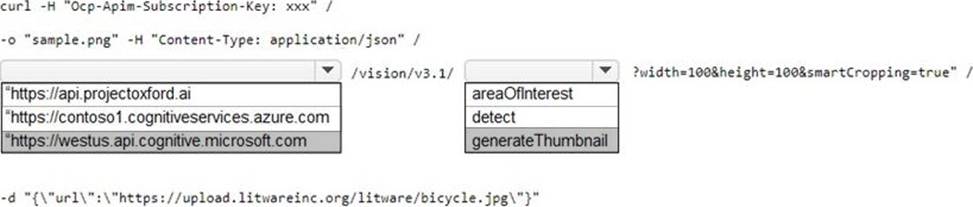
Explanation:
westus.api.cognitive.microsoft.com
generateThumbnail
https://docs.microsoft.com/en-us/rest/api/computervision/3.1/generate-thumbnail/generate-thumbnail#examples
POST
https://westus.api.cognitive.microsoft.com/vision/v3.1/generateThumbnail?width=500&height=500&smartCropping=TrueOcp-Apim-Subscription-Key: {API key}
HOTSPOT
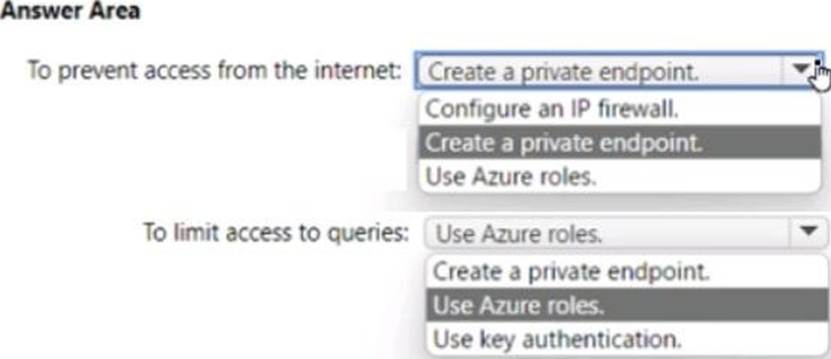
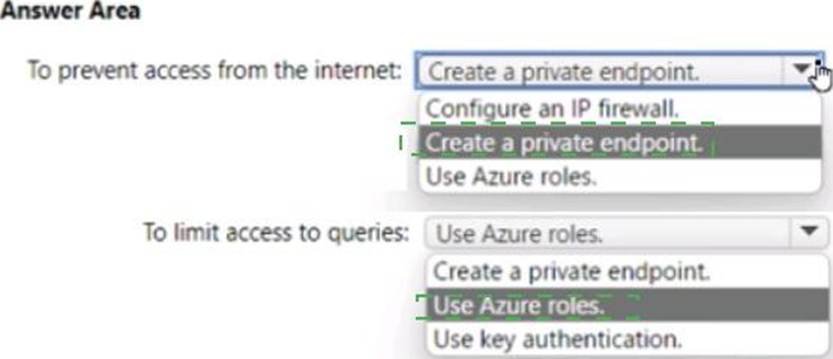
You have an Azure Cognitive Search resource named Search 1 that is used by multiple apps You need to secure Search 1.
The solution must meet the following requirements:
• Prevent access to Search1 from the internet.
• Limit the access of each app to specific queries
What should you do? To answer, select the appropriate options in the answer area NOTE Each correct answer is worth one point.
DRAG DROP
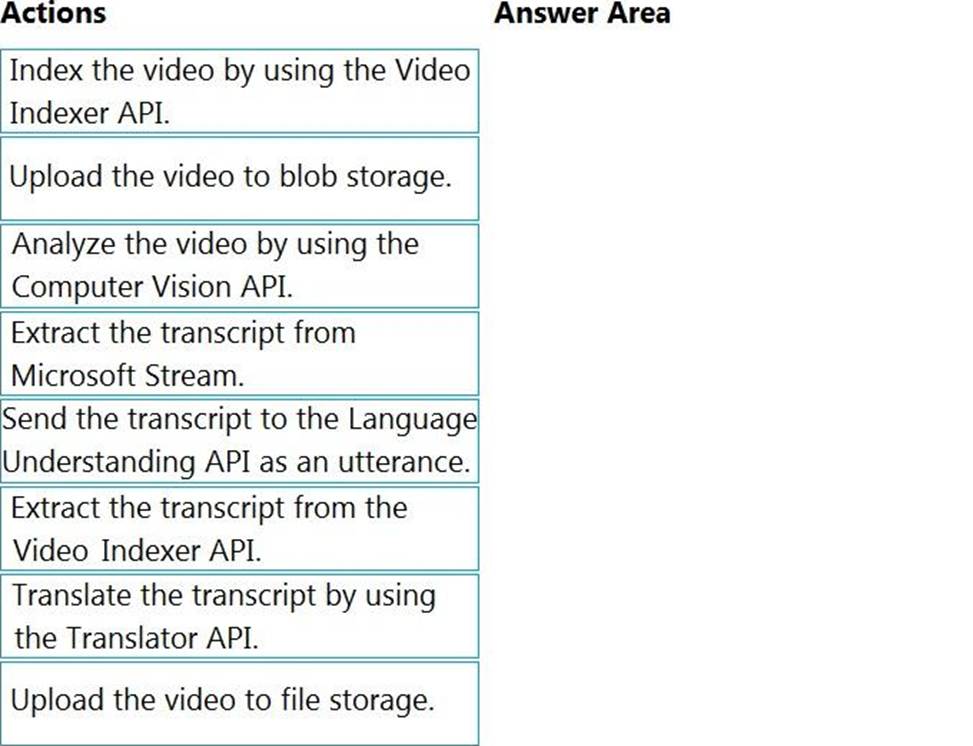
You are planning the product creation project.
You need to recommend a process for analyzing videos.
Which four actions should you perform in sequence? To answer, move the appropriate actions from the list of actions to the answer area and arrange them in the correct order. (Choose four.)
Explanation:
Scenario: All videos must have transcripts that are associated to the video and included in product descriptions.
Product descriptions, transcripts, and all text must be available in English, Spanish, and Portuguese.
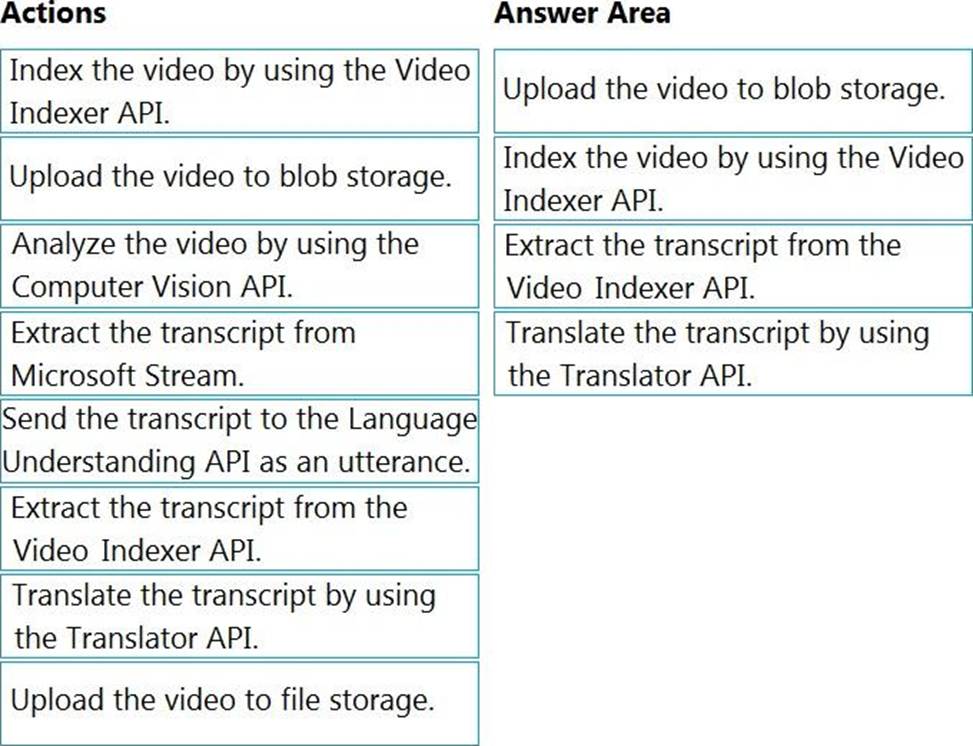
Step 1: Upload the video to blob storage
Given a video or audio file, the file is first dropped into a Blob Storage. T
Step 2: Index the video by using the Video Indexer API.
When a video is indexed, Video Indexer produces the JSON content that contains details of the specified video insights. The insights include: transcripts, OCRs, faces, topics, blocks, etc.
Step 3: Extract the transcript from the Video Indexer API.
Step 4: Translate the transcript by using the Translator API.
Reference:
https://azure.microsoft.com/en-us/blog/get-video-insights-in-even-more-languages/
https://docs.microsoft.com/en-us/azure/media-services/video-indexer/video-indexer-output-json-v2
DRAG DROP
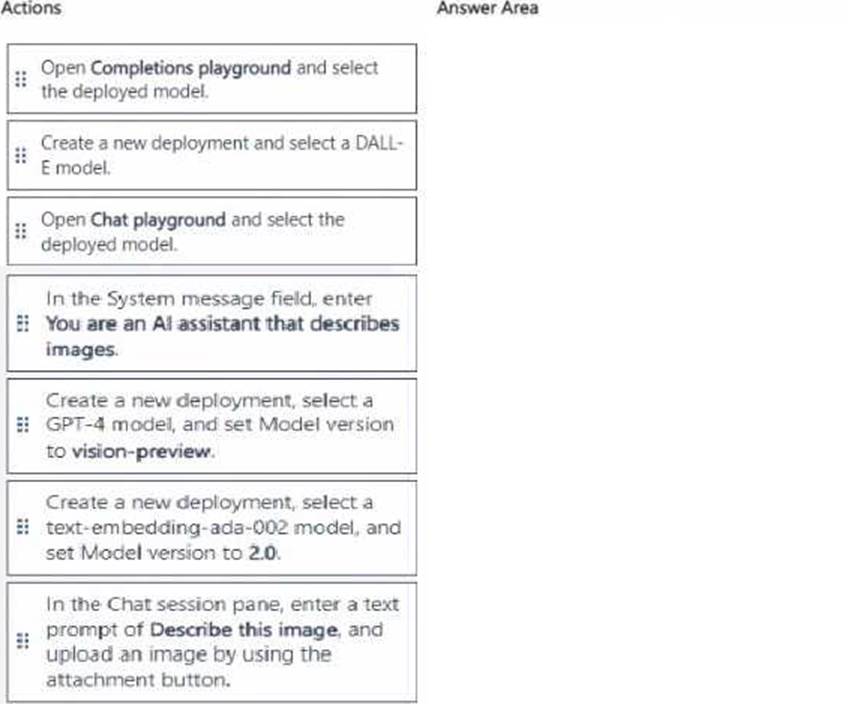
You have an Azure subscription that contains an Azure OpenAI resource named AH.
You need to analyze an image to obtain a text descnption.
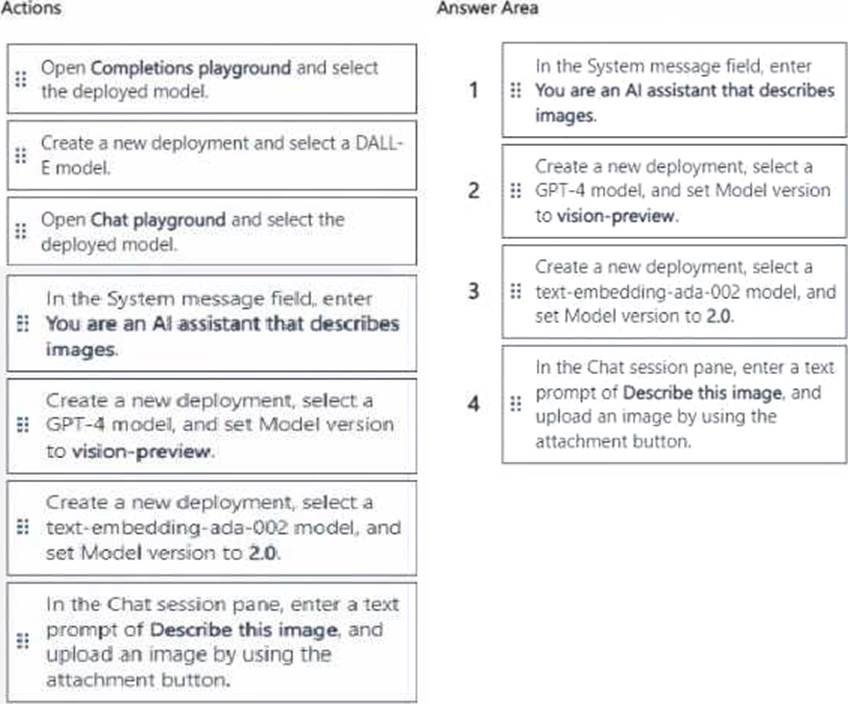
Which four actions should you perform in sequence from Azure OpenAI Studio? To answer, move the appropriate actions from the list of actions to the answer area and arrange them in the correct order.
Explanation:
Key Knowledge:
• To analyze images with Azure OpenAI, you must use a GPT-4 model with vision support (model version vision-preview).
• This requires deploying a GPT-4 model for vision.
• Then you use the Chat playground (not completions, not DALL-E) since you want analysis, not generation.
• You need to give the assistant instructions in the system message field (e.g., “You are an AI assistant that describes images”).
• Finally, you upload an image and prompt the model to describe it.
Correct Sequence:
HOTSPOT
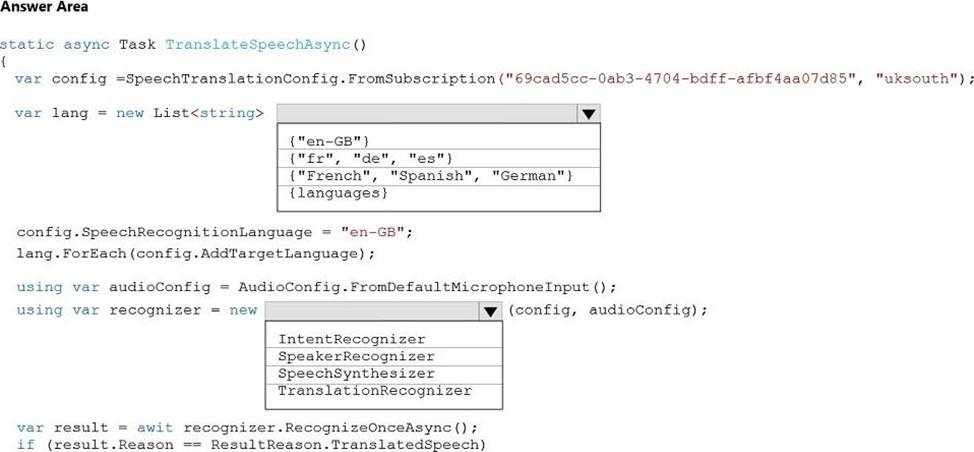
You are developing a service that records lectures given in English (United Kingdom).
You have a method named Append To Transcript File that takes translated text and a language identifier.
You need to develop code that will provide transcripts of the lectures to attendees in their respective language. The supported languages are English, French, Spanish, and German.
How should you complete the code? To answer, select the appropriate options in the answer area. NOTE: Each correct selection is worth one point.
Explanation:
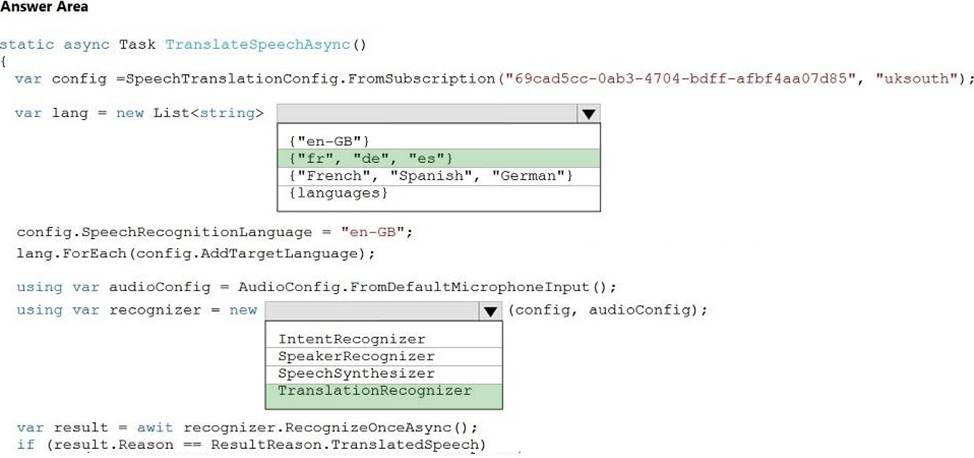
Box 1: {"fr", "de", "es"}
A common task of speech translation is to specify target translation languages, at least one is
required but multiples are supported. The following code snippet sets both French and German as translation language targets.
static async Task TranslateSpeechAsync()
{
var translationConfig =
SpeechTranslationConfig.FromSubscription(SPEECH__SUBSCRIPTION__KEY,
SPEECH__SERVICE__REGION);
translationConfig.SpeechRecognitionLanguage = "it-IT";
// Translate to languages. See, https://aka.ms/speech/sttt-languages translationConfig.AddTargetLanguage("fr"); translationConfig.AddTargetLanguage("de");
}
Box 2: TranslationRecognizer
After you’ve created a SpeechTranslationConfig, the next step is to initialize a TranslationRecognizer.
Example code:
static async Task TranslateSpeechAsync()
{
var translationConfig =
SpeechTranslationConfig.FromSubscription(SPEECH__SUBSCRIPTION__KEY,
SPEECH__SERVICE__REGION);
var fromLanguage = "en-US";
var toLanguages = new List<string> { "it", "fr", "de" }; translationConfig.SpeechRecognitionLanguage = fromLanguage; toLanguages.ForEach(translationConfig.AddTargetLanguage);
using var recognizer = new TranslationRecognizer(translationConfig);
}
You need to upload speech samples to a Speech Studio project.
How should you upload the samples?
- A . Combine the speech samples into a single audio file in the .wma format and upload the file.
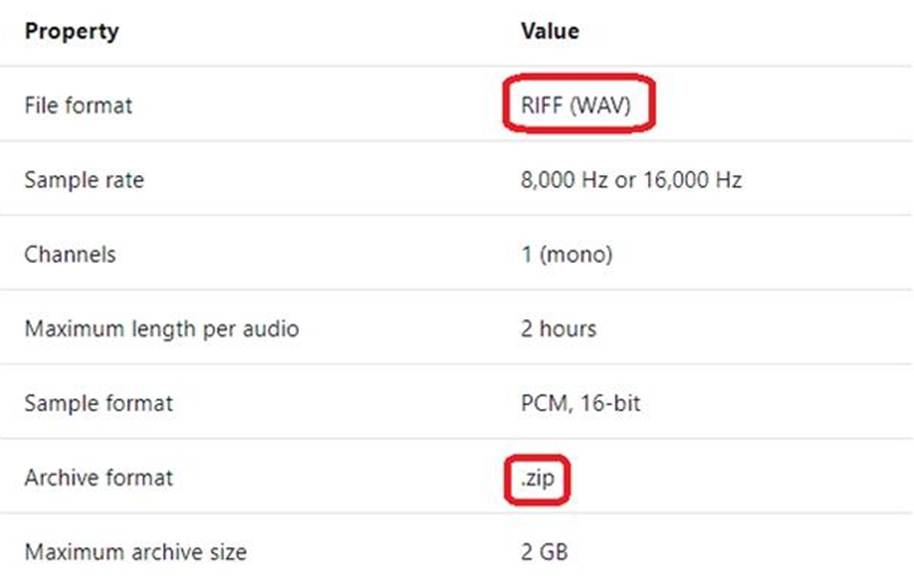
- B . Upload a .zip file that contains a collection of audio files in the .wav format and a corresponding text transcript file.
- C . Upload individual audio files in the FLAC format and manually upload a corresponding transcript in Microsoft Word format.
- D . Upload individual audio files in the .wma format.
B
Explanation:
To upload your data, navigate to the Speech Studio . From the portal, click Upload data to launch the
wizard and create your first dataset. You’ll be asked to select a speech data type for your dataset,
before allowing you to upload your data.
The default audio streaming format is WAV
Use this table to ensure that your audio files are formatted correctly for use with Custom Speech:
Reference: https://docs.microsoft.com/en-us/azure/cognitive-services/speech-service/how-to-custom-speech-test-and-train