
Practice Free MB-335 Exam Online Questions
DRAG DROP
A manufacturing company is implementing Dynamics 365 Supply Chain Management
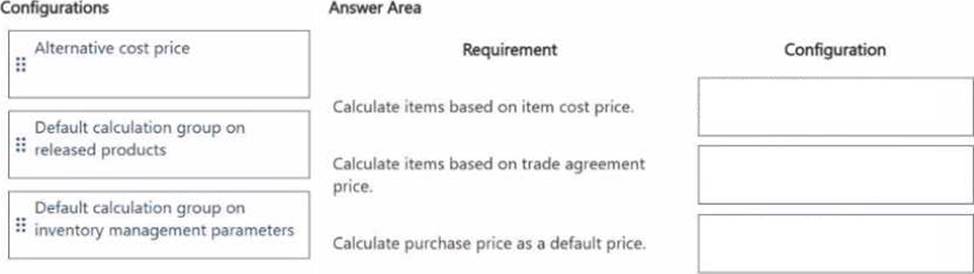
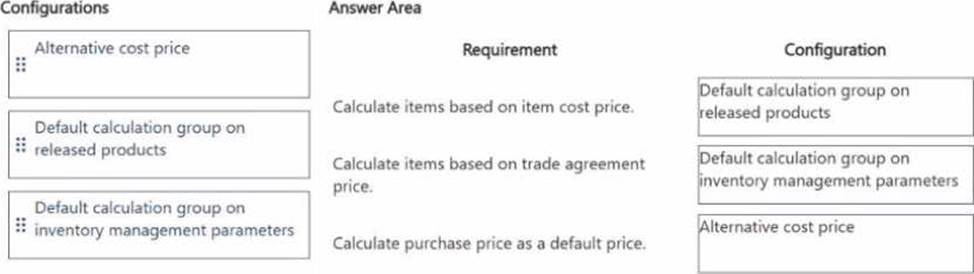
Bill of materials (BOM) calculations are typically based on the item cost price. For a subset of items, the trade agreement price must be used in calculations. If a trade agreement does not exist, the purchase price must be used.
You need to set up the BOM calculations for the items by using the fewest configurations.
Which configurations should you use? To answer, drag the appropriate configurations to the correct requirements. Each configuration may be used once, more than once, or not at all. You may need to drag the split bar between panes or scroll to view content. NOTE: Each correct selection is worth one point.
A company produces paints and assembles bicycle frames.
You must account for paint drying time before assembly operations can begin.
You need to set up the operation to encompass queue times.
Which two options can you use? Each correct answer presents pad of the solution. NOTE: Each correct selection is worth one point.
- A . Build capabilities for each resource related to color.
- B . Enter a value in the queue time after field for the painting operation.
- C . Enter a value in the transit time on the painting operation.
- D . Make a resource group for each size and color and assign that group to the operation.
- E . Enter a value in the queue time before field for the assembly operation.
B, E
Explanation:
Queue time is the time that a job waits at a work center before or after the job is processed1. You can use queue time to account for paint drying time before assembly operations can begin. You can specify queue time in minutes, hours, or days on the route operations that are attached to the production order2.
To set up the operation to encompass queue times, you should do the following:
Enter a value in the queue time after field for the painting operation. This value indicates how long the painted bicycle frames must wait at the painting work center before they can be moved to the next operation2. For example, if the paint drying time is 24 hours, you can enter 24 in the queue time after field and select Hours as the unit.
Enter a value in the queue time before field for the assembly operation. This value indicates how long the painted bicycle frames must wait at the assembly work center before they can be processed2. For example, if there is a delay between the arrival of the frames and the start of the assembly, you can enter a value that reflects this delay in the queue time before field and select the appropriate unit.
The other options are not correct, because they do not involve queue times. Building capabilities for each resource related to color would allow you to assign resources based on their color proficiency, but it would not account for paint drying time. Entering a value in the transit time on the painting operation would indicate how long it takes to move the painted bicycle frames from one work center to another, but it would not include the waiting time before or after the movement. Making a resource group for each size and color and assigning that group to the operation would allow you to group resources that have similar characteristics and can be used interchangeably in production, but it would not affect the queue times.
1: Queue times 2: Set up operations scheduling
DRAG DROP
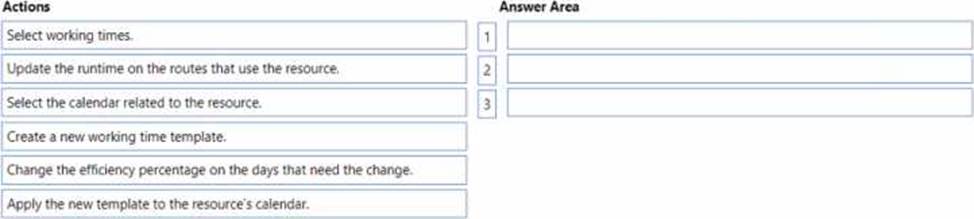
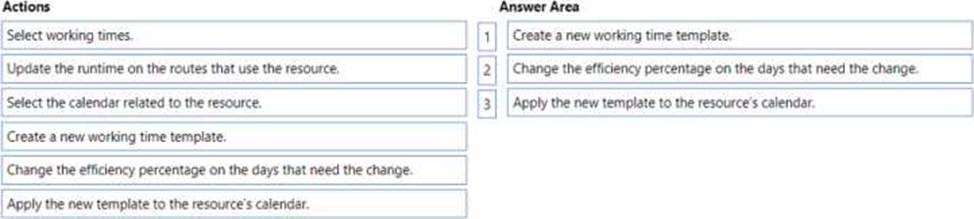
A manufacturer uses route operations and job scheduling. You use a unique calendar for a conveyor line.
The company observes a decrease in the number of hours a conveyor line resource is operational due to breakdowns. You must make a temporary change to the number of hours the resource is available. You need to adjust the efficiency percentage for the conveyor line calendar.
Which three actions should you perform in sequence? To answer, move the appropriate actions from the list of actions to the answer area and arrange them in the correct order.
DRAG DROP
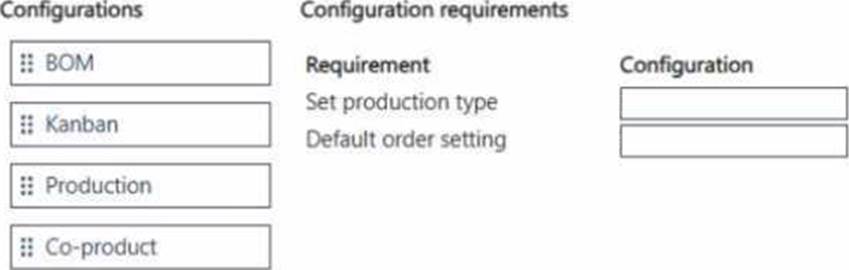
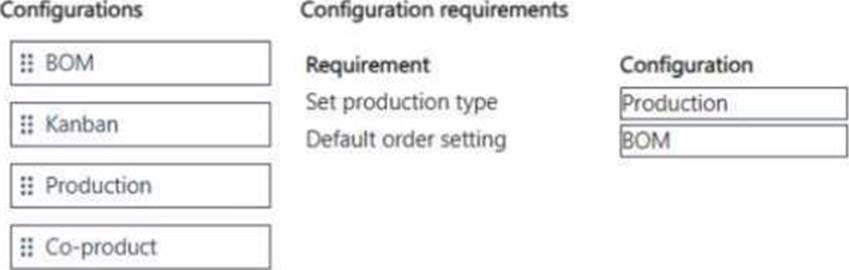
A furniture production company is implementing Dynamics 365 Supply Chain Management The furniture goes through multiple stages of production with cutting wood, assembling the furniture, and then applying paint.
The production manager wants to ensure that the screws used for the assembly of the furniture are not itemized in inventory. Instead, they must be used as needed by the production team. This could change in the future and must have a flexible approach to configuration.
You need to set up the production requirements for the screws.
How should you configure the screw requirements? To answer, move the appropriate configurations to the correct requirements. You may use each configuration once, more than once, or not at all. You may need to move the split bar between panes or scroll to view content. NOTE: Each correct selection is worth one point.
A manufacturing company uses time and attendance in Dynamics 365 Supply Chain Management.
The company requires that employees register time against each machine on the shop floor.
You need to configure the system so that employees can register time.
Which two configurations must be set up? Each answer represents a partial solution NOTE Each correct selection is worth one point.
- A . machines as a resource
- B . time registration workers
- C . electronic timecard parameter
- D . registration workflow
HOTSPOT
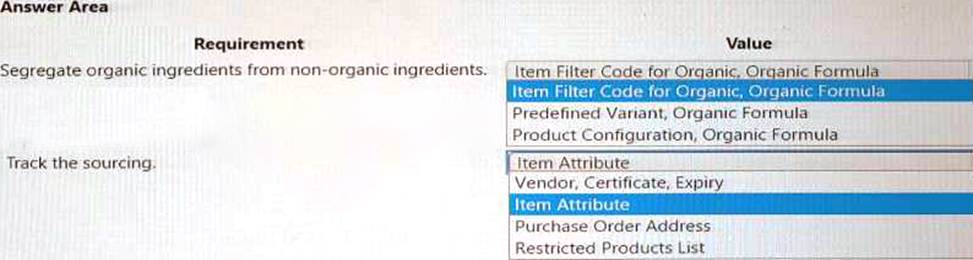
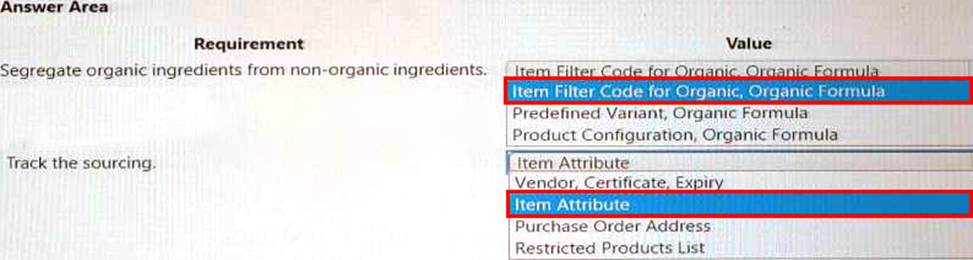
You need to set up the chocolate items.
Which values should you select? To answer, select the appropriate options in the answer area. NOTE: Each correct selection is worth one point.
DRAG DROP
A company is implementing Dynamics 365 Supply Chain Management The company is a subcontractor that produces subassemblies for two major customers. CustomerA and Customers The company prioritizes CustomerA production orders to start on Mondays. The production orders may take several days to complete. Customers’ orders are produced throughout the week, after CustomerA orders are completed. Work in process (W1P) must be calculated and consolidated for CustomerA and CustomerB respectively on the financial reports. You need to configure the production requirements.
What should you configure? To answer, drag the appropriate configurations to the correct requirements. Each configuration may be used once, more than once, or not at all. You may need to drag the split bar between panes or scroll to view content. NOTE: Each correct selection is worth one point.


Note: This question is part of a series of questions that present the same scenario. Each question in the series contains a unique solution that might meet the stated goals. Some question sets might have more than one correct solution, while others might not have a correct solution.
After you answer a question in this section, you will NOT be able to return to it. As a result, these questions will not appear in the review screen.
A company implements Dynamics 365 Supply Chain Management and configures the system to support process manufacturing.
The company manufactures pain-relieving lotions. Several of the primary ingredients are delivered at different concentrations depending on the ingredient and vendor. Ingredient A is the primary active ingredient in the lotion. Ingredient B is used as a compensating ingredient.
You need to ensure that the system is set up to support the manufacturing process.
Solution: Create a dimension-based product with configurations. Use a price model to calculate the different configurable option costs.
Does the solution meet the goal?
- A . Yes
- B . No
B
Explanation:
No, the solution does not meet the goal. A dimension-based product with configurations is used for discrete manufacturing, not process manufacturing. A price model is used to calculate the cost of different configurations of a product, not the cost of different concentrations of an ingredient. For process manufacturing, you need to use a formula-based product with batch attributes and potency management. A formula defines the materials, ingredients, and outcomes of a specific process. Batch attributes are used to capture the characteristics of a batch of products or ingredients. Potency management is used to adjust the quantity of an ingredient based on its concentration or strength1.
1: Configure formulas for process manufacturing in Dynamics 365 Supply Chain Management – Training | Microsoft Learn
You are using the manufacturing execution module in Dynamics 365 Supply Chain Management. License plate labels must be printed for products in the Report as finished step. You need to use the manufacturing execution functionality that meets this requirement.
What should you use?
- A . Work templates
- B . Load planning workbench
- C . License plates
- D . Job card device
D
Explanation:
The manufacturing execution functionality that meets the requirement of printing license plate labels for products in the Report as finished step is License plates. Here is the explanation: License plates are unique identifiers that are assigned to containers, pallets, or individual items in inventory. License plates can be used to track and manage inventory throughout the warehouse processes, such as receiving, put away, picking, packing, and shipping1. License plates can also be used in production processes, such as reporting as finished and raw material picking2.
To print license plate labels for products in the Report as finished step, you must enable the Generate license plate option on the mobile device menu item that is used for reporting as finished2. You must also set up a document routing layout and a document routing for license plate labels3. When you use the mobile device to report a production order as finished, the system will generate a license plate for the finished product and print a license plate label to the specified printer2. The license plate label can include information such as the item number, batch number, quantity, and barcode of the finished product3.
1: License plates 2: Enable license plate label printing 3: Document routing label layouts
You use the master planning module for Dynamics 365 Supply Chain Management.
Planned production orders have been created.
Several sales orders are canceled in response to concerns about recent online reviews of a product.
You need to enable the appropriate action message.
Which action message should you enable?
- A . Increase
- B . Postpone
- C . Decrease
- D . Derived actions.
- E . Advance
C
Explanation:
The action message that you should enable is Decrease. Here is the explanation:
An action message is a system-generated suggestion to change an existing planned, approved, or firmed order. Action messages are generated by the master planning calculation in response to changed requirements1. For example, the ship date or quantity is changed on a sales order after you’ve already created a purchase order to fulfill the demand for that sales order. In this case, the master planning calculation generates one or more action messages that suggest that you update the purchase order. You decide whether to make the changes that are suggested.
The Decrease action message indicates that production orders, purchase orders, and other receipt transactions should be decreased to prevent excess inventory levels1. This action message is generated when there is less demand for a product than was previously planned. For example, if several sales orders are canceled, the master planning calculation will generate a Decrease action message for the corresponding planned production orders.
To enable the Decrease action message, you must select it on the Coverage groups page for the coverage group or item that you want the message to apply to1. You can also specify a decrease margin, which is the minimum percentage difference between the current quantity and the suggested quantity that will trigger a Decrease action message1.