
Practice Free XK0-006 Exam Online Questions
A systems administrator is having issues with a third-party API endpoint.
The administrator receives the following output:
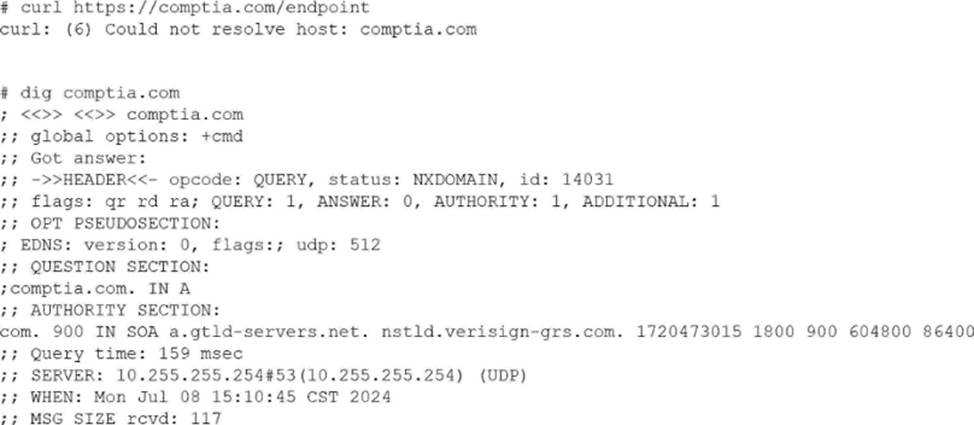
Which of the following actions should the administrator take to resolve the issue?
- A . Open a secure port in the server’s firewall.
- B . Request a new API endpoint from a third party.
- C . Review and fix the DNS client configuration file.
- D . Enable internet connectivity on the host.
C
Explanation:
This scenario represents a name resolution failure, which is a common troubleshooting case addressed in CompTIA Linux+ V8. The critical clues are the error messages returned by both curl and dig.
The curl error “Could not resolve host” indicates that the system is unable to translate the hostname into an IP address. This is confirmed by the dig output, which returns NXDOMAIN, meaning the DNS resolver cannot resolve the requested domain name. Importantly, the dig output shows that the query is reaching a DNS server (10.255.255.254), but the resolution fails, strongly pointing to a DNS client configuration issue.
Option C, reviewing and fixing the DNS client configuration file (such as /etc/resolv.conf or systemd-resolved settings), is the correct action. Linux+ V8 documentation highlights DNS misconfiguration as a primary cause of application connectivity issues. Incorrect nameserver entries, unreachable DNS servers, or misconfigured resolvers commonly produce NXDOMAIN responses.
The other options are incorrect. Firewall issues would result in connection timeouts, not DNS resolution failures. Requesting a new API endpoint is unnecessary without first confirming local DNS functionality. Internet connectivity issues would typically prevent any DNS communication, but here a DNS server is clearly being contacted.
Linux+ V8 stresses a layered troubleshooting approach: verify DNS resolution before investigating network ports or application logic. Therefore, the correct answer is C. Review and fix the DNS client configuration file.
A systems administrator needs to integrate a new storage array into the company’s existing storage pool. The administrator wants to ensure that the server is able to detect the new storage array.
Which of the following commands should the administrator use to ensure that the new storage array is presented to the systems?
- A . lsscsi
- B . lsusb
- C . lsipc
- D . lshw
A
Explanation:
From Exact Extract:
The lsscsi command is used to list information about SCSI devices (including storage arrays) that are attached to the system. This is critical when integrating a new storage array because it allows the administrator to verify that the operating system detects the new device at the SCSI layer, which is the underlying interface for most enterprise storage solutions. lsscsi outputs a list of recognized SCSI devices, their device nodes, and associated information.
Other options:
B. lsusb: Lists USB devices, not storage arrays on SCSI/SATA/SAS.
C. lsipc: Displays information on IPC (inter-process communication) facilities, unrelated to hardware detection.
D. lshw: Lists hardware details and can show storage, but lsscsi is specifically designed for SCSI device detection and is the most direct method for this task.
Reference: CompTIA Linux+ Study Guide: Exam XK0-006, Sybex, Chapter 7: "Managing Storage", Section:
"Identifying and Accessing Storage Devices"
CompTIA Linux+ XK0-006 Objectives: Domain 4.0 C Storage and Filesystems
An administrator must secure an account for a user who is going on extended leave.
Which of the following steps should the administrator take? (Choose two)
- A . Set the user’s files to immutable.
- B . Instruct the user to log in once per week.
- C . Delete the user’s /home folder.
- D . Run the command passwd -l user.
- E . Change the date on the /home folder to that of the expected return date.
- F . Change the user’s shell to /sbin/nologin.
D F
Explanation:
From Linux+ V8 documents:
Securing dormant or temporarily unused user accounts is a best practice emphasized in the Security domain of CompTIA Linux+ V8. When a user goes on extended leave, the goal is to prevent unauthorized access while preserving the user’s data and account for future use.
The most effective approach is to disable authentication and interactive login access without deleting the account.
Option D, running passwd -l user, locks the user’s password by prepending an invalid character to the encrypted password in /etc/shadow. This prevents password-based authentication while retaining the account, files, and ownership information. Linux+ V8 documentation highlights password locking as a standard method for temporarily disabling accounts.
Option F, changing the user’s shell to /sbin/nologin, further strengthens account security by preventing interactive shell access entirely. Even if another authentication mechanism were attempted, the user would be denied a login shell. This is a common defense-in-depth measure and is explicitly referenced in Linux+ V8 objectives for access control and account hardening.
The other options are incorrect or inappropriate.
Option A (immutable files) does not prevent account access and may interfere with system operations.
Option B defeats the purpose of securing an inactive account.
Option C deletes user data, which is unnecessary and risky.
Option E has no security effect, as filesystem timestamps do not control access.
Linux+ V8 stresses that secure account management should be reversible, auditable, and minimally disruptive. Locking the password and disabling the login shell meet these criteria and are commonly used together in enterprise environments.
Which of the following best describes a use case for playbooks in a Linux system?
- A . To provide a set of tasks and configurations to deploy an application
- B . To provide the instructions for implementing version control on a repository
- C . To provide the security information required for a container
- D . To provide the storage volume information required for a pod
A
Explanation:
In the context of Linux automation and orchestration, playbooks are most commonly associated with configuration management tools such as Ansible, which is explicitly referenced in the CompTIA Linux+ V8 objectives. Playbooks are written in YAML and are designed to define a series of tasks, configurations, and desired system states that should be applied to one or more Linux systems in a repeatable and automated manner.
A primary use case for playbooks is application deployment and system configuration automation. Playbooks allow administrators to specify tasks such as installing packages, configuring services, managing users, setting permissions, deploying application files, and starting or enabling services. This aligns directly with option A, which accurately describes playbooks as a method to provide a set of tasks and configurations required to deploy an application consistently across environments.
The remaining options are not accurate representations of playbook functionality.
Option B refers to version control implementation, which is handled by tools like Git and is not the purpose of playbooks themselves, although playbooks may be stored in version control systems.
Option C describes container security information, which is typically managed through container runtime configurations, secrets, or security policies rather than playbooks.
Option D refers to storage volume information for a pod, which is specific to Kubernetes manifests and not a general Linux playbook use case.
According to Linux+ V8 documentation, automation tools and playbooks help reduce human error, improve consistency, and support Infrastructure as Code (IaC) practices. Playbooks are a key mechanism for orchestrating multi-step operations across multiple systems, making them essential for modern Linux system administration.
Therefore, the correct answer is A, as it best describes the practical and documented use case for playbooks in a Linux system.
Joe, a user, has taken a position previously held by Ann. As a systems administrator, you need to archive all the files from Ann’s home directory and extract them into Joe’s home directory.
INSTRUCTIONS
Within each tab, click on an object to form the appropriate commands. Command objects may only be used once, but the spacebar _ object may be used multiple times. Not all objects will be used.
If at any time you would like to bring back the initial state of the simulation, please click the Reset All button.
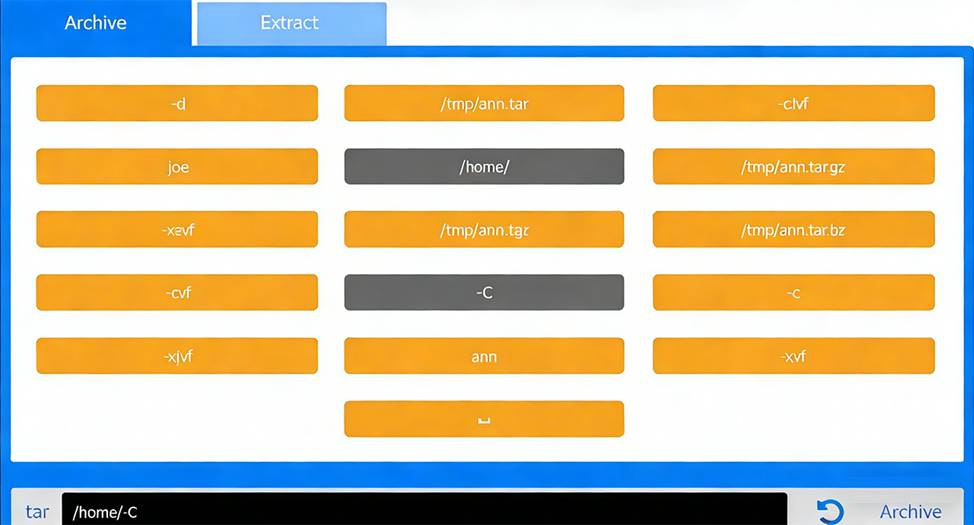
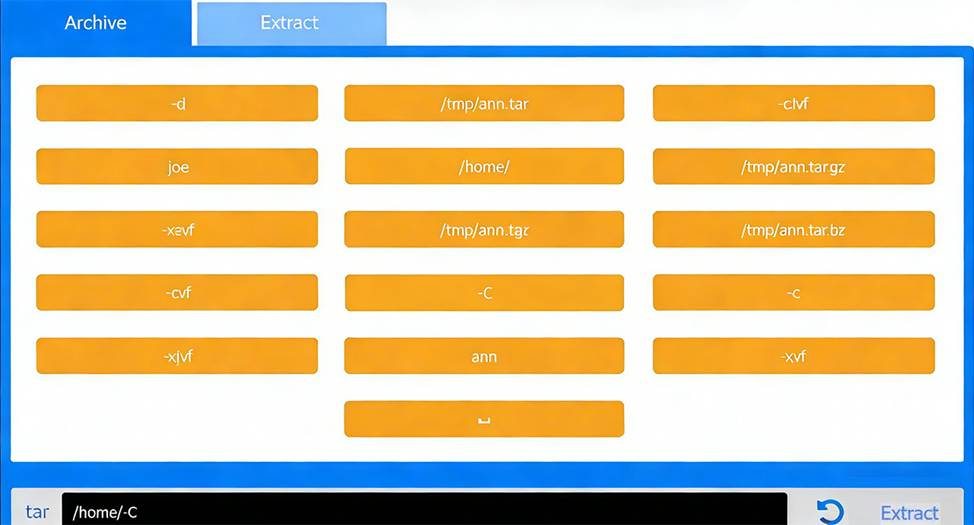
Correct Command:
tar -cvf /tmp/ann.tar -C /home/ ann
Extract Tab C Extract the archive into Joe’s home directory
Correct Command:
tar -xvf /tmp/ann.tar -C /home/ joe
This performance-based question tests file archiving and restoration using tar, a core System Management skill in the CompTIA Linux+ V8 objectives. The task requires preserving Ann’s files and placing them correctly into Joe’s home directory.
# Archive Phase Explanation
The goal of the first step is to archive Ann’s entire home directory without embedding the full path (/home /ann) inside the archive. This is accomplished using the -C option.
Command breakdown:
tar # archive utility
-c # create an archive
-v # verbose output (optional but allowed)
-f /tmp/ann.tar # specifies the archive file
-C /home/ # changes directory before archiving
ann # archives the ann directory only
This results in a clean archive containing Ann’s files without absolute paths, which is best practice and explicitly covered in Linux+ V8 documentation.
# Extract Phase Explanation
The second step extracts the archived files into Joe’s home directory.
Command breakdown:
-x # extract
-v # verbose
-f /tmp/ann.tar # specifies the archive
-C /home/joe # extracts files directly into Joe’s home directory
This ensures Joe receives Ann’s files correctly under /home/joe/ann or directly under /home/joe depending on post-extraction handling, which matches Linux+ expectations for administrative user transitions.
A Linux administrator needs to analyze a compromised disk for traces of malware. To complete the analysis, the administrator wants to make an exact, block-level copy of the disk.
Which of the following commands accomplishes this task?
- A . cp -rp /dev/sdc/* /tmp/image
- B . cpio -i /dev/sdc -ov /tmp/image
- C . tar cvzf /tmp/image /dev/sdc
- D . dd if=/dev/sdc of=/tmp/image bs=8192
D
Explanation:
Disk forensics and malware analysis fall under the Security domain in the CompTIA Linux+ V8 objectives. When analyzing a compromised disk, it is critical to preserve the data exactly as it exists, including unused space, deleted files, and hidden metadata. This requires a block-level copy, not a file-level copy.
The dd command is the correct tool for this task. It operates at a low level, copying raw data from an input device (if=/dev/sdc) directly to an output file (of=/tmp/image) without interpreting filesystem structures. This ensures an exact, bit-for-bit replica of the disk, which is essential for forensic integrity and malware analysis. The bs=8192 option improves performance by specifying a larger block size during copying.
The other options are incorrect. cp -rp copies files and directories but does not capture free space, deleted data, or disk metadata. cpio and tar are archive utilities that operate at the filesystem level and cannot produce a true disk image. These tools also require the filesystem to be mounted and readable, which is not appropriate for forensic preservation.
Linux+ V8 documentation highlights dd as the preferred utility for disk imaging, backups, and forensic investigations. Administrators are also advised to perform such operations on unmounted disks to avoid altering evidence.
Therefore, the correct and best command for creating an exact block-level disk copy is D. dd if=/dev/sdc of= /tmp/image bs=8192.
A DevOps engineer made some changes to files in a local repository. The engineer realizes that the changes broke the application and the changes need to be reverted back.
Which of the following commands is the best way to accomplish this task?
- A . git pull
- B . git reset
- C . git rebase
- D . git stash
B
Explanation:
Version control rollback operations are a core DevOps skill covered in the Linux+ V8 objectives. When changes in a local Git repository break an application and must be reverted, the administrator must choose a command that directly undoes those changes.
The command git reset is the most appropriate option in this scenario. It allows the engineer to move the current branch pointer (HEAD) to a previous commit, effectively discarding or undoing local changes. Depending on the reset mode (–soft, –mixed, or –hard), the engineer can control whether changes are preserved in the staging area or working directory. This flexibility makes git reset the primary tool for reverting problematic local changes.
The other options are not suitable. git pull fetches and merges changes from a remote repository and does not revert local modifications. git rebase rewrites commit history and is used to reapply commits on top of another base, not to undo broken changes. git stash temporarily saves uncommitted changes for later use but does not revert the repository to a stable state.
Linux+ V8 documentation emphasizes that git reset is commonly used during local development when changes need to be undone quickly before being shared with others. Therefore, the correct answer is B.