
Practice Free XK0-006 Exam Online Questions
Which of the following is a reason multiple password changes on the same day are not allowed?
- A . To avoid brute-forced password attacks by making them too long to perform
- B . To increase password complexity and the system’s security
- C . To stop users from circulating through the password history to return to the originally used password
- D . To enforce using multifactor authentication with stronger encryption algorithms instead of passwords
C
Explanation:
Password policy enforcement is a critical component of system security covered in the CompTIA Linux+ V8 objectives. One common control implemented in Linux systems is restricting how frequently users can change their passwords, often referred to as minimum password age enforcement.
The primary reason multiple password changes within a short time frame are not allowed is to prevent password cycling attacks. Without this restriction, a user could repeatedly change their password in quick succession to bypass password history controls and eventually reuse a previously compromised or weak password.
Option C accurately describes this scenario and aligns directly with Linux+ V8 security guidance.
Linux systems enforce this behavior through tools such as chage and PAM (Pluggable Authentication Modules). Administrators can configure minimum password age values to ensure users must wait a defined period before changing passwords again. This ensures that password history requirements are effective and meaningful.
The other options are incorrect.
Option A confuses password expiration with brute-force mitigation, which is typically addressed through account lockout policies.
Option B refers to password complexity, which is enforced through character requirements rather than change frequency.
Option D is unrelated, as password expiration policies do not enforce multifactor authentication.
Linux+ V8 documentation emphasizes layered access controls, and preventing password reuse through enforced timing restrictions is a core principle of secure authentication design.
Therefore, the correct answer is C.
Users cannot access an application that is running inside containers. The administrator wants to validate whether the containers are running.
Which of the following commands should the administrator use?
- A . docker start
- B . docker ps
- C . docker run
- D . docker images
B
Explanation:
Container troubleshooting is a key competency within the Automation, Orchestration, and Scripting domain of CompTIA Linux+ V8. When users report that an application running inside containers is not accessible, one of the first validation steps is to confirm whether the containers are currently running.
The docker ps command is specifically designed to list running containers on the system. By default, it displays container IDs, image names, command executed, uptime, port mappings, and container names. This allows administrators to quickly determine whether the application container is active and whether it is exposing the expected ports. This aligns directly with Linux+ V8 guidance on container lifecycle management and operational validation.
The other options are not suitable for this purpose. docker start is used to start one or more stopped containers but does not display container status. docker run creates and starts a new container, which is not appropriate when the goal is only to check the status of existing containers. docker images lists locally available container images but provides no information about running or stopped containers.
Linux+ V8 documentation emphasizes the importance of using the correct Docker subcommands when diagnosing containerized applications. Verifying container runtime state using docker ps is a foundational troubleshooting step before investigating networking, firewall rules, or application-level errors.
Therefore, the correct command to validate whether containers are running is docker ps, making
Answer B correct.
An administrator receives the following output while attempting to unmount a filesystem:
umount /data1: target is busy.
Which of the following commands should the administrator run next to determine why the filesystem is busy?
- A . ps -f /data1
- B . du -sh /data1
- C . top -d /data1
- D . lsof | grep /data1
D
Explanation:
Filesystem unmount failures are common troubleshooting scenarios covered in Linux+ V8. When the error “target is busy” appears, it means one or more processes are actively using files or directories within the mount point.
The correct diagnostic command is lsof | grep /data1. The lsof (list open files) utility displays all open files and the processes using them. Filtering the output with grep /data1 identifies exactly which processes are holding file descriptors on the filesystem, preventing it from being unmounted.
The other options are incorrect. ps -f displays process information but does not show open file usage. du -sh calculates disk usage and does not identify active processes. top monitors system performance but cannot pinpoint filesystem locks.
Linux+ V8 documentation emphasizes using lsof or fuser to identify resource locks before unmounting filesystems. Therefore, the correct answer is D.
Which of the following best describes the role of initrd?
- A . It is required to connect to the system via SSH.
- B . It contains basic kernel modules and drivers required to start the system.
- C . It contains trusted certificates and secret keys of the system.
- D . It is required to initialize a random device within a Linux system.
B
Explanation:
The initrd (initial RAM disk) plays a critical role in the Linux boot process, a topic covered under system management in Linux+ V8. Initrd is a temporary root filesystem loaded into memory by the bootloader before the main root filesystem is mounted.
Its primary purpose is to provide the kernel with the essential drivers, kernel modules, and utilities required to access the real root filesystem. This includes drivers for storage controllers, filesystems, RAID, LVM, or encrypted disks. Without initrd, the kernel may not be able to locate or mount the root filesystem, causing the boot process to fail.
Option B correctly describes this function. Initrd allows systems to boot flexibly across different hardware configurations by loading only the required modules at startup.
The other options are incorrect. Initrd is not related to SSH connectivity, which requires networking services that start much later in the boot process. It does not store trusted certificates or secret keys, which are typically located in persistent directories such as /etc/ssl. It is also unrelated to initializing random devices.
Linux+ V8 documentation emphasizes initrd (and its successor, initramfs) as a key component of the Linux boot sequence. Therefore, the correct answer is B.
An administrator is investigating the reason a Linux workstation is not resolving the website http://www.comptia.org.
The administrator executes some commands and receives the following output:
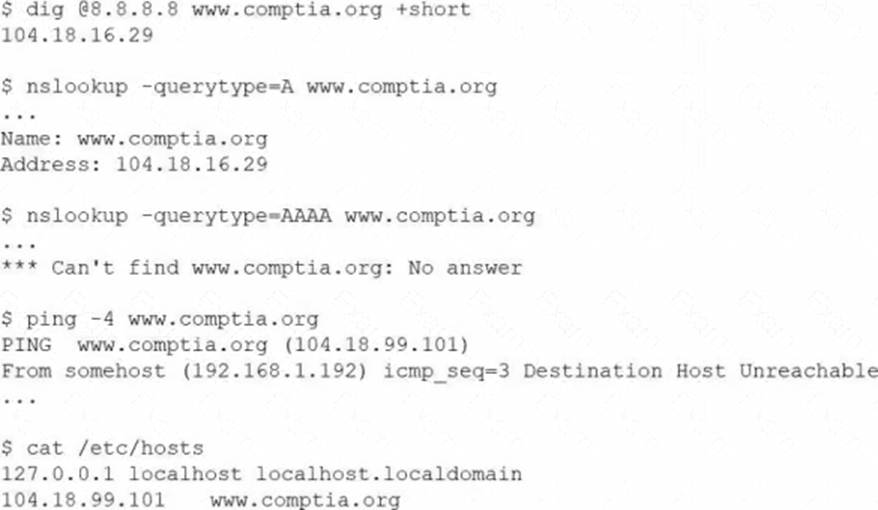
Which of the following is the most likely cause?
- A . The static entry needs to be removed from /etc/hosts.
- B . The remote website does not support IPv6, and the workstation requires it.
- C . The firewall needs to be modified to allow outbound HTTP and HTTPS.
- D . The nameserver in /etc/resolv.conf needs to be updated to 8.8.8.8
A
Explanation:
When troubleshooting name resolution issues in Linux, /etc/hosts entries take precedence over DNS lookups.
The workstation’s /etc/hosts file contains the line:
CopyEdit
In the echo "profile-$num-$name" line of a shell script, the variable $num seems to not be expanding during execution.
Which of the following notations ensures the value is expanded?
- A . echo "profile-$(num)-$name"
- B . echo ‘profile-$num-$name’
- C . echo "profile-‘$num’-$name"
- D . echo "profile-${num}-$name"
D
Explanation:
Shell variable expansion is a fundamental scripting concept included in Linux+ V8 objectives. In Bash and similar shells, variables are expanded only when they are interpreted within double quotes or unquoted contexts, and sometimes explicit syntax is required to avoid ambiguity.
The correct notation is ${num}, as shown in option D. Using curly braces around the variable name ensures the shell correctly identifies the variable boundary, especially when it is adjacent to other characters. This guarantees proper expansion of the variable’s value.
The other options are incorrect. Single quotes prevent variable expansion entirely. The $(…) syntax is used for command substitution, not variable expansion. Quoting the variable name itself also prevents expansion.
Linux+ V8 documentation emphasizes ${VAR} notation as a best practice in shell scripting for clarity and correctness. Therefore, the correct answer is D.
A Linux administrator updates the DNS record for the company using:
cat /etc/bind/db.abc.com
The revised partial zone file is as follows:
ns1 IN A 192.168.40.251
ns2 IN A 192.168.40.252
www IN A 192.168.30.30
When the administrator attempts to resolve www.abc.com to its IP address, the domain name still points to its old IP mapping:
nslookup www.abc.com
Server: 192.168.40.251
Address: 192.168.40.251#53
Non-authoritative answer:
Name: www.abc.com
Address: 199.168.20.81
Which of the following should the administrator execute to retrieve the updated IP mapping?
- A . systemd-resolve query www.abc.com
- B . systemd-resolve status
- C . service nslcd reload
- D . resolvectl flush-caches
D
Explanation:
This scenario represents a classic DNS troubleshooting situation covered in the Troubleshooting domain of the CompTIA Linux+ V8 objectives. Although the DNS zone file has been updated correctly on the BIND server, the system continues to resolve the domain name to an outdated IP address. This behavior strongly indicates DNS caching rather than a configuration error in the zone file itself.
Modern Linux systems that use systemd-resolved cache DNS responses locally to improve performance and reduce external queries. Even after a DNS record is updated on the authoritative server, cached results may persist until the cache expires or is manually cleared. The nslookup output showing a non-authoritative answer further confirms that the response is being served from a cache rather than directly from the updated zone data.
The correct solution is to flush the local DNS cache so the system can retrieve the updated record from the DNS server. The command resolvectl flush-caches clears all cached DNS entries maintained by systemd-resolved, forcing fresh queries to authoritative name servers. This aligns directly with Linux+ V8 documentation for resolving name resolution inconsistencies caused by stale cache entries.
The other options are incorrect for the following reasons. systemd-resolve query www.abc.com performs a DNS lookup but does not clear cached entries. systemd-resolve status only displays resolver configuration and statistics. service nslcd reload reloads the Name Service LDAP daemon and is unrelated to DNS resolution or caching.
Linux+ V8 emphasizes identifying whether issues originate from services, configuration, or cached data. In this case, flushing the DNS cache is the correct and least disruptive corrective action.
Therefore, the correct answer is D. resolvectl flush-caches.
Which of the following is a protocol for accessing distributed directory services containing a hierarchy of users, groups, machines, and organizational units?
- A . SMB
- B . TLS
- C . LDAP
- D . KRB-5
C
Explanation:
Directory services are a key part of enterprise Linux environments and are covered under the Security domain in Linux+ V8. The Lightweight Directory Access Protocol (LDAP) is specifically designed to access and manage distributed directory information.
LDAP directories store structured, hierarchical data such as users, groups, computers, and organizational units. Linux systems commonly use LDAP for centralized authentication, authorization, and identity management. LDAP is also the foundation for services like Active Directory and FreeIPA.
The other options are incorrect. SMB is a file and printer sharing protocol. TLS is an encryption protocol used to secure communications. Kerberos (KRB-5) is an authentication protocol often used alongside LDAP but does not store directory information itself.
Linux+ V8 documentation highlights LDAP as the primary protocol for directory-based identity services.
Therefore, the correct answer is C.
A technician wants to temporarily use a Linux virtual machine as a router for the network segment 10.10.204.0 /24.
Which of the following commands should the technician issue? (Select three).
- A . echo "1" > /proc/sys/net/ipv4/ip_forward
- B . iptables -A FORWARD -j ACCEPT
- C . iptables -A PREROUTING -j ACCEPT
- D . iptables -t nat -s 10.10.204.0/24 -p tcp -A PREROUTING -j MASQUERADE
- E . echo "0" > /proc/sys/net/ipv4/ip_forward
- F . echo "1" > /proc/net/tcp
- G . iptables -t nat -s 10.10.204.0/24 -A POSTROUTING -j MASQUERADE
- H . iptables -t nat -A PREROUTING -j MASQUERADE
A B G
Explanation:
From Exact Extract:
To temporarily configure a Linux virtual machine as a router, the technician must enable IP forwarding and set up iptables rules to allow and masquerade traffic:
A systems administrator is reconfiguring existing user accounts in a Linux system.
Which of the following commands should the administrator use to include "myuser" in the finance group?
- A . groupadd finance myuser
- B . groupmod finance myuser
- C . useradd -g finance myuser
- D . usermod -aG finance myuser
D
Explanation:
From Exact Extract:
To add an existing user (myuser) to an existing group (finance) without removing them from other groups, the correct command is usermod -aG finance myuser.
The -aG option appends the user to the supplementary group (s) specified. Other options: