
Practice Free JN0-106 Exam Online Questions
Question #31
Refer to the exhibit.
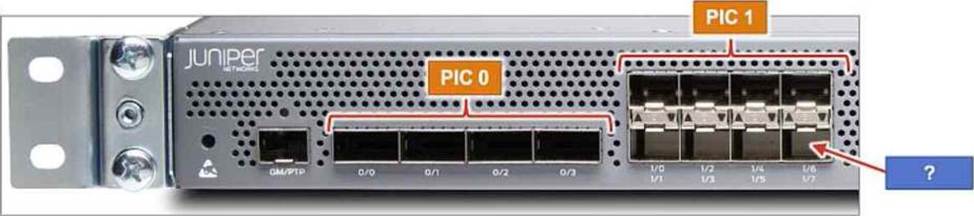
The MX204 has 12 built-in ports.
Referring to the exhibit, to which interface does the arrow point?
- A . хе-0/2/7
- B . хе-0/0/7
- C . хе-0/1/7
- D . хе-0/1/6
Correct Answer: C
C
Explanation:
The Juniper MX204 is a fixed-configuration router that utilizes a specific hierarchical naming convention for its physical interfaces: type-fpc/pic/port. In the MX204 architecture, there is a single built-in Flexible PIC Concentrator (FPC), which is always designated as FPC 0. This FPC is subdivided into two logical Physical Interface Cards (PICs): PIC 0 and PIC 1.
As shown in the exhibit, PIC 0 contains four high-speed ports (labeled 0/0 through 0/3) that typically support 40GbE or 100GbE speeds. PIC 1 contains eight ports (labeled 1/0 through 1/7) designed for 1GbE or 10GbE connectivity. These ports are arranged in a stacked, $2 times 4$ grid. The labeling system on the chassis indicates the port numbers for each column. In the fourth column of the PIC 1 block, the top port is identified as 1/6 and the bottom port as 1/7.
The blue arrow in the exhibit points directly to the bottom-right interface in the PIC 1 section. Correlating this physical location with the chassis labels confirms that the port number is 7. When combined with the FPC and PIC identifiers, the full interface name is xe-0/1/7 (assuming a 10GbE transceiver is installed). Understanding this physical-to-logical mapping is essential for accurate cabling and configuration within the Junos OS, ensuring that administrators apply the correct logical unit and protocol settings to the intended physical hardware.
C
Explanation:
The Juniper MX204 is a fixed-configuration router that utilizes a specific hierarchical naming convention for its physical interfaces: type-fpc/pic/port. In the MX204 architecture, there is a single built-in Flexible PIC Concentrator (FPC), which is always designated as FPC 0. This FPC is subdivided into two logical Physical Interface Cards (PICs): PIC 0 and PIC 1.
As shown in the exhibit, PIC 0 contains four high-speed ports (labeled 0/0 through 0/3) that typically support 40GbE or 100GbE speeds. PIC 1 contains eight ports (labeled 1/0 through 1/7) designed for 1GbE or 10GbE connectivity. These ports are arranged in a stacked, $2 times 4$ grid. The labeling system on the chassis indicates the port numbers for each column. In the fourth column of the PIC 1 block, the top port is identified as 1/6 and the bottom port as 1/7.
The blue arrow in the exhibit points directly to the bottom-right interface in the PIC 1 section. Correlating this physical location with the chassis labels confirms that the port number is 7. When combined with the FPC and PIC identifiers, the full interface name is xe-0/1/7 (assuming a 10GbE transceiver is installed). Understanding this physical-to-logical mapping is essential for accurate cabling and configuration within the Junos OS, ensuring that administrators apply the correct logical unit and protocol settings to the intended physical hardware.