
Practice Free JN0-106 Exam Online Questions
Click the Exhibit button.
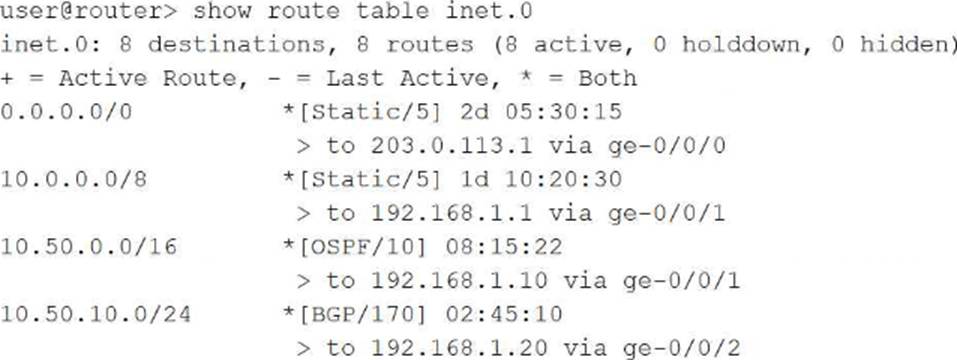
Referring to the exhibit, which route will be selected for a packet destined to IP address 10.50.10.55?
- A . Route 0.0.0.0/0 will be selected using next hop 203.0.113.1 because the default route matches all destinations and has been active the longest.
- B . Route 10.50.0.0/16 will be selected using next hop 192.168.1.10 because OSPF has a better preference value than BGP.
- C . Route 10.50.10.0/24 will be selected using next hop 192.168.1.20 because it has the longest prefix match for the destination address.
- D . Route 10.0.0.0/8 will be selected using next hop 192.168.1.1 because it was learned from the static routing protocol which has the lowest preference value.
C
Explanation:
In Junos OS, the Routing Information Base (RIB) selection process follows a strict hierarchy where the Longest Prefix Match (LPM) is the absolute primary tie-breaker. When a packet is destined for 10.50.10.55, the Routing Engine searches the inet.0 table for all matching entries. In this exhibit, four routes match: the default route (0.0.0.0/0), a general static route (10.0.0.0/8), an OSPF route (10.50.0.0/16), and a BGP route (10.50.10.0/24).
The LPM rule dictates that the router must select the most specific route available, which is defined as the entry with the highest number of matching bits in the subnet mask. The 10.50.10.0/24 route matches 24 bits of the destination address, making it more specific than the 16-bit, 8-bit, or 0-bit alternatives. It is critical to understand that route preference (e.g., Static at 5, OSPF at 10, or BGP at 170) is only evaluated if there are multiple paths to the exact same prefix and length. Because these prefixes vary in length, the length takes precedence over the protocol preference. Therefore, the BGP-learned route via 192.168.1.20 is selected as the active path, ensuring traffic follows the most granular routing information provided to the device. Routing Fundamentals, Routing Table Selection, Longest Prefix Match.
You must add a large hierarchical configuration to your Junos device. You also want to completely replace the existing candidate configuration with a new configuration file.
Which command would allow you to accomplish these tasks?
- A . load merge terminal
- B . load override terminal
- C . load factory default
- D . load set terminal
B
Explanation:
The load command in Junos OS provides several operational methods for importing configuration data into the candidate buffer. When an administrator needs to perform a "clean slate" update―where the objective is to completely replace the existing candidate configuration with a new hierarchical file―the override option is the correct tool. Unlike load merge, which blends new data with the existing configuration, or load replace, which only updates specifically tagged sections, load override discards every statement currently in the candidate configuration and substitutes it entirely with the new content.
Using the terminal keyword in conjunction with override allows the architect to paste a large hierarchical configuration directly into the Command Line Interface (CLI). This is the most efficient method for applying validated templates, restoring full system backups, or migrating configurations between devices without having to manually delete existing parameters. After the data is pasted and the process is finalized (typically with a Ctrl+D sequence), the Junos OS kernel validates the new candidate configuration against the device’s hardware and software capabilities. To make these changes active and operational, a subsequent commit command must be executed. This comprehensive replacement mechanism ensures configuration integrity by eliminating any potential remnants of previous, unwanted settings that might conflict with the new deployment.
What are two characteristics of transit traffic in Junos OS? (Choose two.)
- A . It includes routing protocol packets.
- B . It is traffic destined for the Routing Engine.
- C . It does not require control plane processing.
- D . It is forwarded by the Packet Forwarding Engine.
C, D
Explanation:
Transit traffic represents the primary "workload" of a Junos device; it is the data that enters one network interface and exits another, destined for a remote host. Unlike exception traffic, transit traffic is forwarded exclusively by the Packet Forwarding Engine (PFE). The PFE uses specialized Application-Specific Integrated Circuits (ASICs) or programmable NPUs to perform lookups in the hardware-based forwarding table (FIB) at wire speed.
A defining characteristic of transit traffic is that it does not require control plane processing. Once the Routing Engine (RE) has populated the PFE with the necessary forwarding instructions, the RE steps out of the way. The packets pass through the PFE’s ingress processing, lookups, and egress queuing without ever consuming CPU cycles on the Routing Engine. This bypass is what allows Junos devices to maintain massive throughput and low latency, even if the RE is busy recalculating a complex BGP table. Routing protocol packets (like OSPF updates) and traffic destined for the router’s own management IP address are explicitly not transit traffic; they are control plane traffic because they terminate at the device’s "brain." Transit traffic is strictly "pass-through" data.
What does the user@router> clear log ospf-trace command accomplish?
- A . The ospf-trace file is deleted.
- B . Trace parameters are removed from the OSPF protocol configuration.
- C . Logging data into ospf-trace is stopped.
- D . Data in the ospf-trace file is removed and logging continues.
D
Explanation:
The clear log command is a vital operational utility within the Junos OS used to manage the size and relevance of log files without interrupting the system’s logging processes. When a Senior Architect executes the clear log ospf-trace command, the Junos kernel truncates the specified file, effectively removing all existing text and resetting the file size to zero bytes. Crucially, the file itself is not deleted from the /var/log directory, nor is the underlying traceoptions configuration modified in any way.
Because tracing is often used for real-time debugging of protocol behaviors like OSPF, trace files can rapidly grow to several megabytes, making it difficult to find specific events. By clearing the log, the administrator ensures that any subsequent OSPF events―such as adjacency changes, LSA flooding, or SPF calculations―are recorded at the very beginning of the file, free from historical clutter. The OSPF process (rpd) continues to write to the file immediately after the truncation occurs. This operational behavior distinguishes the clear command from the file delete command, which would remove the file entirely, or the set protocols ospf traceoptions configuration command, which defines which specific events the device should record. Utilizing clear log is a standard best practice during intensive troubleshooting sessions to maintain a clean and chronologically relevant diagnostic environment.
You are creating a new user account on your Junos device. The user must be able to validate the routing table and interface statistics but should not be able to make any configuration changes.
In this scenario, which permission flag would satisfy this requirement?
- A . configure
- B . all
- C . view
- D . network
C
Explanation:
User access control in Junos OS is managed through the application of permission flags within login classes. When an architect needs to define a role that allows for robust monitoring and troubleshooting without granting authority to alter the device’s operational state, the view permission flag is the appropriate selection. This flag grants the user the ability to execute the majority of show commands in operational mode, which includes viewing the routing table, inspecting interface statistics, and checking hardware status.
The view permission is specifically designed for "read-only" access. It ensures that the user can observe all necessary telemetry data to validate network health―satisfying the requirement to check routing and interface stats―while strictly prohibiting access to configuration mode or any set commands. This contrasts with the configure flag, which allows modification of the candidate configuration, or the network flag, which provides specific permissions related to network-level operational tasks. By assigning a user to a class restricted with the view flag, an administrator maintains a secure environment where support personnel can diagnose issues without the risk of accidental or unauthorized configuration changes. This principle of least privilege is a cornerstone of Junos security management. User Interfaces, User Management and Access Control.
Which two statements are correct about Junos OS? (Choose two.)
- A . Junos OS provides the ability to run unsigned third-party binaries.
- B . Junos OS provides modularization of software processes.
- C . Junos OS combines security and routing policies.
- D . Junos OS separates the control plane and the forwarding plane.
B, D
Explanation:
Junos OS is built upon a highly stable and secure architecture that distinguishes it from many legacy network operating systems. Two of its most defining characteristics are software modularization and the separation of the control and forwarding planes.
Modularization means that Junos OS runs each major function―such as the routing protocol process (rpd), the management process (mgd), and the interface process (dcd)―as an independent software daemon in its own protected memory space. This ensures that if a single process crashes or needs to be restarted, it does not bring down the entire system or interrupt traffic forwarding.
Furthermore, the physical and logical separation of the Control Plane (Routing Engine) and the Forwarding Plane (Packet Forwarding Engine) is a cornerstone of Junos design. The Routing Engine handles complex intelligence, protocol calculations, and management, while the Packet Forwarding Engine performs high-speed packet switching in hardware. This ensures that a heavy management load or a complex routing recalculation won’t cause "jitter" or packet loss for transit traffic. Conversely, Junos strictly prohibits unsigned third-party binaries to maintain system integrity, and it maintains a clear functional distinction between routing policies (path selection) and security policies (traffic permit/deny).
Which protocol provides secure remote CLI access to a Junos device?
- A . FTP
- B . SNMP
- C . Telnet
- D . SSH
D
Explanation:
Securing the management plane is a core requirement for any Junos OS deployment. Secure Shell (SSH) is the industry-standard protocol used to provide encrypted, authenticated remote access to the Junos Command Line Interface (CLI). Unlike Telnet, which transmits both administrative credentials and command data in cleartext, SSH utilizes public-key cryptography to establish a secure tunnel, protecting the session from eavesdropping, man-in-the-middle attacks, and unauthorized interception.
In Junos OS, SSH is typically enabled within the [edit system services] hierarchy. Once active, it allows administrators to perform operational and configuration tasks with the assurance that their management traffic remains confidential. Beyond simple terminal access, SSH serves as the transport mechanism for other secure management functions, such as the NETCONF XML management protocol and Secure Copy (SCP) for file transfers. For high-security environments, Junos supports advanced SSH features including key-based authentication, strong cipher suites, and multi-factor authentication integration. Disabling insecure protocols like Telnet and FTP in favor of SSH and SFTP/SCP is a foundational best practice for hardening the Routing Engine against external threats.
Which statement describes the purpose of configuring traceoption log files in Junos OS?
- A . The traceoption log files automatically optimize routing decisions based on traffic patterns.
- B . The traceoption log files enable detailed debugging of specific protocols or processes.
- C . The traceoption log files allow permanent storage of all system logs for compliance purposes.
- D . The traceoption log files provide real-time monitoring of interface bandwidth utilization.
B
Explanation:
Traceoptions represent an essential diagnostic facility within Junos OS, primarily used by network engineers for deep-level troubleshooting and protocol analysis. The fundamental purpose of configuring traceoption log files is to enable detailed debugging of specific protocols―such as BGP, OSPF, or IS-IS―or specific system processes like the Routing Protocol Process (rpd). When enabled, the system captures detailed information about the internal operations of the protocol, including the exchange of packets, state machine transitions, and error conditions, writing this data to a dedicated file in the /var/log directory.
Unlike standard system logging (syslog), which captures high-level events and warnings, traceoptions provide a granular, "behind-the-scenes" view of how a protocol is interacting with its neighbors. This is particularly useful for identifying the root cause of complex adjacency issues or route instability that standard show commands may not reveal. However, because tracing can be resource-intensive, it is typically configured with specific flags to limit the output to relevant events and is disabled once the troubleshooting task is complete. Traceoptions do not serve to optimize routing automatically, nor are they intended for permanent compliance storage or simple bandwidth monitoring. Instead, they remain the premier tool for clinical debugging and protocol verification within the Junos environment. Operational Monitoring and Maintenance, Troubleshooting Tools and Traceoptions.
Which two statements describe the result when you enter at the command-line prompt? (Choose two.)
- A . It lists the available commands and options.
- B . It lists tips for the help menu.
- C . It displays help about a text string contained in a statement.
- D . It displays summary information about the commands and options.
A, D
Explanation:
The Junos Command Line Interface (CLI) is designed with an intuitive, context-sensitive help system that assists users in navigating the command hierarchy. When an administrator enters a question mark (?) at the prompt, the CLI provides immediate feedback based on the current location within the hierarchy. First, it lists all available commands and options that are valid at that specific point. This allows the user to see the breadth of possible next steps without needing to refer to external documentation.
Second, the character triggers the display of summary information for each of those commands and options. This brief descriptive text provides a clinical overview of what each command achieves, helping the user select the appropriate tool for their task. This "help-on-demand" feature is functional in both operational and configuration modes. It is important to distinguish this from the help command; while help (such as help topic or help reference) provides more exhaustive documentation and usage examples, the prompt is primarily a quick-reference tool for command completion and syntax discovery. This mechanism ensures that even complex configurations can be built accurately by exploring the available options and their summarized purposes directly within the terminal environment. User Interfaces, CLI Help Facilities, Command Discovery.
Which interface type prefix represents a 10-Gigabit Ethernet interface?
- A . ge
- B . xe
- C . et
- D . fe
B
Explanation:
In Junos OS, the naming convention for physical interfaces is highly structured, providing immediate information regarding the media type, hardware location, and port number. The prefix of an interface name is a two-letter or three-letter code that identifies the speed and physical transmission characteristics of the interface. For 10-Gigabit Ethernet (GbE) interfaces, the correct prefix is xe. This prefix is a standard identifier across Junos platforms, regardless of whether the interface is fixed or modular.
Understanding these prefixes is essential for navigating the Junos configuration hierarchy and performing operational monitoring. For comparison, other common prefixes include fe for Fast Ethernet (10/100 Mbps), ge for Gigabit Ethernet (1 Gbps), and et for higher-speed interfaces such as 40-GbE or 100-GbE. When an administrator views the output of commands like show interfaces terse, identifying the xe prefix allows for the quick verification of high-bandwidth links within the network fabric. This standardized nomenclature ensures consistency across different hardware families, such as the EX, MX, and QFX series, facilitating easier management and troubleshooting for network architects. This concludes the provided set of questions from the Junos Associate (JNCIA-Junos) curriculum. Junos OS Fundamentals, Interface Naming Conventions.