
Practice Free FCSS_LED_AR-7.6 Exam Online Questions
You need to deploy FortiAPs at remote locations and want to avoid high latency by minimizing interference from FortiGate .
Which SSID traffic mode is best suited for this deployment?
- A . Hybrid mode
- B . Local mode
- C . Bridge mode
- D . Tunnel mode
Refer to the exhibit.
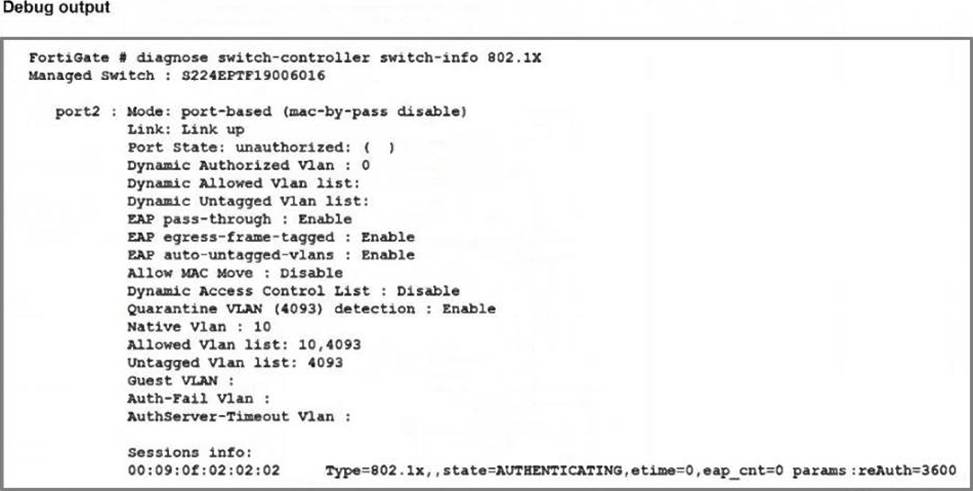
Port2 on FortiSwitch is configured with an 802.1X authentication security policy, but a device connected to port2 is unable to access the network. The administrator has gathered the diagnose output, as shown in the exhibit, to investigate the issue .
Which two scenarios could explain why the device is failing to gain network access? (Choose two.)
- A . The device is not configured for 802.1X authentication.
- B . The device has been quarantined for 3600 seconds.
- C . The device does not support 802.1X authentication.
- D . The device has been assigned the guest VLAN.
Why is it critical to maintain NTP synchronization between FortiGate and FortiSwitch when FortiLink is configured?
- A . To facilitate synchronization of firmware updates across devices
- B . To allow FortiSwitch to communicate with other FortiSwitche devices in the network.
- C . To ensure accurate time for logs, authentication, and event correlation
- D . To allow FortiSwitch to function in standalone mode if FortiGate becomes unavailable
C
Explanation:
FortiGate and FortiSwitchmust share synchronized timewhen operating in FortiLink mode.
Documented reasons in FortiOS:
Accurate time synchronization is required for logs, authentication events, and fabric correlations.
Why it’s critical:
In a Windows environment using AD machine authentication, how does FortiAuthenticator ensure that a previously authenticated device is maintaining its network access once the device resumes operating after sleep or hibernation?
- A . It temporarily assigns the device to a guest VLAN until full reauthentication is completed.
- B . It sends a wake-on-LAN packet to trigger reauthentication.
- C . It uses machine authentication based on the device IP address.
- D . It caches the MAC address of authenticated devices for a configurable period of time.
D
Explanation:
WithAD machine authenticationvia FortiAuthenticator:
When a machine successfully authenticates, FortiAuthenticator records:
Machine account / identity
MAC addressof the device
Associated IP and session info
To handle sleep/hibernation:
FortiAuthenticator keeps acache of authenticated MAC addressesfor a configured timeout.
When the device wakes up and sends traffic again, FortiAuthenticator/FSSO can still treat it as authenticated as long as its MAC is in cache, so access is maintained without forcing a full machine re-auth immediately.
This matches optionD.
A (guest VLAN) is not the standard behavior here.
B (WoL) is unrelated.
C (IP-based) would break as IPs can change; MAC-based caching is what’s used.