
Practice Free FCSS_LED_AR-7.6 Exam Online Questions
You are troubleshooting a Syslog-based single sign-on (SSO) issue on FortiAuthenticator, where user authentication is not being correctly mapped from the syslog messages. You need a tool to diagnose the issue and understand the logs to resolve it quickly.
Which tool in FortiAuthenticator can you use to troubleshoot and diagnose a Syslog SSO issue?
- A . Debug logs > Remote Servers > Syslog Viewer
- B . Parsing Test Tool
- C . Debug logs > SSO Sessions page
- D . Debug logs > Single Sign-On > Syslog SSO
D
Explanation:
Context: You’re troubleshootingSyslog-based SSOonFortiAuthenticator:
Devices (typically firewalls, WLAN controllers, VPN gateways) sendsyslog messagescontaining usernames, IPs, login/logout events.
FortiAuthenticator parses those logs usingSyslog SSO rulesand injects logon sessions intoFSSOfor FortiGate.
When users are not mapping correctly, you need to see:
Did the syslog message arrive?
Which matching rule (if any) caught it?
What username and IP were extracted?
Why was a message ignored or rejected?
FortiAuthenticator has a dedicated debug area for this:
Debug logs → Single Sign-On → Syslog SSO
This view shows:
Raw syslog lines received
Thematching ruleapplied (or “no match”)
Parsed fields (username, IP, group)
Any parsing errors
This is exactly the tool designed totroubleshoot and diagnose Syslog SSO issues.
Why the other options are not the best for this issue
How does Syslog SSO on FortiAuthenticator establish user identity?
- A . By directly communicating with the domain controller to retrieve user login events
- B . By using predefined user credentials stored on ForitAuthenticator
- C . By intercepting and decrypting network traffic to extract user credentials
- D . By parsing syslog messages from network devices to extract user login events and associate them with IP addresses
Refer to the exhibits.
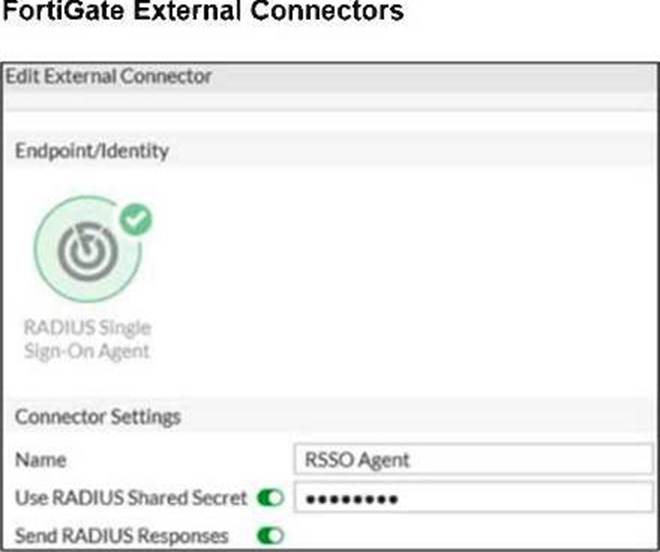
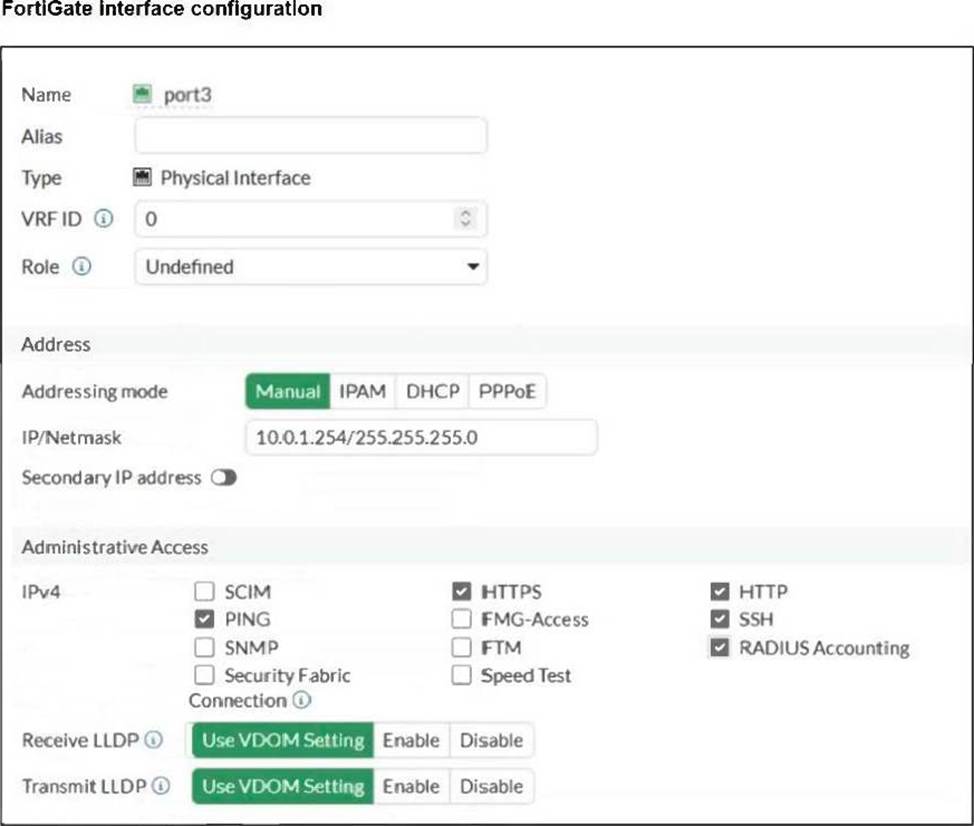
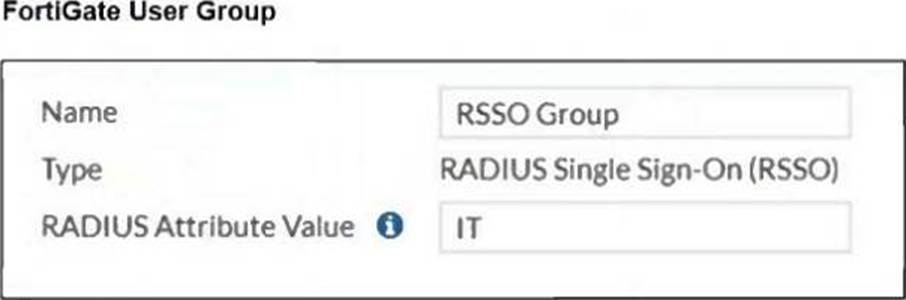
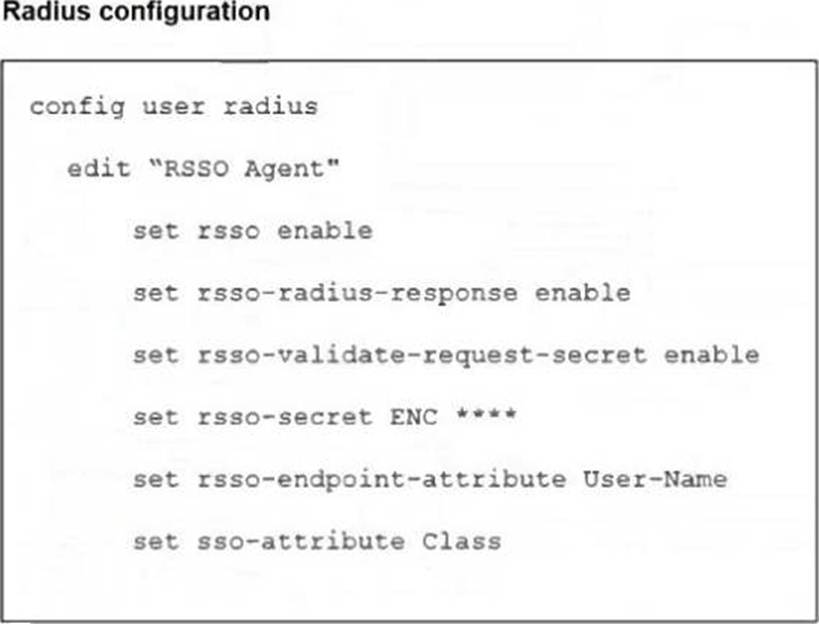
A network administrator is configuring RADIUS single sign-on (RSSO) on FortiGate to dynamically assign users to specific user groups based on RADIUS accounting messages.
Which two configuration steps are required to ensure RSSO user group matching work correctly? (Choose two.)
- A . Configure FortiGate to send RADIUS authentication requests instead of relying on accounting messages.
- B . Set the rsso-endpoint-attribute to define which RADIUS attribute will be used to extract username.
- C . Configure the sso-attribute in the RSSO agent settings to specify which RADIUS attribute will be used for group matching.
- D . Enable the RSSO agent service on FortiGate to actively poll RADIUS servers for authentication requests.
Refer to the exhibits.
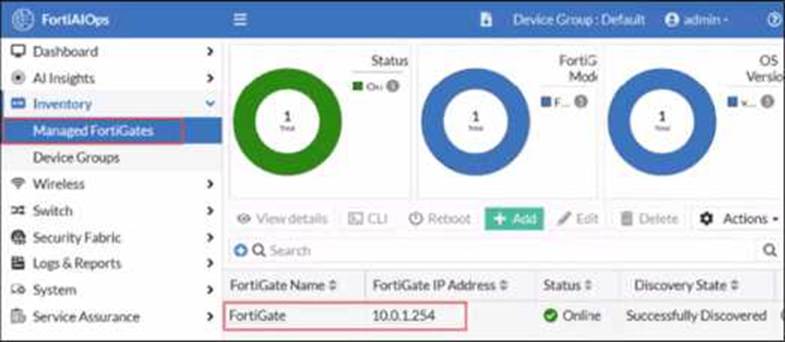
FortiGate has been added to FortiAIOps for management.
Which step must be performed on FortiAIOps to add a FortiSwitch device connected to the recently added FortiGate?
- A . Add the FortiSwitch device by submitting its serial number.
- B . FortiAIOps requires that the FortiSwitch IP address is submitted.
- C . FortiSwitch is added automatically.
- D . Configure the FortiSwitch IP address, user ID, and password
C
Explanation:
In a LAN Edge deployment:
FortiSwitch is managedthrough FortiGate via FortiLink.
FortiAIOps integrates withFortiGateas the single managed device; from there it gains visibility intoall Fabric and LAN-edge devices(FortiSwitch, FortiAP) that are registered to that FortiGate.
Once the FortiGate is successfully added to FortiAIOps (as shown in the exhibit, statusOnline /
Successfully Discovered), all FortiSwitches managed by that FortiGate are:
Discovered automatically through the FortiGateCFortiAIOps connection
Shown under the appropriate inventory / switch views withno separate onboarding stepfor each switch.
This is why no extra IP, serial number, or credential entry is required for FortiSwitch.
So:
AandBsuggest manual per-switch onboarding, which is not how FortiAIOps works with LAN Edge.
Dsimilarly assumes direct FortiSwitch management, but FortiAIOps talks toFortiGate, not the switch.
Therefore the correct behavior is that theFortiSwitch is added automatically (C)once its managing FortiGate is connected to FortiAIOps.
Refer to the exhibits.
FortiGate has been added to FortiAIOps for management.
Which step must be performed on FortiAIOps to add a FortiSwitch device connected to the recently added FortiGate?
- A . Add the FortiSwitch device by submitting its serial number.
- B . FortiAIOps requires that the FortiSwitch IP address is submitted.
- C . FortiSwitch is added automatically.
- D . Configure the FortiSwitch IP address, user ID, and password
C
Explanation:
In a LAN Edge deployment:
FortiSwitch is managedthrough FortiGate via FortiLink.
FortiAIOps integrates withFortiGateas the single managed device; from there it gains visibility intoall Fabric and LAN-edge devices(FortiSwitch, FortiAP) that are registered to that FortiGate.
Once the FortiGate is successfully added to FortiAIOps (as shown in the exhibit, statusOnline /
Successfully Discovered), all FortiSwitches managed by that FortiGate are:
Discovered automatically through the FortiGateCFortiAIOps connection
Shown under the appropriate inventory / switch views withno separate onboarding stepfor each switch.
This is why no extra IP, serial number, or credential entry is required for FortiSwitch.
So:
AandBsuggest manual per-switch onboarding, which is not how FortiAIOps works with LAN Edge.
Dsimilarly assumes direct FortiSwitch management, but FortiAIOps talks toFortiGate, not the switch.
Therefore the correct behavior is that theFortiSwitch is added automatically (C)once its managing FortiGate is connected to FortiAIOps.
You are deploying a FortiSwitch device managed by FortiGate in a secure network environment. To ensure accurate communication, you must identify which protocols are required for communication and control between FortiGate and FortiSwitch.
Which three protocols are used by FortiGate to manage and control FortiSwitch devices? (Choose three.)
- A . SNMP can be used by FortiGate to manage FortiSwitch devices by monitoring their status.
- B . UHTTPS is usea;by FortiGate to securely manage and configure FortiSwitch devices.
- C . FortiGate uses the Fortilink protocol to establish communication with FortiSwitch.
- D . CAPWAP is used to establish the control channel between FortiSwitch and FortiGate.
- E . IGMP is required for managing communication between FortiGate and FortiSwitch devices in multicast environments.
B,C,D
Explanation:
Let’s verify each protocol:
C. FortiGate uses the FortiLink protocol to establish communication with FortiSwitch. ✔
FortiLink is themanagement and control protocol, encapsulated over:
LLDPfor discovery
CAPWAP (UDP/5246C5247)for control channel
DHB (Device Handshake Bus)inside CAPWAP frames
Thus,FortiLink is required.
D. CAPWAP is used to establish the control channel between FortiSwitch and FortiGate. ✔
Although CAPWAP is commonly associated with FortiAP, FortiSwitchalso uses CAPWAPinternally when managed by FortiGate.
This is documented in:
FortiSwitch Administration Guide
LAN Edge deployment guide
SoD is correct.
B. UHTTPS is used by FortiGate to securely manage and configure FortiSwitch devices. ✔
FortiLink session actually uses:
Encrypted CAPWAP (over DTLS)
UHTTPS (port 4433)for secure configuration exchanges
This protocol is mandatory for:
Switch configuration synchronization
Firmware upgrade
NAC data exchange
VLAN provisioning
Therefore UHTTPS is indeed one of the key protocols.
Why the incorrect options are wrong:
A FortiSwitch is not appearing in the FortiGate management interface after being connected via FortiLink.
What could be a first troubleshooting step?
- A . Ensure that the FortiGate security policies allow traffic from the FortiSwitch.
- B . Manually assign a static IP to the FortiSwitch.
- C . Verify that FortiGate device DHCP server is assigning an IP to the FortiSwitch.
- D . Ensure the FortiSwitch has internet access.
C
Explanation:
In FortiLink topologies, a managed FortiSwitch normally gets itsmanagement IP automaticallyfrom theDHCP server on the FortiLink interface. If the switch does not receive an IP:
It cannot form the FortiLink CAPWAP/DTLS control channel.
Therefore it doesnot appearunderWiFi & Switch Controller > FortiSwitch.
FortiOS documentation states that FortiLink uses abuilt-in DHCP serveron the FortiLink interface for onboarding switches.
So thefirst troubleshooting stepis to confirm:
The FortiLink DHCP server is enabled.
Leases are being handed out to the FortiSwitch MAC.
Other options:
A: Security policies do not affect the L2 FortiLink control channel.
B: Static IP may be used but is not the normal first step.
D: Internet access is not required for FortiGate to see the switch.
Connectivity tests are being performed on a newly configured VLAN. The VLAN is configured on a FortiSwitch device that is managed by FortiGate. During testing, it is observed that devices
within the VLAN can successfully ping FortiGate. and FortiGate can also ping these devices.
Inter-VLAN communication is working as expected. However, devices within the same VLAN are unable to communicate with each other.
What could be causing this issue?
- A . Access VLAN is enabled on the VLAN.
- B . The FortiSwitch MAC address table is missing entries.
- C . The FortiGate ARP table is missing entries.
- D . The native VLAN configured on the ports is incorrect.
A
Explanation:
Observed behavior:
Devices in the VLANcan ping FortiGate→ gateway reachability OK.
FortiGatecan ping devicesin that VLAN → return path OK.
Inter-VLAN routingworks → FortiGate’s L3 and policies are fine.
Devices in the same VLAN cannot ping each other→ problem is on theL2 switching plane, not L3.
On FortiSwitch (managed by FortiGate), there is a feature calledAccess VLAN(sometimes described in
NAC/dynamic segmentation context):
WhenAccess VLANis enabled on a VLAN, the switchdoes not perform normal L2 forwardingbetween hosts in that VLAN.
Instead, all traffic from endpoints in that VLAN isforced upstream to FortiGate, as if every frame were destined for the gateway.
This is used for designs where you wantall intra-VLAN traffic inspected by the firewall, implementing micro-segmentation.
Resulting behavior:
Host → FortiGate: works (frames are forwarded to FortiGate).
FortiGate → Host: works (routed back).
Host A → Host B (same VLAN):
Frame from A goes to FortiGate.
FortiGate seessource and destination in same subnet; depending on policy, it may drop or not have a policy allowing that traffic.
Even if allowed, certain designs still break pure L2 expectations.
In the exam scenario, the key point is:
IfAccess VLAN is enabled,local L2 communication within that VLAN is disabled, so hosts in the same VLAN cannot communicate directly.
That perfectly explains:
Same VLAN hosts can’t ping each other
But they can both reach FortiGate and beyond
Why the other options are less likely / incorrect
B. FortiSwitch MAC address table is missing entries
If MAC table were empty/bad,nothingin that VLAN would work properly, including pinging FortiGate. C. FortiGate ARP table is missing entries
Then FortiGate couldn’t ping the devices either; but it can.
D. Native VLAN misconfigured on ports
That would affect connectivity to FortiGate too, not only host-to-host.
Refer to the exhibits.
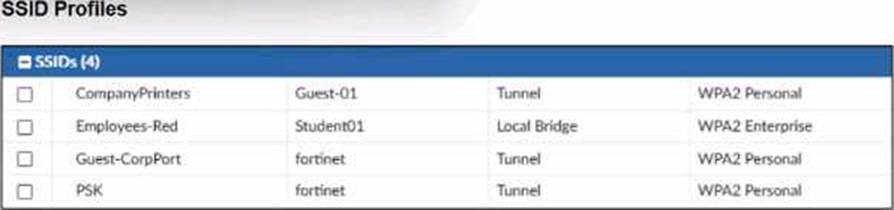
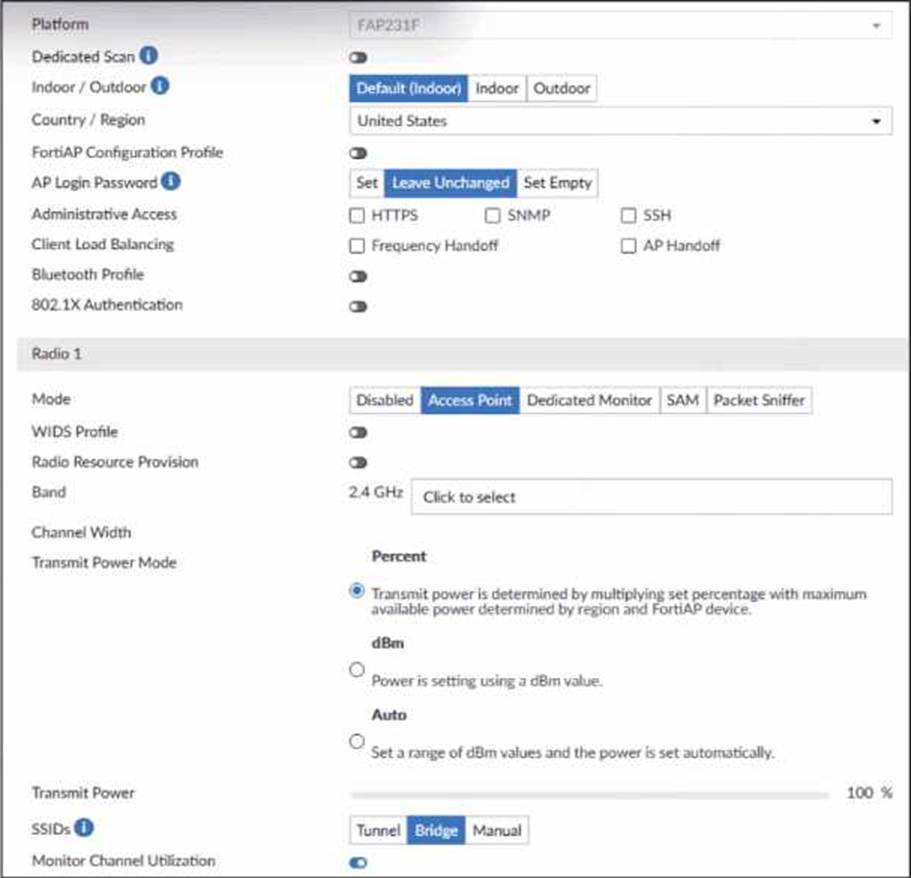
A set of SSID profiles has been configured on FortiManager, and an AP profile has been assigned to a group of AP managed by FortiGate. However, none of the designated SSIDs are being broadcast by these APs.
Which configuration change is required to make the APs broadcast these SSIDs as intended?
- A . Adjust the AP profile to ensure all SSIDs are configured in a supported mode, either bridge or tunnel, but not a mix of both.
- B . Change the AP profile to use a platform that supports the configured mix of SSIDs.
- C . Choose Manual in the SSIDs setting and select the SSIDs to broadcast.
- D . Set the Transmit Power Mode to Auto.
C
Explanation:
From the exhibits:
The AP profile shows:
SSIDs: Tunnel | Bridge | Manual
The current setting isBridge, not Manual.
WhenBridgeorTunnelis selected, the AP profiledoes NOT automatically broadcast SSIDsunless the corresponding VAPs were explicitly mapped in the AP profile.
FortiManager SSID profiles are created, but unless these are explicitly applied underManual SSIDs selection, the AP will not broadcast any SSID.
Fortinet documentation states:
“To control which SSIDs an AP broadcasts, the AP Profile must have SSIDs set toManual, and the desired SSIDs must be selected.”
Therefore, to make the AP broadcast the intended SSIDs:
✔ You must switch the SSIDs setting to Manual, and manually select the SSIDs (CompanyPrinters, Student01, Guest-CorpPort, PSK).
Why the other options are incorrect:
Refer to the exhibit.
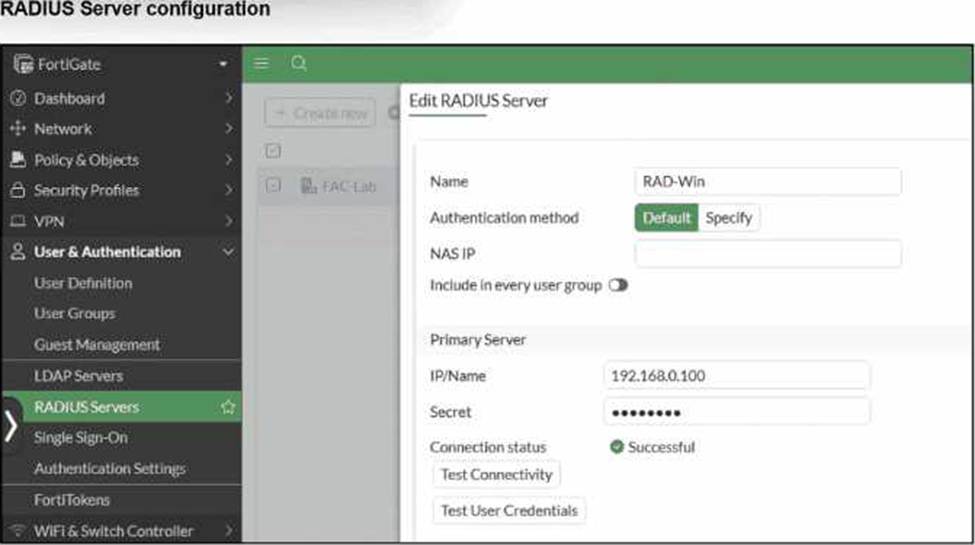
On FortiGate, a RADIUS server is configured to forward authentication requests to FortiAuthenticator, which acts as a RADIUS proxy. FortiAuthenticator then relays these authentication requests to a remote Windows AD server using LDAP.
While testing authentication using the CLI command diagnose test authserver. the administrator observed that authentication succeeded with PAP but failed when using MS-CHAFV2.
Which two solutions can the administrator implement to enable MS-CHAPv2 authentication? (Choose two.)
- A . Change the FortiGate authentication method to CHAP instead of MS-CHAPv2.
- B . Enable Windows Active Directory domain authentication on FortiAuthenticator.
- C . Enable RADIUS attribute filtering on FortiAuthenticator.
- D . Configure FortiAuthenticator to use RADIUS instead of LDAP as the back-end authentication server