Practice Free DP-700 Exam Online Questions
DRAG DROP
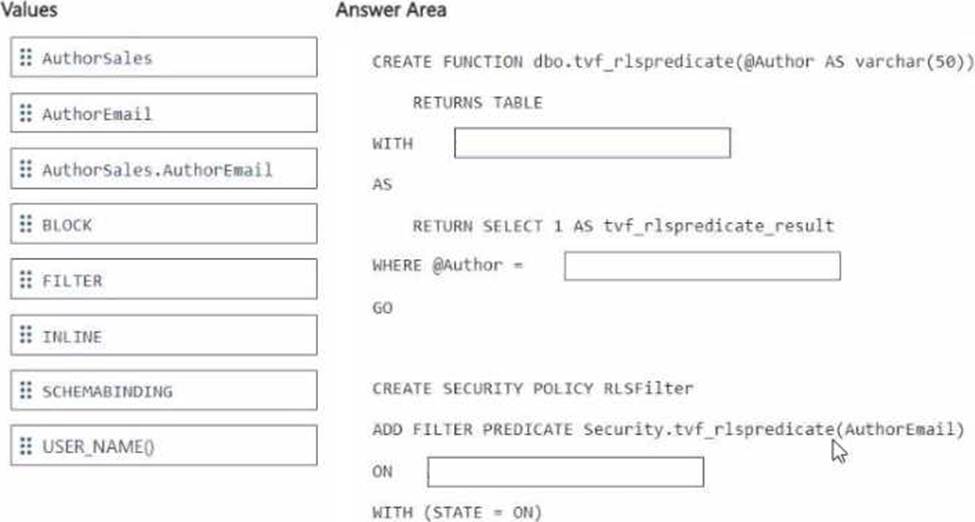
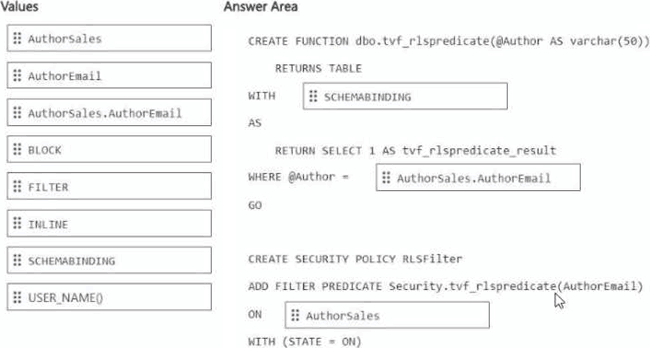
You need to ensure that the authors can see only their respective sales data.
How should you complete the statement? To answer, drag the appropriate values the correct targets. Each value may be used once, more than once, or not at all. You may need to drag the split bar between panes or scroll to view content. NOTE: Each correct selection is worth one point.
You have an Azure key vault named KeyVaultl that contains secrets.
You have a Fabric workspace named Workspace-!. Workspace! contains a notebook named Notebookl that performs the following tasks:
• Loads stage data to the target tables in a lakehouse
• Triggers the refresh of a semantic model
You plan to add functionality to Notebookl that will use the Fabric API to monitor the semantic model refreshes. You need to retrieve the registered application ID and secret from KeyVaultl to generate the authentication token.
Solution: You use the following code segment:
Use notebookutils.credentials.getSecret and specify the key vault name and key vault secret.
Does this meet the goal?
- A . Yes
- B . No
You have a Fabric workspace that contains a lakehouse named Lakehouse1. Data is ingested into Lakehouse1 as one flat table.
The table contains the following columns.
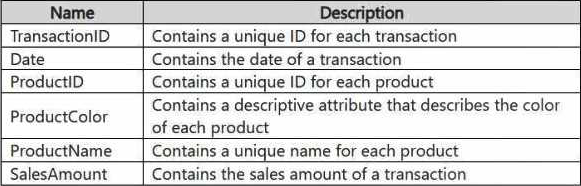
You plan to load the data into a dimensional model and implement a star schema. From the original flat table, you create two tables named FactSales and DimProduct. You will track changes in DimProduct.
You need to prepare the data.
Which three columns should you include in the DimProduct table? Each correct answer presents part of the solution. NOTE: Each correct selection is worth one point.
- A . Date
- B . ProductName
- C . ProductColor
- D . TransactionID
- E . SalesAmount
- F . ProductID
You have a Fabric workspace that contains a data pipeline named Pipeline1 and a notebook named Notebook1. Pipeline1 contains an activity that is used to run Notebook1. Pipeline! is scheduled to run every 10 minutes.
You receive an alert that Pipeline! failed during the notebook execution activity.
You need to identify in which cell the failure occurred.
What should you do from Monitor in the Fabric admin center?
- A . Select the entry for the notebook execution, and then select the logs.
- B . Select the entry for the notebook execution, and then view the item snapshot.
- C . Select the entity for the pipeline execution, and then view the activity run.
- D . Select the entry for the pipeline execution, and then select the output.
You have an Azure subscription that contains a blob storage account named sa1. Sa1 contains two files named Filelxsv and File2.csv.
You have a Fabric tenant that contains the items shown in the following table.
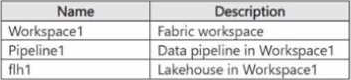
You need to configure Pipeline1 to perform the following actions:
• At 2 PM each day, process Filel.csv and load the file into flhl.
• At 5 PM each day. process File2.csv and load the file into flhl.
The solution must minimize development effort.
What should you use?
- A . a job definition
- B . a data pipeline schedule
- C . a data pipeline trigger
- D . an activator
Note: This question is part of a series of questions that present the same scenario. Each question in the series contains a unique solution that might meet the stated goals. Some question sets might have more than one correct solution, while others might not have a correct solution.
After you answer a question in this section, you will NOT be able to return to it. As a result, these questions will not appear in the review screen.
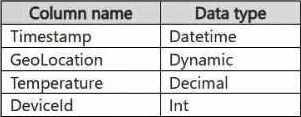
You have a KQL database that contains two tables named Stream and Reference. Stream contains streaming data in the following format.
Reference contains reference data in the following format.
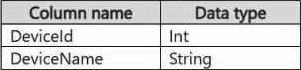
Both tables contain millions of rows.
You have the following KQL queryset.

You need to reduce how long it takes to run the KQL queryset.
Solution: You move the filter to line 02.
Does this meet the goal?
- A . Yes
- B . No
You have a Fabric workspace named Workspace1 that contains a warehouse named DW1 and a data pipeline named Pipeline1.
You plan to add a user named User3 to Workspace1.
You need to ensure that User3 can perform the following actions:
View all the items in Workspace1.
Update the tables in DW1.
The solution must follow the principle of least privilege.
You already assigned the appropriate object-level permissions to DW1.
Which workspace role should you assign to User3?
- A . Admin
- B . Member
- C . Viewer
- D . Contributor
HOTSPOT
You have a table in a Fabric lakehouse that contains the following data.
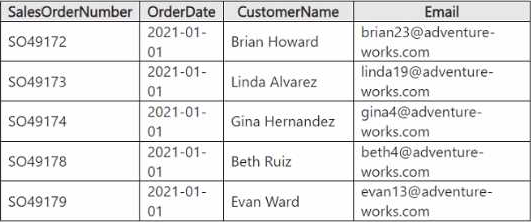
You have a notebook that contains the following code segment.

For each of the following statements, select Yes if the statement is true. Otherwise, select No. NOTE: Each correct selection is worth one point.
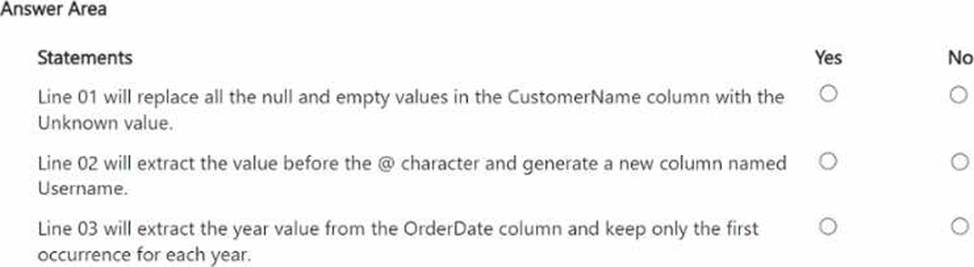
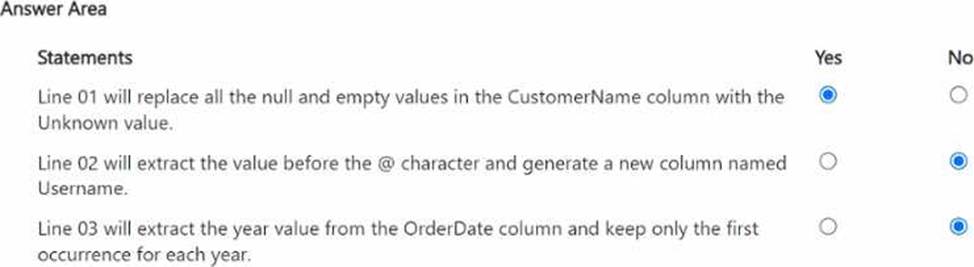
HOTSPOT
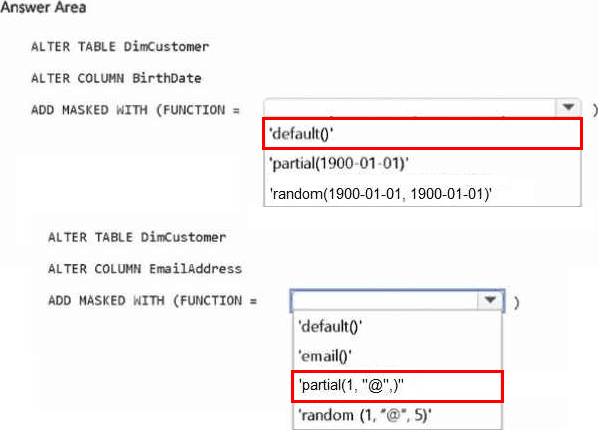
You have a Fabric workspace that contains a warehouse named Warehouse1 Warehousel contains a table named DimCustomers.
DimCustomers contains the following columns:
• CustomerName
• CustomerlD
• Birth Date
• Email
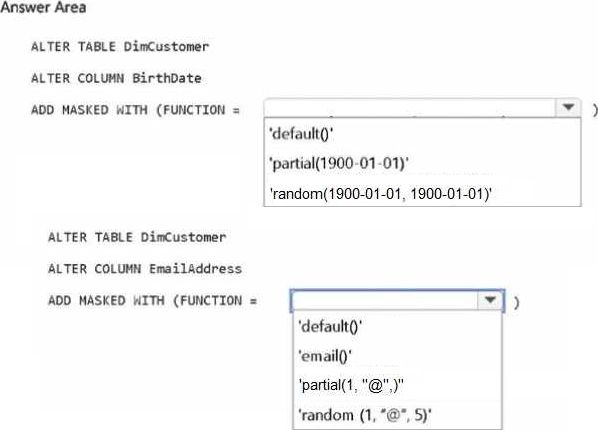
• Birth Date in DimCustomer must be masked and display 1960-01-01
• Email in DimCustomer must be masked and display only the first leading character and the last five characters.
How should you complete the statement? To answer, select the appropriate options in the answer area. NOTE: Each correct selection is worth one point.
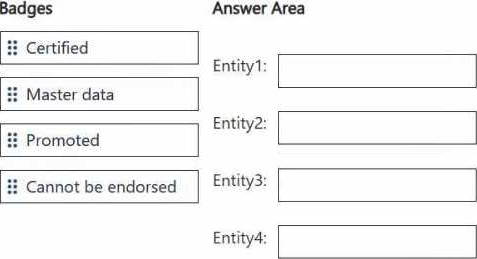
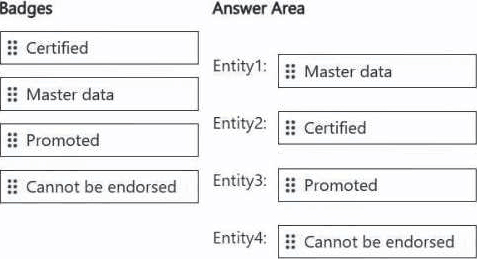
DRAG DROP
You are implementing the following data entities in a Fabric environment:
Entity1: Available in a lakehouse and contains data that will be used as a core organization entity
Entity2: Available in a semantic model and contains data that meets organizational standards
Entity3: Available in a Microsoft Power BI report and contains data that is ready for sharing and reuse
Entity4: Available in a Power BI dashboard and contains approved data for executive-level decision making
Your company requires that specific governance processes be implemented for the data.
You need to apply endorsement badges to the entities based on each entity’s use case.
Which badge should you apply to each entity? To answer, drag the appropriate badges the correct entities. Each badge may be used once, more than once, or not at all. You may need to drag the split bar between panes or scroll to view content. NOTE: Each correct selection is worth one point.