
Practice Free AB-730 Exam Online Questions
You have a Microsoft 365 subscription.
You do NOT have a Microsoft 365 Copilot license.
When you send a prompt in Microsoft 365 Copilot Chat, which three sources does Copilot Chat use to respond? Each correct answer presents part of the solution. NOTE: Each correct selection is worth one point.
- A . chat data in Microsoft Teams
- B . your organization’s databases
- C . the prompt context
- D . organizational data in Microsoft 365
- E . internet search data
- F . the conversation history
C, E, F
Explanation:
When you use Microsoft 365 Copilot Chat without a Microsoft 365 Copilot license, Copilot Chat operates in a “general” mode rather than a Microsoft Graph-grounded work mode. In this configuration, Copilot does not have the entitlement to access and reason over your organization’s protected Microsoft 365 content (such as SharePoint sites, OneDrive files, Outlook mail, Teams messages, or other tenant resources). It also does not connect directly to your organization’s internal databases unless separate, explicitly configured integrations exist.
Instead, Copilot relies on three primary sources to generate a response: (1) the prompt context you provide in the current request (what you ask, plus any text you paste), (2) the conversation history within the current chat thread to maintain continuity, and (3) internet search data (when web grounding is available) to supplement general knowledge with up-to-date public information.
Therefore, the correct selections are C (prompt context), E (internet search data), and F (conversation history), while organizational Microsoft 365 data and Teams chat data are not used without the Copilot license.
You create and share a Microsoft 365 Copilot agent named Agent1 that contains three suggested prompts. A user named Ben Smith installs Agent1. You add a new suggested prompt to Agent1. You need to ensure that Ben Smith sees the new suggested prompt.
What should you do?
- A . Stop sharing Agent1 and then share the agent again.
- B . Instruct Ben to reinstall Agent1.
- C . Instruct Ben to issue any prompt to Agent1.
- D . Instruct Ben to issue the following prompt to Agent1: -developer on.
C
Explanation:
Microsoft 365 Copilot agents dynamically reflect updates such as new suggested prompts. When an agent is updated, users who already have the agent installed do not need to reinstall or have the agent reshared. Instead, the updated configuration becomes available when the agent is used again.
Suggested prompts are surfaced when a user interacts with the agent. Therefore, once Ben Smith issues any prompt to Agent1, the agent session refreshes and displays the latest suggested prompts, including the newly added one.
Stopping and resharing the agent (Option A) or reinstalling it (Option B) is unnecessary overhead.
Option D refers to a non-standard command and is not part of Microsoft Copilot functionality.
Thus, the correct action is simply to have the user interact with the agent again.
You receive the following response to a prompt: "Sorry, it looks like I can’t respond to this. Let’s try a different topic."
What is a possible cause of the response?
- A . The prompt is too vague to elicit a response.
- B . The prompt contains language that violates safety guidelines.
- C . The prompt contains more than five requests.
- D . The prompt is larger than the allowed context window.
B
Explanation:
Microsoft 365 Copilot follows Microsoft’s Responsible AI principles and enforces strict content safety policies. When a prompt violates safety guidelines―such as containing harmful, abusive, illegal, or restricted content―the system may refuse to generate a response. The refusal message shown is consistent with safety filtering behavior.
Generative AI systems include moderation layers that evaluate prompts before generating output. If the prompt is classified as unsafe or non-compliant with policy, Copilot blocks the request and encourages the user to try a different topic.
A vague prompt typically results in a generic or clarifying response rather than a refusal. There is no fixed limit of five requests per prompt. Exceeding the context window usually results in truncation or processing errors, not a safety-based refusal message.
Therefore, the most likely cause of the response is that the prompt contains language that violates safety guidelines.
HOTSPOT
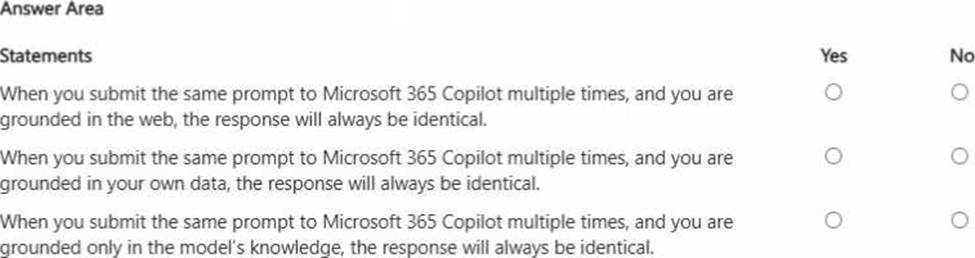
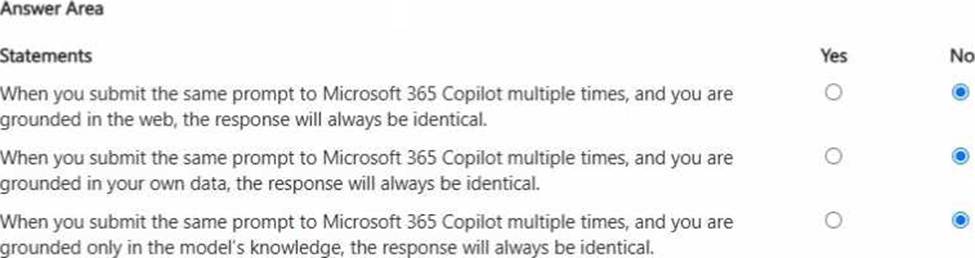
For each of the following statements, select Yes if the statement is true. Otherwise, select No. NOTE: Each correct selection is worth one point.
Explanation:
All three statements are false because generative AI responses are not guaranteed to be identical even when the prompt is the same. First, when grounded in the web, results can vary due to changing web content, different retrieved sources, or differences in how information is summarized at run time. Second, when grounded in your organization’s data, responses can change based on updates to files, emails, meetings, permissions, or which specific items Copilot retrieves as the most relevant context at that moment. Third, even when relying only on the model’s general knowledge, large language models are probabilistic: they may choose different wording, structure, examples, or emphasis across runs, especially when temperature/decoding settings and internal routing differ. In business scenarios, this means Copilot outputs should be treated as drafts that may require validation, and repeatability should be improved by adding precise constraints (cite specific sources, use fixed formats, specify exact sections, and request verbatim quotes where appropriate).