
Practice Free AB-730 Exam Online Questions
HOTSPOT
From Microsoft 365 Copilot, you add custom instructions.
For each of the following statements, select Yes if the statement is true. Otherwise, select No. NOTE: Each correct selection is worth one point.


Explanation:
The instructions will apply to new chat conversations. Answer. Yes
The instructions will apply to new conversations with the Researcher agent and the Analyst agent. Answer. Yes
The instructions will apply to previous responses in existing conversation. Answer. No
Custom instructions in Microsoft 365 Copilot are a persistent preference mechanism that influences how Copilot responds going forward. Once configured, they are applied when you start new interactions, helping Copilot maintain consistent tone, formatting, and behavioral preferences across future chats. Therefore, they apply to new chat conversations (Statement 1 = Yes).
Custom instructions also carry into new conversations you initiate with Copilot experiences and agents (such as Researcher and Analyst), because the instructions act as a user-level guidance layer that shapes responses regardless of which Copilot “mode” you start―provided those agents are
being used in the same Copilot environment and are subject to your settings (Statement 2 = Yes).
However, custom instructions do not retroactively change content that was already generated. Existing conversation history and any prior responses remain unchanged; the instructions affect subsequent turns or new threads, not previously produced outputs (Statement 3 = No).
A colleague from another company shares a link to a prompt.
When you select the link, you receive the following response: "Prompt not found. Sorry, it looks like the prompt is no longer available."
What is a possible cause of the response?
- A . The prompt is a scheduled prompt.
- B . The prompt contains a reference to a file that you do NOT have access to.
- C . The prompt is outdated.
- D . The prompt contains a file that has a sensitivity label applied.
- E . The prompt is outside of your organization.
E
Explanation:
Microsoft 365 Copilot operates within the security, compliance, and identity boundaries of a Microsoft 365 tenant. Shared prompts, prompt links, and Copilot artifacts are governed by organizational access controls and tenant isolation. If a prompt is created and shared from outside your organization, cross-tenant access may not be supported depending on the sharing configuration and administrative policies.
When a user attempts to open a prompt that resides in another organization’s tenant without proper cross-tenant sharing permissions, Copilot cannot locate or validate the resource within the user’s own environment. As a result, the system displays a “Prompt not found” message.
Option B would typically result in an access or permissions error rather than the prompt being unavailable entirely. Sensitivity labels and scheduled prompts do not inherently cause a “not found” error. Therefore, the most likely cause is that the prompt exists outside your organization’s tenant boundary and is not accessible to you.
You are a project coordinator for a small consulting firm.
You are responsible for tracking client communications, managing project timelines, and preparing
weekly status updates for internal stakeholders.
You have a Microsoft 365 Copilot license.
You create an agent to help you monitor project milestones, follow up on client emails, and generate weekly summary reports.
With whom can you share the agent?
- A . only Microsoft Teams channel members
- B . any person who has a valid email address
- C . the people in your organization and people that have personal Microsoft accounts
- D . only the people in your organization
D
Explanation:
Microsoft 365 Copilot agents operate within the security, compliance, and identity boundaries of a
Microsoft 365 tenant. Custom agents created in the Microsoft 365 Copilot app are governed by organizational policies, role-based access control, and Microsoft Entra ID authentication.
According to Microsoft AI Business Professional guidance, Copilot agents are designed for enterprise use and are shared within the organization unless administrators configure broader sharing capabilities. External sharing with personal Microsoft accounts or arbitrary email addresses is not supported by default due to security, data protection, and compliance requirements.
Because the agent in this scenario interacts with organizational data such as client emails, project milestones, and internal reports, access must remain restricted to authenticated users within the same tenant. This ensures that sensitive business information remains protected and that data access respects existing permissions.
Therefore, the agent can be shared only with people in your organization, making option D the correct answer.
You use Microsoft 365 Copilot.
You need to delete all your conversations by using the least amount of effort.
What is the best approach to achieve the goal? More than one answer choice may achieve the goal. Select the BEST answer.
- A . the Microsoft 365 Copilot web app
- B . the My Account portal in Microsoft 365
- C . the Microsoft 365 Copilot desktop app
- D . the Settings app in Windows 11
B
Explanation:
Microsoft provides centralized activity management controls through the My Account portal, which allows users to manage privacy settings, activity history, and data associated with Microsoft 365 services, including Copilot. When the requirement is to delete all conversations with minimal effort, the most efficient method is to use the account-level activity management tools rather than deleting conversations individually.
The My Account portal enables bulk management of Copilot activity data, allowing users to clear conversation history in a consolidated manner. This approach aligns with Microsoft’s privacy-by-design framework, giving users control over their AI-generated interaction history without requiring administrative intervention.
Using the Copilot web or desktop app would typically require manually deleting conversations one at a time, increasing effort. The Windows 11 Settings app is unrelated to Microsoft 365 Copilot data management.
Therefore, to delete all Copilot conversations efficiently and with the least amount of effort, the correct approach is to use the My Account portal in Microsoft 365.
You have an open Microsoft Word document that has a sensitivity label named Highly Confidential applied. From Microsoft PowerPoint, you plan to use Microsoft 365 Copilot to generate a presentation of the Word document.
What will be the result?
- A . Copilot will generate the presentation and will prompt you for a label.
- B . Copilot will generate the presentation and will NOT apply a label.
- C . Copilot will generate the presentation and apply the Highly Confidential label.
- D . Copilot will be unable to generate the presentation.
C
Explanation:
Microsoft 365 Copilot fully respects Microsoft Purview Information Protection, including sensitivity labels applied to documents. When content is used as a source to generate new content (for example, creating a PowerPoint presentation from a Word document), Copilot ensures that data protection policies are preserved and inherited.
If the source Word document is labeled Highly Confidential, the generated presentation will automatically inherit the same sensitivity label. This ensures that the classification, encryption, and access restrictions applied to the original content are consistently enforced in derived content. This behavior aligns with Microsoft’s compliance and data governance model, which prevents accidental data exposure when content is reused or transformed.
Option A is incorrect because Copilot does not require manual reclassification when a label is already present on the source.
Option B is incorrect because labels are not dropped during content generation.
Option D is incorrect because Copilot can still generate content from labeled documents, provided the user has access.
Therefore, the presentation will be generated with the Highly Confidential label applied.
You use Microsoft 365 Copilot.
You regularly upload the same five files to Copilot chats.
You need to simplify referencing the files in the chats.
What are two ways to achieve the goal?
- A . Send a prompt that includes the files, and then save the prompt.
- B . Create a notebook that references the files.
- C . Ask the data engineers to create a fine-tuned model.
- D . Create an agent that has a knowledge source.
- E . Zip the documents and upload the ZIP file to the chats.
B, D
Explanation:
Microsoft 365 Copilot provides structured ways to persist and reuse knowledge sources to avoid repeatedly uploading the same files.
Creating a notebook that references the five files (Option B) allows those documents to remain attached within a persistent workspace. Copilot can then consistently ground responses in those files without re-uploading them for every conversation.
Creating an agent with a defined knowledge source (Option D) also provides a reusable solution. By configuring the five files as part of the agent’s knowledge base, the agent can automatically reference them in future interactions.
Saving a prompt does not persist file attachments. Fine-tuning models is not part of standard Microsoft 365 Copilot user workflows. Uploading a ZIP file does not improve reference management and may reduce accessibility of individual documents.
Therefore, the correct solutions are to create a notebook that references the files and to create an agent with a knowledge source.
You are creating a custom agent in the Microsoft 365 Copilot app for the marketing team at your company. The agent will be used to produce marketing collateral, including copy, logos, and artwork.
What should you add to the agent? More than one answer choice may achieve the goal. Select the BEST answer.
- A . a template
- B . a suggested prompt
- C . image generator
- D . code interpreter
C
Explanation:
When building a custom agent in Microsoft 365 Copilot for marketing use cases, the required capabilities must align with the intended outputs. Marketing collateral includes written copy as well as visual assets such as logos and artwork. According to Microsoft AI Business Professional documentation, generative AI solutions that produce visual creative assets require integrated image generation capabilities powered by multimodal AI models.
Option C is correct because an image generator enables the agent to create visual marketing materials such as logos, artwork, and design elements. While templates and suggested prompts can improve usability and consistency, they do not provide the underlying capability to generate images. A code interpreter is designed for data analysis, calculations, or technical scripting tasks and is not relevant to creative marketing asset production.
Therefore, to fulfill the requirement of producing both textual and visual marketing collateral, the most essential addition to the custom agent is an image generator.
You are a merchandiser who is planning for the upcoming season.
You prompt Microsoft 365 Copilot to suggest which products to stock based on historical sales data.
Without reviewing the suggestions or checking current market trends, you place a large order based solely on the output of Copilot.
What is this an example of?
- A . verification
- B . overreliance
- C . fabrication
- D . prompt injection
B
Explanation:
This scenario is an example of overreliance. Microsoft’s AI guidance highlights that Copilot is an assistive tool that can accelerate analysis and drafting, but users remain responsible for validating outputs―especially for high-impact business decisions. Overreliance occurs when someone treats AI output as authoritative and acts on it without applying judgment, cross-checking sources, or validating against current conditions.
Here, the merchandiser uses Copilot to generate stocking recommendations from historical sales data, then places a large order without reviewing the suggestions or incorporating current market trends. Even if the historical data is accurate, demand can shift due to seasonality changes, competitor actions, pricing, supply constraints, macroeconomic factors, or new product launches. Copilot’s recommendations should be treated as a starting point for decision-making, not the final decision.
Option A (verification) is the opposite behavior―checking accuracy before acting.
Option C (fabrication) would involve Copilot inventing facts; the prompt doesn’t indicate fictional data, only unvalidated reliance.
Option D (prompt injection) involves malicious instructions embedded in content to manipulate the model, which is not described here.
Therefore, the best answer is overreliance.
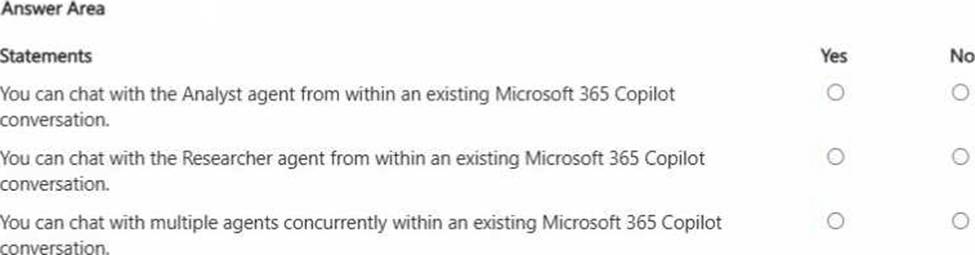
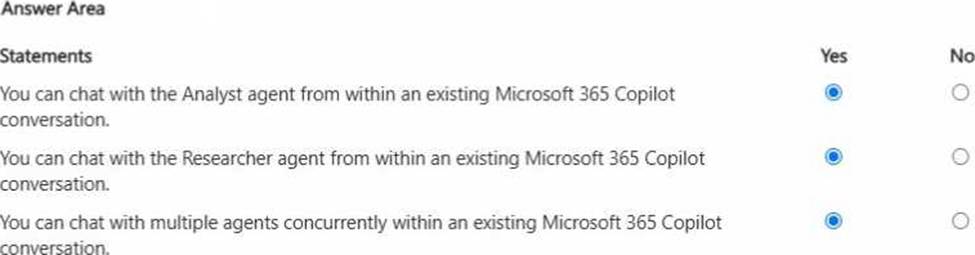
HOTSPOT
For each of the following statements, select Yes if the statement is true. Otherwise, select No. NOTE: Each correct selection is worth one point.
You are using Microsoft 365 Copilot to enhance your productivity in Microsoft Word.
Which two tasks can you achieve by using Copilot in Word?
- A . Insert a table of contents based on the headings in your document.
- B . Insert a custom watermark that has specific text and formatting.
- C . Generate a summary of the key points in your document.
- D . Customize the page margins to match your company’s document standards.
A, C
Explanation:
Copilot in Word assists with content generation, summarization, rewriting, and structural organization. It can analyze document headings and insert a table of contents based on structured heading styles, supporting document navigation. It can also generate summaries of key points, which aligns directly with generative AI text analysis capabilities.
Custom watermark formatting and precise page margin configuration are traditional Word formatting functions and are not core generative AI capabilities of Copilot.
Therefore, the correct answers are A and C.