
Practice Free AB-100 Exam Online Questions
DRAG DROP
You need to design a Microsoft Copilot Studio agent that meets the following requirements:
Supports interactive speech responses
Optimizes decision-making and the accuracy of responses
What should you include in the design for each requirement? To answer, drag the appropriate options to the correct requirements. Each option may be used once, more than once, or not at all.


Explanation:
Supports interactive speech responses → Copilot Studio voice features;
Optimizes decision-making and response accuracy → A deep reasoning model
Why Copilot Studio voice features is correct
The requirement is to design a Microsoft Copilot Studio agent that supports interactive speech responses. Since the scenario is specifically centered on a Copilot Studio agent, the most direct and appropriate design choice is Copilot Studio voice features.
These voice features are intended to enable conversational voice experiences within the Copilot Studio environment, including spoken interaction patterns for agent-based experiences. In a business solutions context, this is the feature set that aligns most directly with building a voice-capable agent rather than just adding a lower-level speech technology component.
Why not the others for this requirement:
Azure AI Speech is a foundational speech service, but the question is about what to include in the design of a Copilot Studio agent. The more direct answer is the native Copilot Studio voice features.
SSML helps control how speech is synthesized, such as pronunciation, pacing, and emphasis, but it does not itself provide the full interactive speech response capability.
Azure Language in Foundry Tools is not the right fit for voice response functionality.
Why a deep reasoning model is correct
The second requirement is to optimize decision-making and the accuracy of responses. That points to a model capability that improves reasoning quality, response evaluation, and more structured inference. The best fit among the choices is a deep reasoning model.
A deep reasoning model is designed to better handle:
multi-step logic
more complex decisions
higher-quality answer generation
improved contextual inference
stronger response accuracy in nuanced scenarios
From an agentic AI business solutions perspective, this matters when the agent is expected not just to respond conversationally, but to produce answers that are more reliable and better aligned to business intent. For enterprise agents, reasoning quality often has a direct effect on trust, adoption, and operational outcomes.
Why the other options are incorrect
Azure AI Speech for decision-making and response accuracy
Azure AI Speech handles speech-related capabilities, not reasoning quality.
Azure Language in Foundry Tools for decision-making optimization
Language tooling can help in language-related scenarios, but it is not the best answer here for improving reasoning and decision quality compared to a deep reasoning model.
SSML for interactive speech responses
SSML enhances synthesized speech output, but it does not serve as the primary capability for interactive speech-based agent conversations.
Expert reasoning
For exam-style mapping:
Voice interaction in Copilot Studio → Copilot Studio voice features Higher-quality reasoning, decisions, and response accuracy → a deep reasoning model
DRAG DROP
A company has an AI solution that uses a Microsoft Copilot Studio agent.
You need to monitor the agent’s performance.
The solution must meet the following requirements:
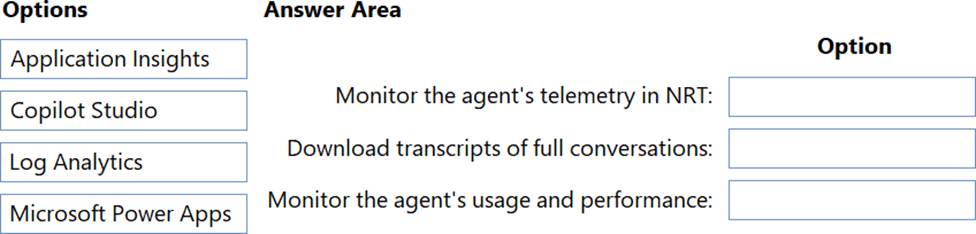
Monitor the agent’s telemetry in near-real-time (NRT).
Download transcripts of full conversations.
Monitor the agent’s usage and performance.
What should you use for each requirement? To answer, drag the appropriate options to the correct requirements. Each option may be used once, more than once, or not at all. NOTE: Each correct selection is worth one point.
Explanation:
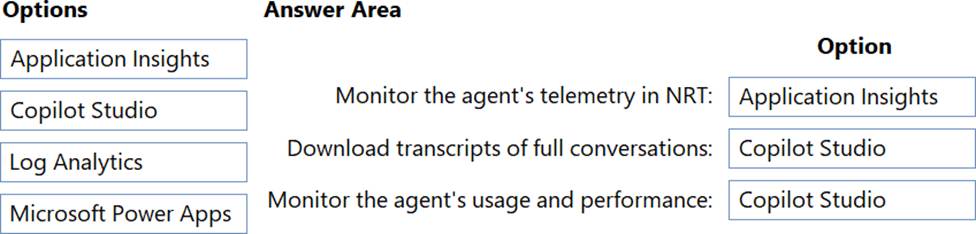
Monitor telemetry in NRT → Application Insights;
Download transcripts of full conversations → Copilot Studio;
Monitor usage and performance → Copilot Studio
The correct mapping is:
Monitor the agent’s telemetry in near-real-time (NRT) → Application Insights Download transcripts of full conversations → Copilot Studio Monitor the agent’s usage and performance → Copilot Studio Why Application Insights is correct for NRT telemetry
Application Insights is the right choice for near-real-time telemetry because it is built for operational monitoring of application events, traces, failures, latency, and runtime behavior.
For a Copilot Studio agent, Application Insights is used when you want fast visibility into:
request activity
errors and exceptions
latency trends
runtime traces
telemetry streaming for troubleshooting
From an AI business solutions perspective, this is essential for early detection of issues in production, especially when the agent supports customer or employee workflows.
Why Copilot Studio is correct for full conversation transcripts
Copilot Studio provides access to conversation/session-level analysis, including the ability to review and download full conversation transcripts.
This is the correct place to inspect:
what the user asked
how the agent responded
where the conversation failed
whether escalation occurred
what happened across the whole interaction
That makes it the best tool for transcript retrieval and investigation.
Why Copilot Studio is also correct for usage and performance
Copilot Studio includes built-in analytics for monitoring agent usage and performance, such as:
conversation volume
engagement
resolution trends
escalation behavior
answer quality and outcomes
This supports business-level performance monitoring and continuous improvement.
Why the other options are incorrect
Log Analytics
Log Analytics is useful for querying centralized logs, but it is not the best direct answer here for near-real-time Copilot telemetry or full conversation transcript download in this scenario.
Microsoft Power Apps
Power Apps is not the monitoring platform for Copilot Studio telemetry, transcripts, or usage/performance analytics.
Expert reasoning
Use this exam shortcut:
Near-real-time telemetry and operational tracing → Application Insights
Conversation transcripts → Copilot Studio
Agent usage and performance analytics → Copilot Studio
You are designing a Microsoft Copilot Studio agent that uses a custom Microsoft Foundry model to generate responses. You need to ensure that the agent can securely connect to and invoke the custom model during user interactions.
What should you include in the design?
- A . Create a connection to Microsoft Foundry in the agent
- B . Configure the agent to use classic orchestration.
- C . Add the Microsoft Foundry model as a Copilot Studio skill.
- D . Create a custom engine agent
A company has Microsoft Copilot Studio agents.
The company plans to deploy custom connectors across development, test, and production environments.
You need to design an application lifecycle management (ALM) process to ensure consistency and prevent direct editing in production.
Which two actions should you include in the design? Each correct answer presents part of the solution. NOTE: Each correct selection is worth one point.
- A . Include agents and connectors in a solution.
- B . Move the agents between the environments by using data export and import.
- C . Manually rebuild the agents in each environment.
- D . Deploy managed solutions to production.
- E . Deploy unmanaged solutions to production.
A, D
Explanation:
For Microsoft Copilot Studio ALM across development, test, and production, the right approach is to package the app components properly and use controlled deployment in production.
HOTSPOT
A company has Microsoft Power Platform development staging, and production environments. Each environment has its own Microsoft Dataverse tables and Azure Al Search index.
You are designing an application lifecycle management (ALM) process to deploy a Microsoft Copilot Studio agent between the environments.
The company has a Copilot Studio agent named Agent! in development.
Agent1 uses the following grounding data sources:
• A Dataverse table named Customer Orders
• An Azure Al Search index named customer-knowledge
You need to deploy Agent1 to production. The solution must ensure that the agent uses the production grounding data sources, minimizes downtime, and handles credentials and endpoints securely.
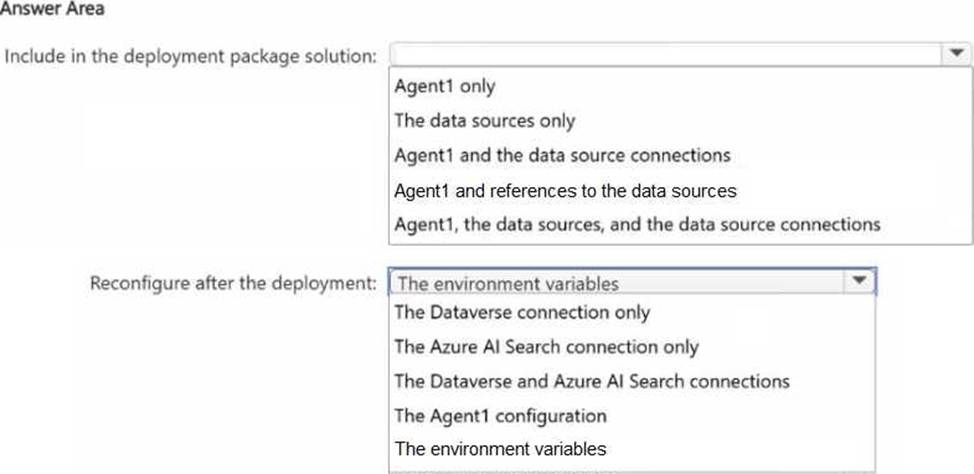
What should you include in the deployment package solution, and what should you reconfigure after the deployment? To answer, select the appropriate options in the answer area. NOTE: Each correct selection is worth one point.

Explanation:
In a proper ALM deployment for Microsoft Copilot Studio across development, staging, and production, you should package the agent in a way that is portable across environments while avoiding hardcoded endpoints, indexes, table targets, or credentials.
Here, Agent1 uses:
a Dataverse table: Customer Orders
an Azure AI Search index: customer-knowledge
Because each environment has its own Dataverse tables and Azure AI Search index, the deployment package should not carry over the development environment’s live connections as fixed production settings. Instead, it should carry the agent and the references needed so the target environment can bind to its own production resources.
That is why the correct recommendation is:
Deployment package: Agent1 and references to the data sources
After deployment: Reconfigure the environment variables
Why this is correct:
Environment variables are the standard ALM-friendly way to externalize settings like:
endpoints
index names
table references
connection-related values
This supports secure handling of credentials and endpoints
It also helps minimize downtime, because production values can be switched cleanly after import without rebuilding the agent
Why the other choices are weaker:
Agent1 only would omit needed source references
The data sources only would not deploy the actual agent
Agent1 and the data source connections risks carrying environment-specific connection bindings
Agent1, the data sources, and the data source connections is too tightly coupled to the source environment and is not the best ALM design for secure cross-environment deployment
Reconfiguring only Dataverse or only Azure AI Search is incomplete because both can vary by environment
Reconfiguring Agent1 configuration is broader and less precise than using environment variables
HOTSPOT
You need to recommend a Microsoft Power Platform solution for customer support.
The solution must include Al capabilities in Microsoft Power Automate and must meet the following requirements:
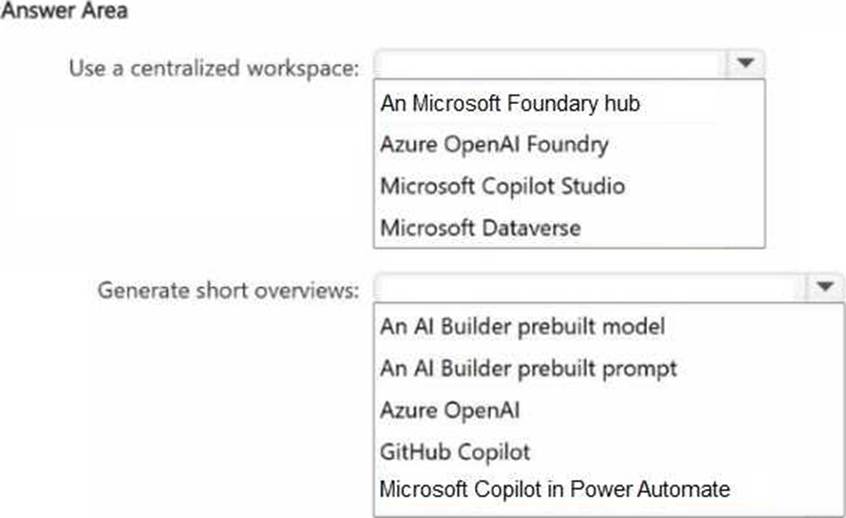
• Use a centralized workspace for Al models.
• Generate short overviews from large amounts of unstructured text such as case notes or transcripts, without requiring additional training or coding.
What should you include in the recommendation for each requirement? To answer, select the appropriate options in the answer area. NOTE: Each correct selection is worth one point.

Explanation:
DRAG DROP
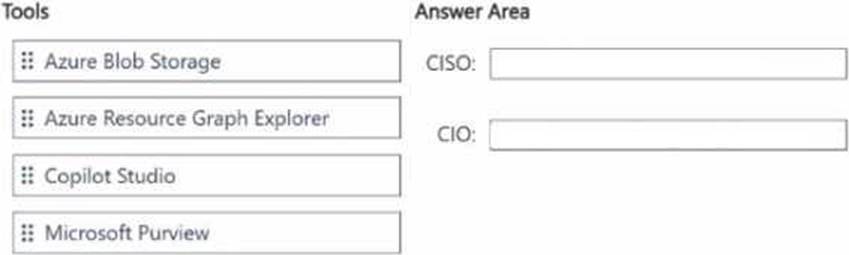
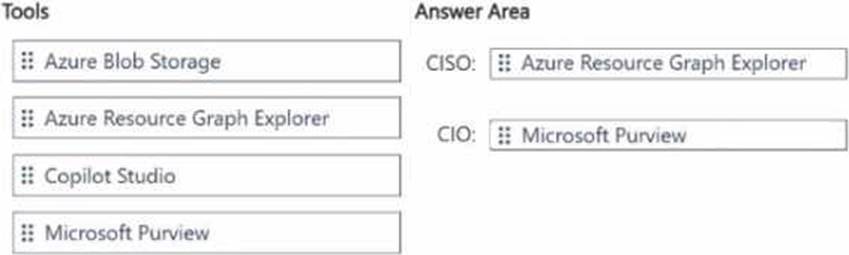
Which tools should you recommend to assist the CISO and the CIO with their specific responsibilities? To answer, drag the appropriate tools to the correct executives. Each tool may be used once, more than once, or not at all. You may need to drag the split bar between panes or scroll to view content. NOTE: Each correct selection is worth one point.
Explanation:
Verified Answer. =
CISO → Azure Resource Graph Explorer
CIO → Microsoft Purview
Comprehensive and Detailed Explanation from Agentic AI Topics:
The CISO is responsible for discovering and inventorying AI resources for auditing across multiple Azure subscriptions. The best tool for that is Azure Resource Graph Explorer, because it is designed to query Azure resources at scale across subscriptions and provide visibility into what AI-related resources exist for governance and audit purposes.
The CIO is responsible for ensuring that appropriate security labels are assigned to the data used by the AI agents. The best tool for that is Microsoft Purview, because Purview supports data governance, classification, sensitivity labeling, and compliance management across enterprise data assets.
Why the other options are not correct:
Azure Blob Storage is storage, not the primary tool for discovery/inventory or labeling governance.
Copilot Studio is for building and managing agents, not for Azure-wide AI resource inventory or enterprise data labeling.
A company plans to deploy a Microsoft Copilot Studio agent to enhance customer support.
The company stores customer data across ServiceNow, Microsoft Dynamics 365 Finance, Dynamics 365 Supply Chain Management, and Excel files in SharePoint Online.
You need to recommend a solution to ensure that the agent can deliver accurate and timely responses.
What should you recommend?
- A . Enable incremental indexing in Azure Al Search.
- B . Implement a model router for query handling.
- C . Create custom prompts.
- D . Implement Microsoft Power Platform connectors.
D
Explanation:
The agent must deliver accurate and timely responses while customer data is spread across several systems:
ServiceNow
Dynamics 365 Finance
Dynamics 365 Supply Chain Management
Excel files in SharePoint Online
The most appropriate recommendation is Microsoft Power Platform connectors because they are the
standard low-code integration mechanism for bringing together data and actions from multiple enterprise systems inside Microsoft Copilot Studio.
Why D is correct:
Connectors let the agent access data across different business systems
They reduce development effort compared with custom integration patterns
They help the agent ground responses on the latest data from connected sources
Why the other options are not the best fit:
A company has an Azure environment that supports multiple business units.
The company plans to implement an Al solution that will perform sentiment analysis on customer product reviews. You need to evaluate the potential cost of the solution to support return on Al investment (ROAI) analysis.
What should you use?
- A . Total Cost of Ownership (TCO) Calculator
- B . Azure Reservations
- C . Azure pricing calculator
- D . Azure Monitor
C
Explanation:
The requirement is to evaluate the potential cost of an AI solution before deployment so the company can support a return on AI investment (ROAI) analysis.
The correct choice is C. Azure pricing calculator.
Why C is correct:
The Azure pricing calculator is used to estimate the expected cost of Azure services before implementation. For an AI solution such as sentiment analysis on customer product reviews, it helps estimate likely spending across the relevant Azure components and usage patterns. That makes it the right tool for cost forecasting as part of ROAI planning.
Why the other options are not correct:
A company uses Microsoft 365 and Dynamics 365
You need to recommend a solution lo automatically summarize email threads, generate suggested replies in Microsoft Outlook and provide meeting preparation summaries that include relevant customer relationship management (CRM) data.
Solution: You recommend a classic Microsoft Dataverse workflow.
Does this meet the goal?
- A . Yes
- B . No