
Practice Free AB-100 Exam Online Questions
You are designing an Al business solution that contains the following components:
• A Microsoft Power Automate workflow
• A Microsoft Copilot Studio agent
• A Microsoft Dataverse database
• A Microsoft Power Apps app
As part of the application lifecycle management (ALM) process, you plan to package the components, so that they can be deployed to other environments as a group. You need to recommend a solution that supports versioning, dependencies, and deployments.
What should you include m the recommendation?
- A . Azure DevOps
- B . GitHub Actions
- C . Microsoft Power Platform solutions
You need to design a Microsoft Copilot Studio agent for customer support.
The agent must securely retrieve product warranty data from a REST API. The solution must minimize development effort.
What should you include in the design?
- A . Use a Microsoft Power Automate desktop flow to screen scrape the warranty data.
- B . Export the agent as a managed solution and customize the agent in Power Apps.
- C . Add the warranty data to the Fallback topic.
- D . Create a custom connector in Copilot Studio and use the connector to call the API.
D
Explanation:
The requirement is to build a Microsoft Copilot Studio agent that can securely retrieve product warranty data from a REST API while minimizing development effort.
The best choice is D. Create a custom connector in Copilot Studio and use the connector to call the API.
Why this is correct:
A custom connector is the standard low-code way to integrate Copilot Studio with a REST API. It lets the agent call the external warranty service securely, using supported authentication methods, without requiring heavy custom development.
This directly satisfies both key requirements:
secure retrieval of warranty data
minimal development effort
Why the other options are incorrect:
You need to design a Microsoft 365 Copilot solution to optimize employee productivity.
The solution must meet the following requirements:
Ensure that the employees can query content stored in a subset of Microsoft SharePoint Online sites and in Teams by using natural language-based prompt actions.
Ensure that employees receive contextually relevant responses in Microsoft 365 Copilot.
What should you include in the design?
- A . Build a Microsoft Power Automate desktop flow to read the SharePoint content and post the responses to Teams.
- B . Modify SharePoint settings.
- C . Create a custom REST API that crawls the SharePoint content.
- D . Configure Microsoft Graph access.
D
Explanation:
Comprehensive and Detailed Explanation From Agentic AI Business Solutions Topics:
The correct answer is D. Configure Microsoft Graph access.
Microsoft 365 Copilot grounds its responses in Microsoft 365 data through the Microsoft Graph. If employees need to query content from a subset of SharePoint Online sites and Teams using natural-language prompts, the solution must ensure Copilot can access and use the right Microsoft 365 content context through Graph-connected permissions and data access patterns.
Why D is correct
Microsoft Graph is the core data and context layer for Microsoft 365 Copilot.
It connects Copilot to organizational content such as:
SharePoint sites
Teams messages and files
OneDrive content
Outlook data
calendar and collaboration context
Because the requirement is to provide contextually relevant responses in Microsoft 365 Copilot, the design must rely on the platform’s native grounding mechanism. That mechanism is Graph-based access to Microsoft 365 content.
From an AI business solutions perspective, this is the right design because it ensures:
natural-language prompts can retrieve relevant organizational knowledge
responses are grounded in authorized enterprise content access remains aligned to Microsoft 365 permissions employees only see content they are allowed to access
This is especially important when only a subset of SharePoint sites should be included. The relevance and security model depend on the Microsoft 365 content graph and its permission-aware access behavior.
Why the other options are incorrect
HOTSPOT
A company uses Microsoft Dynamics 365 Supply Chain Management.
You are designing an AI supply chain process that meets the following requirements:
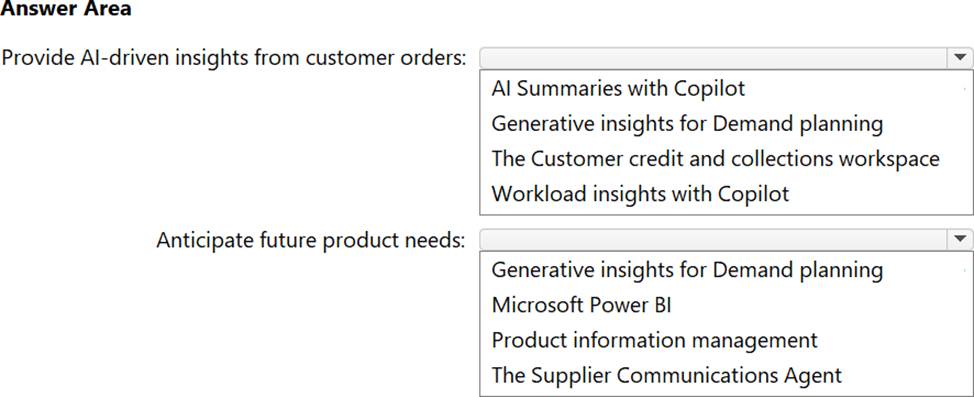
Provides managers with AI-driven insights that surface key information from customer orders
Helps planners use AI to anticipate future product needs more accurately
You need to recommend which Microsoft Copilot features to include in the design.
What should you recommend for each requirement? To answer, select the appropriate options in the answer area. NOTE: Each correct selection is worth one point.
Explanation:
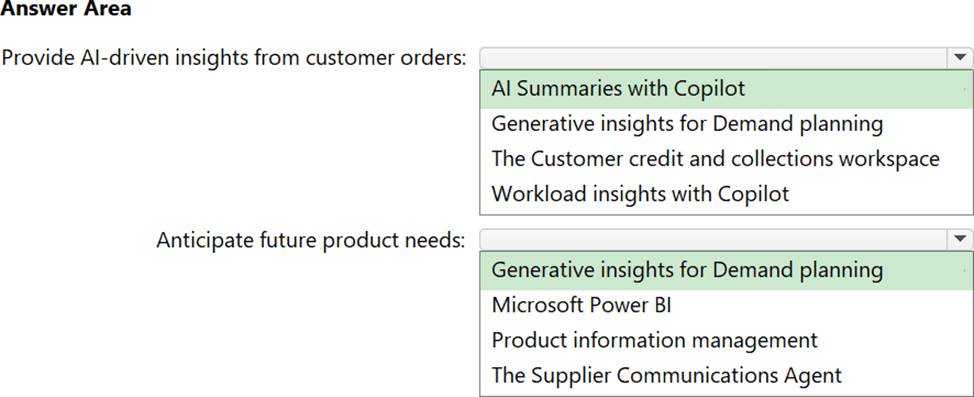
Provide AI-driven insights from customer orders → AI Summaries with Copilot;
Anticipate future product needs → Generative insights for Demand planning
The first requirement is to give managers AI-driven insights that surface key information from customer orders.
That aligns best with AI Summaries with Copilot, because summaries are designed to extract and present the most important information from operational records in a concise, business-friendly way.
In a supply chain context, this helps managers quickly understand:
important order details
exceptions or risks
priority items
fulfillment context
notable changes or issues tied to customer orders
From an AI business solutions perspective, this is exactly the kind of feature used to reduce manual review effort and improve decision speed. Rather than reading through many order records, managers get a synthesized view of key information.
Why “Generative insights for Demand planning” is correct
The second requirement is to help planners anticipate future product needs more accurately.
This directly maps to Generative insights for Demand planning. Demand planning is the business function focused on forecasting future demand, identifying trends, and improving planning accuracy for inventory and supply decisions.
Generative insights in this area help planners by surfacing patterns, explaining forecast behavior, and supporting better forward-looking decisions about product demand.
From an agentic AI business solutions standpoint, this is the right fit because it applies AI to:
forecast interpretation
trend identification
planning support
future demand anticipation
more accurate product need estimation
Why the other options are incorrect
Workload insights with Copilot
This is not the best match for surfacing key information from customer orders. It is more associated with operational workload visibility than customer-order summarization.
Microsoft Power BI
Power BI is useful for analytics and dashboards, but the question specifically asks for a Microsoft Copilot feature to anticipate future product needs. The direct feature match is Generative insights for Demand planning.
The Customer credit and collections workspace
This is focused on finance and collections activity, not on supply chain customer-order insight summarization.
Product information management
This manages product data and attributes, not AI-driven future demand anticipation.
The Supplier Communications Agent
This is related to supplier communication workflows, not demand forecasting for future product needs.
Expert reasoning
A quick exam shortcut here is:
Surface key information from records/orders → think AI Summaries with Copilot Anticipate future demand/product needs → think Generative insights for Demand planning
A company uses Microsoft Dynamics 365 to manage service operations. Dispatchers coordinate service requests, and technicians perform scheduled on-site work.
You need to design a solution that will use Microsoft Copilot to improve the efficiency of the service operations.
The solution must meet the following requirements:
• Provide Al-driven assistance to help staff organize and resolve work orders.
• Deliver contextual Al support to frontline workers as they prepare for and complete customer appointments.
Which two components should you include in the design? Each correct answer presents part of the solution. NOTE: Each correct selection is worth one point.
- A . Copilot in Customer Service
- B . Copilot in Outlook
- C . Copilot in Field Service
- D . the Dynamics 365 Field Service mobile app
- E . Dynamics 365 Customer Service
- F . Copilot Service workspace
C, D
Explanation:
This scenario is centered on Dynamics 365 service operations, with two distinct user groups:
dispatchers/staff who organize and resolve work orders
frontline technicians who perform on-site service appointments
The best two components are:
Copilot in Field Service
Dynamics 365 Field Service mobile app
Why
C. Copilot in Field Service is correct:
Copilot in Field Service is designed to help service teams work more efficiently with work orders, scheduling context, task assistance, and service-related operational support. This matches the requirement to provide AI-driven assistance to help staff organize and resolve work orders.
Why
D. the Dynamics 365 Field Service mobile app is correct:
Frontline workers and technicians use the Field Service mobile app while preparing for and completing appointments. That is the right surface for delivering contextual AI support in the flow of field work.
Why the other options are not the best fit:
DRAG DROP
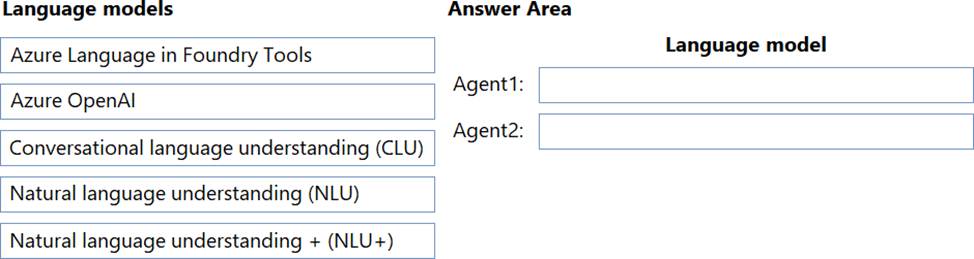
You are designing two Microsoft Copilot Studio agents named Agent1 and Agent2. Each agent must
meet the following requirements:
Each agent must use a standard model.
Each agent must NOT use generative orchestration.
Agent1 must support simple and short phrases for a given topic.
Agent2 must integrate with Microsoft Dynamics 365 Contact Center voice channel.
You need to recommend language models for the agents.
What should you recommend for each agent?
Explanation:
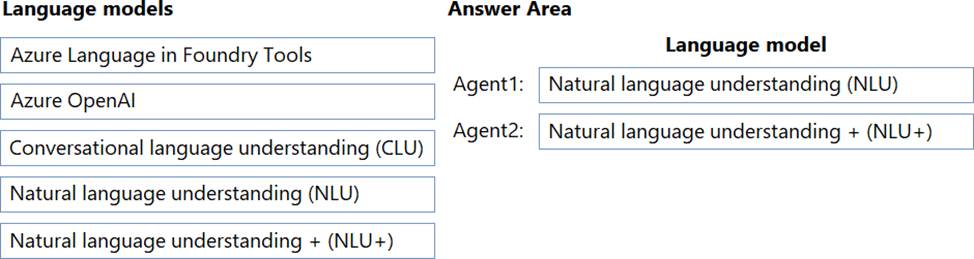
Agent 1 = NLU
Agent 2 = NLU and NLU+
https://learn.microsoft.com/en-us/microsoft-copilot-studio/nlu-overview
Agent1 must support simple and short phrases for a given topic. That is the classic use case for NLU in Copilot Studio. NLU is designed for standard intent recognition where users enter brief, predictable utterances tied to a topic.
This makes NLU the best fit for:
narrow topic triggering
short phrase matching
standard, non-generative agent behavior
Why Agent2 = NLU+
Agent2 must integrate with Microsoft Dynamics 365 Contact Center voice channel. For that scenario, NLU+ is the correct recommendation among the listed standard models.
NLU+ extends the standard NLU approach and is the model aligned to scenarios that need stronger language understanding support in more advanced enterprise channel integrations such as voice experiences. Since the requirement explicitly says:
use a standard model
do not use generative orchestration
NLU+ fits better than Azure OpenAI or other generative options.
DRAG DROP
You are designing two Microsoft Copilot Studio agents named Agent1 and Agent2. Each agent must
meet the following requirements:
Each agent must use a standard model.
Each agent must NOT use generative orchestration.
Agent1 must support simple and short phrases for a given topic.
Agent2 must integrate with Microsoft Dynamics 365 Contact Center voice channel.
You need to recommend language models for the agents.
What should you recommend for each agent?
Explanation:
Agent 1 = NLU
Agent 2 = NLU and NLU+
https://learn.microsoft.com/en-us/microsoft-copilot-studio/nlu-overview
Agent1 must support simple and short phrases for a given topic. That is the classic use case for NLU in Copilot Studio. NLU is designed for standard intent recognition where users enter brief, predictable utterances tied to a topic.
This makes NLU the best fit for:
narrow topic triggering
short phrase matching
standard, non-generative agent behavior
Why Agent2 = NLU+
Agent2 must integrate with Microsoft Dynamics 365 Contact Center voice channel. For that scenario, NLU+ is the correct recommendation among the listed standard models.
NLU+ extends the standard NLU approach and is the model aligned to scenarios that need stronger language understanding support in more advanced enterprise channel integrations such as voice experiences. Since the requirement explicitly says:
use a standard model
do not use generative orchestration
NLU+ fits better than Azure OpenAI or other generative options.
A company uses Microsoft Dynamics 365 Finance to manage accounts payable.
You are designing an AI invoice processing solution.
You need to recommend the prerequisites to configure a prebuilt copilot for accounts payable.
What should you recommend?
- A . From Microsoft Copilot Studio, create an accounts payable agent.
- B . Extend Microsoft 365 Copilot for Sales to an accounts payable agent.
- C . Build an AI tool in Microsoft Foundry.
- D . From the Power Platform admin center, assign the Finance and Operations AI security role to users.
D
Explanation:
Comprehensive and Detailed Explanation From Agentic AI Business Solutions Topics:
The correct answer is D. From the Power Platform admin center, assign the Finance and Operations AI security role to users.
This question is asking for the prerequisite to configure a prebuilt copilot for accounts payable in Microsoft Dynamics 365 Finance. Since the copilot is already prebuilt, the requirement is not to create a new agent or build a custom AI tool. Instead, the needed prerequisite is proper access and security enablement for users.
Why D is correct
Prebuilt copilots in Dynamics 365 Finance and Operations apps rely on the platform’s built-in configuration and security model. Before users can configure or use these AI capabilities, they must have the correct permissions. Assigning the Finance and Operations AI security role is the prerequisite that enables access to those AI experiences.
From a business solutions perspective, this makes sense because enterprise AI in finance functions must be governed carefully. Accounts payable touches:
invoices
vendors
payment workflows
financial controls
audit-sensitive business data
Because of that, Microsoft requires the appropriate security role before users can configure or interact with the prebuilt copilot capabilities.
This is also aligned with responsible deployment practice: enable access through role-based controls first, then configure and use the copilot.
Why the other options are incorrect
HOTSPOT
A company has a Microsoft 365 E5 subscription and uses Microsoft Copilot Studio.
The company has a Microsoft SharePoint Online library that contains 10,000 policy PDFs from various departments. The library contains a populated column named Department for each PDF.
You need to design a Copilot Studio agent that will use the SharePoint library as a knowledge source.
The solution must meet the following requirements:
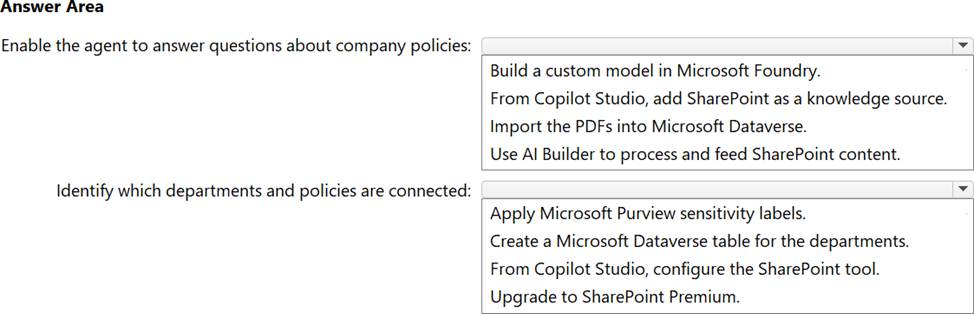
• Enable the agent to answer user questions about company policies.
• Ensure that the agent can identify which departments and policies are connected.
What should you include in the design for each requirement? To answer, select the appropriate options in the answer area. NOTE: Each correct selection is worth one point.
Explanation:
Verified Answer. =
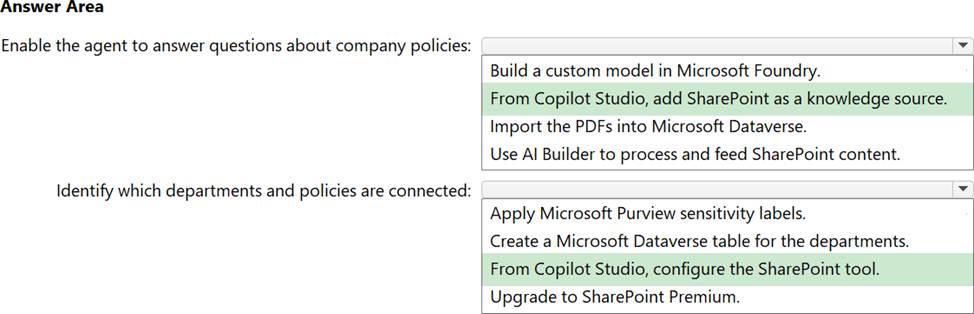
Enable the agent to answer questions about company policies → From Copilot Studio, add SharePoint as a Knowledge source.
Identify which departments and policies are connected → From Copilot Studio, configure the SharePoint tool.
This scenario is about designing a Microsoft Copilot Studio agent that uses a SharePoint Online library containing 10,000 policy PDFs, with a populated Department column for each document.
For the first requirement, the agent must answer questions about company policies. The most direct and correct design choice is to add SharePoint as a Knowledge source in Copilot Studio. This allows the agent to ground its answers in the contents of the policy PDFs stored in the SharePoint library.
For the second requirement, the agent must identify which departments and policies are connected. Since the SharePoint library already includes a structured Department column, the correct design step is to configure the SharePoint tool in Copilot Studio so the agent can use that SharePoint content and its associated metadata more effectively. This supports linking documents to departments rather than only retrieving unstructured text.
Why the other options are not the best fit:
Build a custom model in Microsoft Foundry is unnecessary because the scenario can be solved with native Copilot Studio and SharePoint integration.
Import the PDFs into Microsoft Dataverse adds extra complexity and is not required when SharePoint is already the source.
Use AI Builder to process and feed SharePoint content is not the simplest or most direct design for policy Q&A.
Apply Microsoft Purview sensitivity labels helps with governance, not with department-policy mapping.
Create a Microsoft Dataverse table for the departments is redundant because the department information already exists in SharePoint metadata.
Upgrade to SharePoint Premium is not required for this design.
DRAG DROP
A company has a cloud-based Al solution that uses Azure OpenAI models.
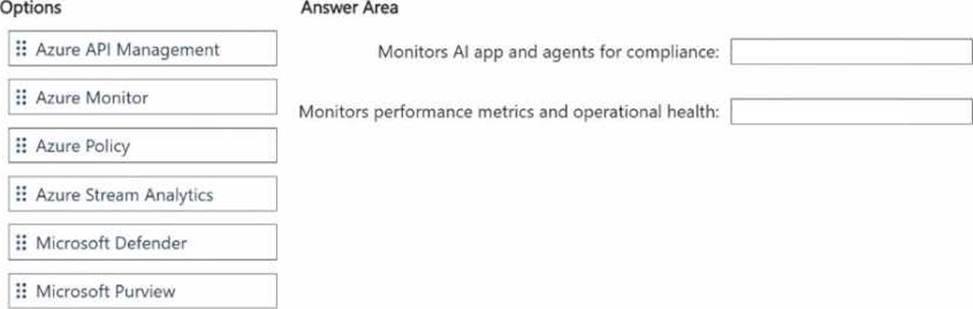
You need to design a monitoring solution that meets the following requirements:
• Monitors performance metrics and operational health for the models
• Monitors Al apps and agents for compliance
• Uses Azure-native capabilities
• Minimizes development effort
What should you use for each requirement? To answer, drag the appropriate options to the correct requirements. Each option may be used once, more than once, or not at all. You may need to drag the split bar between panes or scroll to view content. NOTE: Each correct selection is worth one point.
Explanation:
Verified Answer. =
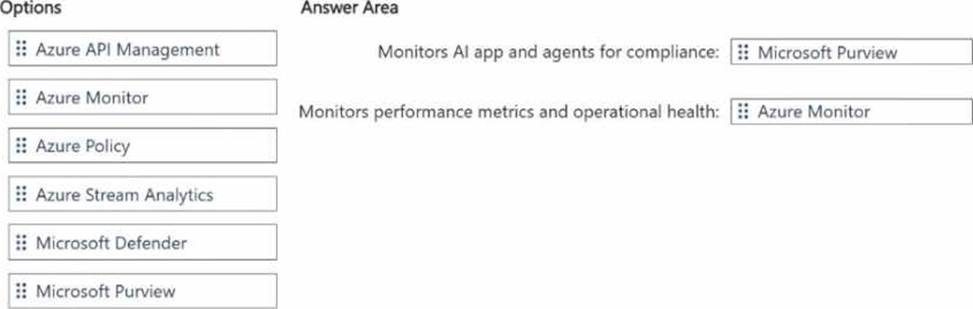
Monitors AI app and agents for compliance → Microsoft Purview
Monitors performance metrics and operational health → Azure Monitor
For an Azure-based AI solution using Azure OpenAI models, the best Azure-native monitoring design is to separate:
operational and performance monitoring
compliance and governance monitoring
For performance metrics and operational health, the correct choice is Azure Monitor. It is the standard Azure-native service for collecting telemetry, tracking service health, monitoring metrics, analyzing logs, and alerting on runtime issues. This is the best fit for model and application operational monitoring with minimal development effort.
For monitoring AI apps and agents for compliance, the correct choice is Microsoft Purview. Purview is designed for compliance, governance, data protection, and policy-based oversight across data and AI-related assets. It aligns best with the requirement to monitor AI applications and agents from a
compliance perspective.
Why the other options are not the best fit:
Azure API Management is for API exposure, management, and security, not primary compliance or operational monitoring.
Azure Policy is used to enforce and assess Azure resource compliance, but it is not the main tool for monitoring AI apps and agents in the broader compliance/governance sense asked here.
Azure Stream Analytics is for streaming data processing, not this monitoring scenario.
Microsoft Defender is focused on security threat detection and posture, not overall AI compliance monitoring.