
Practice Free Workday Pro Integrations Exam Online Questions
How do you initially upload the XSLT file to a Document Transformation integration system?
- A . From the Related Action on the Document Transformation, select Configure Integration Attachment Service.
- B . From the Related Action on the Document Transformation, select Configure Integration Attributes.
- C . In the Global Workday Search bar, run the Edit Integration Attachment Service task.
- D . In the Global Workday Search bar, run the Edit Integration Service Attachment task.
Refer to the following scenario to answer the question below.
You are configuring a filename sequence generator for a connector. Below are common pattern tokens for timestamps ranging from the year to the millisecond.
Define the sequence format using a combination of string constants and pattern tokens to create a unique identifier. Note the example tokens include the square brackets.
For the next sequence number: [Seq] or [seq]
Assume date of September 21, 2022, 12:35:59:123 PM .
Some common tokens:
Year: [yyyy] Month: [MMM] Day: [d] Hours: [k] Minutes: [m] Seconds: [s] Milliseconds: [S]
What configuration would generate a filename matching the day month year format for “File-14-1-2024.xml”?
- A . File-[d]-[MM]-[yyyy].xml
- B . File-[d]-[mmm]-[yyyy].xml
- C . File-[d]-[M]-[yyyy].xml
- D . File-[d]-[m]-[yyyy].xml
You have successfully configured an ISU and an ISSG with the correct security policies and have assigned them to an EIB.
What task do you need to run before you can launch the EIB?
- A . Activate Pending Security Policy Changes
- B . View Security for Securable Item
- C . Assign the ISSG to only one security policy
- D . Maintain Integration Security Policies
Refer to the following scenario to answer the question below.
You are configuring a Core Connector: Worker integration to send data to a new external compliance and certification tracking vendor. You have begun to configure the connector with the Data Initialization Service (DIS) enabled .
Your goal is to extract worker qualification data, but the vendor has three specific requirements:
The file must only include Active workers who are in the “Clinical Staff” Job Family.
The vendor has specified that for each worker’s Education data, they only want to receive the Institution Name, Institution Type and Degree.
The vendor requires a custom “License ID” that must combine the Certification Name and Issuing State, for example, “RN-CA”. A Calculated Field that provides this custom “License ID” already exists in the tenant.
During testing, using a Full File run, the output file is missing all education-related information, even though you believe you have initially configured field attributes such as Institution Name, Institution Type and Degree in the Configure Integration Field Attributes step. Additionally, you confirmed that the Worker Qualification Data Section is marked as Include in Output.
What should you do to resolve this issue?
- A . Enable the Education subfolder in Configure Integration Field Attributes and then reselect the Institution Name, Institution Type, and Degree fields.
- B . Within the Configure Integration Services task, select the Enable All Services checkbox.
- C . Enable the Worker Qualification Data Section Fields Service within the Configure Integration Services step.
- D . Mark each education field in the Education subfolder as Required in Configure Integration Field Attributes.
Refer to the following XML to answer the question below.
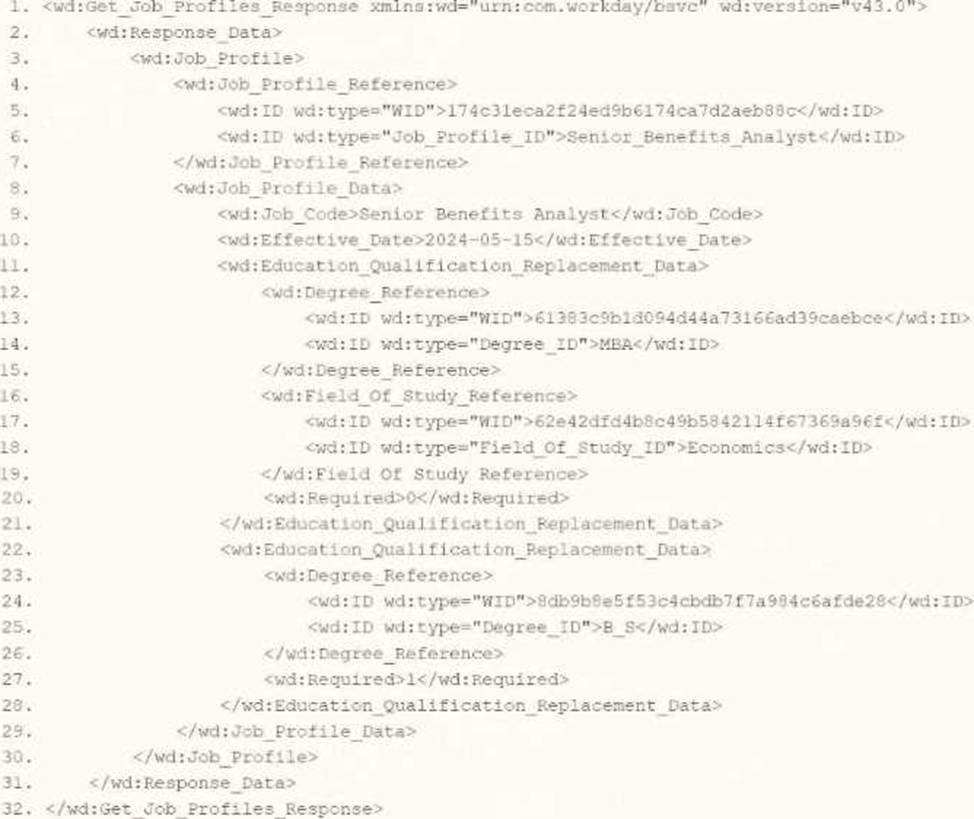
You are an integration developer and need to write XSLT to transform the output of an EIB which is making a request to the Get Job Profiles web service operation. The root template of your XSLT matches on the <wd: Get_Job_Profiles_Response> element. This root template then applies templates against <wd: Job_Profile>. XPath contains a number of delivered functions such as format-date. The format-date function uses the following syntax: format-date ($value as xs: date? $picture as xs: string) .
Within the template which matches on <wd: Job_Profile>, what XPath syntax would you use to output the value of the <wd: Effective_Date> element formatted with the day-month-year format of "15-07-2024"?
- A . format-date(‘[D01]-[M01]-[Y0001]’, wd: Job_Profile_Data/wd: Effective_Date)
- B . format-date (wd: Job_Profile_Data/wd: Effective_Date, ‘[D01]-[M01]-[Y0001]’)
- C . format-date (wd: Job_Profile_Data/wd: Effective_Date, ‘[M01]-[D01]-[Y0001]’)
- D . format-date(‘[M01]-[D01]-[Y0001]’, wd: Job_Profile_Data/wd: Effective_Date)
Refer to the scenario. You are configuring a Core Connector: Worker integration to extract worker demographic and contact information. The integration uses the Data Initialization Service (DIS) and must include worker fields such as name, address, and a calculated field identifying workers eligible for a phone allowance.
During a Full File test run, the output file is missing all address-related information, even though the Address Line Data, Municipality, Region, and Postal Code fields were configured in the Configure Integration Field Attributes step. You also confirmed that the Worker Personal Data Section is marked as Include in Output.
What should you do to resolve this issue?
- A . Mark each address field in the Address Data subfolder as Required in Configure Integration Field Attributes.
- B . Enable the Address Data subfolder in Configure Integration Field Attributes and then reselect the address fields.
- C . Enable the Worker Personal Data Section Fields integration service within the Configure Integration Services step.
- D . Within the Configure Integration Services task, select the Enable All Services checkbox.
What is the purpose of the <xsl: template> element?
- A . Determine the output file type.
- B . Grant access to the XSLT language.
- C . Provide rules to apply to a specified node.
- D . Generate an output file name.
Refer to the scenario. You are configuring a Core Connector: Worker integration with the Data Initialization Service (DIS) enabled. The integration must extract worker contact details and job information, including a calculated field override that determines phone allowance eligibility.
When testing, you run the Test Security Related Action from the Configure Integration Field Override step. Several field overrides display “No” in the Available by User column.
To ensure the ISSG has access to these field overrides and that “Yes” is displayed in the Test Security step, what configuration should you review?
- A . Provide the ISSG View permissions to the domain security policies securing each overridden field.
- B . Assign the ISSG to the domain security policies that govern the web service operations with Get access.
- C . Grant View permissions to the ISSG for the domain security policies that secure the web service operations.
- D . Identify the domain security policies securing the field overrides and grant Modify permissions.
You are creating an outbound connector using the Core Connector: Job Postings template .
The vendor has provided the following specification for worker subtype values:
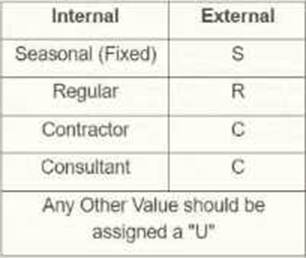
The vendor has also requested that any output file have the following format "CC_Job_Postings_dd-mm-yy_#.xml".
Where the dd is the current day at runtime, mm is the current month at runtime, yy is the last two digits of the current year at runtime, and # is the current value of the sequencer at runtime.
What configuration step(s) must you complete to meet the vender requirements?
- A . • Enable the Sequence Generator Field Attribute
• Configure the Sequence Generator
• Configure the Worker Sub Type Integration Mapping leaving the default value blank - B . • Enable the Integration Mapping Field Attribute
• Configure the Worker Sub Type Integration Mapping leaving the default value blank
• Configure the Sequence Generator - C . • Enable the Integration Mapping Integration Service
• Configure the Worker Sub Type Integration Mapping and include a default value of "U"
• Configure the Sequence Generator - D . • Enable the Sequence Generator Integration Service
• Configure the Sequence Generator
• Configure the Worker Sub Type Integration Mapping and include a default value of "U"
You are configuring an EIB that uses a custom report as its data source. When attempting to transfer ownership of the report to the Integration System User (ISU), the ISU does not appear as an option for new report owners. You confirm that the ISU already has the necessary access to the report data source and related fields.
Within the Custom Report Creation domain, which security configuration should you update to allow the ISU to appear as a valid report owner?
- A . Assign the ISSG to a row within the Report/Task Permissions table that has Modify access enabled.
- B . Assign the ISSG to a row within the Integration Permissions table that has Get access enabled.
- C . Assign the ISSG to a row within the Report/Task Permissions table that has View access enabled.
- D . Assign the ISSG to a row within the Integration Permissions table that has Put access enabled.