
Practice Free VNX301 Exam Online Questions
Examine the exhibit below.
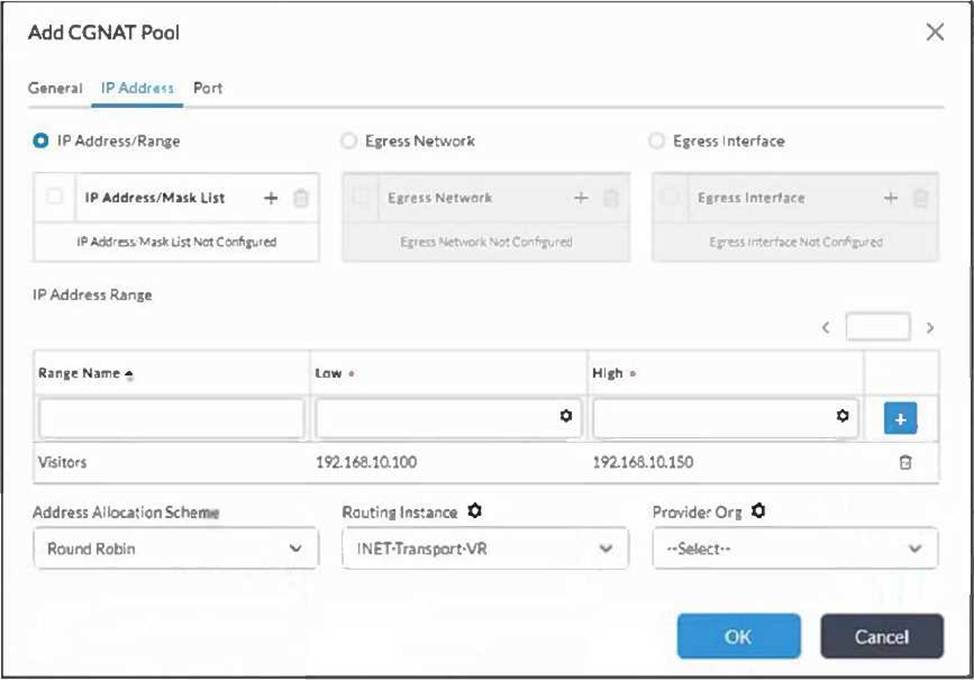
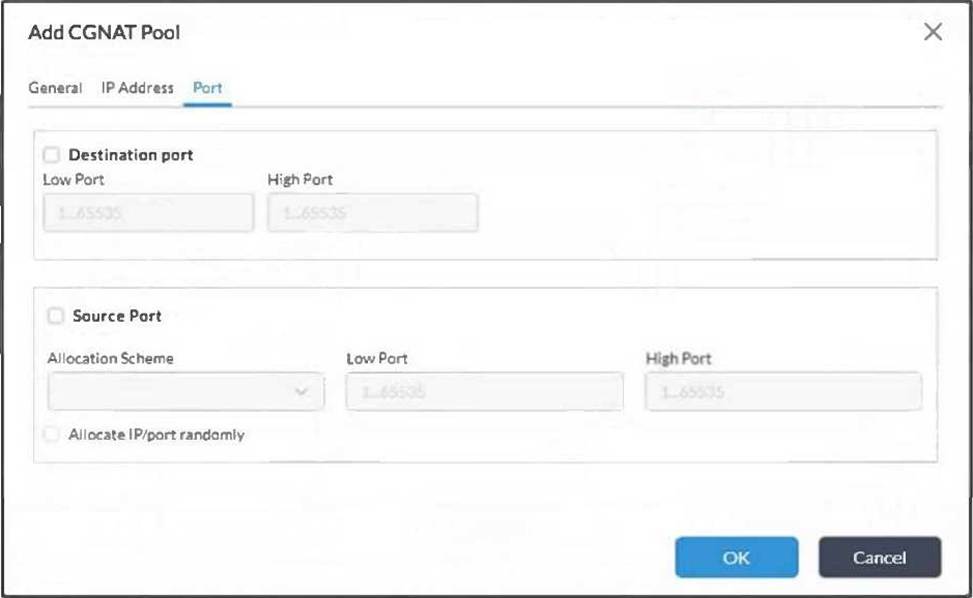
According to the CGNAT pool configuration shown in the exhibit, which two statements are true? (Choose two.)
- A . Port translation will not be applied on sessions.
- B . Only addresses sourced from hosts in the 192.168.10.100 through 192.168.10.150 address range will be translated.
- C . The source address of matching sessions will be translated to an address in the range of 192.168.10.100 through 192.168.10.150.
- D . Ports will be dynamically translated for each session.
AC
Explanation:
The exhibit shows the Add CGNAT Pool configuration with the IP Address/Range option selected. The configured address range is named Visitors, with a low address of 192.168.10.100 and a high address of 192.168.10.150. In CGNAT, this pool defines the translated source address resource used by matching NAT rules; it does not define the original inside source hosts. Therefore, matching sessions will have their source address translated to an address from this configured pool range, which makes option C correct. Versa’s CGNAT configuration examples show that a rule matches original source and destination prefixes, and then attaches a translated source pool to perform NAT.
You are configuring a CGNAT rule for branch internet access and want to verify which access-list entry will match traffic before translation.
Which information is shown by the CGNAT ACL command?
- A . Rule ID, category, precedence, VRF, source IP, and destination IP
- B . Only system uptime and CPU usage
- C . Only SD-WAN SLA latency, jitter, and loss
- D . Only BGP AS path and local preference
A
Explanation:
The correct answer is A. Versa CGNAT troubleshooting documentation shows the command show cgnat acl info <tenant-id> for viewing CGNAT access lists used for traffic matching. The example output includes columns such as ACL handle, RuleId, Category, Precedence, VRF, Source IP, and Destination IP. It also shows tenant ID and total filters.
This command is useful when a CGNAT rule exists in configuration but sessions are not being translated. By checking the ACL output, the administrator can confirm whether the correct source prefix, destination prefix, VRF, and rule precedence are actually programmed in the dataplane. If the wrong VRF or subnet is shown, the rule may never match the intended traffic.
System uptime and CPU usage are operational health indicators. SLA metrics are SD-WAN path-quality values. BGP AS path and local preference are routing attributes. None of these directly show CGNAT access-list match programming.
Examine the exhibit below.
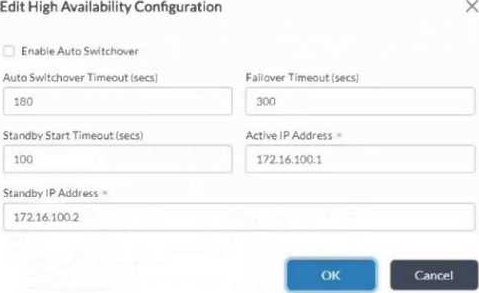
You are deploying Versa Secure SD-WAN and require high availability for the Versa Directors. You configured the Versa Director high availability parameters shown in the exhibit.
With the parameters shown, which two statements are true? (Choose two.)
- A . The administrator must manually initiate the failover to the backup Director.
- B . The backup Director will automatically take over mastership if the primary Director fails.
- C . The primary Director will automatically take over mastership once it comes back online.
- D . The administrator must manually set the primary Director as active once it comes back online.
B, D
Explanation:
Comprehensive and Detailed 150 to 250 words of Explanation From Versa Networks SDWAN Topics: The correct answers are B and D. In the exhibit, Enable Auto Switchover is not selected. However, the Failover Timeout value is configured as 300 seconds. Versa Director HA documentation states that the Failover Timeout is the timeout period before the standby Director node can promote itself to become the active Director node. Therefore, if the active or primary Director fails, the backup Director can automatically assume the active role after the failover condition and timeout are met.
The important distinction is that Auto Switchover controls revertive behavior after recovery, not the initial standby takeover during failure. Versa documentation explains that Director HA is non-revertive by default. This means that when the designated master or primary Director comes back online after recovery, it is not automatically promoted back to active unless automatic switchover is enabled. To make the designated active Director automatically reclaim the active state after recovery, Enable Auto Switchover must be selected and the Auto Switchover Timeout must expire.
What are three roles that VOS performs? (Choose three.)
- A . uCPE Platform
- B . Controller
- C . Zookeeper Arbiter Node
- D . Log Collector
- E . SD-Branch
A, B, E
Explanation:
The correct answers are A, B, and E. Versa Operating System, or VOS, is the software platform used for Versa SD-WAN branch and headend functions. Versa troubleshooting documentation explicitly refers to common runtime state across SD-WAN Controller, branch, and hub devices, confirming that VOS is used for Controller and branch-style SD-WAN roles. Versa monitoring documentation also lists SD-WAN branches, SD-WAN Controller nodes, SD-WAN hubs, vCPEs, and uCPEs as assets that are monitored and managed in Versa Director, which aligns with VOS being used as a branch/edge and controller platform.
VOS can also act as a uCPE platform. Versa documentation includes procedures to configure uCPE on a VOS device, showing that VOS can host or support uCPE deployment use cases.
The originally provided answer A, C, D is not correct. A Log Collector or log forwarder function belongs to the Versa Analytics architecture, not the VOS branch role; Versa’s design guide states that the log forwarder is part of the Versa Analytics node or can run as a standalone log-forwarder server. A Zookeeper arbiter is also not a standard VOS SD-WAN device role in this context.
You configured a Versa speed-test server on a VOS device, but the client cannot start the bandwidth test. A firewall exists between the client and server.
Which port must be allowed through the firewall?
- A . TCP 5201
- B . UDP 4790
- C . TCP 443
- D . UDP 53
A
Explanation:
The correct answer is A. Versa link-bandwidth troubleshooting documentation explains that a VOS device can be configured as a Versa speed-test client, a Versa speed-test server, or both simultaneously. After the server is configured, the client starts the test by initiating a TCP-based connection toward the speed-test server. The server listens on port 5201. The documentation includes an explicit note that if the VOS device is behind a firewall, port 5201 must be open.
This is different from the SD-WAN overlay data path, which commonly uses UDP-based transport encapsulation, and different from internet speed-test traffic, which uses other ports depending on the specific test type. In this scenario, the question states that a Versa speed-test server was configured, so the relevant requirement is TCP 5201 reachability from the client to the server.
TCP 443 may be used for management or web access, UDP 4790 is associated with SD-WAN transport encapsulation, and UDP 53 is DNS. None of those replace TCP 5201 for Versa speed-test server operation.
Examine the exhibit below.
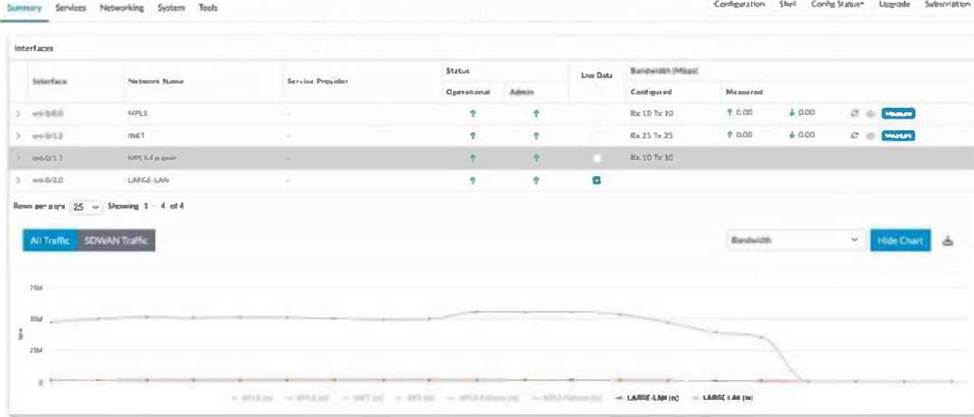
As an administrator of a Versa Secure SD-WAN, you are asked to find the current bandwidth of each WAN circuit used for SD-WAN connectivity in a branch, but the Director is not displaying any information for the WAN circuits.
In this scenario, what should be done to get the graph populated for all WAN circuits?
- A . Refresh the page to get the graphs populated in the dashboard.
- B . Select live data for all WAN circuits in the dashboard.
- C . Select live data for MPLS circuits alone.
- D . Unselect live data for INET circuit and select again.
B
Explanation:
The correct answer is B. The exhibit shows the branch interface summary in Versa Director with a Live Data column. To populate real-time bandwidth graphs for WAN circuits, the administrator must select Live Data for the WAN interfaces that need to be monitored. Versa monitoring documentation states that, from a Director node, you can monitor VOS devices and organizations, and that Director, together with Versa Analytics, can poll VOS devices in real time to understand what is happening on the devices. This real-time information can be displayed to assist with troubleshooting.
Because the question asks for the current bandwidth of each WAN circuit, historical analytics alone is not sufficient. The dashboard must poll live statistics from the selected WAN circuits. In the exhibit, not all WAN interfaces appear to have Live Data selected; therefore, the graph is not populated for all circuits. Refreshing the page does not enable polling and will not solve the missing data condition. Selecting only MPLS would populate only the MPLS circuit, not all WAN circuits. Unselecting and reselecting only the INET circuit would affect only that one interface. Therefore, Live Data must be selected for all WAN circuits whose current bandwidth should be displayed.
Which two statements are true about templates? (Choose two.)
- A . You can have more than one device template per appliance.
- B . You must have at least one service template per appliance.
- C . You can use variables in a template to allow devices to have unique values.
- D . You can use a Workflow Template to create new device templates.
C, D
Explanation:
The correct answers are C and D. Versa templates are designed to reuse common configuration while still allowing per-device customization. Template variables allow the same template to be deployed to multiple appliances while using device-specific values such as addresses, VLAN IDs, DHCP information, or other bind-data values. Versa documentation for deploying templates describes assigning values to variables contained in a main template that are specific to the device. This makes option C correct.
Option D is also correct because Versa workflows are used to create templates for VOS device configuration. Versa documentation states that workflows are used to create templates to configure VOS devices, and also to create templates for application steering, spoke groups, and service chains.
Option A is not correct in the normal Versa Director onboarding model because a group of devices is associated with one staging template and one post-staging template, rather than multiple device templates being stacked per appliance.
Option B is also incorrect because service templates are optional reusable service-specific fragments. Versa documentation states that service templates can be used by multiple device templates and device groups, but it does not require every appliance to have one.
Examine the exhibit below.
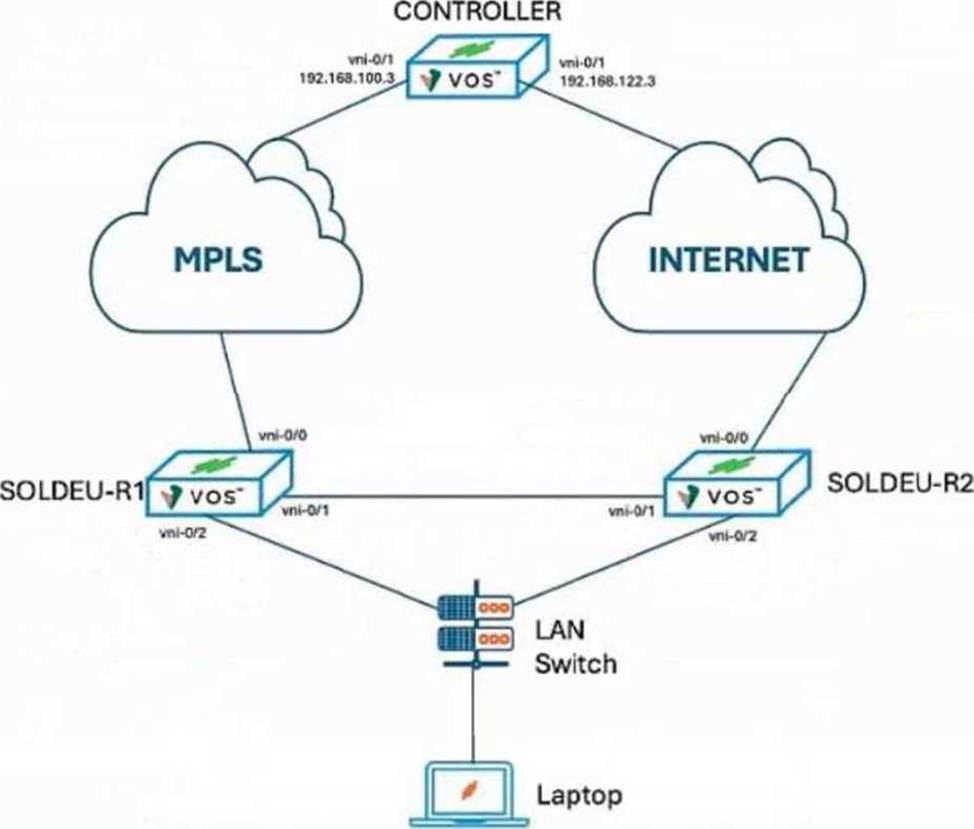
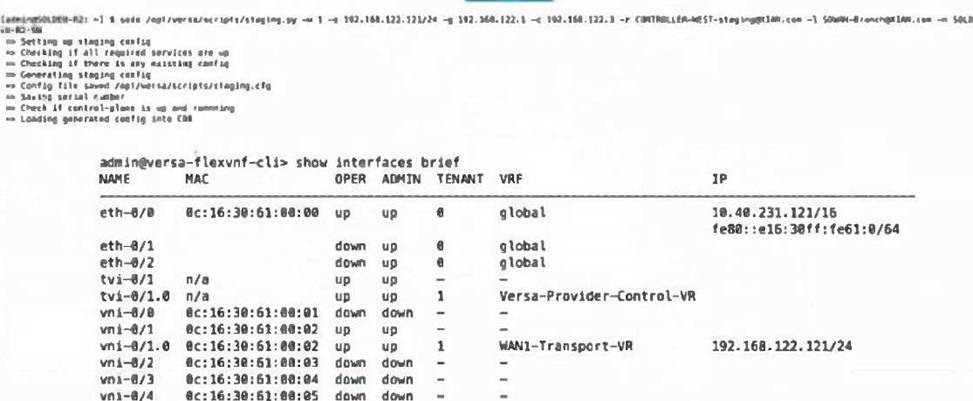
You are onboarding the SOLDEU-R2 branch device using the staging script. You cannot get a Versa-Provider-Controller-VR IP address assigned, indicating that the IPsec tunnel to the corrector has not come up. You verified that the cables have been connected to the correct ports.
What has caused this issue?
- A . The Controller IP address is incorrectly specified in the staging script.
- B . The default gateway is in not in the same subnet as the WAN IP address.
- C . The serial number was corrupted in the line feed.
- D . The incorrect port was specified in the staging script.
D
Explanation:
The issue is caused by specifying the incorrect WAN port in the staging script. In the exhibit, the SOLDEU-R2 branch is physically connected to the Internet cloud through vni-0/0, while vni-0/1 is shown as the inter-device link toward SOLDEU-R1. However, the show interfaces brief output shows that the WAN IP address 192.168.122.121/24 has been assigned to vni-0/1.0, not to the Internet-facing interface. Since the cables are confirmed to be connected correctly, the mismatch must be in the staging script interface selection, not in the cabling.
Versa documentation states that during SD-WAN staging, the branch establishes an IKE session with the Controller, and after that the Controller assigns an IP address to the branch device. Versa troubleshooting guidance also states that after transport connectivity to the Controller is established, the branch forms IKE-based IPsec connectivity, and if this succeeds, the ptvi interface toward the Controller comes up. If IKE/IPsec fails, the ptvi interface remains down. Because the staged WAN IP is placed on the wrong VNI interface, the branch cannot reach the Controller over the intended Internet transport, so the Controller tunnel does not come up.
A CGNAT rule is configured, but traffic is not being translated. You want to confirm whether the expected source and destination prefixes are programmed in the CGNAT access list for the tenant.
Which command is most appropriate?
- A . show cgnat acl info <tenant-id>
- B . show system status
- C . show device clients
- D . show system storage
A
Explanation:
The correct answer is A. Versa CGNAT troubleshooting documentation states that, after connecting to the vsmd daemon, administrators can view CGNAT access lists used for traffic matching with the command show cgnat acl info <tenant-id>. The sample output shows ACL handle, rule ID, category, precedence, VRF, source IP, destination IP, tenant ID, and total filters.
This is the correct command when NAT configuration appears present but translations do not occur, because it verifies whether the runtime dataplane has the correct traffic-match rules. If the source prefix, destination prefix, VRF, or precedence is wrong, the session may never match the NAT rule, and no translation will be applied.
show system status checks system services. show device clients shows active and failed sessions, CPU usage per session, and memory load for processes. show system storage shows disk usage. These commands are useful in other troubleshooting workflows, but they do not validate CGNAT ACL matching criteria for tenant traffic.
A branch device is powered on with factory-default staging configuration. The device establishes an IKE session to the staging server and receives an IP address, but it does not proceed to establish an IKE session with the Versa Controller.
Which staging phase is failing?
- A . Stage 1
- B . Stage 2
- C . Stage 3
- D . Post-activation template commit
B
Explanation:
The correct answer is B. In Versa SD-WAN onboarding, the branch progresses through three staging phases. In Stage 1, the branch uses its factory-default configuration to start an IKE session with the staging server. After the IKE session comes up, the staging server assigns an IP address to the branch and notifies the branch of the Versa Director IP address. Versa Director is also notified that the branch has come up.
In Stage 2, Versa Director pushes the stage-two configuration to the branch through the staging server. This stage changes the IPsec profile so that the Controller IP address becomes the remote IP. The branch reboots and then attempts to establish the IKE session with the Controller. If the device successfully completed Stage 1 but never forms the Controller IKE session, the failure point is Stage 2.
Stage 3 is later, when the device receives stage-three configuration, becomes operational, and creates Controller IPsec plus branch-to-branch VXLAN/ESP sessions. Therefore, the described issue is a Stage 2 staging failure.