
Practice Free SC-900 Exam Online Questions
HOTSPOT
For each of the following statements, select Yes if the statement is true. Otherwise, select No. NOTE: Each correct selection is worth one point.
Explanation:
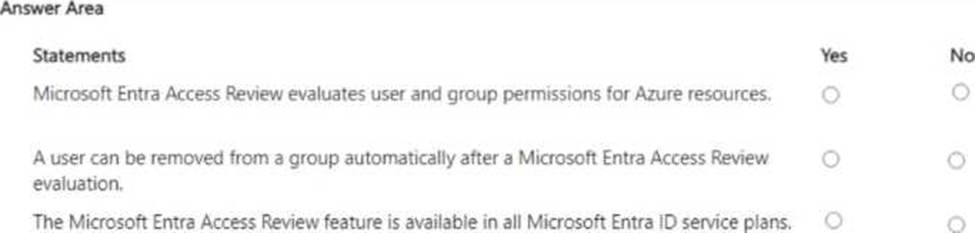
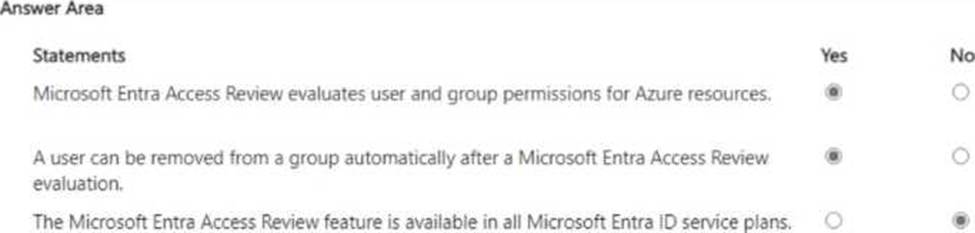
Microsoft Entra Access Reviews are designed to help organizations regularly validate and right-size access. Microsoft’s documentation explains that access reviews can target group memberships, enterprise app assignments, Azure AD roles, and Azure resource roles (via Privileged Identity Management), allowing reviewers to assess whether users, service principals, or groups should retain access to Azure resources―confirming the first statement. Access Reviews support automation: you can configure a review to “Auto-apply results”, so when the review ends, users who were denied or not reviewed are automatically removed from the group, application assignment, or role―validating the second statement. Finally, Access Reviews are a Premium P2 capability (now Microsoft Entra ID P2) alongside PIM and advanced identity governance. They are not included in all service plans; tenants require the appropriate P2 licenses for reviewers and users in scope― therefore the third statement is No.
Which Microsoft Purview feature allows users to identify content that should be protected?
- A . Sensitivity Labels
- B . Insider Risks
- C . Data Loss prevention
- D . eDiscovery
A
Explanation:
In Microsoft Purview, Sensitivity labels are the feature designed to let users identify and classify content that should be protected. Microsoft’s guidance explains that sensitivity labels “enable you to classify and protect your organization’s data while ensuring that user productivity and collaboration aren’t hindered.” Users can manually choose a label in Office apps and services to indicate the data’s sensitivity; as Microsoft notes, labels “can be applied by users or automatically,” and the label “persists with the content in its metadata.” Once identified with a label, protection settings can be enforced, including “encryption, content marking (headers, footers, watermarks), and access restrictions based on the label.”
By comparison, Data Loss Prevention (DLP) focuses on “monitoring and blocking the unintentional sharing of sensitive information” based on policy―DLP enforces handling rules after data is identified, rather than providing the user-centric classification mechanism. Insider Risk addresses “risky user activities and insider data security scenarios,” and eDiscovery is used to “find, preserve, collect, and review content for investigations or litigation.” Therefore, the feature that explicitly allows users to identify content that should be protected―by selecting and applying a classification that then drives protection―is Sensitivity labels.
Which pillar of identity relates to tracking the resources accessed by a user?
- A . auditing
- B . authorization
- C . authentication
- D . administration
A
Explanation:
Microsoft’s identity model highlights four pillars: administration, authentication, authorization, and auditing. In this model, auditing is the capability that records and reports identity-related activities, providing visibility into “who accessed what, when, from where, and how.” SCI-aligned guidance explains that authentication verifies identity and authorization grants permissions, while auditing tracks and logs the resulting access to resources so organizations can investigate activity, satisfy compliance obligations, and detect anomalies. Microsoft services such as Microsoft Entra ID (sign-in logs and audit logs), Access Reviews, Privileged Identity Management (PIM) reports, and Microsoft Purview Audit are explicitly positioned to capture user access events and administrative changes across cloud apps and services. This evidence enables security operations and compliance teams to monitor access patterns, prove regulatory adherence, and respond to incidents. Therefore, when the question focuses on tracking the resources accessed by a user, the pillar that directly addresses this requirement is auditing, not authentication (identity proof), authorization (permission assignment), or administration (lifecycle and configuration).
HOTSPOT
Select the answer that correctly completes the sentence.


Explanation:
In Microsoft’s Security, Compliance, and Identity materials, Customer Lockbox is described as the feature that controls any Microsoft engineer access to your tenant content during support operations. Microsoft states that Customer Lockbox “ensures that Microsoft cannot access your content to perform a service operation without your explicit approval.” It is specifically applicable to Microsoft 365 workloads that store customer data, including “Exchange Online, SharePoint Online, and OneDrive for Business.” When a support case requires elevated access, “a lockbox request is created and routed to the customer for approval or rejection,” and access is only granted if the organization’s authorized admin approves the request within the defined window. The request contains who is requesting access, the reason, the scope, and the duration, and all actions are audited for compliance reporting. This capability aligns with Microsoft’s zero standing access principles by making engineer access time-bound, least-privileged, and customer-approved. By contrast, Information barriers segregate communications between groups, Privileged Access Management (PAM) governs privileged tasks inside Microsoft 365, and Sensitivity labels classify and protect data. Therefore, the feature that “can be used to provide Microsoft Support Engineers with access to an organization’s data stored in Microsoft Exchange Online, SharePoint Online, and OneDrive for Business” is Customer Lockbox.
HOTSPOT
Select the answer that correctly completes the sentence.
Explanation:
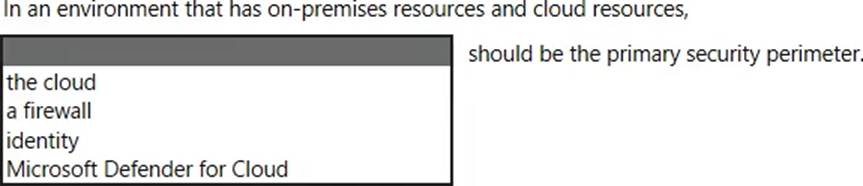
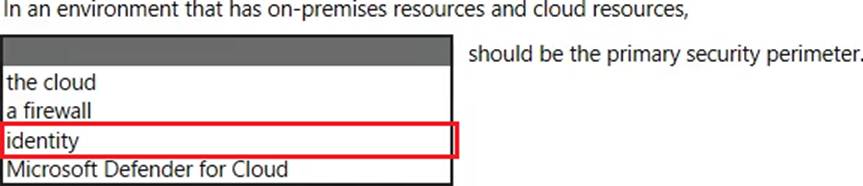
Microsoft’s security guidance for hybrid and cloud environments adopts the Zero Trust approach, which explicitly positions identity as the primary boundary for access decisions. Microsoft states that in modern, distributed environments, “the traditional network perimeter is no longer sufficient” and that identity becomes the new security perimeter for protecting access to resources across on-premises and cloud. In Zero Trust, access is granted based on who the user or workload is, the risk of the sign-in, the device health, and the context of the session. Microsoft summarizes this shift as: “Identity is the control plane,” emphasizing that authentication, authorization, and continuous evaluation of trust are enforced through identity-centric controls such as Conditional Access, multifactor authentication, Privileged Identity Management, device compliance, and session controls.
While tools like firewalls and services such as Microsoft Defender for Cloud remain important layers in a defense-in-depth strategy, they are not the primary perimeter in a hybrid model. Because users, devices, and applications operate from anywhere, identity is the consistent, verifiable layer through which policy is enforced for both on-premises and cloud resources. Therefore, in an environment that spans on-premises and cloud, Microsoft recommends treating identity as the primary security perimeter, applying continuous verification and least-privilege access through identity-driven policies.
HOTSPOT
For each of the following statements, select Yes if the statement is true. Otherwise, select No. NOTE: Each correct selection is worth one point.
Explanation:
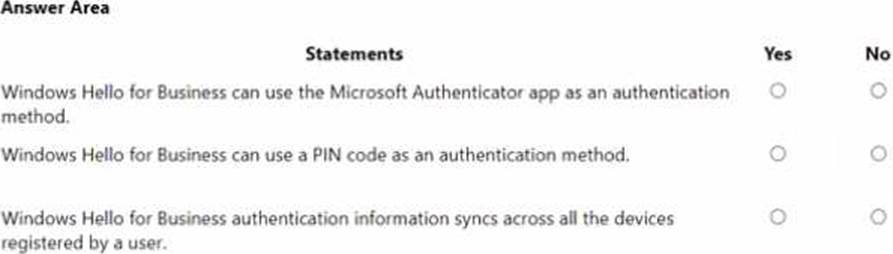
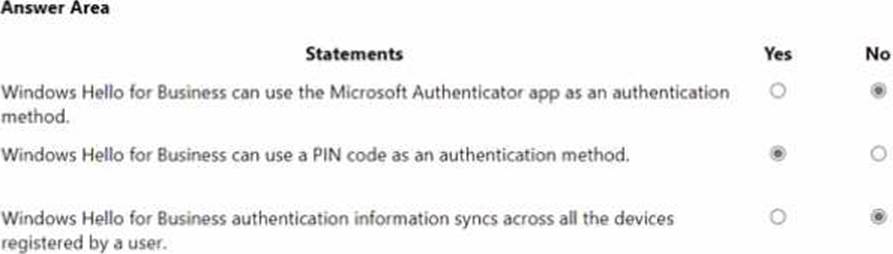
Microsoft describes Windows Hello for Business (WHfB) as replacing passwords with a device-bound credential: “Windows Hello for Business replaces passwords with strong two-factor authentication on devices. This authentication consists of a new type of user credential that is tied to a device and uses a biometric or a PIN.” WHfB authenticators are biometric gesture or PIN unlocking an asymmetric key stored on the device (typically in the TPM). Microsoft clarifies that the PIN is not a password and is “local to the device” and used to unlock the user’s private key. Consequently, Yes―a PIN is a supported WHfB sign-in gesture.
Conversely, the Microsoft Authenticator app is a separate Azure AD (Microsoft Entra ID) authentication method (push notifications, TOTP, passwordless phone sign-in). It is not the WHfB credential; WHfB relies on keys/certificates on the device, not on the Authenticator app.
Finally, WHfB credentials are per-device: Microsoft states the credential is “tied to a device” and the private key never leaves the device, which means it does not roam/sync across a user’s different devices. Each device enrolls and provisions its own WHfB key and gesture. These statements from Microsoft SCI documentation lead to the outcomes: No / Yes / No.
What is an assessment in Compliance Manager?
- A . A grouping of controls from a specific regulation, standard or policy.
- B . Recommended guidance to help organizations align with their corporate standards.
- C . A dictionary of words that are not allowed in company documents.
- D . A policy initiative that includes multiple policies.
A
Explanation:
Microsoft Purview Compliance Manager is a feature in the Microsoft Purview compliance portal that helps you manage your organization’s compliance requirements with greater ease and convenience. Compliance Manager can help you throughout your compliance journey, from taking inventory of your data protection risks to managing the complexities of implementing controls, staying current
with regulations and certifications, and reporting to auditors.
Watch the video below to learn how Compliance Manager can help simplify how your organization manages compliance:
Compliance Manager helps simplify compliance and reduce risk by providing:
Pre-built assessments for common industry and regional standards and regulations, or custom assessments to meet your unique compliance needs (available assessments depend on your licensing agreement; learn more).
Workflow capabilities to help you efficiently complete your risk assessments through a single tool.
Detailed step-by-step guidance on suggested improvement actions to help you comply with the standards and regulations that are most relevant for your organization. For actions that are managed by Microsoft, you’ll see implementation details and audit results.
A risk-based compliance score to help you understand your compliance posture by measuring your progress in completing improvement actions.
HOTSPOT
For each of the following statements, select Yes if the statement is true. Otherwise, select No. NOTE: Each correct selection is worth one point.
Explanation:
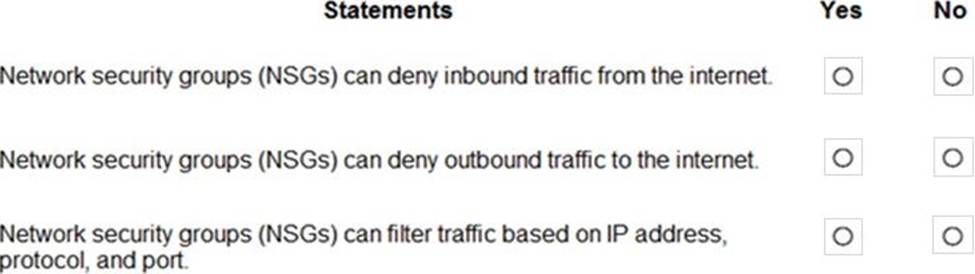
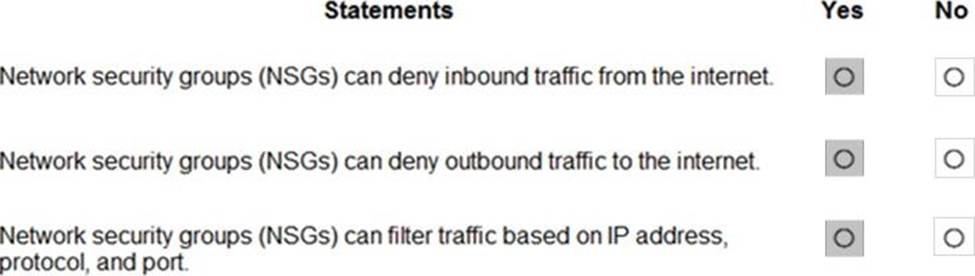
You can use an Azure network security group to filter network traffic to and from Azure resources in an Azure virtual network. A network security group contains security rules that allow or deny inbound network traffic to, or outbound network traffic from, several types of Azure resources. For each rule, you can specify source and destination, port, and protocol.
Reference: https://docs.microsoft.com/en-us/azure/virtual-network/network-security-groups-overview
HOTSPOT
Select the answer that correctly completes the sentence.


Explanation:
In Microsoft 365 Defender, security signals from across Microsoft 365 services are raised as alerts. Microsoft’s documentation defines an incident as “a collection of correlated alerts” that represent the end-to-end story of an attack. The incident object aggregates the related signals, entities, and evidence so analysts can triage and remediate holistically rather than handling individual alerts in isolation. Microsoft further explains that incidents “group together related alerts, assets, users, and evidence” to reduce noise and provide context for investigation, and that automated correlation “helps SOCs focus on what matters most” by stitching alerts from Defender for Endpoint, Defender for Office 365, Defender for Identity, and Microsoft Defender for Cloud Apps into one case. Within an incident, analysts see a timeline, impacted assets and users, alert details, and recommended actions, and they can trigger response measures (for example, isolate device, block URL/file, or disable user). This contrasts with events (raw telemetry), vulnerabilities (exposure findings managed by Defender Vulnerability Management), and Microsoft Secure Score improvement actions (posture recommendations). Therefore, in the Microsoft 365 Defender portal, an incident is specifically a collection of correlated alerts, designed to streamline investigation and coordinated remediation across the Microsoft 365 security stack.
HOTSPOT
Select the answer that correctly completes the sentence.


Explanation:
In Microsoft’s SCI guidance, Insider risk management is a Microsoft Purview capability surfaced and administered from the Microsoft Purview compliance portal. The official description states that Insider risk management “helps you minimize internal risks by enabling you to detect, investigate, and act on risky activities in your organization.” Microsoft further clarifies access and configuration by directing admins to “use the Microsoft Purview compliance portal to configure and manage insider risk policies, alerts, and investigations,” and that you can “go to the Microsoft Purview compliance portal and select Insider risk management” to start. These statements place the feature squarely in the compliance plane―not the Microsoft 365 admin center (tenant-wide service management), not the Microsoft 365 Defender portal (threat protection and incident response), and not Microsoft Defender for Cloud Apps (app discovery and cloud app protection). In the SCI learning path, Insider risk is consistently grouped with Microsoft Purview solutions (Information Protection, DLP, eDiscovery, and Audit), emphasizing compliance workflows, risk indicators, policy tuning, and case management. Therefore, the correct completion of the sentence “Insider risk management is configured from the” is the Microsoft Purview compliance portal, where administrators create policies, review alerts, investigate user activity timelines, and take appropriate remediation actions within a compliance-centric experience.