
Practice Free Plat-Dev-201 Exam Online Questions
A developer deployed a trigger to update the status__c of Assets related to an Account when the Account’s status changes and a nightly integration that updates Accounts in bulk has started to fail with limit failures.
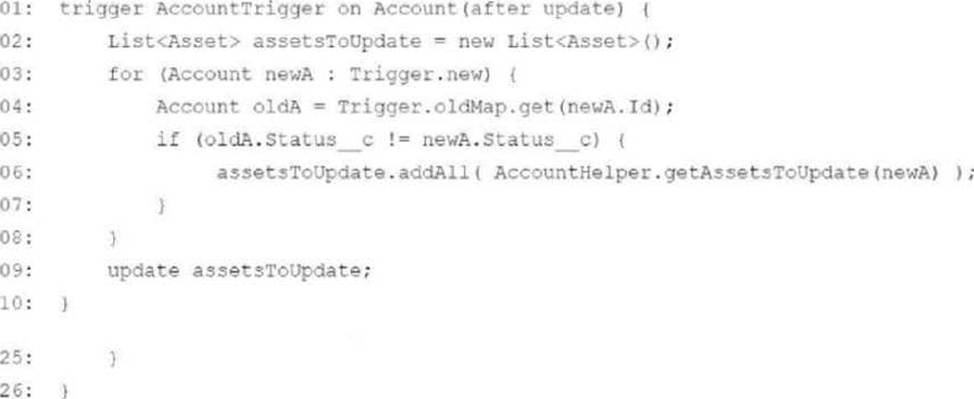
What should the developer change about the code to address the failure while still having the code update all of the Assets correctly?
- A . Move all of the logic to a Queveable class that queries for and updates the Assets and call it from the trigger.
- B . Add List<asset> assets = [SELECT id, Status_¢ FROM WHERE AccountId = : acctId] to line 14 and
iterate over the assets list in the for loop on line 15.; - C . Add a LIMIT clause to the SOQL query on line 16 to limit the number of Assets queried for an Account.
- D . Change the getAssetsToUpdate method to process all Accounts in one call and call it outside of the for loop that starts on line 03.
A
Explanation:
Why Queueable?
Queueable Apex allows asynchronous processing, which can handle bulk updates efficiently without hitting governor limits.
The trigger enqueues the Queueable class to process the asset updates.
Avoiding Limit Failures:
Moving logic to a Queueable class offloads resource-intensive operations to asynchronous processing.
What is the result of the following code snippet?
public word doWork (Account acct) {
for (Integer i = 0; i <= 2007 i++) {
insert acct;
}
- A . Accounts are inserted.
- B . Account is inserted.
- C . 200 Accounts are inserted.
- D . 201 Accounts are inserted.
D
Explanation:
ThedoWorkmethod inserts an account for every iteration of theforloop, which runs fromi = 0toi <= 200, inclusive.
This results in 201 iterations, and hence 201 accounts are inserted into the org.
Explanation of Code Behavior:
The loop conditioni <= 200runs 201 times (0 to 200).
Theinsert acct;statement is executed 201 times.
: Apex Developer Guide – Loop Constructs
A developer needs to allow users to complete a form on an Account record that will create a record for a custom object.
The form needs to display different fields depending on the user’s job role, The functionality should only be available to a small group of users.
Which three things should the developer do to satisfy these requirements? Choose 3 answers
- A . Create a Dynamic Form.
- B . Create a Custom Permission for the users.
- C . Add a Dynamic Action to the Users’ assigned Page Layouts.
- D . Create a Lightning wed component.
- E . Add a Dynamic Action to the Account Record Page.
B,C,D
Explanation:
Custom Permission:
Ensures that only the small group of users has access to this functionality.
Dynamic Action:
Allows displaying different fields depending on the user’s role directly on the Account Record Page.
Why Not A or C:
Dynamic Forms are not used to create records for custom objects in this context. A Lightning Web Component is unnecessary when Dynamic Actions can be used.
Reference: Dynamic Actions: https: //help.salesforce.com/s/articleView?id=sf.dynamic_actions.htm
Custom Permissions: https: //developer.salesforce.com/docs/atlas.en-us.apexcode.meta/apexcode/apex_classes_perms_custom.htm
Which three Salesforce resources can be accessed from a Lightning web component? Choose 3 answers
- A . Static resources
- B . All external libraries
- C . SVG resources
- D . Third-party web components
- E . Content asset files
A,C,E
Explanation:
Lightning Web Components (LWCs) have access to a variety of resources in Salesforce. Below are the supported resources:
Static Resources (A): You can use static resources to reference JavaScript libraries, images, and other files needed in an LWC.
Reference: Static Resources in LWC
SVG Resources (C): LWCs can use custom SVG files for icons or other visual elements.
Reference: SVG Resources in LWC
Content Asset Files (E): Content asset files, like images or videos, stored in Salesforce can be accessed and used in LWC.
Reference: Using Content Assets in LWC
Incorrect Options:
B. All external libraries: Only libraries uploaded as static resources are supported, not directly external libraries.
D. Third-party web components: While supported, additional configuration is needed to use them effectively.
A lead developer creates a virtual class called "OrderRequest". Consider the following code snippet:
apex
Copy
public class CustomerOrder {
// code implementation
}
How can a developer use the OrderRequest class within the CustomerOrder class?
- A . extends (class="OrderRequest") public class CustomerOrder
- B . public class CustomerOrder implements Order
- C . public class CustomerOrder extends OrderRequest
- D . @Implements (class="OrderRequest") public class CustomerOrder
C
Explanation:
Comprehensive and Detailed Explanation From Exact Extract:
To determine how a developer can use the OrderRequest class within the CustomerOrder class, we need to evaluate the options based on Apex syntax for inheritance, focusing on the fact that OrderRequest is a virtual class. Let’s analyze the problem and each option systematically, referencing Salesforce’s official Apex Developer Guide.
Understanding Virtual Classes and Inheritance in Apex:
Virtual Class: In Apex, a virtual class allows other classes to extend it and inherit its methods and properties. It can also define methods that can be overridden by subclasses. The Apex Developer Guide states: “A virtual class can be extended by another class, allowing the subclass to inherit its methods and properties, and override virtual methods if needed” (Salesforce Apex Developer Guide, Classes).
Inheritance: Apex supports single inheritance using the extends keyword, where a subclass inherits from a single parent class. The Apex Developer Guide notes: “Use the extends keyword to create a subclass that inherits from a parent class” (Salesforce Apex Developer Guide, Inheritance).
Virtual vs. Interface:
A virtual class can contain method implementations and is extended using extends.
An interface defines method signatures without implementations and is implemented using implements. The question specifies OrderRequest as a virtual class, not an interface.
Requirement: The CustomerOrder class needs to use OrderRequest, which likely means inheriting its functionality, as OrderRequest is a virtual class.
Evaluating the Options:
When a user edits the Postal Code on an Account, a custom Account text field named "Timezone" must be updated based on the values in another custom object called PostalCodeToTimezone__c.
What is the optimal way to implement this feature?
- A . Build a flow with Flow Builder.
- B . Create an account approval process.
- C . Create a formula field.
- D . Build an account assignment rule.
A
Explanation:
Comprehensive and Detailed Explanation From Exact Extract:
Flow Builder is designed for automating business processes declaratively. In this scenario, it can be configured to update the Timezone field on Account whenever the Postal Code is changed by querying the PostalCodeToTimezone__c object and updating the Account accordingly.
Reference: Flow Builder Guide
In terms of the MVC paradigm, what are two advantages of implementing the view layer of a Salesforce application using Lightning Web Component-based development over Visualforce? Choose 2 answers
- A . Rich component ecosystem
- B . Leg capturing via the Debug Logs Setup page
- C . Built-in standard and custom set controllers
- D . Self-contained and reusable units of an application
A,D
Explanation:
Advantages of Lightning Web Components (LWC):
How is a controller and extension specified for a custom object named "Notice" on a Visualforce page?
- A . apex: page standardController="Notice_c" extensions="myControllerExtension"”
- B . apex: page controllers="Notice_c, myContcollerExtension"
- C . apex: pege=Notice extends="myControllerExtension”
- D . apex: page controller="Notice_c" extensions="myControllerExtension"
D
Explanation:
In Visualforce, to specify a standard controller for a custom object, the syntax iscontroller="ObjectName__c".
To add custom functionality, you can use anextensionsattribute to include a controller extension.
Why not other options?
A: The correct syntax iscontroller, notstandardController, for custom objects. BandC: These are syntactically incorrect.
Visualforce Pages Documentation
What are three characteristics of change set deployments? Choose 3 answers Sending a change set between two orgs requires a deployment connection.
- A . Change sets can deploy custom settings data.
- B . Change sets can only be used between related organizations.
- C . Deployment is done in a one-way, single transaction.
- D . Sending a change set between two orgs requires a deployment connection.
- E . Change sets can be used to transfer records.
B,C,D
Explanation:
Change sets can only be used between related organizations:
Change sets require a relationship between the source and target Salesforce orgs, such as a production org and its sandboxes. You cannot use change sets between unrelated Salesforce orgs.
Reference: Salesforce Change Set Overview
Deployment is done in a one-way, single transaction:
When a change set is deployed, it is applied to the target org as a single transaction. If there are any errors in the deployment, the entire transaction is rolled back.
Reference: Apex Development Guide
Sending a change set between two orgs requires a deployment connection:
Before sending or deploying a change set, a deployment connection must be established between the source and target orgs. This connection is configured in the setup menu under "Deployment Connections."
Reference: Trailhead: Deployment Connections
Incorrect Options:
Universal Containers has implemented an order management application. Each Order can have one or more Order Line items. The Order Line object is related to the Order via a master-detail relationship. For each Order Line item, the total price is calculated by multiplying the Order Line item price with the quantity ordered.
What is the best practice to get the sum of all Order Line item totals on the Order record?
- A . Roll-up summary field
- B . Formula field
- C . Apex trigger
- D . Quick action
A
Explanation:
A roll-up summary field is the best practice for aggregating values (e.g., sum, count, or average) from child records in a master-detail relationship. This feature automatically calculates the sum of all Order Line item totals and displays it on the parent Order record.
Reference: Roll-Up Summary Fields