Practice Free NSE4_FGT_AD-7.6 Exam Online Questions
Refer to the exhibit.

An administrator has configured an Application Overrides for the ABC.Com application signature and set the Action to Allow This application control profile is then applied to a firewall policy that is scanning all outbound traffic. Logging is enabled in the firewall policy. To test the configuration, the administrator accessed the ABC.Com web site several times.
Why are there no logs generated under security logs for ABC.Com?
- A . The ABC Com is hitting the category Excessive-Bandwidth.
- B . The ABC.Com Type is set as Application instead of Filter.
- C . The ABC.Com is configured under application profile, which must be configured as a web filter profile.
- D . The ABC Com Action is set to Allow
D
Explanation:
In FortiOS 7.6 Application Control, security logs are generated primarily for actions such as Block or Monitor, not for Allow actions.
What is happening in the exhibit
An Application Override is configured for ABC.Com
Type: Application
Action: Allow
The application control profile is applied to a firewall policy
Logging is enabled on the firewall policy
Traffic to ABC.Com is successfully allowed
However, no security logs appear for ABC.Com.
Why no logs are generated
In FortiOS 7.6:
Application Control logs are written to Security Logs when:
An application is Blocked
An application is Monitored
When an application action is set to Allow:
The traffic is permitted silently
No application control security log is generated
Even if policy logging is enabled
This is expected and documented behavior.
To generate logs for allowed applications, the action must be set to Monitor, not Allow.
Why the other options are incorrect
0.11.254/24.
If the host 100.65.1.111 sends a TCP SYN packet on port 443 to 100.65.0.200.
What will the source address, destination address, and destination port of the packet be at the time FortiGate forwards the packet to the destination?
- A . 10.0.11.254, 100.65.0.200. and 443, respectively
- B . 10.0.11.254, 10.0.15.50, and 4443. respectively
- C . 100.65.1. 111, 10.0.11.50, and 4443. respectively
- D . 100.65.1.111, 10.0.11.50. and 443. respectively
C
Explanation:
From the exhibits:
A VIP named VIP-WEB-SERVER is configured on WAN (port2) with: External IP: 100.65.0.200
Mapped (internal) IP: 10.0.11.50 Port forwarding enabled (TCP) External service port: 443 Map to IPv4 port: 4443
The inbound firewall policy Web_Server_Access is: From WAN (port2) to LAN (port4)
Destination: VIP-WEB-SERVER
Service: HTTPS
NAT: Disabled (meaning no source NAT is applied)
What happens to the packet
A host 100.65.1.111 sends TCP SYN dst-port 443 to 100.65.0.200.
When FortiGate matches the VIP and forwards traffic to the internal server, FortiGate performs destination NAT (DNAT) based on the VIP:
Source IP is unchanged because policy NAT is disabled:
Source remains 100.65.1.111
Destination IP is translated by the VIP:
Destination becomes 10.0.11.50
Destination port is translated by the VIP port-forward:
Destination port becomes 4443
Therefore, at the time FortiGate forwards the packet to the destination (internal server), it will be:
Source address: 100.65.1.111
Destination address: 10.0.11.50
Destination port: 4443
FortiGate is operating in NAT mode and has two physical interfaces connected to the LAN and DMZ networks respectively.
Which two statements about the requirements of connected physical interfaces on FortiGate are true? (Choose two.)
- A . Both interfaces must have DHCP enabled and interfaces set to LAN and DMZ roles assigned.
- B . Both interfaces must have the interface role assigned.
- C . Both interfaces must have directly connected routes on the routing table.
- D . Both interfaces must have IP addresses assigned.
C,D
Explanation:
In FortiOS 7.6, when a FortiGate is operating in NAT mode, physical interfaces that participate in traffic forwarding (such as LAN and DMZ) must meet certain fundamental requirements.
Correct statements
D. Both interfaces must have IP addresses assigned.
Correct
In NAT mode, FortiGate operates as a Layer-3 device.
Every interface that forwards traffic must have an IP address.
Without an IP address:
The interface cannot participate in routing
Firewall policies cannot be applied correctly
This is a mandatory requirement.
C. Both interfaces must have directly connected routes on the routing table.
Correct
When an IP address is assigned to an interface, FortiGate automatically installs a connected route for that subnet in the routing table.
These connected routes are required so FortiGate:
Knows how to reach the locally attached networks
Can forward traffic between LAN and DMZ
While administrators do not manually create these routes, their presence is required for correct operation.
Why the other options are incorrect
Refer to the exhibit.

A RADIUS server configuration is shown.
An administrator added a configuration for a new RADIUS server While configuring, the administrator enabled Include in every user group.
What is the impact of enabling Include in every user group in a RADIUS configuration?
- A . This option places the RADIUS server, and all users who can authenticate against that server, into every FortiGate user group.
- B . This option places all FortiGate users and groups required to authenticate into the RADIUS server, which, in this case, is FortiAuthenticator.
- C . This option places the RADIUS server, and all users who can authenticate against that server, into every RADIUS group.
- D . This option places all users into every RADIUS user group, including groups that are used for the
LDAP server on FortiGate.
A
Explanation:
Based on the FortiOS 7.6 Authentication and User Group documentation, the correct answer is A.
Meaning of “Include in every user group” (FortiOS 7.6)
When configuring a RADIUS server on FortiGate, enabling Include in every user group has a very specific and documented effect:
The configured RADIUS server object is automatically added to all FortiGate user groups.
As a result, any user who successfully authenticates against that RADIUS server becomes a valid member of every FortiGate user group, unless additional group filtering (such as RADIUS attributes) is applied.
This simplifies configuration when the same external authentication source must be accepted across multiple firewall policies that reference different user groups.
This behavior is explicitly described in the FortiOS 7.6 Administrator Guide under RADIUS authentication servers and user groups.
Why Option A is Correct
FortiGate user groups can include:
Local users
LDAP servers
RADIUS servers
Enabling Include in every user group causes FortiGate to:
Insert the RADIUS server into all existing and future FortiGate user groups
Therefore, all users authenticating via this RADIUS server are implicitly allowed in every FortiGate user group.
This is exactly what option A describes.
Why the Other Options Are Incorrect
B: FortiGate does not push users or groups into the RADIUS server. Authentication is always initiated by FortiGate toward RADIUS.
C: FortiGate does not manage or modify RADIUS-side group definitions.
D: LDAP and RADIUS user groups are separate authentication mechanisms; this setting does not merge or affect LDAP groups.
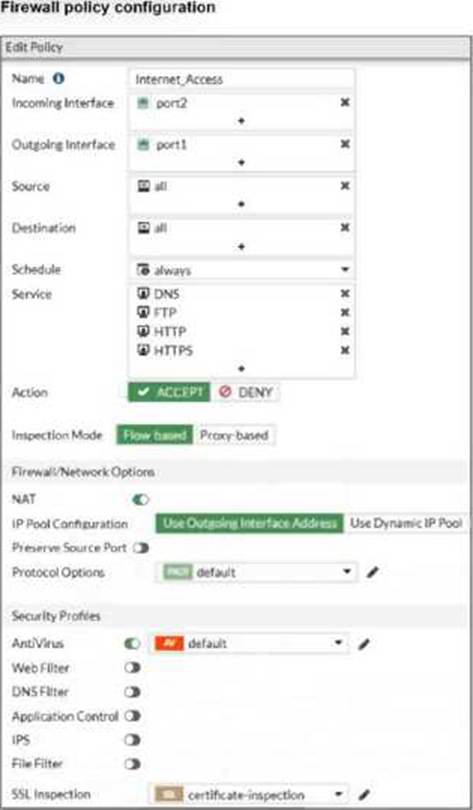
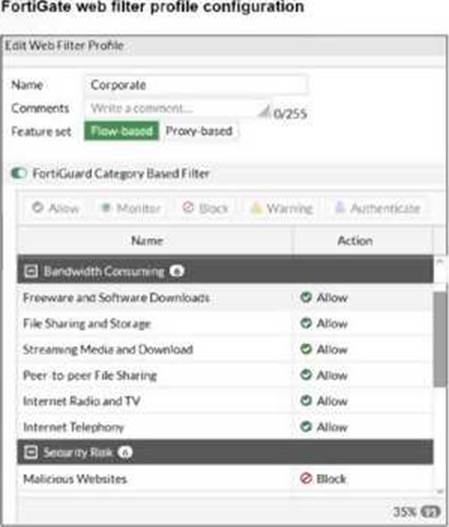
You have created a web filter profile named restrictmedia-profile with a daily category usage quota.
When you are adding the profile to the firewall policy, the restrict_media-profile is not listed in the available web profile drop down.
What could be the reason?
- A . The web filter profile is already referenced in another firewall policy.
- B . The firewall policy is in no-inspection mode instead of deep-inspection.
- C . The naming convention used in the web filter profile is restricting it in the firewall policy.
- D . The inspection mode in the firewall policy is not matching with web filter profile feature set.
D
Explanation:
In FortiOS 7.6, web filter profiles are inspection-mode dependent. Certain advanced web filtering features―such as daily category usage quota―are only supported when the firewall policy is operating in proxy-based inspection mode.
Why the profile is not visible
The profile restrictmedia-profile includes a daily category usage quota.
Daily quotas are a proxy-based web filtering feature.
If the firewall policy is configured with:
Inspection mode: Flow-based
Then FortiGate will not display proxy-only web filter profiles in the Web Filter drop-down list.
FortiGate automatically filters the available profiles based on feature compatibility with the policy’s inspection mode.
This behavior is explicitly documented in the FortiOS 7.6 Web Filtering and Inspection Mode Compatibility sections.
Why the other options are incorrect
You have created a web filter profile named restrictmedia-profile with a daily category usage quota.
When you are adding the profile to the firewall policy, the restrict_media-profile is not listed in the available web profile drop down.
What could be the reason?
- A . The web filter profile is already referenced in another firewall policy.
- B . The firewall policy is in no-inspection mode instead of deep-inspection.
- C . The naming convention used in the web filter profile is restricting it in the firewall policy.
- D . The inspection mode in the firewall policy is not matching with web filter profile feature set.
D
Explanation:
In FortiOS 7.6, web filter profiles are inspection-mode dependent. Certain advanced web filtering features―such as daily category usage quota―are only supported when the firewall policy is operating in proxy-based inspection mode.
Why the profile is not visible
The profile restrictmedia-profile includes a daily category usage quota.
Daily quotas are a proxy-based web filtering feature.
If the firewall policy is configured with:
Inspection mode: Flow-based
Then FortiGate will not display proxy-only web filter profiles in the Web Filter drop-down list.
FortiGate automatically filters the available profiles based on feature compatibility with the policy’s inspection mode.
This behavior is explicitly documented in the FortiOS 7.6 Web Filtering and Inspection Mode Compatibility sections.
Why the other options are incorrect
0.11.254/24.
Which IP address will be used to source NAT (SNAT) the traffic, if the user on HQ-PC-1 (10.0.11.50) pings the IP address of BR-FGT (100.65.1.111)?
- A . 100.65.0.101
- B . 100.65.0.49
- C . 100.65.0.149
- D . 100.65.0.99
D
Explanation:
From the exhibits, there are three relevant firewall policies from LAN (port4) to WAN (port2), each using a different IP pool for source NAT:
TCP traffic
Service: ALL_TCP
Destination: BR1-FGT
IP Pool: SNAT-Pool → 100.65.0.49
PING traffic
Service: PING
Destination: all
IP Pool: SNAT-Remote1 → 100.65.0.99
IGMP traffic
Service: IGMP
Destination: all
IP Pool: SNAT-Remote → 100.65.0.149
The user on HQ-PC-1 (10.0.11.50) is pinging BR1-FGT (100.65.1.111). In FortiOS, policy matching is based on (among other fields) source, destination, and service, and the first matching policy in top-down order is applied.
Because the traffic is ICMP echo (ping), it matches the policy named PING traffic (service PING, destination all). That policy explicitly uses Use Dynamic IP Pool with SNAT-Remote1, which is configured with external IP 100.65.0.99.
Therefore, the source NAT IP used for this ping is 100.65.0.99.
What are two features of FortiGate FSSO agentless polling mode? (Choose two.)
- A . FortiGate uses the AD server as the collector agent.
- B . FortiGate uses the SMB protocol to read the event viewer logs from the DCs.
- C . FortiGate does not support workstation check.
- D . FortiGate directs the collector agent to use a remote LDAP server.
B,C
Explanation:
Based on the FortiOS 7.6 Administrator Guide regarding Fortinet Single Sign-On (FSSO) polling modes, the agentless polling mode has specific technical characteristics:
SMB Protocol Usage (Statement B is True):
In agentless polling mode, the FortiGate unit itself acts as the collector.
It establishes direct connections to the Windows Domain Controllers (DCs) using the SMB (Server Message Block) protocol, typically over TCP port 445, to read the Windows Security Event logs.
This allows FortiGate to parse login event IDs (such as 4768 and 4769) to identify users and their corresponding IP addresses without needing an external collector agent installed on a server.
Workstation Check Support (Statement C is True):
One of the primary limitations of the agentless polling mode compared to the agent-based mode is the lack of workstation verification.
In agentless mode, FortiGate does not perform "workstation checks" or "dead entry checks". This means it cannot proactively verify if a user is still logged into a specific workstation after the initial logon event is recorded, which can lead to stale entries if a user logs off without a corresponding event being captured.
Why other options are incorrect:
Option A: In agentless mode, FortiGate (the FSSO daemon) performs the collection itself; it does not use the AD server as a "collector agent" in the functional sense of FSSO architecture.
Option D: While FortiGate uses LDAP to retrieve group membership information once a user is identified, it does not "direct" a collector agent to a remote LDAP server, as there is no external collector agent involved in this specific mode.
An administrator wanted to configure an IPS sensor to block traffic that triggers the signature set number of times during a specific time period.
How can the administrator achieve the objective?
- A . Use IPS group signatures, set rate-mode 60.
- B . Use IPS packet logging option with periodical filter option.
- C . Use IPS signatures, rate-mode periodical option.
- D . Use IPS filter, rate-mode periodical option.
C
Explanation:
“Rate-based IPS signatures also allows you to detect anomalies, which are unusual behaviors in the network…”
“There are two ways to add predefined signatures to an IPS sensor. One way is to select the
signatures individually… The second way to add a signature to a sensor is using filters.”
“You can also add rate-based signatures to block specific traffic when the threshold is exceeded. On the CLI, If you set the command rate-mode to periodical, FortiGate triggers the action when the threshold is reached during the configured Duration time period.”
Technical Deep Dive:
The correct answer is
C. Use IPS signatures, rate-mode periodical option.
The guide is explicit that this behavior belongs to rate-based IPS signatures. The question asks for blocking traffic when a signature is triggered a certain number of times within a defined interval. That is exactly what rate-mode periodical does: it evaluates the trigger count over the configured duration window and then applies the configured IPS action when the threshold is met.
Why the other options are wrong:
A is wrong because rate-mode 60 is not the documented syntax or method.
B is wrong because packet logging records packets; it does not implement threshold-based blocking logic.
D is wrong because the guide ties rate-mode periodical to rate-based signatures, not to IPS filters as the mechanism for this threshold behavior.
Operationally, this is used for anomaly-style detection, similar in concept to lightweight rate-based protection. A typical CLI pattern is along these lines:
config ips sensor
edit "custom-ips"
config entries
edit 1
set rule <signature_id>
set rate-mode periodical
set rate-count <threshold>
set rate-duration <seconds>
set action block
next
end
next
end
This works best when applied only to relevant protocols and signatures, because broad use of rate-based signatures can consume more resources and increase false-positive risk.
There are multiple dialup IPsec VPNs configured in aggressive mode on the HQ FortiGate. The requirement is to connect dial-up users to their respective department VPN tunnels.
Which phase 1 setting you can configure to match the user to the tunnel?
- A . Local Gateway
- B . Dead Peer Detection
- C . Peer ID
- D . IKE Mode Config
C
Explanation:
In FortiOS 7.6, when multiple dialup IPsec VPNs are configured on the same FortiGate―especially in Aggressive Mode―FortiGate must identify which Phase 1 configuration a connecting client should match.
How FortiGate selects a dialup IPsec tunnel
For dialup VPNs:
The remote peer (user or device) does not have a fixed IP address
Multiple Phase 1 interfaces may exist on the HQ FortiGate
FortiGate uses identifying information sent during IKE Phase 1 to select the correct tunnel Aggressive Mode behavior
Aggressive mode sends ID information in clear text during Phase 1
This allows FortiGate to match incoming peers to the correct Phase 1 configuration
Why Peer ID is the correct answer
C. Peer ID
Peer ID (also called IKE ID) is used to:
Identify the remote peer
Differentiate between multiple dialup tunnels
Common Peer ID formats:
FQDN
User FQDN
Key ID
FortiGate matches the received Peer ID against the Phase 1 configuration to select the correct tunnel
This is the documented and recommended method for:
Mapping users to different department tunnels
Supporting multiple dialup IPsec VPNs in aggressive mode
Why the other options are incorrect