
Practice Free JN0-232 Exam Online Questions
Question #51
You are creating Ipsec connections.
In this scenario, which two statements are correct about proxy IDs? (Choose two.)
- A . Proxy IDs are used to configure traffic selectors.
- B . Proxy IDs are optional for Phase 2 session establishment.
- C . Proxy IDs must match for Phase 2 session establishment.
- D . Proxy IDs default to 0.0.0.0/0 for policy-based VPNs.
Correct Answer: A, B
Question #52
Your company is adding IP cameras to your facility to increase physical security. You are asked to help protect these loT devices from becoming zombies in a DDoS attack.
Which Juniper ATP feature should you configure to accomplish this task?
- A . IPsec
- B . static NAT
- C . allowlists
- D . C&C feeds
Correct Answer: D
D
Explanation:
Juniper ATP should be configured with C&C feeds that contain lists of malicious domains and IP addresses in order to prevent IP cameras from becoming zombies in a DDoS attack.
This is an important step to ensure that the IP cameras are protected from malicious requests – and thus, they will not be able to be used in any DDoS attacks against the facility.
D
Explanation:
Juniper ATP should be configured with C&C feeds that contain lists of malicious domains and IP addresses in order to prevent IP cameras from becoming zombies in a DDoS attack.
This is an important step to ensure that the IP cameras are protected from malicious requests – and thus, they will not be able to be used in any DDoS attacks against the facility.
Question #53
Which two statements are correct about security zones? (Choose two.)
- A . An interface can exist in multiple security zones.
- B . Interfaces in the same security zone must share the same routing instance.
- C . Interfaces in the same security zone must use separate routing instances.
- D . A security zone can contain multiple interfaces.
Correct Answer: B D
B D
Explanation:
Option B: Correct. Interfaces in the same security zone must belong to the same routing instance; zones cannot span multiple routing instances.
Option D: Correct. A security zone can contain multiple interfaces, allowing grouping of similar trust levels (e.g., multiple LAN subnets in a trust zone).
Option A: Incorrect. An interface can belong to only one zone at a time.
Option C: Incorrect. Interfaces within the same zone cannot be split across routing instances.
Correct Statements: Interfaces in the same zone must share the same routing instance, and a zone can contain multiple interfaces.
Reference: Juniper Networks CSecurity Zones and Routing Instances, Junos OS Security Fundamentals.
B D
Explanation:
Option B: Correct. Interfaces in the same security zone must belong to the same routing instance; zones cannot span multiple routing instances.
Option D: Correct. A security zone can contain multiple interfaces, allowing grouping of similar trust levels (e.g., multiple LAN subnets in a trust zone).
Option A: Incorrect. An interface can belong to only one zone at a time.
Option C: Incorrect. Interfaces within the same zone cannot be split across routing instances.
Correct Statements: Interfaces in the same zone must share the same routing instance, and a zone can contain multiple interfaces.
Reference: Juniper Networks CSecurity Zones and Routing Instances, Junos OS Security Fundamentals.
Question #54
Which two statements are correct about the processing of NAT rules within a rule set? (Choose two.)
- A . NAT rule processing processes all rules.
- B . NAT rule processing stops at the first match.
- C . NAT rules are processed from top to bottom.
- D . NAT rules are processed from bottom to top.
Correct Answer: B C
B C
Explanation:
NAT rule processing on SRX devices follows a deterministic order:
Top-to-bottom order (Option C): NAT rules are always evaluated in the order they appear in the configuration, starting at the top.
First-match wins (Option B): Once a packet matches a NAT rule, processing stops.
Option A: Incorrect. Not all rules are processed; evaluation stops at the first match.
Option D: Incorrect. NAT rules are never processed bottom-to-top.
Correct Statements: NAT rule processing stops at the first match, and NAT rules are processed top-to-bottom.
Reference: Juniper Networks CNAT Rule Processing Order, Junos OS Security Fundamentals.
B C
Explanation:
NAT rule processing on SRX devices follows a deterministic order:
Top-to-bottom order (Option C): NAT rules are always evaluated in the order they appear in the configuration, starting at the top.
First-match wins (Option B): Once a packet matches a NAT rule, processing stops.
Option A: Incorrect. Not all rules are processed; evaluation stops at the first match.
Option D: Incorrect. NAT rules are never processed bottom-to-top.
Correct Statements: NAT rule processing stops at the first match, and NAT rules are processed top-to-bottom.
Reference: Juniper Networks CNAT Rule Processing Order, Junos OS Security Fundamentals.
Question #55
Click the Exhibit button.
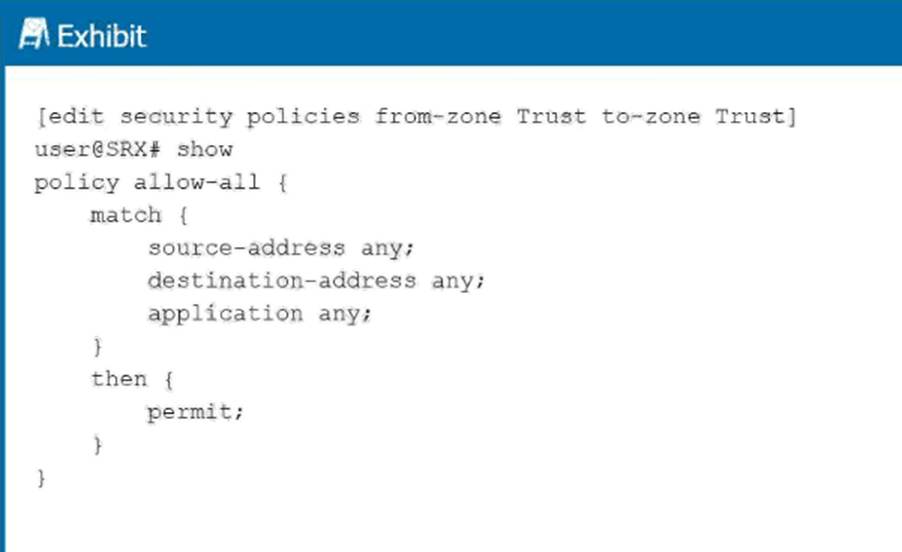
Which type of policy is shown in the exhibit?
- A . global policy
- B . inter-zone policy
- C . intra-zone policy
- D . default policy
Correct Answer: C
C
Explanation:
From the exhibit configuration:
[edit security policies from-zone Trust to-zone Trust]
policy allow-all {
match {
source-address any;
destination-address any;
application any;
}
then {
permit;
}
}
The from-zone and to-zone are both set to Trust # Trust.
This means the policy is governing traffic within the same zone.
Policies within the same zone are calledintra-zone policies.
Analysis of options:
Global policy (A): Applied universally across zones, not zone-specific. Not the case here.
Inter-zone policy (B): Applies between two different zones (e.g., Trust # Untrust). Not the case here since both zones are Trust.
Intra-zone policy (C): Correct. Applies to traffic within the same zone (Trust # Trust).
Default policy (D): The implicit deny-all policy that applies when no policy matches. Not shown in this exhibit.
Correct Policy Type: Intra-zone policy
Reference: Juniper Networks CSecurity Policy Types (Inter-zone, Intra-zone, and Global), Junos OS Security Fundamentals.
C
Explanation:
From the exhibit configuration:
[edit security policies from-zone Trust to-zone Trust]
policy allow-all {
match {
source-address any;
destination-address any;
application any;
}
then {
permit;
}
}
The from-zone and to-zone are both set to Trust # Trust.
This means the policy is governing traffic within the same zone.
Policies within the same zone are calledintra-zone policies.
Analysis of options:
Global policy (A): Applied universally across zones, not zone-specific. Not the case here.
Inter-zone policy (B): Applies between two different zones (e.g., Trust # Untrust). Not the case here since both zones are Trust.
Intra-zone policy (C): Correct. Applies to traffic within the same zone (Trust # Trust).
Default policy (D): The implicit deny-all policy that applies when no policy matches. Not shown in this exhibit.
Correct Policy Type: Intra-zone policy
Reference: Juniper Networks CSecurity Policy Types (Inter-zone, Intra-zone, and Global), Junos OS Security Fundamentals.
Question #56
You want to verify the effectiveness of Web filtering on the SRX Series Firewall.
How would you accomplish this task?
- A . by installing a local NGWF server
- B . by checking the file extensions of blocked content
- C . by examining the content filtering policies
- D . by attempting to access permitted or blocked URLs
Correct Answer: D
D
Explanation:
The simplest and most direct method of verifying Web filtering effectiveness isto attempt to access permitted and blocked URLs.
Option A: Installing a local NGWF server is not required; NGWF queries Juniper’s cloud.
Option B: File extension checking applies to content filtering, not web filtering.
Option C: Examining policies shows configuration but does not verify enforcement.
Option D: Correct. Attempting to browse URLs that should be blocked or allowed confirms the Web filtering policy is effective.
Correct Method: Attempt to access permitted or blocked URLs
Reference: Juniper Networks CVerifying Web Filtering Configuration, Junos OS Security Fundamentals.
D
Explanation:
The simplest and most direct method of verifying Web filtering effectiveness isto attempt to access permitted and blocked URLs.
Option A: Installing a local NGWF server is not required; NGWF queries Juniper’s cloud.
Option B: File extension checking applies to content filtering, not web filtering.
Option C: Examining policies shows configuration but does not verify enforcement.
Option D: Correct. Attempting to browse URLs that should be blocked or allowed confirms the Web filtering policy is effective.
Correct Method: Attempt to access permitted or blocked URLs
Reference: Juniper Networks CVerifying Web Filtering Configuration, Junos OS Security Fundamentals.