
Practice Free HPE7-A02 Exam Online Questions
A company uses HPE Aruba Networking ClearPass Policy Manager (CPPM) as a TACACS+ server to authenticate managers on its AOS-CX switches. You want to assign managers to groups on the AOS-CX switch by name.
How do you configure this setting in a CPPM TACACS+ enforcement profile?
- A . Add the Shell service and set autocmd to the group name.
- B . Add the Shell service and set priv-Ivl to the group name.
- C . Add the Aruba: Common service and set Aruba-Admin-Role to the group name.
- D . Add the Aruba: Common service and set Aruba-Priv-Admin-User to the group name.
C
Explanation:
To assign managers to groups on the AOS-CX switch by name using HPE Aruba Networking ClearPass Policy Manager (CPPM) as a TACACS+ server, you should add the Aruba service to the TACACS+ enforcement profile and set the Aruba-Admin-Role to the group name. This configuration ensures that the appropriate administrative roles are assigned to managers based on their group membership, allowing for role-based access control on the AOS-CX switches.
Reference: ClearPass TACACS+ configuration guides and AOS-CX switch management documentation provide details on setting up enforcement profiles and using the Aruba-Admin-Role attribute for role assignment.
You need to create a rule in an HPE Aruba Networking ClearPass Policy Manager (CPPM) role mapping policy that references a ClearPass Device Insight Tag.
Which Type (namespace) should you specify for the rule?
- A . Endpoint
- B . TIPS
- C . Device
- D . Application
A
Explanation:
ClearPass Role Mapping Policy:
The Endpoint namespace is used to reference attributes and tags related to endpoint devices.
Device Insight Tags are part of endpoint profiling information and are stored in the Endpoint Repository.
Option Analysis:
Option A: Correct. The Endpoint namespace includes Device Insight Tags.
Option B: Incorrect. TIPS refers to system attributes and configuration data, not endpoint tags.
Option C: Incorrect. Device is not a valid namespace in this context.
Option D: Incorrect. Application relates to application-level attributes, not Device Insight Tags.
Refer to the exhibit:
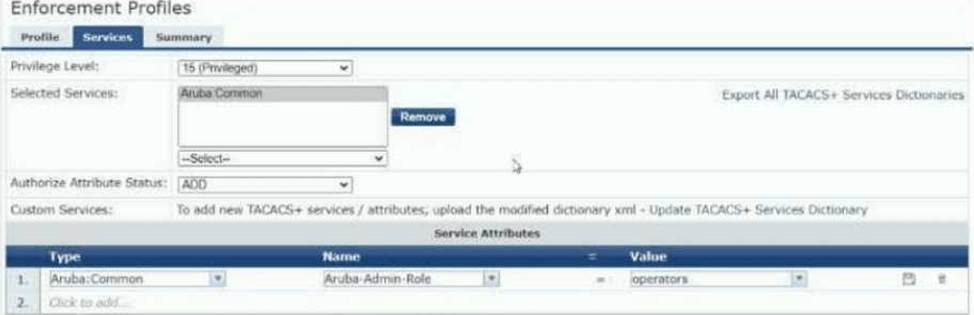
The exhibit shows the TACACS+ enforcement profile that HPE Aruba Networking ClearPass Policy
Manager (CPPM) assigns to a manager.
When this manager logs into an AOS-CX switch, what does the switch do?
- A . Assigns the manager operator-level privileges
- B . Assigns the manager administrator-level privileges
- C . Rejects the manager with an error message
- D . Assigns the manager auditor-level privileges
A
Explanation:
TACACS+ Enforcement Profile:
The profile specifies a Service Attribute under Aruba: Common with:
Name: Aruba-Admin-Role
Value: operators
AOS-CX Role Mapping:
On Aruba AOS-CX switches, the Aruba-Admin-Role attribute maps the authenticated user to predefined roles:
operators: Operator-level privileges (read-only access, limited commands).
administrators: Full administrator privileges.
Other roles like auditors may exist based on configuration.
Analysis:
The value operators explicitly maps the user to operator-level privileges, granting read-only access to the AOS-CX switch.
Since the Aruba-Admin-Role is correctly set and recognized, the switch assigns the appropriate role without errors.
Option Breakdown:
Option A: Correct. The switch assigns operator-level privileges based on the Aruba-Admin-Role value.
Option B: Incorrect. Administrator-level privileges require the role value to be administrators.
Option C: Incorrect. The manager is successfully authenticated and authorized; there is no error.
Option D: Incorrect. There is no reference to an auditor role in the configuration shown.
Conclusion:
The operators value in the TACACS+ enforcement profile ensures that the manager is assigned operator-level privileges on the AOS-CX switch.
Refer to the exhibit:
The exhibit shows the TACACS+ enforcement profile that HPE Aruba Networking ClearPass Policy
Manager (CPPM) assigns to a manager.
When this manager logs into an AOS-CX switch, what does the switch do?
- A . Assigns the manager operator-level privileges
- B . Assigns the manager administrator-level privileges
- C . Rejects the manager with an error message
- D . Assigns the manager auditor-level privileges
A
Explanation:
TACACS+ Enforcement Profile:
The profile specifies a Service Attribute under Aruba: Common with:
Name: Aruba-Admin-Role
Value: operators
AOS-CX Role Mapping:
On Aruba AOS-CX switches, the Aruba-Admin-Role attribute maps the authenticated user to predefined roles:
operators: Operator-level privileges (read-only access, limited commands).
administrators: Full administrator privileges.
Other roles like auditors may exist based on configuration.
Analysis:
The value operators explicitly maps the user to operator-level privileges, granting read-only access to the AOS-CX switch.
Since the Aruba-Admin-Role is correctly set and recognized, the switch assigns the appropriate role without errors.
Option Breakdown:
Option A: Correct. The switch assigns operator-level privileges based on the Aruba-Admin-Role value.
Option B: Incorrect. Administrator-level privileges require the role value to be administrators.
Option C: Incorrect. The manager is successfully authenticated and authorized; there is no error.
Option D: Incorrect. There is no reference to an auditor role in the configuration shown.
Conclusion:
The operators value in the TACACS+ enforcement profile ensures that the manager is assigned operator-level privileges on the AOS-CX switch.
Refer to the exhibit:
The exhibit shows the TACACS+ enforcement profile that HPE Aruba Networking ClearPass Policy
Manager (CPPM) assigns to a manager.
When this manager logs into an AOS-CX switch, what does the switch do?
- A . Assigns the manager operator-level privileges
- B . Assigns the manager administrator-level privileges
- C . Rejects the manager with an error message
- D . Assigns the manager auditor-level privileges
A
Explanation:
TACACS+ Enforcement Profile:
The profile specifies a Service Attribute under Aruba: Common with:
Name: Aruba-Admin-Role
Value: operators
AOS-CX Role Mapping:
On Aruba AOS-CX switches, the Aruba-Admin-Role attribute maps the authenticated user to predefined roles:
operators: Operator-level privileges (read-only access, limited commands).
administrators: Full administrator privileges.
Other roles like auditors may exist based on configuration.
Analysis:
The value operators explicitly maps the user to operator-level privileges, granting read-only access to the AOS-CX switch.
Since the Aruba-Admin-Role is correctly set and recognized, the switch assigns the appropriate role without errors.
Option Breakdown:
Option A: Correct. The switch assigns operator-level privileges based on the Aruba-Admin-Role value.
Option B: Incorrect. Administrator-level privileges require the role value to be administrators.
Option C: Incorrect. The manager is successfully authenticated and authorized; there is no error.
Option D: Incorrect. There is no reference to an auditor role in the configuration shown.
Conclusion:
The operators value in the TACACS+ enforcement profile ensures that the manager is assigned operator-level privileges on the AOS-CX switch.
A company has HPE Aruba Networking APs, which authenticate users to HPE Aruba Networking ClearPass Policy Manager (CPPM).
What does HPE Aruba Networking recommend as the preferred method for assigning clients to a role on the AOS firewall?
- A . Configure CPPM to assign the role using a RADIUS enforcement profile with a RADIUS: IETF Username attribute.
- B . Configure CPPM to assign the role using a RADIUS enforcement profile with an Aruba-User-Role VSA.
- C . Create server rules on the APs to assign clients to roles based on RADIUS IETF attributes returned by CPPM.
- D . Create user rules on the APs to assign clients to roles based on a variety of criteria.
B
Explanation:
The preferred method for assigning clients to a role on the AOS firewall is to configure HPE Aruba Networking ClearPass Policy Manager (CPPM) to assign the role using a RADIUS enforcement profile with an Aruba-User-Role VSA (Vendor-Specific Attribute). This method allows ClearPass to dynamically assign the appropriate user roles to clients during the authentication process, ensuring that role-based access policies are consistently enforced across the network.
Reference: Aruba ClearPass documentation and RADIUS configuration guides provide detailed instructions on setting up RADIUS enforcement profiles and using the Aruba-User-Role VSA for role assignment.
A company is implementing HPE Aruba Networking Wireless IDS/IPS (WIDS/WIPS) on its AOS-10 APs, which are managed in HPE Aruba Networking Central.
What is one requirement for enabling detection of rogue APs?
- A . Each VLAN in the network assigned on at least one AP’s or AM’s port
- B . A Foundation with Security license for each of the APs
- C . One AM deployed for every one AP deployed
- D . A manual radio profile that enables non-regulatory channels
B
Explanation:
To enable the detection of rogue APs with HPE Aruba Networking Wireless IDS/IPS (WIDS/WIPS) on AOS-10 APs managed in HPE Aruba Networking Central, each AP must have a Foundation with Security license. This license enables advanced security features, including rogue AP detection, which is crucial for maintaining a secure wireless environment and protecting against unauthorized access points.
Reference: Aruba’s licensing documentation and WIDS/WIPS setup guides specify the need for appropriate licenses to activate security features such as rogue AP detection.
A company is implementing HPE Aruba Networking Wireless IDS/IPS (WIDS/WIPS) on its AOS-10 APs, which are managed in HPE Aruba Networking Central.
What is one requirement for enabling detection of rogue APs?
- A . Each VLAN in the network assigned on at least one AP’s or AM’s port
- B . A Foundation with Security license for each of the APs
- C . One AM deployed for every one AP deployed
- D . A manual radio profile that enables non-regulatory channels
B
Explanation:
To enable the detection of rogue APs with HPE Aruba Networking Wireless IDS/IPS (WIDS/WIPS) on AOS-10 APs managed in HPE Aruba Networking Central, each AP must have a Foundation with Security license. This license enables advanced security features, including rogue AP detection, which is crucial for maintaining a secure wireless environment and protecting against unauthorized access points.
Reference: Aruba’s licensing documentation and WIDS/WIPS setup guides specify the need for appropriate licenses to activate security features such as rogue AP detection.
A company is implementing HPE Aruba Networking Wireless IDS/IPS (WIDS/WIPS) on its AOS-10 APs, which are managed in HPE Aruba Networking Central.
What is one requirement for enabling detection of rogue APs?
- A . Each VLAN in the network assigned on at least one AP’s or AM’s port
- B . A Foundation with Security license for each of the APs
- C . One AM deployed for every one AP deployed
- D . A manual radio profile that enables non-regulatory channels
B
Explanation:
To enable the detection of rogue APs with HPE Aruba Networking Wireless IDS/IPS (WIDS/WIPS) on AOS-10 APs managed in HPE Aruba Networking Central, each AP must have a Foundation with Security license. This license enables advanced security features, including rogue AP detection, which is crucial for maintaining a secure wireless environment and protecting against unauthorized access points.
Reference: Aruba’s licensing documentation and WIDS/WIPS setup guides specify the need for appropriate licenses to activate security features such as rogue AP detection.
You want to examine the applications that a device is using and look for any changes in application usage over several different ranges.
In which HPE Aruba Networking solution can you view this information in an easy-to-view format?
- A . HPE Aruba Networking ClearPass OnGuard agent installed on the device
- B . HPE Aruba Networking Central within a device’s Live Monitoring page
- C . HPE Aruba Networking ClearPass Insight using an Active Endpoint Security report
- D . HPE Aruba Networking ClearPass Device Insight (CPDI) in the device’s network activity
B
Explanation:
HPE Aruba Central Live Monitoring:
Aruba Central provides real-time Live Monitoring of network devices, including:
Application usage statistics.
Trends and changes over time for specific devices.
This information is presented in a clear and easy-to-read format, making it ideal for examining changes in application usage over different time ranges.
Option Analysis:
Option A: Incorrect. ClearPass OnGuard monitors endpoint compliance (e.g., antivirus, OS version) but does not analyze application usage.
Option B: Correct. Aruba Central’s Live Monitoring page is specifically designed for this type of analysis.
Option C: Incorrect. ClearPass Insight generates endpoint security reports but does not track application usage.
Option D: Incorrect. ClearPass Device Insight (CPDI) focuses on device profiling and identification, not continuous application monitoring.