
Practice Free HPE0-S59 Exam Online Questions
For which interconnect type must a logical interconnect group be configured for only a single frame?
- A . HPE Virtual Connect SE 40 Gb F8 Module for Synergy
- B . Brocade 32GB Fibre Channel Switch Module for HPE Synergy
- C . HPE Virtual Connect SE 32 Gb FC Module for Synergy
- D . HPE Virtual Connect SE 100 Gb F32 Module for Synergy
B
Explanation:
In the HPE Synergy architecture, Logical Interconnect Groups (LIGs) define the connectivity patterns for the frames.
The ability of an LIG to span multiple frames depends entirely on the interconnect technology being used:
Ethernet Virtual Connect (Options A & D): The HPE Virtual Connect SE 40 Gb F8 and 100 Gb F32 modules are designed for Multi-Frame Link Aggregation. Using a Master/Satellite architecture, these LIGs can span up to five Synergy frames, allowing a single logical management point for the entire fabric.
Fibre Channel Switches (Option B): The Brocade 32GB Fibre Channel Switch Module is a traditional "managed switch" persona. Unlike Virtual Connect, which acts as a fabric extender/aggregator, the Brocade module operates as a standalone switch within the frame’s backplane. In HPE OneView, an LIG containing traditional Fibre Channel switches is strictly limited to a single frame. You cannot "stack" or span a Brocade switch LIG across multiple frames in the same way you do with Ethernet VC modules.
Virtual Connect FC (Option C): While Virtual Connect Fibre Channel modules also generally operate within a frame context for their uplinks, the question specifically targets the "Switch Module" (Brocade) which, as a standard industry switch, does not participate in the proprietary Synergy multi-frame horizontal stacking architecture.
Your customer plans to deploy VMware vSAN using D3940 Storage Modules.
Which statement about this solution is true?
- A . The 12Gb SAS modules required for D3940 connectivity can only be installed in the first fabric.
- B . To use the storage controller that will access D3940 storage modules, a second CPU must be installed.
- C . For VMware vSAN deployment, all drives in the D3940 storage modules must be SSD drives.
- D . All drives in the D3940 storage modules must formulate a single logical drive with RAID5 configured
C
Explanation:
For VMware vSAN deployments, it is recommended that all drives in the D3940 storage modules be SSD drives to ensure optimal performance and efficiency. SSDs provide the necessary speed and reliability required by vSAN for handling storage-intensive operations and maintaining high performance.
Reference: VMware vSAN Hardware Quick Reference Guide
Your customer is trying to grow a VMware cluster using HPE OneView for VMware vCenter Server.
They get an error and cannot proceed.
Which tool should you use to troubleshoot the problem?
- A . HPE OneView interface to import an existing cluster using the hypervisor cluster profile functionality.
- B . HPE OneView for VMware vCenter Server to verify if the server profile template is properly imported and registered.
- C . vCenter Server to use the HPE OneView for VMware vCenter plugin to import the cluster for HPE OneView management.
- D . iLO interface of a given HPE Synergy compute node to verify whether this node is registered within HPE OneView.
B
Explanation:
The HPE OneView for VMware vCenter (OV4VC) plugin allows administrators to perform "Grow Cluster" operations directly from the vSphere Client. This process relies on a tight integration between the plugin appliance and the HPE OneView appliance.
Dependency on Server Profile Templates (SPT): When you "Grow" a cluster, the plugin must have access to a valid Server Profile Template defined in HPE OneView. This template dictates the hardware configuration, firmware levels, and network connectivity for the new nodes being added to the cluster.
Import and Registration Process: For an SPT to be available within the "Grow Cluster" wizard in vCenter, it must first be successfully imported and registered within the OV4VC appliance. If the SPT was recently created in OneView or if the synchronization between OneView and the OV4VC appliance has failed, the template will not appear, or the process will throw an error during the validation phase.
Troubleshooting Workflow: If an error occurs during the "Grow Cluster" operation, the primary troubleshooting step is to log into the HPE OneView for VMware vCenter Server management console (the appliance’s own web interface).
Here, you can verify:
The health of the connection to the HPE OneView appliance.
Whether the required Server Profile Templates are correctly listed and synchronized.
If the OS Deployment Plans associated with those templates are accessible.
Why other options are incorrect:
Option A: Hypervisor Cluster Profiles are a feature inside the HPE OneView UI itself. While they serve a similar purpose, the question specifically mentions the customer is using HPE OneView for VMware vCenter Server (the plugin), which operates from the vSphere side.
Option C: "Importing a cluster" is the initial step to bring an existing vSphere cluster under OneView management. The customer is already attempting to grow a cluster, implying the management relationship should already be established.
Option D: While iLO is essential for node health, a "Grow Cluster" error in the plugin is typically a higher-level orchestration issue related to template availability or appliance connectivity rather than an individual node’s registration status in OneView.
Your customer has 6 logical enclosures spanning 18 HPE Synergy frames. The customer needs to add one more logical enclosure based on 5 HPE Synergy frames
How will this change impact the customer environment?
- A . The customer can add a new logical enclosure to the existing setup because the maximum number of logical enclosures in a single management ring is not reached.
- B . The customer has to expand the management ring capacity either by adding HPE Composer 2 modules or adding memory to reach 128GB per module.
- C . The customer has to create a new management ring for new logical enclosure because the maximum number of frames m a single management ring is reached.
- D . The customer can add a new logical enclosure to an existing setup once all required licenses are added to HPE OneView and associated with the new frames.
C
Explanation:
HPE Synergy management rings have a maximum capacity for the number of frames they can manage. With 18 frames already managed in 6 logical enclosures, adding 5 more frames would exceed this capacity. Therefore, the customer needs to create a new management ring for the new logical enclosure to ensure proper management and operation.
Reference: HPE Synergy Management Guide
Your customer plans to manage HPE Primera using HPE Oneview
Which storage management tasks can be completed using HPE OneView for this environment?
- A . CPG management
- B . Volume provisioning
- C . Cache management
- D . Replication setup
B
Explanation:
HPE OneView allows for several storage management tasks when managing HPE Primera, including volume provisioning. This task involves creating and managing storage volumes that can be allocated to compute nodes and applications within the environment. HPE OneView streamlines this process,
providing a centralized management interface.
Reference: HPE OneView and HPE Primera Integration Guide
Your customer reports that they cannot deploy HPE Synergy compute nodes using HPE OneView for VMware vCenter Server (HPE OV4VC).
What should you check during troubleshooting process?
- A . If HPE OneView credentials are added in vCenter Server
- B . If an compute nodes are added to the vCenter Server
- C . If the HPE Oneview instance Is integrated with HPE OV4VC.
- D . If vCenter Server is licensed in the HPE Oneview interface
Your customer has experience with utilization sampling for HPE Virtual Connect SE 100 Gb F32 Module for HPE Synergy. They have recently purchased HPE VC FC modules.
What must you be aware of regarding utilization sampling for the new modules?
- A . Utilization sampling for HPE VC FC modules must be enabled manually using CLI.
- B . For HPE VC FC modules, utilization sampling is always enabled and cannot be disabled
- C . For HPE VC FC modules, utilization sampling can be enabled once appropriate license is applied
- D . Utilization sampling works the same way tor any type of HPE Synergy interconnect modules
B
Explanation:
For HPE Virtual Connect Fibre Channel (VC FC) modules, utilization sampling is always enabled by default and cannot be disabled. This feature ensures continuous monitoring of the module’s performance and utilization, providing valuable insights for managing the Fibre Channel network.
Reference: HPE Virtual Connect FC Module User Guide
HOTSPOT
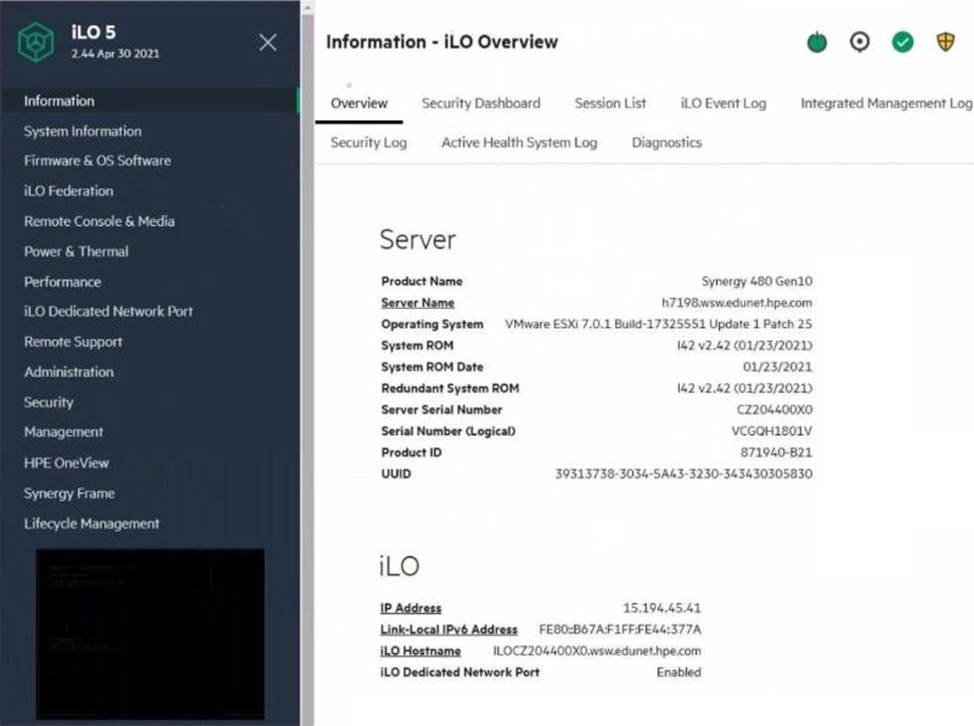
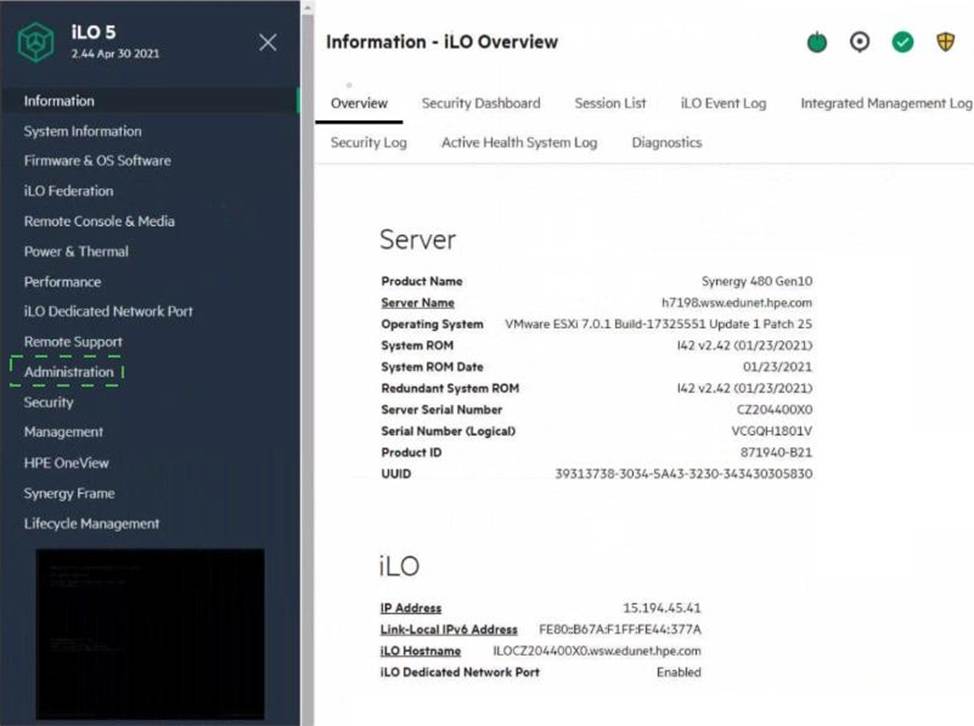
Click the area within the iLO management interface that will allow you to access workload Advisor.
Explanation:
The Performance section within the iLO management interface provides access to the Workload Advisor. This feature offers insights and analytics regarding the server’s performance, helping to optimize workloads and manage resources efficiently.
Reference: HPE iLO 5 User Guide