Practice Free FCP_FMG_AD-7.6 Exam Online Questions
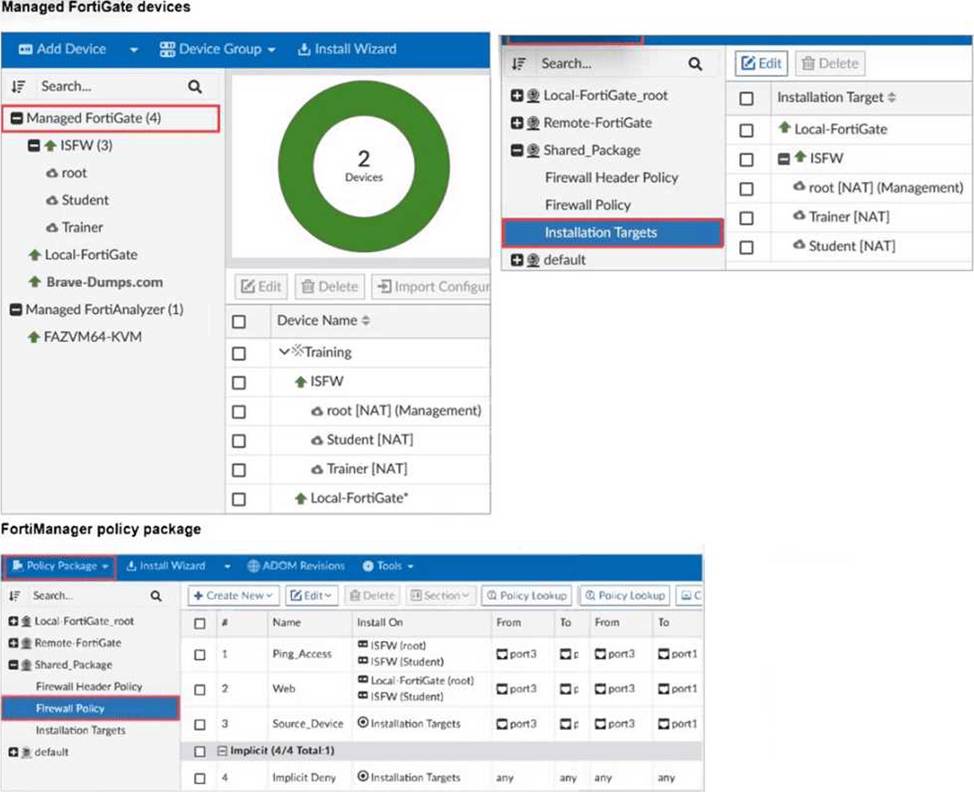
Refer to the exhibit.

Which two results occur if you run the script using the Device Database option? (Choose two.)
- A . The device Config Status is tagged as Modified.
- B . The script history shows the successful installation of the script on the remote FortiGate.
- C . The successful execution of a script on the Device Database creates a new revision history.
- D . The administrator must install these changes on a managed device using the Install Wizard.
A, D
Explanation:
Running a script on the Device Database marks the configuration as modified but does not immediately apply changes to the device.
The administrator must use the Install Wizard to push and install these changes from the Device Database onto the managed device.
What is the best explanation of how FortiManager helps with mass provisioning?
- A . It upgrades the OS of each FortiGate device.
- B . It provides local FortiGuard Distribution Server (FDS) services to the network.
- C . It uses templates to configure the same settings on many devices simultaneously.
- D . It sends email alerts when new devices connect.
C
Explanation:
FortiManager helps with mass provisioning by using templates that allow administrators to configure the same settings on multiple FortiGate devices simultaneously, streamlining deployment and management.
Refer to Exhibit:

An administrator admin used the Configuration Revision History window to revert the FortiGate device configuration to revision ID 6. After running the reinstall policy package, the administrator noticed problems with the firewall policy- they could not see the unset comment on policy ID 1.
Why did FortiManager not remove the comment from policy ID 1 when the administrator ran reinstall policy package?
- A . Because the administrator student must install the configuration changes to correctly see the expected results.
- B . Because the administrator must import the firewall policies to update the firewall policy package.
- C . Because every time the administrator uses the revert config file, they must use the Install Wizard instead of running the reinstall policy package.
- D . Because the administrator used the Revision Diff view, which shows what changed, not what will be installed.
C
Explanation:
The correct answer is B. The FortiManager 7.6 Administrator Study Guide gives the exact extract: “Performing a revert operation followed by an installation only reverts device-level changes and does not revert policy packages. To achieve full synchronization, you must run the Import Configuration tool on FortiManager to synchronize the policy package.”
The guide also states: “After every retrieve, auto-update, or revert operation, you must use Import Configuration to ensure the policy information is synchronized.”
In the exhibit, the missing unset comment for policy ID 1 is a policy package issue, not just a device-level revert issue. Reinstalling the existing policy package does not automatically rebuild it from the reverted revision. The administrator must import the firewall policies again so the policy package reflects the reverted policy state. That is why the comment was not removed.
Refer to the following configuration.

What are two results from the configuration shown in the exhibit? Choose two answers
- A . The same administrator can lock more than one ADOM at the same time.
- B . Multiple administrators can lock and work on separate ADOMs at the same time.
- C . All changes must be approved before they can be installed on a device.
- D . Concurrent read-write access to an ADOM is disabled.
B,D
Explanation:
The command set workspace-mode normal enables Workspace (ALL ADOMs). In this mode, FortiManager uses ADOM locking to prevent configuration conflicts. The study guide explains that workspace mode is used to prevent concurrent ADOM access, and once an ADOM is locked, only the administrator who locked it has read-write access while all others have read-only access.
That makes D correct.
B is also correct because locking is applied per ADOM, so different administrators can work at the same time on different ADOMs without conflicting with each other. This is consistent with the design goal of workspace mode and ADOM locking.
C describes workflow mode, not workspace normal. Approval before installation is required only with set workspace-mode workflow.
Refer to the exhibit.

Which two statements about the output are true? (Choose two.)
- A . The latest revision history for the managed FortiGate does not match the device-level database.
- B . Configuration changes have been installed on FortiGate, updating policy and device-level database.
- C . The latest revision history for the managed FortiGate does match the FortiManager policy database.
- D . The system template default will override device-level database configurations.
CD
Explanation:
The status "pending" indicates the latest revision history does not match the device-level database, meaning there are unapplied changes.
The template is marked as [modified], so the system template default will override device-level database configurations when installed.
An administrator receives the import report after importing policies into the policy package layer.

Based on the import report, how did FortiManager handle the profile-protocol-options object named default?
- A . FortiManager deleted the duplicate value from its database.
- B . FortiManager created a new service category in its database.
- C . FortiManager did not update its database with the value.
- D . FortiManager updated the duplicate value in the FortiGate database.
C
Explanation:
The import report clearly shows: "firewall profile-protocol-options", SKIPPED, "(name=default, oid=3491, DUPLICATE)". In FortiManager import reporting, SKIPPED means the object was not imported or updated, and DUPLICATE means an object with that identity already exists in the ADOM database. So FortiManager did not update its database with the imported value for the object default, which makes C correct.
The lab guide reinforces this behavior in the conflict-handling workflow. It explains that during import, FortiManager checks for duplicate names and conflicts, and for conflicting objects the administrator may need to choose whether to keep the value from FortiGate or FortiManager. For the default Firewall Profile-Protocol-Options object, the guide specifically discusses keeping the existing FortiManager value to avoid unnecessary changes.
An administrator notices that CLI scripts are failing on some FortiGate devices because they use different FortiOS versions.
Which two actions should the administrator take to fix the failing CLI scripts? Choose two answers.
- A . Create separate ADOMs for each FortiOS version.
- B . Disable CLI scripts for devices using older firmware.
- C . Modify the CLI scripts to include conditional commands based on FortiOS version.
- D . Create version-specific CLI script groups and assign them to the appropriate devices.
C,D
Explanation:
The most strongly supported answer is A. The study guide explicitly states: “In the case of having multiple FortiOS firmware versions on the same ADOM, it is recommended to use separate ADOMs instead.” It also says: “When you organize managed FortiGate devices, it is highly recommended that you group them based on their FortiOS firmware version. This is because valid command syntax varies by firmware version, which affects script compatibility.”
D is the other practical fix supported by FortiManager workflow. The study guide states that FortiManager can run scripts on multiple managed devices at once, and device groups let you run scripts on multiple devices instead of a single device. Combined with the firmware-version compatibility rule above, the correct operational approach is to keep version-specific scripts and apply them only to the matching device sets. B and C are not supported by the uploaded study guide as the recommended fix.
Refer to the exhibit.

An administrator assigned a new policy package to FortiGate HQ-NGFW-1. In the installation preview, they noticed some settings they did not modify and are unsure about the changes.
Based on the exhibit, which two things will happen if they continue with the installation? (Choose two.)
- A . FortiGate HQ-NGFW-1 can use FortiManager firmware templates to upgrade firmware and ratings.
- B . FortiGate HQ-NGFW-1 can contact the FortiManager acting as FortiGuard Distribution Server (FDS) to download FortiGuard updates.
- C . FortiGate HQ-NGFW-1 will use the root_CA3 certificate in firewall address objects or policies.
- D . FortiManager will install the CA certificate named root_CA3 to authenticate FortiGate-to-FortiManager communication protocol (FGFM) tunnel connections with FortiGate HQ- NGFW-1.
B, D
Explanation:
The configuration includes a server-list with server-type set to "update rating," which enables FortiGate HQ-NGFW-1 to contact FortiManager as a FortiGuard Distribution Server (FDS) for FortiGuard updates.
The installation includes a root_CA3 certificate, which FortiManager will install on FortiGate HQ-NGFW-1 to authenticate FGFM tunnel connections between the devices.
An administrator configures a new BGP peer in the FortiManager device-level database of FortiGate. They reinstall the policy package to the managed FortiGate device without any errors. However, when the administrator logs in to FortiGate, they do not see the BGP configuration changes.
What is the most likely reason why FortiManager did not push the BGP peer changes to FortiGate?
- A . The administrator must run a sanity check on FortiManager to make sure the database is not corrupted.
- B . Fortigate has a BGP template assigned on the FortiManager database.
- C . The administrator must use the Install Wizard and select Install device settings only to push BGP settings
- D . The FortiGate firmware version is different from the FortiManager ADOM version.
B
Explanation:
If a BGP template is assigned to the FortiGate device on FortiManager, device-level BGP configurations made directly in the device-level database are overridden by the template settings, so the changes do not get pushed to the device.
An administrator suspects that the Collector Agent is not forwarding login events to FortiGate.
What is the most effective troubleshooting step?
- A . Verify if DC agent is enabled on the FortiGate.
- B . Restart the domain controller to refresh authentication services.
- C . Verify if FortiGate is set to use LDAP authentication instead of FSSO.
- D . Check if TCP port 8000 is open between the collector agent and FortiGate.
D
Explanation:
This point is not covered in the uploaded FortiManager 7.6 study guide, so the answer is based on Fortinet’s official FSSO documentation. Fortinet documents that in FSSO Collector Agent deployments, the FortiGate connects to the Collector Agent on TCP port 8000 by default, and if a different port is not configured, that is the port that must be reachable. Fortinet also explains that the DC agents monitor user logon events and pass the information to the Collector Agent, which stores the information and sends it to the FortiGate.
So, when login events are not reaching FortiGate, the most effective first troubleshooting step is to verify connectivity on TCP 8000 between the Collector Agent and FortiGate. Options A, B, and C are less direct and do not test the actual transport path used by the Collector Agent to send FSSO information to FortiGate.