Practice Free FCP_FMG_AD-7.6 Exam Online Questions
An administrator has assigned a global policy package to a new ADOM named ADOM1.
What will happen if the administrator tries to create a new policy package in ADOM1?
- A . The administrator will be able to select the option to assign the global policy package to the new policy package.
- B . FortiManager will automatically assign the global policy package to the new policy package.
- C . FortiManager will automatically install policies on the policy package in ADOM1.
- D . The administrator will have to assign the global policy package from the global ADOM.
A
Explanation:
When a global policy package is assigned to an ADOM, administrators creating new policy packages within that ADOM have the option to select and assign the global policy package to the new policy package if desired.
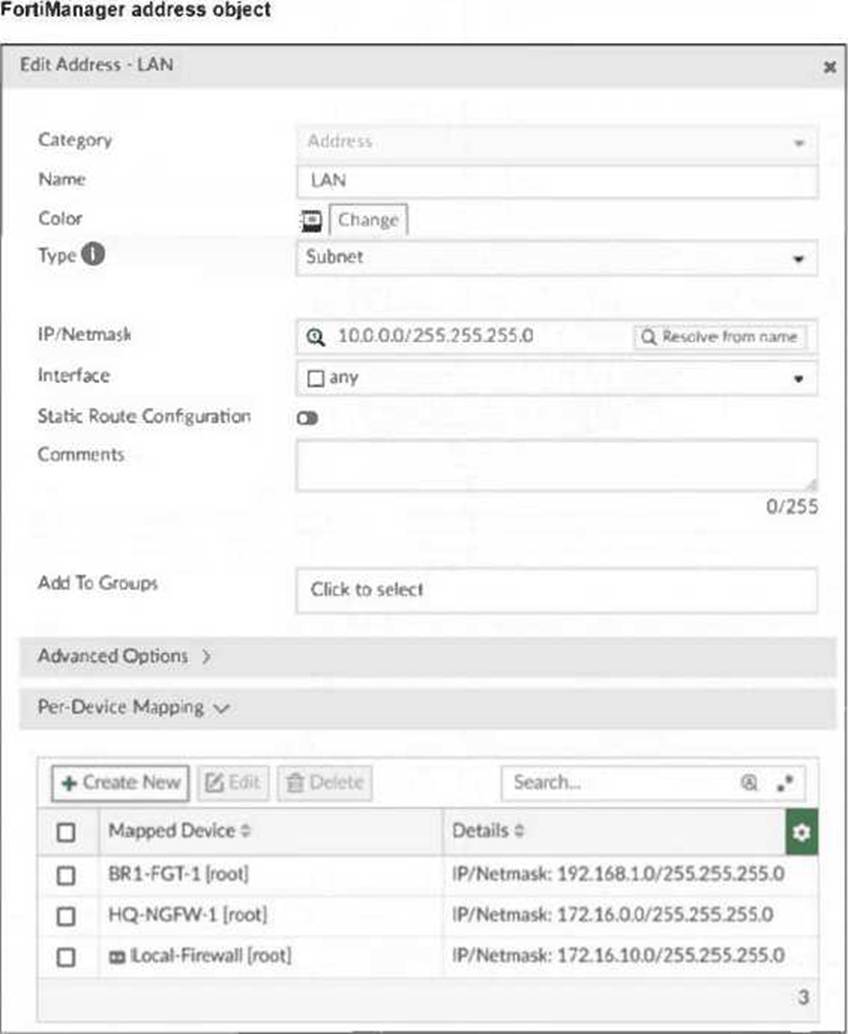
Refer to the exhibit.

An administrator has assigned the default system template to install all devices with the FortiAnalyzer IP address 10.0.13.12. However, not all FortiGate devices can reach FortiAnalyzer using the default interface. Some devices may use the LAN interface, while others may use the WAN interface.
How can the administrator change the source interface for FortiGate devices using the default system template? Choose one answer
- A . Use per-device dynamic object configurations at the ADOM level and apply them in the template.
- B . Configure a metadata variable at the ADOM level and use it in the template.
- C . Create a different system template for each FortiGate, if the configuration is different.
- D . Create a meta field on FortiManager system settings of type Device and use it in the template.
B
Explanation:
The correct answer is B because FortiManager supports ADOM-level metadata variables in scripts and templates. The study guide explicitly states that meta fields cannot be used as variables in scripts or provisioning templates; instead, you must use ADOM-level metadata variables. It further says these variables can be used in templates, and their values can be mapped depending on the device where the template is applied.
That makes metadata variables the proper method for handling per-device differences such as whether a FortiGate should use a LAN or WAN source interface for FortiAnalyzer communication. A is wrong because per-device dynamic objects apply to objects like addresses and VIPs, not template interface selection. D is wrong because meta fields are comments/attributes, not template variables. C could work operationally, but it is not the FortiManager feature intended for this use case.
A service provider administrator has assigned a global policy package to a managed customer ADOM named My_ADOM. The customer administrator has access only to My_ADOM.
How can the customer administrator edit the global header policy of the global policy package?
- A . The customer administrator can edit the header policy by using workspace mode on the global ADOM.
- B . The customer administrator can edit the header policy by using workflow mode on the global ADOM and My_ADOM.
- C . The service provider administrator can unlock the global policy from the global ADOM to authorize changes to the customer administrator.
- D . The customer administrator cannot edit the global header policy; only the service provider administrator can make changes from the global ADOM.
D
Explanation:
The global policy package is managed only from the global ADOM by the service provider administrator. Customer administrators with access solely to their ADOM (My_ADOM) cannot edit the global header policy; such changes must be made by the service provider administrator in the global ADOM.
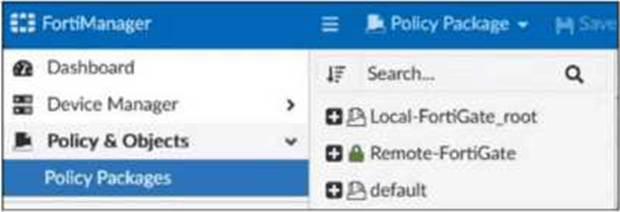
Refer to the exhibit.

Which two statements about the configuration shown in the exhibit are true? Choose two answers.
- A . An administrator can lock the Local-FortiGate_root policy package.
- B . The administrator created a snapshot of the Remote-FortiGate policy package.
- C . The FortiManager ADOM workspace mode is set to normal.
- D . The FortiManager is in workflow mode.
A,C
Explanation:
The exhibit shows Remote-FortiGate with a green closed lock icon, which indicates a locked policy package. The FortiManager 7.6 Administrator Study Guide states: “Policy locking is available in workspace normal and per-ADOM modes” and “Policy locking allows administrators to work on and lock a single policy package instead of locking the whole ADOM.” This confirms that a package such as Local-FortiGate_root can also be locked, so A is correct.
B is incorrect because the study guide and lab guide describe snapshots as ADOM revisions, not policy package snapshots: “An ADOM revision creates a snapshot of the policy and object configuration for the ADOM.”
D is incorrect because in workflow mode, sessions and approval are required before installation. The exhibit shows a normal save/lock state, not a workflow session state.
Refer to Exhibit:

Which two actions will occur if you run the script using the Remote FortiGate Directly via CLI option? Choose two answers
- A . FortiManager will provide a preview of CLI commands before executing this script on a managed FortiGate.
- B . FortiManager will create a new revision history.
- C . FortiGate will auto-updated the FortiManager device-level database.
- D . You will have to install these changes using the Install Wizard.
B,C
Explanation:
The correct answers are B and C. The FortiManager 7.6 Administrator Study Guide explicitly states: “Scripts that you run directly on remote devices also cause automatic updates and create a revision history.” This exact extract proves both results: FortiManager creates a new revision history and the device status becomes Auto-Updated, meaning the FortiGate change is automatically reflected in the FortiManager device-level database.
The lab guide also distinguishes this from database-targeted scripts by stating: “You must perform an installation if you run a script on a device database, policy package, or ADOM database.” That wording excludes Remote FortiGate Directly via CLI, so D is incorrect.
A is also incorrect because direct remote execution does not use the install preview workflow; preview and validation are tied to Install Wizard operations, not direct CLI execution.
An administrator created a new global policy package that includes both header policies and footer policies.
What two things must the administrator know before deploying the global policy package to ADOM2? Choose two answers
- A . They can promote ADOM2 objects to global objects.
- B . They can assign the global policy package to all or selected policy packages within ADOM2.
- C . They must install from the ADOM2 layer to FortiGate when using the Automatically install policies to ADOM devices option.
- D . They can synchronize policy packages by importing from the ADOM2 policy package into the global ADOM policy package.
A,B
Explanation:
FortiManager global policies and objects are shared across ADOMs, but they are not applied automatically to every package. The study guide states that when you create a global policy package, you can choose the ADOMs you want to apply it to, and you can even pick specific policy packages in individual ADOMs. That directly validates B.
A is also correct because the lab guide explicitly says you can promote ADOM objects to global objects by right-clicking an ADOM object and selecting Promote to Global.
C is incorrect because when Automatically Install Policies to ADOM Devices is enabled, FortiManager installs without giving you a preview/accept step first; the lab warns to use it only when you are sure of the changes.
D is incorrect because FortiManager imports device policies into an ADOM policy package, not into the global package for synchronization.
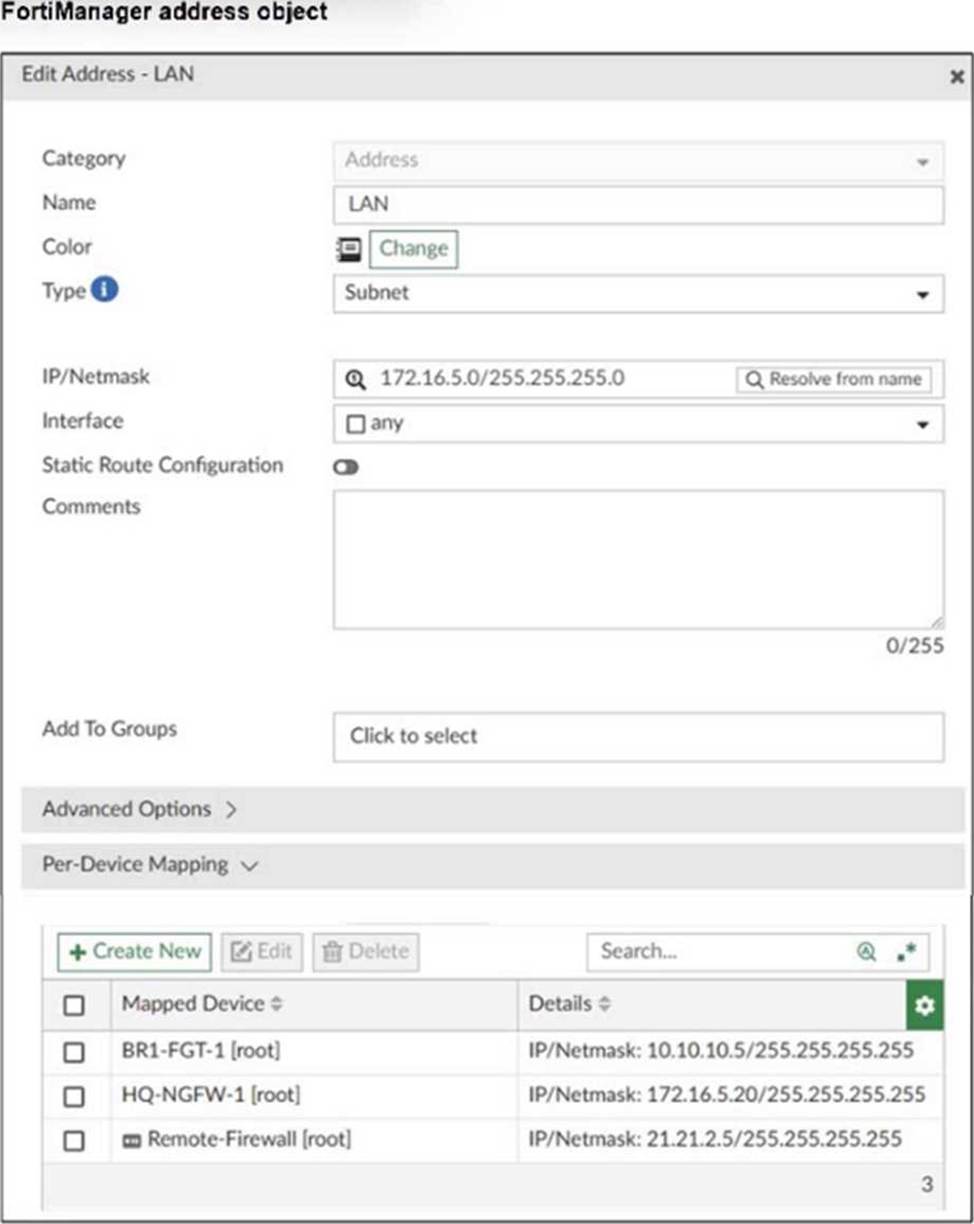
Refer to the exhibit.

FortiManager is operating behind a network address translation (NAT) device, and the administrator configured the FortiManager NATed IP address under the FortiManager system administration settings.
What is the expected result during discovery?
- A . FortiManager sets both the 100.65.0.120 IP address and 10.0.13.120 IP address on FortiGate.
- B . FortiManager sets both the 100.65.0.120 IP address and 100.65.0.101 IP address on FortiGate.
- C . FortiManager sets the 100.65.0.101 IP address on FortiGate.
- D . FortiManager sets the 100.65.0.120 IP address on FortiGate.
D
Explanation:
When FortiManager is behind a NAT device, setting the NATed IP address (100.65.0.120) in the system admin settings causes FortiManager to use that NATed IP address for communication and configuration with FortiGate during discovery and management operations.
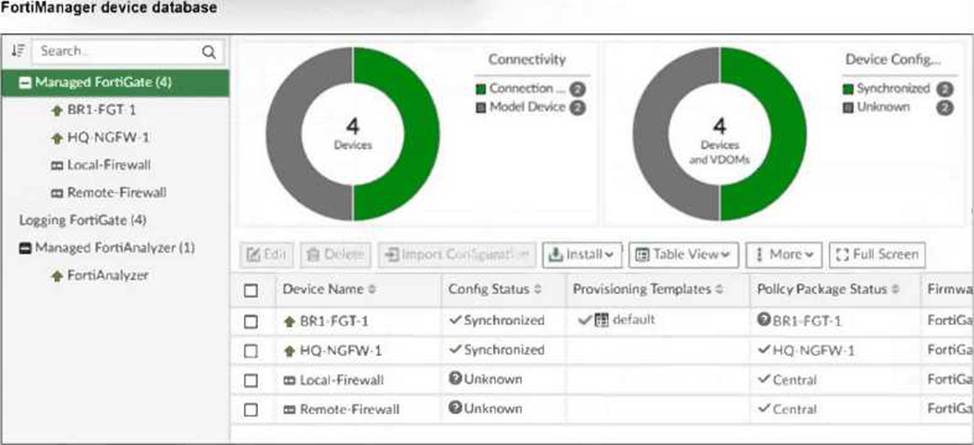
An administrator sees that the policy package status of HQ-NGFW-1 is Never Installed.
What can you conclude from this status? Choose one answer
- A . The policies have not yet been retrieved from the HQ-NGFW-1 device-level database of FortiManager.
- B . The policy package was never imported to the revision history after HQ-NGFW-1 was registered on FortiManager.
- C . The firewall policies were created or changed in the ADOM, and they need to be installed on the managed HQ-NGFW-1 for the first time.
- D . The firewall policies exist only in the HQ-NGFW-1 device-level database, and no policy package has been assigned to the firewall.
C
Explanation:
The correct conclusion is D. The FortiManager 7.6 Administrator Study Guide defines Never Installed as a state where the policy package was never created and was never imported for a managed device. That means FortiManager may already know the device itself at the device layer, but the firewall policy layer has not yet been built for that device.
The lab guide confirms this behavior directly: when you choose Import Later in the Add Device wizard, the policy package status becomes Never Installed because there is still no policy package created for the added FortiGate devices.
So this is not a revision-history issue, and it does not mean ADOM policy changes are merely waiting for first install. It means the policies still exist only on the managed device side until they are imported into a FortiManager policy package.
Company policy dictates that any time a change is made to a policy package on FortiManager an ADOM revision is created before the change installed, and that revision is held for a minimum of 90 days.
Over the past three months, each installed change has resulted in several unused policies and duplicate objects.
The FortiManager administrator plans to upgrade the FortiGate devices and then upgrade the FortiManager ADOM from version 7.4 to 7.6.
Which action can the administrator take to avoid slow ADOM upgrades?
- A . Check and repair the global configuration database before upgrading.
- B . Export firewall policies to Excel, delete them on the ADOM. then reimport them after upgrading the ADOM.
- C . Find unused firmware templates, then delete them before upgrading.
- D . Limit ADOM revisions before upgrading.
D
Explanation:
Limiting ADOM revisions reduces the number of stored historical configurations, which helps avoid performance degradation and slow ADOM upgrades caused by a large volume of revisions.
Refer to the exhibit.

What are two results from the configuration shown in the exhibit? (Choose two.)
- A . Ungraceful closed sessions will keep the ADOM in a locked state until the administrator session times out.
- B . The administrator can lock policy blocks and FortiManager global ADOM.
- C . The same administrator can lock more than one ADOM at the same time.
- D . The administrator must have access to the ADOM to approve changes.
A, B
Explanation:
In normal workspace mode, ungraceful session closures will keep the ADOM locked until the session times out, preventing other administrators from editing.
Normal workspace mode allows administrators to lock policy blocks and the global ADOM, providing granular locking control.