
Practice Free DP-800 Exam Online Questions
You have an Azure SQL database that contains a column named Notes.
A security review discovers that Notes contains sensitive data.
You need to ensure that the data is protected so that neither the stored values nor the query inputs reveal information about the actual data. The solution must prevent a user from inferring relationships or repetitions in the data based on the encrypted output
Which should you use?
- A . Always Encrypted with secure enclaves
- B . Always Encrypted with randomized encryption
- C . row-level security <RLS)
- D . Always Encrypted with deterministic encryption
B
Explanation:
The requirement says the stored values and query inputs must both be protected, and users must not be able to infer relationships or repetitions in the data from the encrypted output. Microsoft documents that deterministic encryption always produces the same ciphertext for the same plaintext, which allows equality comparisons but also leaks patterns. By contrast, randomized encryption produces a different encrypted value each time for the same plaintext, which improves security and prevents pattern analysis based on repeated ciphertext values.
That makes randomized encryption the right choice here:
It protects data at rest and in transit/query parameters under Always Encrypted’s client-side encryption model.
It prevents attackers from learning that the same plaintext value appears repeatedly, because repeated inputs do not produce repeated ciphertext.
Why the other options are wrong:
DRAG DROP
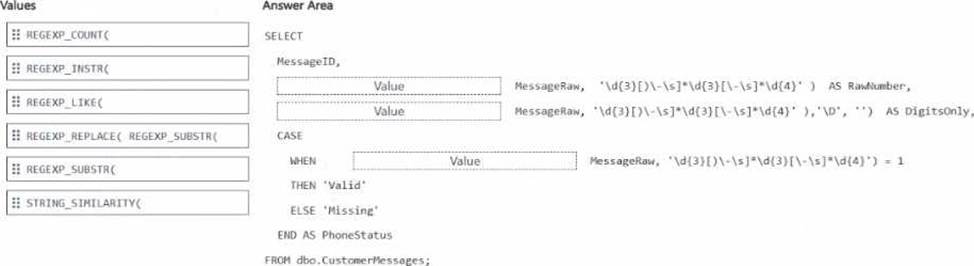
You have a Microsoft SQL Servei 2025 database that contains a table named dbo.Customer-Messages, dbo. Customer-Messages contains two columns named HessagelD (int) and MessageRaw (nvarchar(iux)).
MessageRaw can contain a phone number in multiple formats. and some rows do NOT contain a phone number.
You need to write a single SELECT query that meets the following requirements:
• The query must return Message ID, RawNumber. DigitsOnly, and PhoneStatus.
• RawNumber must contain the first substring that matches a phone-number pattern, or NULL if no match exists.
• DigitsOnly must remove all non-digit characters from RawNumber. or return NULL.
• PhoneStatus must return Valid when a phone number exists in MessageRaw. otherwise return Missing.
How should you complete the Transact-SQL query? To answer, drag the appropriate values. To the correct targets. Each value may be used once, more than once, or not at all. You may need to drag the split bar between panes or scroll to view content. NOTE: Each correct selection is worth one point.
Explanation:
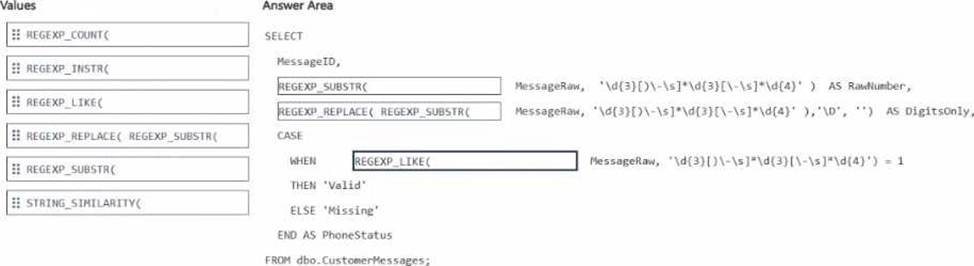
The correct drag-and-drop mapping is based on the documented behavior of the new SQL regular expression functions.
For RawNumber, the requirement is to return the first substring in MessageRaw that matches the phone-number pattern, or NULL if nothing matches. That is exactly what REGEXP_SUBSTR does: it extracts the matched substring from the source text. Microsoft documents REGEXP_SUBSTR as the function that “extracts parts of a string based on a regular expression pattern” and returns the matched occurrence.
For DigitsOnly, you first need the matched phone substring, then remove all non-digit characters from it. The correct combined expression is REGEXP_REPLACE( REGEXP_SUBSTR( so the matched substring is passed into REGEXP_REPLACE, which strips characters matching D. Microsoft documents REGEXP_REPLACE as returning a modified source string with matching patterns replaced. Using it around REGEXP_SUBSTR satisfies the “digits only or NULL” requirement in one select expression.
For PhoneStatus, the requirement is simply to return Valid when a phone number exists and Missing otherwise. That is a Boolean test, so REGEXP_LIKE is the right function. Microsoft documents REGEXP_LIKE as returning a Boolean value indicating whether the input matches the regex pattern.
You have an Azure SQL database.
You need to create a scalar user-defined function (UDF) that returns the number of whole years between an input parameter named 0orderDate and the current date/time as a single positive integer. The function must be created in Azure SQL Database.
You write the following code.
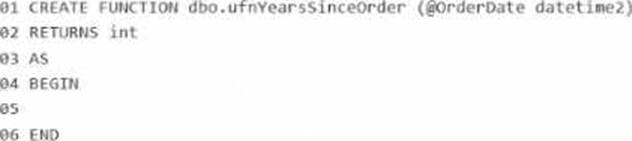
What should you insert at line 05?
- A . RETURN DATEDIFF(year, GETDATE(), @OrderDate);
- B . DATEDIFF(month, @orderdate, GETDATE()) / 12
- C . DATEPART(year, GETDATE()) – DATEPART(year, @orderdate)
- D . RETURN DATEDIFF(year, @OrderDate, GETDATE());
D
Explanation:
The correct answer is D because the scalar UDF must return the number of whole years from the input @OrderDate to the current date/time as a single positive integer.
The correct DATEDIFF order is:
DATEDIFF(year, @OrderDate, GETDATE())
Microsoft documents that DATEDIFF(datepart, startdate, enddate) returns the count of specified datepart boundaries crossed between the start and end values. Since @OrderDate is the earlier date and GETDATE() is the later date, this ordering returns a positive result for past order dates.
The other choices are incorrect:
A reverses the arguments and would return a negative value for a past order date.
B is missing RETURN, and converting month difference to years by dividing by 12 is not the direct whole-year expression the question asks for.
C subtracts year parts only, which can be off around anniversary boundaries because it ignores whether the full year has actually elapsed.
So the correct insertion at line 05 is:
RETURN DATEDIFF(year, @OrderDate, GETDATE());
You have an Azure SQL database.
You deploy Data API builder (DAB) to Azure Container Apps by using the mcr.nicrosoft.com/azure-databases/data-api-builder:latest image.
You have the following Container Apps secrets:
• MSSQL_COMNECTiON_STRrNG that maps to the SQL connection string
• DAB_C0HFT6_BASE64 that maps to the DAB configuration
You need to initialize the DAB configuration to read the SQL connection string.
Which command should you run?
- A . dab init –database-type mssql –connection-string "secretref:DAB_CONFIG_BASE64" –host-mode Production –config dab-config.json
- B . dab init –database-type mssql –connection-string "@env(‘MSSQL_CONNECTION_STRING’)" –host-mode Production –config dab-config.json
- C . dab init –database-type mssql –connection-string "secretref:mssql-connection-string" –host-mode Production –config dab-config.json
- D . dab init –database-type mssql –connection-string "@env(‘DAB_CONFIG_BASE64’)" –host-mode Production –config dab-config.json
B
Explanation:
Data API builder supports reading the database connection string from an environment variable by using the syntax:
@env(‘MSSQL_CONNECTION_STRING’)
Microsoft’s DAB documentation explicitly shows that @env(‘MSSQL_CONNECTION_STRING’) tells Data API builder to read the connection string from an environment variable at runtime.
That fits this scenario because Azure Container Apps secrets are typically exposed to the container as environment variables. Microsoft’s Azure Container Apps documentation states that environment variables can reference secrets, and DAB’s Azure Container Apps deployment guidance shows a secret being mapped into an environment variable that DAB then reads.
Why the other options are wrong:
A and D incorrectly point the connection string to DAB_CONFIG_BASE64, which is the config payload secret, not the SQL connection string.
C uses secretref: syntax inside dab init, but DAB expects the connection string parameter in the config to use the environment-variable reference syntax @env(…). The secretref: pattern is for Azure Container Apps environment variable configuration, not for the DAB CLI connection-string argument itself.
So the correct command is:
dab init –database-type mssql –connection-string "@env(‘MSSQL_CONNECTION_STRING’)" –host-mode Production –config dab-config.json
HOTSPOT
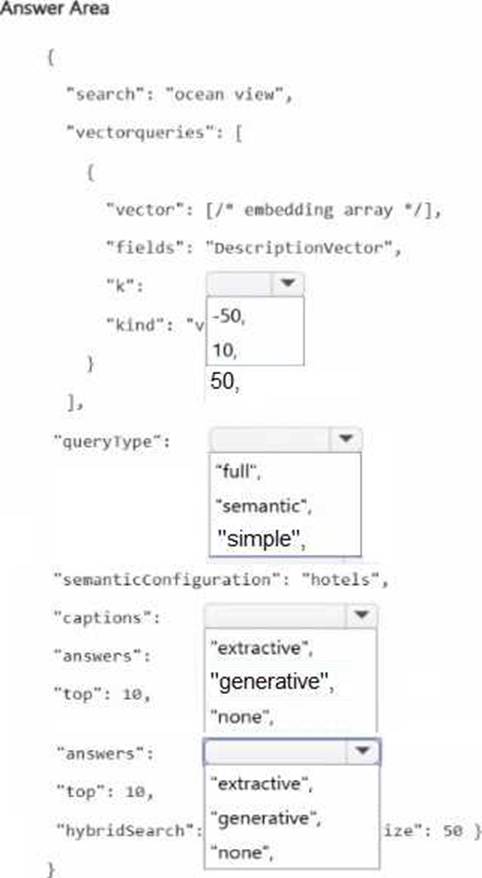
You have an Azure Al Search service and an index named hotels that includes a vector Held named DescriptionVector.
You query hotels by using the Search Documents REST API.
You add semantic ranking to the hybrid search query and discover that some queries return fewer results than expected, and captions and answers are missing.
You need to complete the hybrid search request to meet the following requirements:
• Include more documents when ranking.
• Always include captions and answers.
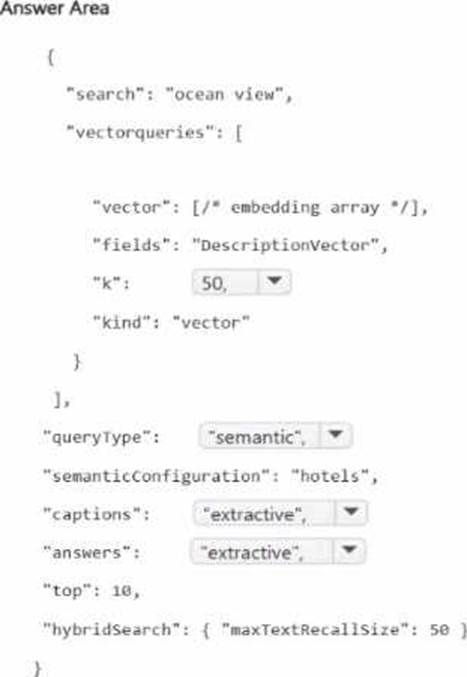
Explanation:
These are the correct selections for a hybrid query that uses semantic ranking in Azure AI Search.
Use k = 50 because Microsoft explicitly recommends that when you combine semantic ranking with vector queries, you should set k to 50 so the semantic ranker has enough candidates to rerank. If you use a smaller value such as 10, semantic ranking can receive too few inputs, which is exactly why some queries return fewer results than expected.
Use queryType = "semantic" because captions and answers are only available on semantic queries. Microsoft documents that captions is valid only when the query type is semantic, and semantic answers are returned only for semantic queries.
Use captions = "extractive" because semantic captions are extractive passages pulled from the top-ranked documents. Microsoft’s REST documentation states that the valid captions option here is extractive and that it defaults to none if not specified.
Use answers = "extractive" because semantic answers in Azure AI Search are extractive, not generated. Microsoft documents that semantic answers are verbatim passages recognized as answers and the REST API lists extractive as the answer-return option.
You need to enable similarity search to provide the analysts with the ability to retrieve the most relevant health summary reports. The solution must minimize latency.
What should you include in the solution?
- A . a computed column that manually compares vector values
- B . a standard nonclustered index on the Fmbeddings (vector (1536)) column
- C . a full-text index on the Fmbeddings (vector (1536)) column
- D . a vector index on the Embedding* (vector (1536)) column
D
Explanation:
The correct answer is D because the requirement is to enable similarity search over embedding vectors and to minimize latency. Microsoft documents that CREATE VECTOR INDEX is specifically used to create an index on vector data for approximate nearest neighbor (ANN) search, which is designed
to accelerate vector similarity queries compared to exact k-nearest-neighbor scans.
This matches the scenario exactly. The VehicleHealthSummary table already includes an Embeddings (vector(1536)) column. In Microsoft SQL platforms, embeddings are stored in vector columns and queried for semantic similarity. To improve performance and reduce response time, Microsoft recommends a vector index, not a regular B-tree nonclustered index and not a full-text index. A vector index is purpose-built for finding the most similar vectors efficiently.
The other options are not appropriate:
A would require manual comparison logic and would increase latency rather than minimize it.
B is incorrect because a standard nonclustered index is not the index type used for vector similarity operations.
C is incorrect because full-text indexes are for textual token-based search, not numeric vector embeddings.
Microsoft’s current documentation is explicit that vector indexes support approximate nearest neighbor search, and that the optimizer can use the ANN index automatically for vector queries. That is the exam-aligned design choice when the goal is fast retrieval of the most relevant health summary reports from an embeddings column.
You have a SQL database in Microsoft Fabric that contains a table named dbo.Orders, dbo.Orders has a clustered index, contains three years of data, and is partitioned by a column named OrderDate by month.
You need to remove all the rows for the oldest month. The solution must minimize the impact on other queries that access the data in dbo.orders.
Solution: Identify the partition number for the oldest month, and then run the following Transact-SQL statement.
TRUNCATE TABIE dbo.Orders
WITH (PARTITIONS (partition number));
Does this meet the goal?
- A . Yes
- B . No
A
Explanation:
Yes, this meets the goal. Microsoft documents that on a partitioned table, you can use TRUNCATE TABLE … WITH (PARTITIONS (…)) to remove data from a specific partition, and that this is an efficient maintenance operation that targets only that data subset rather than the whole table. Microsoft’s partitioning guidance explicitly lists truncating a single partition as an example of a fast partition-level maintenance or retention operation.
That matches the requirement to remove the oldest month while minimizing impact on other queries. Because the table is already partitioned by month on OrderDate, identifying the partition number for that oldest month and truncating only that partition is the correct low-impact approach, assuming the table and indexes are aligned as required for partition truncation.
HOTSPOT
You have an Azure SQL database that has Query Store enabled
Query Performance Insight shows that one stored procedure has the longest runtime. The procedure runs the following parameterized query.
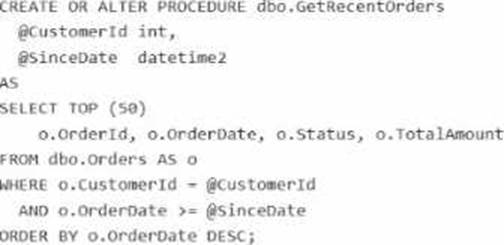
The dbo.orders table has approximately 120 million rows. Customer-id is highly selective, and orderOate is used for range filtering and sorting.
Vou have the following indexes:
• Clustered index: PK_Orders on (Orderld)
• Nonclustered index: lx_0rders_order-Date on (OrderDate) with no included columns An actual execution plan captured from Query Store for slow runs shows the following:
• An index seek on ixordersorderDate followed by a Key Lookup (Clustered) on PKOrders for customerid, status, and TotalAnount
• A sort operator before top (50), because the results are ordered by orderDate DESC
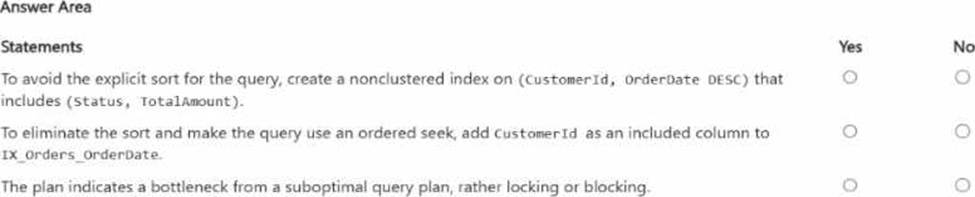
For each of the following statements, select Yes if the statement is true. Otherwise, select No. NOTE:
Each correct selection is worth one point.
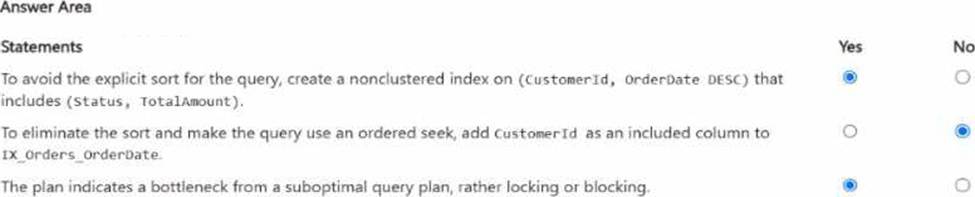
Explanation:
The first statement is Yes. The query filters on CustomerId, applies a range predicate on OrderDate, and sorts by OrderDate DESC. Microsoft’s index design guidance recommends putting equality predicates first in the key, followed by columns used for ordering/range access, because the order of key columns determines seek and sort support. A nonclustered index on (CustomerId, OrderDate DESC) can support an ordered seek for this query and avoid the explicit sort. Including Status and TotalAmount helps cover the query, and OrderId is already available because the clustered key is stored with nonclustered index rows.
The second statement is No. Adding CustomerId as an included column to IX_Orders_OrderDate does not make it part of the index’s navigational structure. Microsoft states that included columns are nonkey columns used to cover queries; they do not provide the seek and ordering characteristics that key columns do. So an index keyed only on OrderDate still is not the right ordered access path for WHERE CustomerId = @CustomerId … ORDER BY OrderDate DESC.
The third statement is Yes. The described actual plan shows an index seek on the wrong access path for the workload, followed by clustered key lookups and an explicit sort before TOP (50). That is characteristic of a suboptimal query/index plan. Query Store and Query Performance Insight are designed to surface plan-related performance regressions, while locking/blocking problems are typically identified through waits/DMVs and blocking-session indicators, not from a plan shape like seek + lookup + sort alone.
You need to design a generative Al solution that uses a Microsoft SOL Server 2025 database named
DB1 as a data source.
The solution must generate responses that meet the following requirements:
• Ait’ grounded In the latest transactional and reference data stored in D61
• Do NOT require retraining or fine-tuning the language model when the data changes
• Can include citations or references to the source data used in the response
Which scenario is the best use case for implementing a Retrieval Augmented Generation (RAG) pattern? More than one answer choice may achieve the goal. Select the BEST answer
- A . summarizing free-form user input text
- B . training a custom language model on historical database data
- C . answering user questions based on company-specific knowledge
- D . generating marketing slogans based on user sentiment analysis
C
Explanation:
The best use case for RAG is answering user questions based on company-specific knowledge. Microsoft defines RAG as a pattern that augments a language model with a retrieval system that provides grounding data at inference time, which is exactly what you need when responses must be based on the latest transactional and reference data, must avoid retraining/fine-tuning, and should be able to include citations or references to source data.
The other options do not fit as well:
summarizing free-form user input does not inherently require retrieval from DB1, training a custom model contradicts the requirement to avoid retraining/fine-tuning, generating marketing slogans is a creative generation task, not a grounding-and-citation scenario. RAG is specifically strong when answers must come from your organization’s own changing knowledge.