
Practice Free DP-800 Exam Online Questions
You have an Azure SQL database that contains a table named Rooms.
Rooms was created by using the following transact-SQL statement.
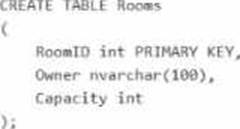
You discover that some records in the Rooms table contain NULL values for the Owner field. You need to ensure that all future records have a value for the Owner field.
What should you add?
- A . a foreign key
- B . a check constraint
- C . a nonclustered index
- D . a unique constraint
B
Explanation:
The table definition allows Owner to be nullable because it was created as Owner nvarchar(100) without NOT NULL. Since the question asks what to add so that future rows must have a value, a check constraint such as CHECK (Owner IS NOT NULL) is the appropriate choice. Microsoft documents that check constraints validate future INSERT and UPDATE operations against the constraint condition.
The other options do not solve the requirement:
A foreign key enforces referential integrity, not non-null entry by itself. A nonclustered index does not require values to be present.
A unique constraint prevents duplicate values but still does not serve as the right mechanism here for enforcing presence across future writes. Microsoft’s constraint documentation also notes that primary-key columns are implicitly NOT NULL, which helps distinguish nullability enforcement from other constraint types.
DRAG DROP
You have a database named DB1. The schema is stored in a GitHub repository as an SDK style SQL database project.
You use a feature branch workflow to deploy changes to DB1
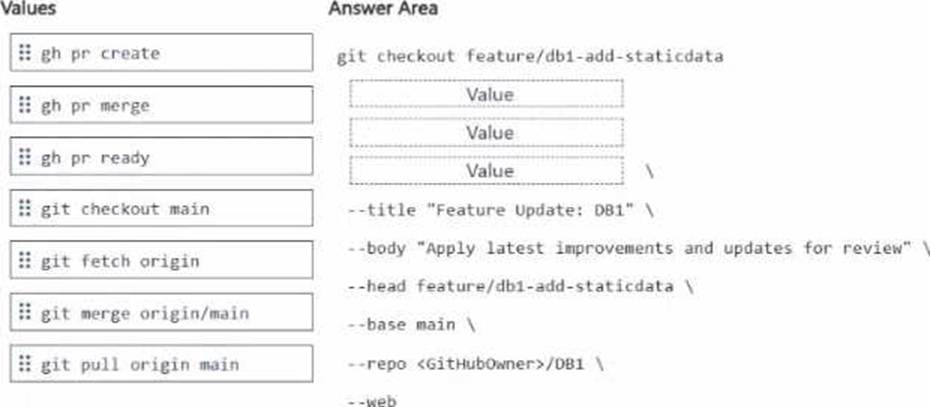
You need to update the local feature branch with the latest changes to main, and then create a pull request to merge the feature branch into main for review.
How should you complete the GitHub CLI script? To answer, drag the appropriate values to the correct targets. Each value may be used once, more than once, or not at all. You may need to drag the split bar between panes or scroll to view content. NOTE: Each correct selection is worth one point.
Explanation:
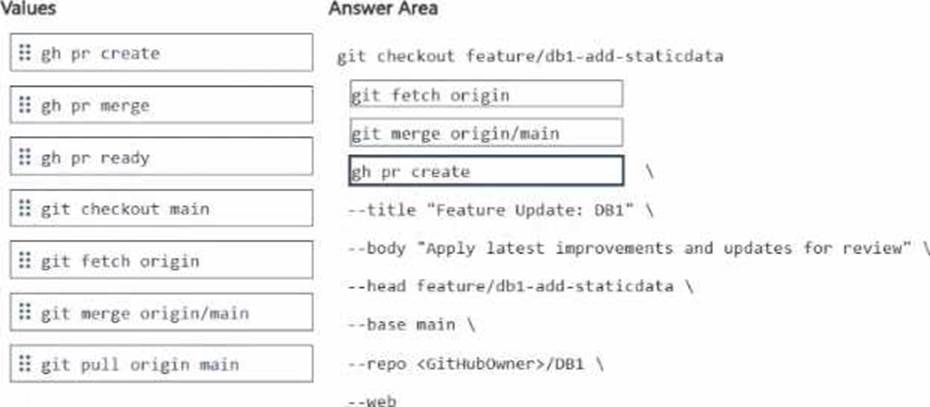
The correct sequence is:
git fetch origin
git merge origin/main
gh pr create
This is the right workflow because the script starts on the local feature branch:
git checkout feature/db1-add-staticdata
To update that local feature branch with the latest changes from main, you first fetch the latest remote refs with git fetch origin, then merge the updated remote main branch into the current feature branch with git merge origin/main. After the feature branch is up to date, the correct GitHub CLI command to open the pull request is gh pr create. GitHub’s CLI documentation shows that gh pr create is the command used to create a pull request, and supports flags such as –title, –body, –head, –base, –repo, and –web, which match the script shown in the question.
The other commands are not the best fit here:
git checkout main would move you off the feature branch, which is not what you want before merging main into the feature branch.
git pull origin main could update from remote main, but the script pattern here clearly separates fetching and then merging.
gh pr merge merges an existing pull request, not create one.
gh pr ready marks a draft PR as ready for review, but does not create the PR.
You have an Azure SQL database that supports a customer-facing API. The API calls a stored procedure named dbo.GetCustomerOrders thousands of times per hour.
After a deployment that updated indexes and statistics, users report that the API endpoint backed by dbo.Getcustomerorders is slower. In Query Store, the same query now has two persisted execution plans. During the last hour, the newer plan had a significantly higher average duration and CPU time than the older plan.
You need to restore the previous performance quickly, without changing the API code.
Which Transact-SQL command should you run?
- A . EXEC sys.sp_query_store_set_hints
- B . DBCC FREEPROCCACHE
- C . EXEC sp_query_store_force_plan
- D . ALTER DATABASE
C
Explanation:
The scenario says Query Store already shows two persisted execution plans for the same query, and the older plan performed much better than the newer one during the last hour. Microsoft documents that sp_query_store_force_plan is used to force a particular plan for a particular query in Query Store. That makes it the fastest way to restore the previously good plan without changing application code, which is exactly what the question requires.
Why the other options are not the best fit:
sp_query_store_set_hints is for adding or updating Query Store hints to influence compilation behavior, but when you already know the exact older good plan, Microsoft points to plan forcing as the direct remedy.
DBCC FREEPROCCACHE clears cached plans broadly and is disruptive; it does not guarantee a return to the known good plan.
ALTER DATABASE is too general and does not directly restore the prior execution plan.
So the right Transact-SQL command is:
EXEC sp_query_store_force_plan
using the relevant @query_id and @plan_id from Query Store for the older, better-performing plan. Microsoft also notes that when a plan is forced, SQL Server tries to use that plan whenever it encounters the query again.
You have a Microsoft SQL Server 2025 instance that contains a database named SalesDB SalesDB supports a Retrieval Augmented Generation (RAG) pattern for internal support tickets. The SQL Server instance runs without any outbound network connectivity.
You plan to generate embeddings inside the SQL Server instance and store them in a table for vector similarity queries.
You need to ensure that only a database user account named AlApplicationUser can run embedding generation by using the model.
Which two actions should you perform? Each correct answer presents part of the solution. NOTE: Each correct selection is worth one point.
- A . Grant the control permission on SalesDB to AlApplicationUser.
- B . Create a database audit specification on SalesDB owned by AlApplicationUser.
- C . Grant the execute permission on the external model project to AlApplicationUser.
- D . Create an external model project by using ONNX runtime and local paths.
- E . Create an external model project that points to a Microsoft Foundry REST endpoint.
C, D
Explanation:
Because the SQL Server 2025 instance has no outbound network connectivity, the embedding model cannot rely on a remote REST endpoint such as Azure AI Foundry or Azure OpenAI. Microsoft’s CREATE EXTERNAL MODEL documentation includes a local deployment pattern using ONNX Runtime running locally with local runtime/model paths. That is the right design when embeddings must be generated inside the SQL Server instance without external network access. Microsoft explicitly documents a local ONNX Runtime example for SQL Server 2025 and notes the required local runtime setup and model path configuration.
The permission requirement is handled by granting the application user access to use the external embeddings model. Microsoft’s AI_GENERATE_EMBEDDINGS documentation states that, as a prerequisite, you must create an external model of type EMBEDDINGS that is accessible via the correct grants, roles, and/or permissions. Among the choices, the exam-appropriate action is to grant execute permission on the external model project to AlApplicationUser so only that database user can run embedding generation through the model.
You have an Azure SQL database named SalesDB on a logical server named sales-sql01.
You have an Azure App Service web app named OrderApi that connects to SalesDB by using SQL authentication.
You enable a user-assigned managed identity named OrderApi-Id for OrderApi.
You need to configure OrderApi to connect to SalesDB by using Microsoft Entra authentication. The managed identity must have read and write permissions to SalesDB.
Which Transact-SQL statements should you run in SalesDB?
- A . CREATE LOGIN [OrderApi-Id] FROM EXTERNAL PROVIDER; ALTER ROLE db_datareader ADD MEMBER [OrderApi-Id]; ALTER ROLE db_datawriter ADD MEMBER [OrderApi-Id];
- B . CREATE USER [OrderApi-Id] WITH PASSWORD = ‘P@ssw0rd!’; ALTER ROLE db_datareader ADD MEMBER [OrderApi-Id]; ALTER ROLE db_datawriter ADD MEMBER [OrderApi-Id];
- C . CREATE USER [OrderApi-Id] FROM EXTERNAL PROVIDER; ALTER ROLE db_datareader ADD MEMBER [OrderApi-Id]; ALTER ROLE db_datawriter ADD MEMBER [OrderApi-Id];
- D . CREATE LOGIN [OrderApi-Id] WITH PASSWORD = ‘P@ssw0rd!’; ALTER SERVER ROLE sysadmin ADD MEMBER [OrderApi-Id];
C
Explanation:
For an Azure App Service using a user-assigned managed identity to connect to Azure SQL Database with Microsoft Entra authentication, the required database-side step is to create a database user from the external provider, then grant the needed database roles. Microsoft’s Azure SQL documentation for managed identities states that to let a managed identity access the target database, you create a SQL user for that identity by using:
CREATE USER [<identity-name>] FROM EXTERNAL PROVIDER; and then assign the appropriate roles.
That makes db_datareader and db_datawriter the right role grants here, because the requirement says the identity must have read and write permissions to SalesDB.
The other options are incorrect:
A uses CREATE LOGIN … FROM EXTERNAL PROVIDER, which is not the right choice for this Azure SQL Database scenario; the documented pattern is to create a database user from the external provider.
B and D create SQL-authentication principals with passwords, which does not meet the Microsoft Entra managed-identity requirement.
D also grants sysadmin, which is a server-level overgrant and not appropriate for the stated read/write requirement.
Your development team uses GitHub Copilot Chat in Microsoft SQL Server Management Studio (SSMS) to generate and run Transact-SQL queries against an Azure SQL database named DB1 DB1 contains tables that store sensitive customer data.
You need to ensure that any Transact SQL queries that run from GitHub Copilot Chat In SSMS are restricted by the same permissions as the developer’s database login.
What prevents the GitHub Copilot Chat-run queries from accessing data beyond the developer’s access?
- A . GitHub Copilot Chat runs queries in a read-only sandbox that is isolated from production database permissions.
- B . GitHub Copilot Chat runs queries by using the developer’s database identity and permissions.
- C . GitHub Copilot Chat filters query results on (he client side to remove rows the developer is unauthorized to see.
- D . GitHub Copilot Chat uses different row-level security (RLS) policies than the developer.
B
Explanation:
The correct answer is
B. Microsoft’s SSMS Copilot documentation states that queries from Copilot in SSMS are executed under the context of the user’s login and permissions, and that there are no separate permissions for Copilot in SSMS. That means Copilot-run Transact-SQL cannot access more data than the developer’s own database principal is already allowed to access.
That is why the other options are incorrect:
A is wrong because Copilot does not use a separate read-only sandbox in place of database permissions.
C is wrong because enforcement is not a client-side filtering trick; it is enforced by the database security context of the current login.
D is wrong because Copilot does not apply a different RLS model from the developer; it simply runs under the same login context.
So the security boundary is the developer’s existing database identity and permissions.
HOTSPOT
You have a SQL database in Microsoft Fabric that contains the following functions:
• A multi-statement table-valued function (TVF) named sales.mstvf_orderStatus() that returns order status information
• A scalar user-defined function (UOF) named dbo.ufn_GetlaxMultiplier(^rax/Wt money, gStateCode char(2)) that returns a numeric multiplier used in tax calculations
Reporting queries frequently join Sales.«istvf_OrderStatus() to a table named Sales.SalesOrderHeader and return large result sets. A performance review shows that the queries produce inconsistent execution plans.
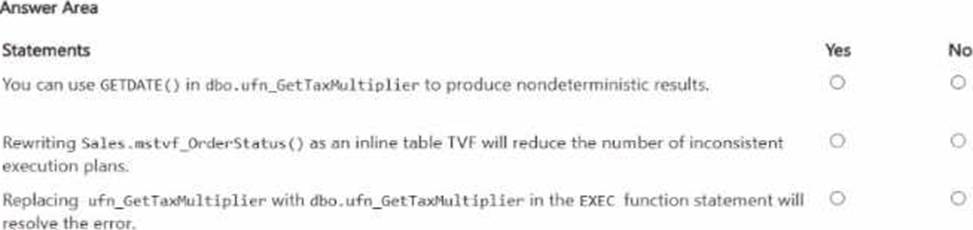
During a code review, a developer discovers that the following Transact-SQL statement produced an
error.

Explanation:
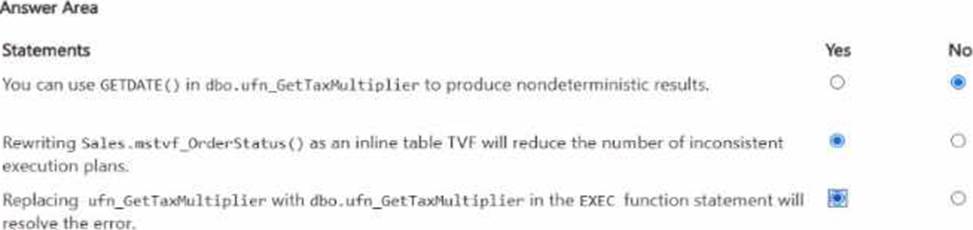
The first statement is No. GETDATE() is a nondeterministic built-in function, and SQL Server UDF guidance does not support using nondeterministic built-ins inside a T-SQL user-defined function for this purpose. Microsoft explicitly classifies GETDATE() as nondeterministic.
The second statement is Yes. Multi-statement TVFs are a common source of weak cardinality estimates and unstable plans because the optimizer has less information about their result sizes. Microsoft documents features such as interleaved execution for multi-statement TVFs, which exist specifically because MSTVFs have optimization challenges, and Microsoft also notes that scalar/UDF style constructs can lead to poorer optimization behavior than relationally inlined alternatives. Rewriting an MSTVF as an inline TVF generally gives the optimizer better visibility and more consistent plans.
The third statement is Yes. Scalar functions must be invoked using at least the two-part name <schema>.<function>. Microsoft’s documentation is explicit on that point for executing user-defined functions. So changing ufn_GetTaxMultiplier to dbo.ufn_GetTaxMultiplier resolves the naming error in the EXEC statement.
Vou have an Azure SQL database named SalesDB that contains a table named dbo. Articles, dbo.Articles contains two million articles with embeddmgs. The articles are updated frequently throughout the day.
You query the embeddings by using VECTOR_SEARQi
Users report that semantic search results do NOT reflect the updates until the following day.
Vou need to ensure that the embeddings are updated whenever the articles change. The solution must minimize CPU usage on SalesDB
Which embedding maintenance method should you implement?
- A . Modify the query to use VECTOR.DTSTANCF instead of VECTOR.SEARCK
- B . enable change data capture (COC) on dbo.Articles and use an Azure Functions app to process CLX changes.
- C . Run an hourly Transact-SQL job that regenerates embeddings for all the rows in dbo.Articles.
- D . On dbo.Articles, create a trigger that calls AI GENERATE EMBEDOINGS for each inserted or updated row.
B
Explanation:
The correct answer is B because the problem is not the vector search operator itself. The problem is that embeddings are becoming stale when article content changes. Microsoft documents that change data capture (CDC) tracks insert, update, and delete operations on source tables, which makes it the right mechanism to identify only the rows that changed.
This also best satisfies the requirement to minimize CPU usage on SalesDB. With CDC, the database only records the row changes, and the embedding regeneration work can be moved to an external process such as an Azure Functions app. That avoids running embedding generation inline inside the database for every update and avoids repeatedly recalculating embeddings for unchanged rows. In contrast, an hourly full-table regeneration would be extremely wasteful on a table with two million frequently updated articles, and a trigger that calls embedding generation per row would push expensive AI work into the transactional path of the database.
Option A is incorrect because changing from VECTOR_SEARCH to VECTOR_DISTANCE does not regenerate embeddings; it only changes the retrieval method. Microsoft states that VECTOR_SEARCH is the ANN search function, while VECTOR_DISTANCE performs exact distance calculation, so neither option addresses stale embedding data.
So the right design is:
use CDC to detect only changed articles,
process those changes outside the database,
regenerate embeddings only for changed rows,
write back the refreshed embeddings for current semantic search results.
You have an Azure SQL database named AdventureWorksDB that contains a table named dbo.Employee.
You have a C# Azure Functions app that uses an HTTP-triggered function with an Azure SQL input binding to query dbo.Employee.
You are adding a second function that will react to row changes in dbo.Employee and write structured logs.
You need to configure AdventureWorksDB and the app to meet the following requirements:
• Changes to dbo.Employee must trigger the new function within five seconds.
• Each invocation must processes no more than 100 changes.
Which two database configurations should you perform? Each correct answer presents part of the solution. NOTE: Each correct selection is worth one point.
- A . Create an AFTER trigger on dbo.Employee for Data Manipulation Language (DML).
- B . SetSql Trigger MaxBatchSize to 100.
- C . Enable change tracking on the dbo. Employee table.
- D . Enable change tracking at the database level.
- E . Set Sql_Trigger_PollingIntervalMs to 5000.
- F . Enable change data capture (CDC) for dbo.Employee table changes
C, E
Explanation:
Azure Functions’ Azure SQL trigger requires change tracking to be enabled on the source table. Microsoft’s SQL trigger documentation states that setting up change tracking for the Azure SQL trigger requires two steps: enable change tracking on the database and enable change tracking on the table being monitored. Since the question asks specifically which database configurations you should perform, enabling change tracking on dbo.Employee is one of the required database-side steps.
To meet the latency requirement that changes trigger the function within five seconds, the relevant trigger setting is Sql_Trigger_PollingIntervalMs. Microsoft documents this setting as the delay, in milliseconds, between processing each batch of changes, and a value of 5000 means the trigger polls every 5 seconds.
A few clarifications about the other options:
B is not the documented setting name. The documented app setting is Sql_Trigger_BatchSize or host setting MaxBatchSize, not “SetSql Trigger MaxBatchSize”. The screenshot wording suggests a distractor.
D is also required in practice for the trigger to work, but the question asks for two answers and includes the polling setting plus the table-level CT setting as the actionable choices presented.
F is wrong because the Azure SQL trigger uses change tracking, not CDC.
DRAG DROP
You have an Azure SQL database named DB1 that contains two tables named knowledgebase and query_cache. knowledge_base contains support articles and embeddings. query_cache contains chat questions, responses, and embeddings DB1 supports an Al-enabled chat agent.
You need to design a solution that meets the following requirements:
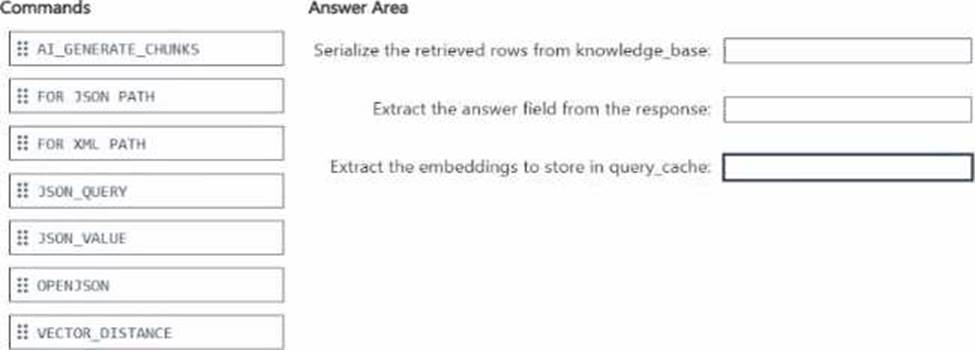
• Serializes the retrieved rows from knowledee_base
• Extracts the answer field from the response
• Extracts the embeddings to store in query_cache
You will call the external large language model (LLM) by using the sp_irwoke_external_re standpoint stored procedure.
Which Transact-SGL commands should you use for each requirement? To answer, drag the appropriate commands to the correct requirements. Each command may be used once, mote than once, or not at all. You may need to drag the split bar between panes or scroll to view content. NOTE: Each correct selection is worth one point.
Explanation:
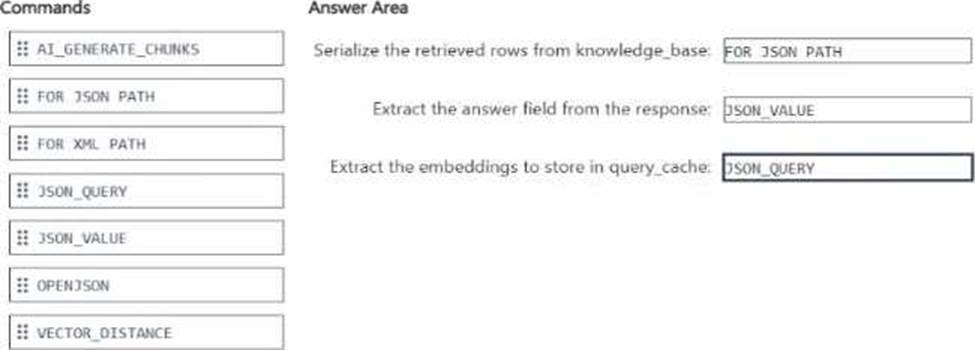
The correct mapping is:
FOR JSON PATH
JSON_VALUE
JSON_QUERY
To serialize the retrieved rows from knowledge_base, the correct command is FOR JSON PATH. Microsoft documents that FOR JSON formats query results as JSON, and PATH mode is the standard
way to shape relational rows into JSON for downstream application or AI use.
To extract the answer field from the response, the correct command is JSON_VALUE because answer is a single scalar field. Microsoft states that JSON_VALUE is used to extract a scalar value from JSON text.
To extract the embeddings to store in query_cache, the correct command is JSON_QUERY because embeddings are returned as a JSON array, not a scalar. Microsoft states that JSON_QUERY extracts an object or array from JSON text, which is exactly the right behavior for an embeddings payload.
The unused options are not the best fit here:
OPENJSON is mainly for shredding JSON into rows and columns.
AI_GENERATE_CHUNKS is for chunking text, not extracting fields from a response payload.
VECTOR_DISTANCE computes similarity between vectors and is unrelated to JSON extraction.
FOR XML PATH produces XML, not JSON.