
Practice Free DP-800 Exam Online Questions
Your team is developing an Azure SQL dataset solution from a locally cloned GitHub repository by using Microsoft Visual Studio Code and GitHub Copilot Chat.
You need to disable the GitHub Copilot repository-level instructions for yourself without affecting other users.
What should you do?
- A . From Visual Studio Code, modify your GitHub Copilot Chat user settings.
- B . Add a – debug flag when you start the GitHub Copilot Chat extension.
- C . Delete .github/copilot-instruetions.md
A
Explanation:
GitHub documents that repository custom instructions for Copilot Chat can be disabled for your own use in the editor settings, and that doing so does not affect other users. In VS Code, this is controlled through settings related to instruction files, where you can disable the use of repository instruction files for your own environment.
The other options are incorrect:
B is not a documented mechanism for disabling repository-level Copilot instructions.
C would remove the repository instruction file itself and therefore affect everyone using that repository, which violates the requirement.
HOTSPOT
You have an Azure SQL database that has Query Store enabled
Query Performance Insight shows that one stored procedure has the longest runtime. The procedure runs the following parameterized query.
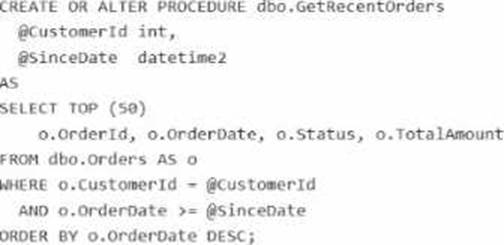
The dbo.orders table has approximately 120 million rows. Customer-id is highly selective, and orderOate is used for range filtering and sorting.
Vou have the following indexes:
• Clustered index: PK_Orders on (Orderld)
• Nonclustered index: lx_0rders_order-Date on (OrderDate) with no included columns An actual execution plan captured from Query Store for slow runs shows the following:
• An index seek on ixordersorderDate followed by a Key Lookup (Clustered) on PKOrders for customerid, status, and TotalAnount
• A sort operator before top (50), because the results are ordered by orderDate DESC
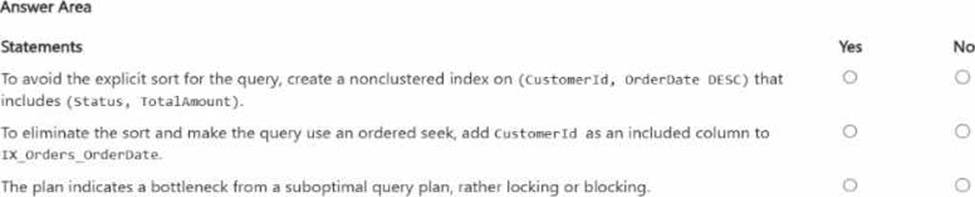
For each of the following statements, select Yes if the statement is true. Otherwise, select No. NOTE:
Each correct selection is worth one point.
Explanation:
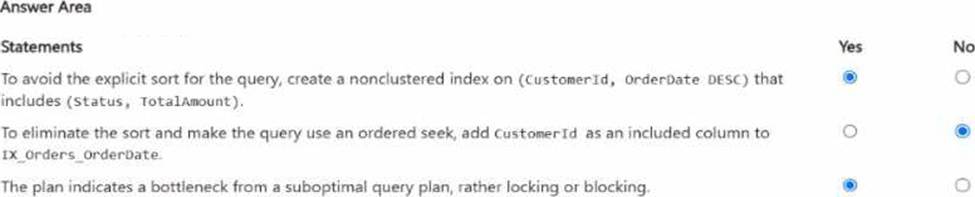
The first statement is Yes. The query filters on CustomerId, applies a range predicate on OrderDate, and sorts by OrderDate DESC. Microsoft’s index design guidance recommends putting equality predicates first in the key, followed by columns used for ordering/range access, because the order of key columns determines seek and sort support. A nonclustered index on (CustomerId, OrderDate DESC) can support an ordered seek for this query and avoid the explicit sort. Including Status and TotalAmount helps cover the query, and OrderId is already available because the clustered key is stored with nonclustered index rows.
The second statement is No. Adding CustomerId as an included column to IX_Orders_OrderDate does not make it part of the index’s navigational structure. Microsoft states that included columns are nonkey columns used to cover queries; they do not provide the seek and ordering characteristics that key columns do. So an index keyed only on OrderDate still is not the right ordered access path for WHERE CustomerId = @CustomerId … ORDER BY OrderDate DESC.
The third statement is Yes. The described actual plan shows an index seek on the wrong access path for the workload, followed by clustered key lookups and an explicit sort before TOP (50). That is characteristic of a suboptimal query/index plan. Query Store and Query Performance Insight are designed to surface plan-related performance regressions, while locking/blocking problems are typically identified through waits/DMVs and blocking-session indicators, not from a plan shape like seek + lookup + sort alone.
You need to recommend a solution that will resolve the ingestion pipeline failure issues.
Which two actions should you recommend? Each correct answer presents part of the solution. NOTE: Each correct selection is worth one point.
- A . Enable snapshot isolation on the database.
- B . Use a trigger to automatically rewrite malformed JSON.
- C . Add foreign key constraints on the table.
- D . Create a unique index on a hash of the payload.
- E . Add a check constraint that validates the JSON structure.
D, E
Explanation:
The two correct actions are D and E because the ingestion failures are caused by malformed JSON and duplicate payloads, and these two controls address those two problems directly. Microsoft’s JSON documentation states that SQL Server and Azure SQL support validating JSON with ISJSON, and Microsoft specifically recommends using a CHECK constraint to ensure JSON text stored in a column is properly formatted.
For the duplicate-payload issue, creating a unique index on a hash of the payload is the appropriate design. Microsoft documents using hashing functions such as HASHBYTES to hash column values, and SQL Server allows a deterministic computed column to be used as a key column in a UNIQUE constraint or unique index. That makes a persisted hash-based computed column plus a unique index a practical and exam-consistent way to reject duplicate payloads efficiently.
The other options do not solve the stated root causes:
Snapshot isolation addresses concurrency behavior, not malformed JSON or duplicate payload detection.
A trigger to rewrite malformed JSON is not the right integrity control and is brittle.
Foreign key constraints enforce referential integrity, not JSON validity or duplicate-payload prevention
HOTSPOT
You have a database named db1. The schema is stored in a Git repository as an SDK-style SQL database project.
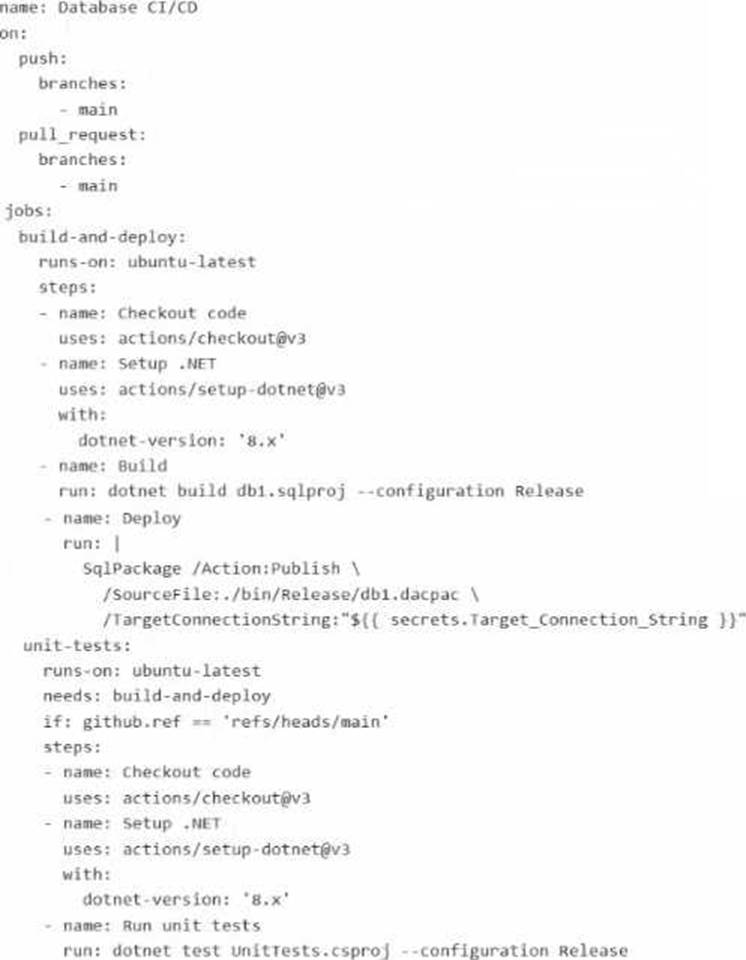
The repository Contains the following GitHub Action workflow.
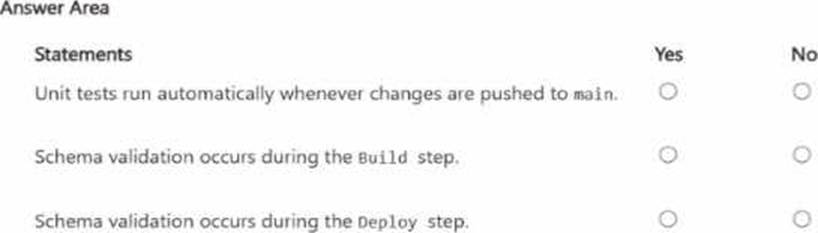
For each of the following statements, select Yes if the statement is true. Otherwise, select No. NOTE: Each correct selection is worth one point.
Explanation:
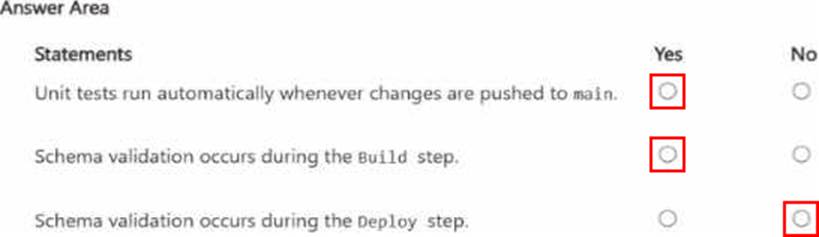
Unit tests run automatically whenever changes are pushed to main. → Yes
Schema validation occurs during the Build step. → Yes
Schema validation occurs during the Deploy step. → No
The first statement is Yes. The workflow is configured to trigger on both push to main and pull_request targeting main. The unit-tests job has this condition:
if: github.ref == ‘refs/heads/main’
On a push to main, GitHub sets github.ref to refs/heads/main, so the condition is true and the unit-tests job runs. GitHub’s workflow syntax documentation confirms that push.branches: [main] triggers on pushes to main, and the github.ref value for branch pushes is the fully qualified ref such as refs/heads/main.
The second statement is Yes. The Build step runs:
dotnet build db1.sqlproj –configuration Release
For an SDK-style SQL database project, the build process produces a .dacpac and validates the database project model as part of compilation/build. Microsoft’s SQL database project documentation describes SDK-style SQL projects as the project format used for SQL Database Projects, and Microsoft’s command-line build documentation is specifically about building a .dacpac from that SQL project. That means schema-level project validation happens during build.
The third statement is No.
The Deploy step uses:
SqlPackage /Action:Publish …
Microsoft documents that SqlPackage Publish incrementally updates the target database schema to match the source .dacpac. That is a deployment operation, not the primary schema-validation stage of the SQL project source itself. In this workflow, the schema is validated when the SQL project is built into the .dacpac; the deploy step applies that built artifact to the target database.
You have an SDK-style SQL database project stored in a Git repository. The project targets an Azure SQL database.
The CI build fails with unresolved reference errors when the project leferences system objects.
You need to update the SQL database project to ensure that dotnet build validates successfully by including the correct system objects in the database model for Azure SQL Database.
Solution: Add an artifact reference to the Azure SQL Database master.dacpac file.
Does this meet the goal?
- A . Yes
- B . No
B
Explanation:
For an SDK-style SQL database project targeting Azure SQL Database, Microsoft recommends using the Azure SQL system DACPAC as a NuGet package reference rather than adding a direct artifact reference to master.dacpac for new SDK-style development. Microsoft’s SQL Database Projects documentation says direct .dacpac artifact references are not recommended for new development in SDK-style projects; instead, use NuGet package references.
Because the goal is specifically to make dotnet build validate successfully with the correct Azure SQL system objects, adding an artifact reference to master.dacpac is not the recommended SDK-style solution. It can work in some project styles, but it does not meet the stated goal as the proper approach for SDK-style Azure SQL projects.
You need to recommend a solution for the development team to retrieve the live metadata. The solution must meet the development requirements.
What should you include in the recommendation?
- A . Export the database schema as a .dacpac file and load the schema into a GitHub Copilot context window.
- B . Add the schema to a GitHub Copilot instruction file.
- C . Use an MCP server
- D . Include the database project in the code repository.
C
Explanation:
The best recommendation is to use an MCP server. In the official DP-800 study guide, Microsoft explicitly lists skills such as configuring Model Context Protocol (MCP) tool options in a GitHub Copilot session and connecting to MCP server endpoints, including Microsoft SQL Server and Fabric Lakehouse. That makes MCP the exam-aligned mechanism for enabling AI-assisted tools to work with live database context rather than static snapshots.
This also matches the stated development requirement: the team will use Visual Studio Code and GitHub Copilot and needs to retrieve live metadata from the databases. Microsoft’s documentation for GitHub Copilot with the MSSQL extension explains that Copilot works with an active database connection, provides schema-aware suggestions, supports chatting with a connected database, and adapts responses based on the current database context. Microsoft also documents MCP as the standard way for AI tools to connect to external systems and data sources through discoverable tools and endpoints.
The other options do not satisfy the “live metadata” requirement as well:
HOTSPOT
You have an Azure subscription. The subscription contains an Azure SQL database named SalesDB and an Azure App Service app named sales-api. sales-api uses virtual network integration to a subnet named vnet-prod/subnet-app and reads from SalesDB
You need to configure authentication and network access to meet the following requirements:
• Ensure that sales-api connects to SalesDB by using passwordless authentication.
• Ensure that all the database traffic remains within the subscription.
The solution must minimize administrative effort
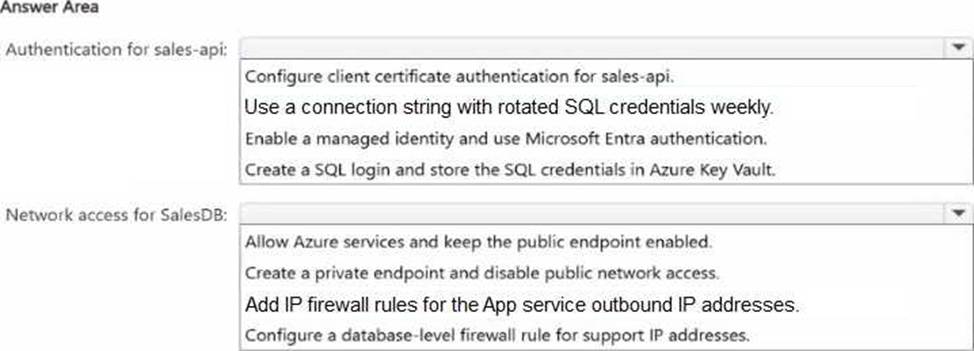
What should you configure? To answer, select the appropriate options in the answer area. NOTE: Each correct selection is worth one point.

Explanation:
For authentication, the correct choice is Enable a managed identity and use Microsoft Entra authentication. Azure App Service supports managed identity, and Microsoft documents this as the recommended way to connect to Azure SQL Database without passwords or secrets. This minimizes administrative effort because there are no SQL passwords to rotate, store, or manage.
For network access, the correct choice is Create a private endpoint and disable public network access. Microsoft documents that when public network access is disabled, Azure SQL Database only accepts connections through private endpoints. That keeps the database traffic on Azure private networking rather than exposing it through the public endpoint. Microsoft also notes that simply adding a private endpoint does not disable public access by itself, so disabling public network access is part of the correct configuration.
The other options are weaker:
Rotated SQL credentials or storing SQL logins in Key Vault still use passwords and create more admin overhead.
Allowing Azure services, adding outbound IP firewall rules, or database firewall rules still rely on the public endpoint, so they do not best satisfy the requirement that database traffic remain within the subscription.
HOTSPOT
You have an Azure SQL database that contains the following tables and columns.
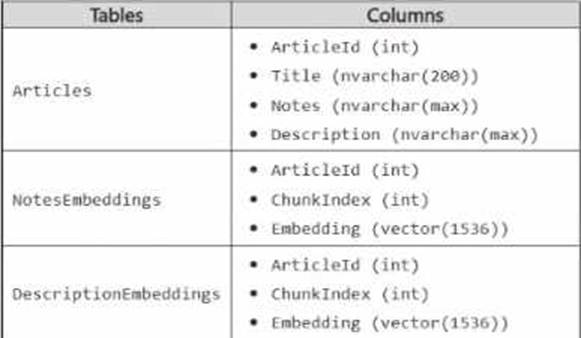
Embeddings in the NotesEnbeddings and DescriptionEabeddings tables have been generated from values in the Description and notes columns of the Articles table by using different chunk sizes.
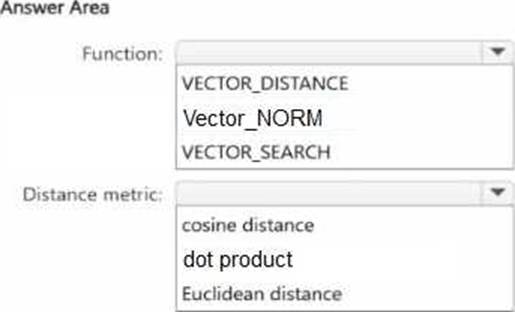
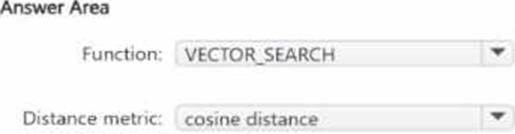
You need to perform approximate nearest neighbor (ANN) queries across both embedding tables.
The solution must minimize the impact of using different chunk sizes.
What should you use? To answer, select the appropriate options in the answer area. NOTE: Each correct selection is worth one point.
Explanation:
The correct function is VECTOR_SEARCH because the requirement is to perform approximate nearest neighbor (ANN) queries. Microsoft’s SQL documentation states that VECTOR_SEARCH is the function used for vector similarity search, and that an ANN index is used only with VECTOR_SEARCH when a compatible vector index exists on the target column. By contrast, VECTOR_DISTANCE calculates an exact distance and does not use a vector index for ANN retrieval.
The correct distance metric is cosine distance. Microsoft documents that VECTOR_SEARCH supports cosine, dot, and euclidean metrics, and Microsoft guidance specifically notes that cosine similarity is commonly used for text embeddings. It also states that retrieval of the most similar texts to a given text typically functions better with cosine similarity, and that Azure OpenAI embeddings rely on cosine similarity to compute similarity between a query and documents. Since both NotesEmbeddings and DescriptionEmbeddings are text-derived embeddings and the goal is to minimize the impact of different chunk sizes, cosine is the best choice because it compares direction/angle rather than being as sensitive to vector magnitude as Euclidean distance.
You have a Microsoft SQL Server 2025 instance that has a managed identity enabled.
You have a database that contains a table named dbo.ManualChunks. dbo.ManualChunks contains product manuals.
A retrieval query already returns the top five matching chunks as nvarchar(max) text.
You need to call an Azure OpenAI REST endpoint for chat completions. The solution must provide the highest level of security.
You write the following Transact-SG1 code.
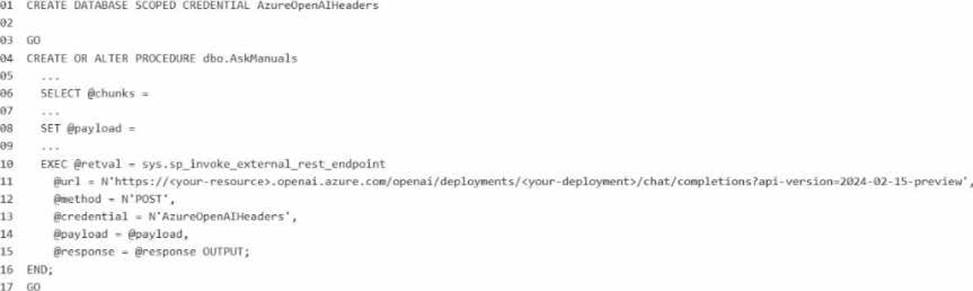
What should you insert at line 02?
A)

B)

C)

D)

E)

- A . Option A
- B . Option B
- C . Option C
- D . Option D
- E . Option E
B
Explanation:
The correct answer is Option B because the requirement is to call an Azure OpenAI REST endpoint from SQL Server 2025 while providing the highest level of security, and the instance already has a managed identity enabled. For Microsoft’s SQL AI features, the preferred secure pattern is to use a database scoped credential with IDENTITY = ‘Managed Identity’ instead of storing an API key. Microsoft documents that SQL Server 2025 supports managed identity for external AI endpoints, and for Azure OpenAI the credential secret uses the Cognitive Services resource identifier: {"resourceid":"https://cognitiveservices.azure.com"}.
So line 02 should be:
WITH IDENTITY = ‘Managed Identity’,
SECRET = ‘{"resourceid":"https://cognitiveservices.azure.com"}’;
Why the other options are incorrect:
A and D use HTTP header or query-string credentials with an API key, which is less secure than
managed identity because a secret key must be stored and rotated manually. Microsoft recommends managed identity where supported to avoid embedded secrets.
C mixes Managed Identity with an api-key secret, which is not the correct pattern for Azure OpenAI managed-identity authentication.
E uses an invalid identity value for this scenario. The accepted credential identities for external REST endpoint calls include HTTPEndpointHeaders, HTTPEndpointQueryString, Managed Identity, and Shared Access Signature.
Because the endpoint is Azure OpenAI and the question explicitly asks for the highest security, managed identity with the Cognitive Services resource ID is the Microsoft-aligned answer.