
Practice Free DP-800 Exam Online Questions
You have a SQL database in Microsoft Fabric that contains a table named dbo.Orders, dbo.Orders has a clustered index, contains three years of data, and is partitioned by a column named OrderDate by month.
You need to remove all the rows for the oldest month. The solution must minimize the impact on other queries that access the data in dbo.orders.
Solution: Identify the partition number for the oldest month, and then run the following Transact-SQL statement.
TRUNCATE TABIE dbo.Orders
WITH (PARTITIONS (partition number));
Does this meet the goal?
- A . Yes
- B . No
A
Explanation:
Yes, this meets the goal. Microsoft documents that on a partitioned table, you can use TRUNCATE TABLE … WITH (PARTITIONS (…)) to remove data from a specific partition, and that this is an efficient maintenance operation that targets only that data subset rather than the whole table. Microsoft’s partitioning guidance explicitly lists truncating a single partition as an example of a fast partition-level maintenance or retention operation.
That matches the requirement to remove the oldest month while minimizing impact on other queries. Because the table is already partitioned by month on OrderDate, identifying the partition number for that oldest month and truncating only that partition is the correct low-impact approach, assuming the table and indexes are aligned as required for partition truncation.
You have an Azure SQL database that contains tables named dbo.ProduetDocs and dbo.ProductuocsEnbeddings. dbo.ProductOocs contains product documentation and the following columns:
• Docld (int)
• Title (nvdrchdr(200))
• Body (nvarthar(max))
• LastHodified (datetime2)
The documentation is edited throughout the day. dbo.ProductDocsEabeddings contains the following columns:
• Dotid (int)
• ChunkOrder (int)
• ChunkText (nvarchar(aax))
• Embedding (vector (1536))
The current embedding pipeline runs once per night
Vou need to ensure that embeddings are updated every time the underlying documentation content changes. The solution must NOT ‘equire a nightly batch process.
What should you include in the solution?
- A . fixed-size chunking
- B . a smaller embedding model
- C . table triggers
- D . change tracking on dbo.ProductDocs
D
Explanation:
The requirement is to ensure embeddings are updated every time the underlying content changes without relying on a nightly batch job. The right design is to enable change tracking on the source table so an external process can identify which rows changed and regenerate embeddings only for those rows. Microsoft documents that change detection mechanisms are used to pick up new and updated rows incrementally, which is the right pattern when you need near-continuous refresh instead of full nightly rebuilds.
This is better than:
You have a GitHub Codespaces environment that has GitHub Copilot Chat installed and is connected to a SQL database in Microsoft Fabric named DB1 DB1 contains tables named Sales.Orders and Sales.Customers.
You use GitHub Copilot Chat in the context of DB1.
A company policy prohibits sharing customer Personally Identifiable Information (Pll), secrets, and query result sets with any Al service.
You need to use GitHub Copilot Chat to write and review Transact-SQL code for a new stored procedure that will join Sales.Orders to sales .Customers and return customer names and email addresses. The solution must NOT share the actual data in the tables with GitHub Copilot Chat.
What should you do?
- A . From Sales.Customers, paste several rows that include email addresses into a chat, so that GitHub Copilot Chat can infer edge cases.
- B . Run a select statement that returns customer names and email addresses and provide the result set to GitHub Copilot Chat so that GitHub Copilot Chat can generate the stored procedure.
- C . Provide the database connection string to GitHub Copilot Chat so that GitHub Copilot Chat can validate the stored procedure.
- D . Ask GitHub Copilot Chat to generate the stored procedure by using schema details only.
D
Explanation:
The correct answer is D because the policy explicitly prohibits sharing customer PII, secrets, and query result sets with any AI service. The safe way to use GitHub Copilot Chat here is to provide only schema-level information such as table names, column names, relationships, and the required procedure behavior, without sharing actual table contents or result sets. That lets Copilot help generate and review the Transact-SQL while avoiding disclosure of customer data. This is consistent with Microsoft and GitHub guidance that content provided in prompts is what the AI can use, so avoiding real data in the prompt is the appropriate control.
The other options violate the requirement:
A pastes real rows containing email addresses, which is direct PII disclosure.
B shares actual query result sets, which the policy forbids.
C provides the connection string so Copilot can validate against the database, which is inappropriate because it exposes connection details and could enable access beyond schema-only assistance.
So the correct approach is to ask Copilot to generate the stored procedure using only the schema and requirements, not real customer data.
You have an SDK-style SQL database project stored in a Git repository. The project targets an Azure SQL database.
The CI build fails with unresolved reference errors when the project references system objects.
You need to update the SQL database project to ensure that dotnet build validates successfully by including the correct system objects in the database model for Azure SQL Database.
Solution: Add the Microsoft.SqlServer.Dacpacs.Azure.Master NuGet package to the project.
Does this meet the goal?
- A . Yes
- B . No
A
Explanation:
This does meet the goal. Microsoft documents that SDK-style SQL projects can add the master.dacpac database reference as a package reference, and for Azure SQL Database the correct package is the Azure-specific master DACPAC package. The Azure SQL system DACPACs are available through NuGet, and this is the recommended way to include the right system objects in the database model for dotnet build validation.
So for an SDK-style SQL database project that targets Azure SQL Database, adding Microsoft.SqlServer.Dacpacs.Azure.Master is the correct fix for unresolved references to system objects.
You have a SQL database in Microsoft Fabric that contains a table named dbo.Orders, dbo.Orders has a clustered index, contains three years of data, and is partitioned by a column named OrderDate by month.
You need to remove all the rows for the oldest month. The solution must minimize the impact on other queries that access the data in dbo.orders.
Solution: Run the following Transact-SQL statement.
DELETE FROM dbo.Orders
WHERE OrderDate < DATEADD(nonth, -36, SYSUTCDATETIME());
Does this meet the goal?
- A . Yes
- B . No
B
Explanation:
This does not meet the goal. A row-by-row DELETE against the oldest month is not the lowest-impact way to purge data from a monthly partitioned table. Microsoft’s partitioning guidance specifically says partitioning lets you perform maintenance and retention operations more efficiently by targeting just the relevant partition, including the ability to truncate data in a single partition.
The proposed statement:
DELETE FROM dbo.Orders
WHERE OrderDate < DATEADD(month, -36, SYSUTCDATETIME());
would log row deletions and can hold locks longer, creating more overhead for other queries than a partition-level maintenance operation. Since the table is already partitioned by month, the expected low-impact approach is to operate on the oldest partition directly, not issue a broad delete predicate over rows. Microsoft explicitly highlights partition-targeted truncation as a faster, more efficient retention operation than working against the whole table or rowset.
DRAG DROP
You have an Azure SQL database that contains a table named dbo.Orders.
You have an application that calls a stored procedure named dbo.usp_tresteOrder to insert rows into dbo.Orders.
When an insert fails, the application receives inconsistent error details.
You need to implement error handling to ensure that any failures inside the procedure abort the transaction and return a consistent error to the caller.
How should you complete the stored procedure? To answer, drag the appropriate values to the correct targets, tach value may be used once, more than once, or not at all. You may need to drag the split bar between panes or scroll to view content. NOTE: Each correct selection is worth one point.
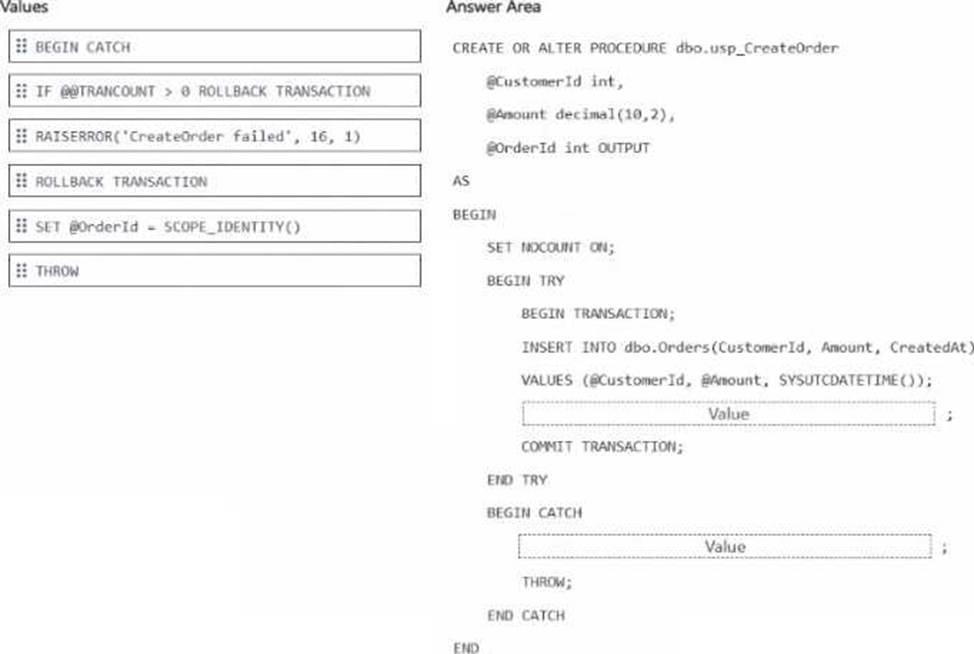
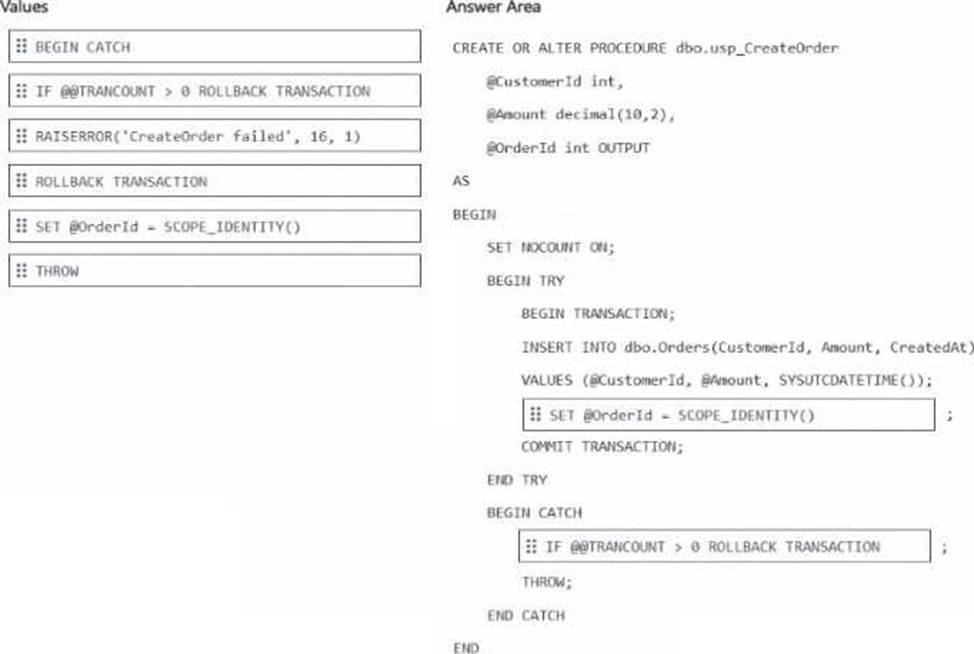
Explanation:
After the INSERT → SET @OrderId = SCOPE_IDENTITY()
Inside CATCH → IF @@TRANCOUNT > 0 ROLLBACK TRANSACTION
The correct drag-and-drop choices are:
SET @OrderId = SCOPE_IDENTITY()
IF @@TRANCOUNT > 0 ROLLBACK TRANSACTION
After the INSERT, the procedure should assign the newly generated identity value to the output parameter by using SCOPE_IDENTITY(). Microsoft documents that SCOPE_IDENTITY() returns the last identity value inserted in the same scope, which makes it the correct choice for returning the new OrderId from the procedure.
Inside the CATCH block, the procedure should use IF @@TRANCOUNT > 0 ROLLBACK TRANSACTION
before THROW. This ensures any open transaction is rolled back only when one actually exists, which prevents transaction-state issues and guarantees the failure aborts the transaction cleanly. Keeping THROW after the rollback is also the correct modern pattern because THROW re-raises the error to the caller with the original error information intact, giving consistent error behavior. This matches SQL Server best practice for TRY…CATCH transaction handling.
DRAG DROP
You have an Azure SQL database that supports an OLTP application.
You need to write Transact-SQL code that returns blocking chain details. The output must return only sessions that ate blocked or are blocking other sessions.
How should you complete the code? To answer, drag the appropriate values to the correct targets. Each value may be used once, more than once, or not at all. You may need to drag the split bar between panes or scroll to view content. NOTE: Each correct selection is worth one point.
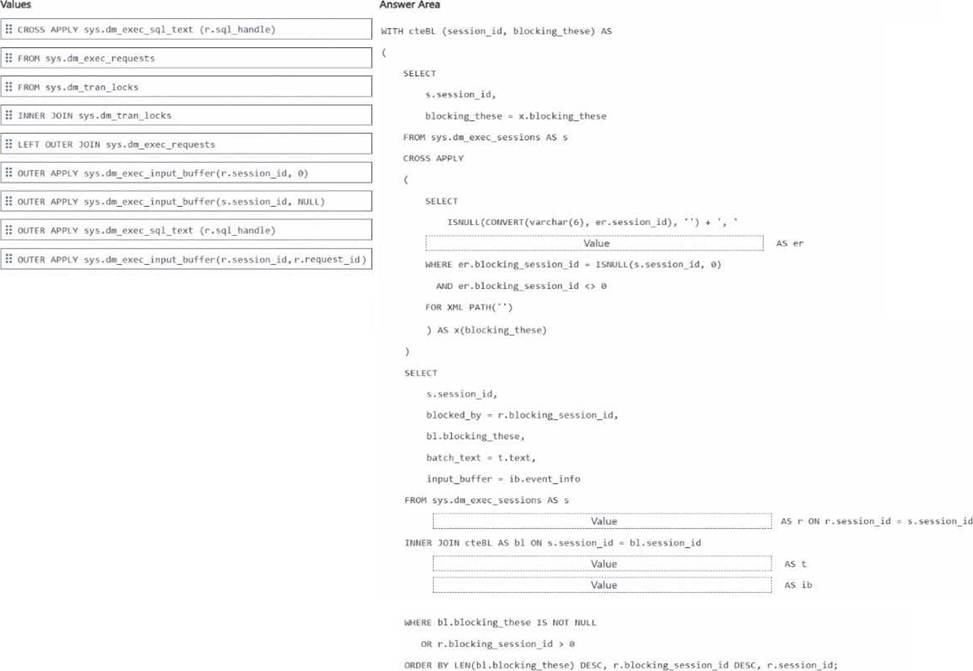
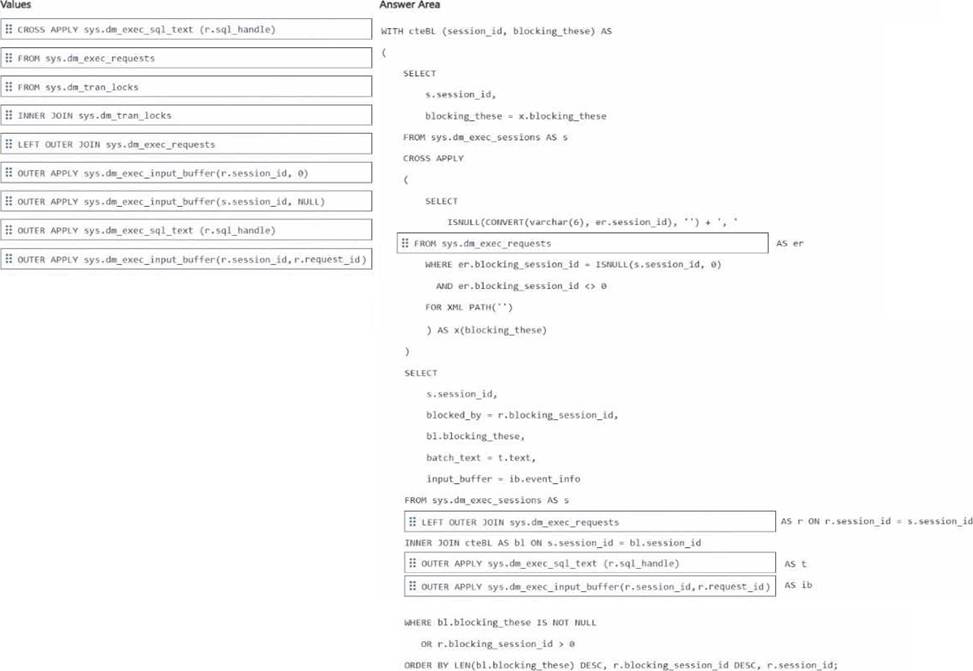
Explanation:
CTE inner source → FROM sys.dm_exec_requests
Join after sys.dm_exec_sessions AS s → LEFT OUTER JOIN sys.dm_exec_requests
Text retrieval → OUTER APPLY sys.dm_exec_sql_text(r.sql_handle)
Input buffer retrieval → OUTER APPLY sys.dm_exec_input_buffer(r.session_id, r.request_id)
The correct drag-and-drop choices are based on how blocking-chain details are normally assembled in Azure SQL Database.
The CTE must read from sys.dm_exec_requests because the alias er is used with er.session_id and er.blocking_session_id, and those columns come from sys.dm_exec_requests. Microsoft documents that sys.dm_exec_requests returns information about executing requests and includes the blocking_session_id column used to identify blockers.
After FROM sys.dm_exec_sessions AS s, the correct join is LEFT OUTER JOIN sys.dm_exec_requests
so the query can still return sessions from sys.dm_exec_sessions even when a current request row is missing. This is useful when showing sessions that are blocked or blocking, while still attempting to attach current request details when available.
For batch text, use OUTER APPLY sys.dm_exec_sql_text(r.sql_handle) because Microsoft documents sys.dm_exec_sql_text(sql_handle) as the function that returns the SQL batch text for the specified sql_handle.
For the input buffer, use OUTER APPLY sys.dm_exec_input_buffer(r.session_id, r.request_id) because Microsoft documents that sys.dm_exec_input_buffer takes session_id and request_id and returns event_info, which is commonly used when sys.dm_exec_sql_text is null or when you want the last command text.
So the completed code uses:
FROM sys.dm_exec_requests
LEFT OUTER JOIN sys.dm_exec_requests
OUTER APPLY sys.dm_exec_sql_text(r.sql_handle)
OUTER APPLY sys.dm_exec_input_buffer(r.session_id, r.request_id)
DRAG DROP
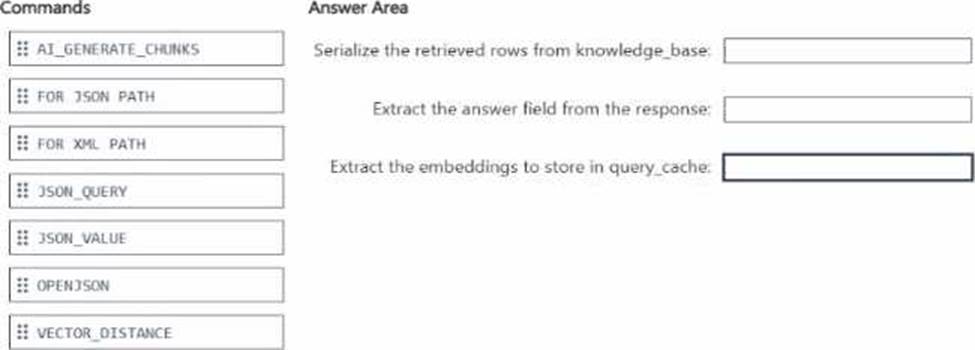
You have an Azure SQL database named DB1 that contains two tables named knowledgebase and query_cache. knowledge_base contains support articles and embeddings. query_cache contains chat questions, responses, and embeddings DB1 supports an Al-enabled chat agent.
You need to design a solution that meets the following requirements:
• Serializes the retrieved rows from knowledee_base
• Extracts the answer field from the response
• Extracts the embeddings to store in query_cache
You will call the external large language model (LLM) by using the sp_irwoke_external_re standpoint stored procedure.
Which Transact-SGL commands should you use for each requirement? To answer, drag the appropriate commands to the correct requirements. Each command may be used once, mote than once, or not at all. You may need to drag the split bar between panes or scroll to view content. NOTE: Each correct selection is worth one point.
Explanation:
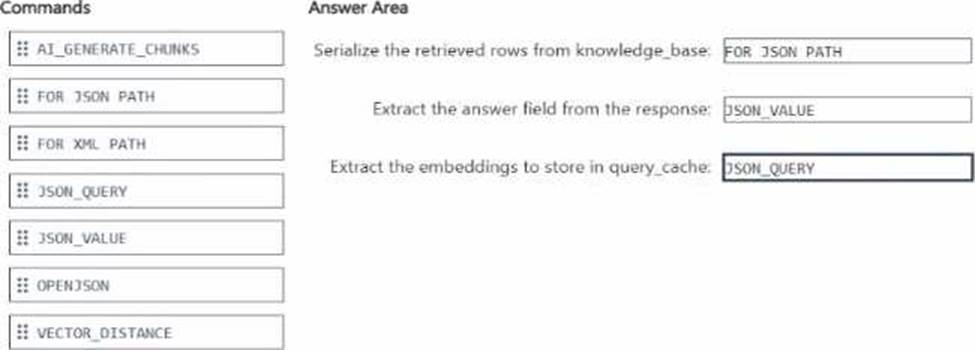
The correct mapping is:
FOR JSON PATH
JSON_VALUE
JSON_QUERY
To serialize the retrieved rows from knowledge_base, the correct command is FOR JSON PATH. Microsoft documents that FOR JSON formats query results as JSON, and PATH mode is the standard
way to shape relational rows into JSON for downstream application or AI use.
To extract the answer field from the response, the correct command is JSON_VALUE because answer is a single scalar field. Microsoft states that JSON_VALUE is used to extract a scalar value from JSON text.
To extract the embeddings to store in query_cache, the correct command is JSON_QUERY because embeddings are returned as a JSON array, not a scalar. Microsoft states that JSON_QUERY extracts an object or array from JSON text, which is exactly the right behavior for an embeddings payload.
The unused options are not the best fit here:
OPENJSON is mainly for shredding JSON into rows and columns.
AI_GENERATE_CHUNKS is for chunking text, not extracting fields from a response payload.
VECTOR_DISTANCE computes similarity between vectors and is unrelated to JSON extraction.
FOR XML PATH produces XML, not JSON.
You have a SQL database in Microsoft Fabric that contains a column named Payload. pay load stores customer data in JSON documents that have the following format.
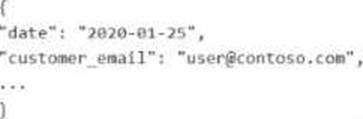
Data analysis shows that some customers have subaddressing in their email address, for example, [email protected].
You need to return a normalized email value that removes the subaddressing, for example, user! + [email protected] must be normalized to [email protected].
Which Transact SQL expression should you use?
- A . REGEXP_REPLACE(JSON_VALUE(Payload, ‘$.customer_email’), ‘+.*$’, ”)
- B . REGEXP_SUBSTR(JSON_VALUE(Payload, ‘$.customer_email’), ‘^[^+]+@.*$’)
- C . REGEXP_REPLACE(JSON_VALUE(Payload, ‘$.customer_email’), ‘+.*@’, ‘@’)
- D . REGEXP_REPLACE(JSON_VALUE(Payload, ‘$.customer_email’), ‘+.*’, ”)
C
Explanation:
The correct answer is C because the email must be normalized by removing only the subaddressing portion between the plus sign and the @, while preserving the domain. JSON_VALUE is the correct function to extract the scalar email value from the JSON document. Microsoft states that JSON_VALUE is used to extract a scalar value from JSON text.
Then REGEXP_REPLACE should remove the pattern +.*@ and replace it with a single @. For example:
[email protected] → [email protected]
Microsoft documents that REGEXP_REPLACE returns the source string with text matching the regular expression replaced by the replacement string, and that an empty or custom replacement string can be used to reshape the result.
Why the other options are wrong:
A removes everything from + to the end of the string, which would leave user1 and lose @contoso.com.
B tries to extract a string that already excludes +…, but it does not reliably reconstruct the normalized address in this pattern.
D also removes everything after +, including the domain, which is incorrect.
So the normalized-email expression is:
REGEXP_REPLACE(JSON_VALUE(Payload, ‘$.customer_email’), ‘+.*@’, ‘@’)
HOTSPOT
Your company has an ecommerce catalog in a Microsoft SQL Server 202b database named SalesDB SalesDB contains a table named products, products contains the following columns:
• product.id (int)
• product_name (nvarchar(200))
• description (nvarchar(max))
• category (nvarchar(50))
• brand (nvarchar(W))
• price (decimal)
• sku (nvarchar(40))
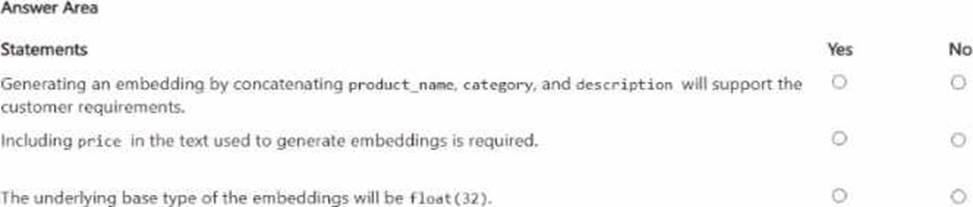
The description fields ate updated dairy by a content pipeline, and price can change multiple times per day. You want customers to be able to submit natural language queries and apply structured filters for brand and price. You plan to store embeddings in a new VECTOR(1536) column and use VECTOR_SEARCH(… METRIC=’ cosine’ …).
For each of the following statements, select Yes if the statement is true. Otherwise, select No. NOTE: Each correct selection is worth one point.
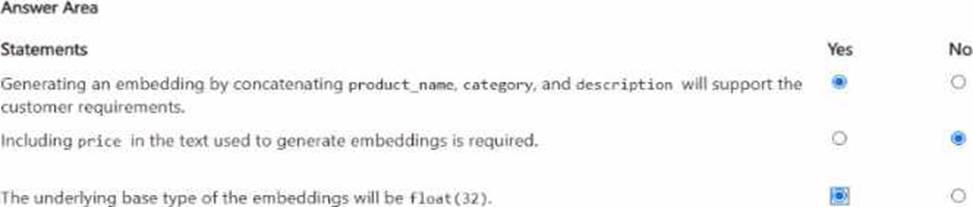
Explanation:
The first statement is Yes. Embeddings are used to represent the semantic meaning of content, and vector search is for conceptually similar matches over that content. Here, the semantically meaningful fields are product_name, category, and description. Using those together supports natural-language search, while brand and price can be handled as structured filters outside the embedding itself. This is an inference from Microsoft’s guidance that vector search works over embeddings representing content meaning, while filters remain part of the nonvector query pipeline.
The second statement is No. price changes multiple times per day and is a structured numeric attribute, not stable semantic content. Since the requirement already says customers can apply structured filters for brand and price, price does not need to be embedded into the text. Embedding volatile numeric values would also make embeddings stale faster without improving the semantic-search objective. This is again an inference grounded in Microsoft’s distinction between vector similarity over content and filtering/sorting over nonvector fields.
The third statement is Yes. In SQL Server’s vector type, the default underlying base type is float32 unless float16 is specified explicitly.