
Practice Free DOP-C02 Exam Online Questions
A company uses containers for its applications The company learns that some container Images are missing required security configurations
A DevOps engineer needs to implement a solution to create a standard base image The solution must publish the base image weekly to the us-west-2 Region, us-east-2 Region, and eu-central-1 Region.
Which solution will meet these requirements?
- A . Create an EC2 Image Builder pipeline that uses a container recipe to build the image. Configure the pipeline to distribute the image to an Amazon Elastic Container Registry (Amazon ECR) repository in us-west-2. Configure ECR replication from us-west-2 to us-east-2 and from us-east-2 to eu-central-1 Configure the pipeline to run weekly
- B . Create an AWS CodePipeline pipeline that uses an AWS CodeBuild project to build the image Use AWS CodeOeploy to publish the image to an Amazon Elastic Container Registry (Amazon ECR) repository in us-west-2 Configure ECR replication from us-west-2 to us-east-2 and from us-east-2 to eu-central-1 Configure the pipeline to run weekly
- C . Create an EC2 Image Builder pipeline that uses a container recipe to build the Image Configure the
pipeline to distribute the image to Amazon Elastic Container Registry (Amazon ECR) repositories in all three Regions. Configure the pipeline to run weekly. - D . Create an AWS CodePipeline pipeline that uses an AWS CodeBuild project to build the image Use AWS CodeDeploy to publish the image to Amazon Elastic Container Registry (Amazon ECR) repositories in all three Regions. Configure the pipeline to run weekly.
C
Explanation:
Create an EC2 Image Builder Pipeline that Uses a Container Recipe to Build the Image:
EC2 Image Builder simplifies the creation, maintenance, validation, and sharing of container images. By using a container recipe, you can define the base image, components, and validation tests for your container image.
Configure the Pipeline to Distribute the Image to Amazon Elastic Container Registry (Amazon ECR)
Repositories in All Three Regions:
Amazon ECR provides a secure, scalable, and reliable container registry.
Configuring the pipeline to distribute the image to ECR repositories in us-west-2, us-east-2, and eu-central-1 ensures that the image is available in all required regions. Configure the Pipeline to Run Weekly:
Setting the pipeline to run on a weekly schedule ensures that the base image is regularly updated and published, incorporating any new security configurations or updates.
By using EC2 Image Builder to automate the creation and distribution of the container image, the solution ensures that the base image is consistently maintained and available across multiple regions with minimal management overhead.
Reference: EC2 Image Builder
Amazon ECR
Setting Up EC2 Image Builder Pipelines
A company hosts its staging website using an Amazon EC2 instance backed with Amazon EBS storage. The company wants to recover quickly with minimal data losses in the event of network connectivity issues or power failures on the EC2 instance.
Which solution will meet these requirements?
- A . Add the instance to an EC2 Auto Scaling group with the minimum, maximum, and desired capacity set to 1.
- B . Add the instance to an EC2 Auto Scaling group with a lifecycle hook to detach the EBS volume when the EC2 instance shuts down or terminates.
- C . Create an Amazon CloudWatch alarm for the StatusCheckFailed System metric and select the EC2 action to recover the instance.
- D . Create an Amazon CloudWatch alarm for the StatusCheckFailed Instance metric and select the EC2 action to reboot the instance.
A company uses an organization in AWS Organizations to manage multiple AWS accounts in a hierarchical structure. An SCP that is associated with the organization root allows IAM users to be created.
A DevOps team must be able to create IAM users with any level of permissions. Developers must also be able to create IAM users. However, developers must not be able to grant new IAM users excessive permissions. The developers have the CreateAndManageUsers role in each account. The DevOps team must be able to prevent other users from creating IAM users.
Which combination of steps will meet these requirements? (Select TWO.)
- A . Create an SCP in the organization to deny users the ability to create and modify IAM users. Attach
the SCP to the root of the organization. Attach the CreateAndManageUsers role to developers. - B . Create an SCP in the organization to grant users that have the DeveloperBoundary policy attached the ability to create new IAM users and to modify IAM users. Configure the SCP to require users to attach the PermissionBoundaries policy to any new IAM user. Attach the SCP to the root of the organization.
- C . Create an IAM permissions policy named PermissionBoundaries within each account. Configure the PermissionBoundaries policy to specify the maximum permissions that a developer can grant to a new IAM user.
- D . Create an IAM permissions policy named PermissionBoundaries within each account. Configure PermissionsBoundaries to allow users who have the PermissionBoundaries policy to create new IAM users.
- E . Create an IAM permissions policy named DeveloperBoundary within each account. Configure the DeveloperBoundary policy to allow developers to create IAM users and to assign policies to IAM users only if the developer includes the PermissionBoundaries policy as the permissions boundary. Attach the DeveloperBoundary policy to the CreateAndManageUsers role within each account.
C, E
Explanation:
Comprehensive & Detailed Explanation (150C250 words):
To allow developers to create IAM users without granting excessive permissions, the correct solution is to use permissions boundaries, which AWS specifically recommends for restricting delegated administrators such as developers. A permissions boundary defines the maximum permissions that an IAM user or role can delegate.
Step C ensures that each AWS account contains a PermissionBoundaries policy defining the maximum allowed permissions that any developer-created user may receive. This prevents privilege escalation, even if the developer attaches a more powerful policy. This aligns with AWS guidance for restricting privilege escalation within multi-account environments.
Step E ensures that developers can create IAM users but only if they attach the PermissionBoundaries policy as the permissions boundary. By attaching the DeveloperBoundary policy to the CreateAndManageUsers role, developers gain the ability to create users, but they are cryptographically prevented from assigning permissions outside the boundary policy.
Meanwhile, the DevOps team (who are not restricted by the boundary) can still create IAM users with full permissions.
This combination satisfies all constraints:
DevOps team: unrestricted IAM creation
Developers: restricted IAM creation enforced by boundaries
Other users: still blocked from IAM creation by existing SCP
A company runs a workload on Amazon EC2 instances. The company needs a control that requires the use of Instance Metadata Service Version 2 (IMDSv2) on all EC2 instances in the AWS account. If an EC2 instance does not prevent the use of Instance Metadata Service Version 1 (IMDSv1), the EC2 instance must be terminated.
Which solution will meet these requirements?
- A . Set up AWS Config in the account. Use a managed rule to check EC2 instances. Configure the rule to remediate the findings by using AWS Systems Manager Automation to terminate the instance.
- B . Create a permissions boundary that prevents the ec2:Runlnstance action if the ec2:MetadataHttpTokens condition key is not set to a value of required. Attach the permissions boundary to the IAM role that was used to launch the instance.
- C . Set up Amazon Inspector in the account. Configure Amazon Inspector to activate deep inspection for EC2 instances. Create an Amazon EventBridge rule for an Inspector2 finding. Set an AWS Lambda function as the target to terminate the instance.
- D . Create an Amazon EventBridge rule for the EC2 instance launch successful event. Send the event to an AWS Lambda function to inspect the EC2 metadata and to terminate the instance.
A
Explanation:
Option A: Set up AWS Config in the account and use a managed rule to check the configuration of EC2 instances for the use of IMDSv2. If an instance is found to be non-compliant (i.e., it allows the use of IMDSv1), configure the rule to trigger a remediation action using AWS Systems Manager Automation to terminate the instance. AWS Config continuously monitors and records your AWS resource configurations and can automate the evaluation of recorded configurations against desired configurations. If it detects non-compliant resources, it can take action to remediate them.
A company has developed a serverless web application that is hosted on AWS. The application consists of Amazon S3. Amazon API Gateway, several AWS Lambda functions, and an Amazon RDS for MySQL database. The company is using AWS CodeCommit to store the source code. The source code is a combination of AWS Serverless Application Model (AWS SAM) templates and Python code.
A security audit and penetration test reveal that user names and passwords for authentication to the database are hardcoded within CodeCommit repositories. A DevOps engineer must implement a solution to automatically detect and prevent hardcoded secrets.
What is the MOST secure solution that meets these requirements?
- A . Enable Amazon CodeGuru Profiler. Decorate the handler function with @with_lambda_profiler(). Manually review the recommendation report. Write the secret to AWS Systems Manager Parameter Store as a secure string. Update the SAM templates and the Python code to pull the secret from Parameter Store.
- B . Associate the CodeCommit repository with Amazon CodeGuru Reviewer. Manually check the code review for any recommendations. Choose the option to protect the secret. Update the SAM templates and the Python code to pull the secret from AWS Secrets Manager.
- C . Enable Amazon CodeGuru Profiler. Decorate the handler function with @with_lambda_profiler(). Manually review the recommendation report. Choose theoption to protect the secret. Update the SAM templates and the Python code to pull the secret from AWS Secrets Manager.
- D . Associate the CodeCommit repository with Amazon CodeGuru Reviewer. Manually check the code review for any recommendations. Write the secret to AWS Systems Manager Parameter Store as a string. Update the SAM templates and the Python code to pull the secret from Parameter Store.
An AWS CodePipeline pipeline has implemented a code release process. The pipeline is integrated with AWS CodeDeploy to deploy versions of an application to multiple Amazon EC2 instances for each CodePipeline stage.
During a recent deployment the pipeline failed due to a CodeDeploy issue. The DevOps team wants to improve monitoring and notifications during deployment to decrease resolution times.
What should the DevOps engineer do to create notifications. When issues are discovered?
- A . Implement Amazon CloudWatch Logs for CodePipeline and CodeDeploy create an AWS Config rule to evaluate code deployment issues, and create an Amazon Simple Notification Service (Amazon SNS) topic to notify stakeholders of deployment issues.
- B . Implement Amazon EventBridge for CodePipeline and CodeDeploy create an AWS Lambda function to evaluate code deployment issues, and create an Amazon Simple Notification Service (Amazon SNS) topic to notify stakeholders of deployment issues.
- C . Implement AWS CloudTrail to record CodePipeline and CodeDeploy API call information create an AWS Lambda function to evaluate code deployment issues and create an Amazon Simple Notification Service (Amazon SNS) topic to notify stakeholders of deployment issues.
- D . Implement Amazon EventBridge for CodePipeline and CodeDeploy create an Amazon. Inspector assessment target to evaluate code deployment issues and create an Amazon Simple. Notification Service (Amazon SNS) topic to notify stakeholders of deployment issues.
B
Explanation:
AWS CloudWatch Events can be used to monitor events across different AWS resources, and a CloudWatch Event Rule can be created to trigger an AWS Lambda function when a deployment issue is detected in the pipeline. The Lambda function can then evaluate the issue and send a notification to the appropriate stakeholders through an Amazon SNS topic. This approach allows for real-time notifications and faster resolution times.
A DevOps engineer has implemented a Cl/CO pipeline to deploy an AWS Cloud Format ion template that provisions a web application. The web application consists of an Application Load Balancer (ALB) a target group, a launch template that uses an Amazon Linux 2 AMI an Auto Scaling group of Amazon EC2 instances, a security group and an Amazon RDS for MySQL database The launch template includes user data that specifies a script to install and start the application.
The initial deployment of the application was successful. The DevOps engineer made changes to update the version of the application with the user data. The CI/CD pipeline has deployed a new version of the template However, the health checks on the ALB are now failing. The health checks have marked all targets as unhealthy.
During investigation the DevOps engineer notices that the Cloud Formation stack has a status of UPDATE_COMPLETE. However, when the DevOps engineer connects to one of the EC2 instances and checks /varar/log messages, the DevOps engineer notices that the Apache web server failed to start successfully because of a configuration error
How can the DevOps engineer ensure that the CloudFormation deployment will fail if the user data fails to successfully finish running?
- A . Use the cfn-signal helper script to signal success or failure to CloudFormation Use the WaitOnResourceSignals update policy within the CloudFormation template Set an appropriate timeout for the update policy.
- B . Create an Amazon CloudWatch alarm for the UnhealthyHostCount metric. Include an appropriate alarm threshold for the target group Create an Amazon Simple Notification Service (Amazon SNS) topic as the target to signal success or failure to CloudFormation
- C . Create a lifecycle hook on the Auto Scaling group by using the AWS AutoScaling LifecycleHook resource Create an Amazon Simple Notification Service (Amazon SNS) topic as the target to signal success or failure to CloudFormation Set an appropriate timeout on the lifecycle hook.
- D . Use the Amazon CloudWatch agent to stream the cloud-init logs Create a subscription filter that includes an AWS Lambda function with an appropriate invocation timeout Configure the Lambda function to use the SignalResource API operation to signal success or failure to CloudFormation.
A
Explanation:
https://docs.aws.amazon.com/AWSCloudFormation/latest/UserGuide/aws-attribute-updatepolicy.html
A company has an organization in AWS Organizations. A DevOps engineer needs to maintain multiple AWS accounts that belong to different OUs in the organization. All resources, including 1AM policies and Amazon S3 policies within an account, are deployed through AWS CloudFormation. All templates and code are maintained in an AWS CodeCommit repository Recently, some developers have not been able to access an S3 bucket from some accounts in the organization.
The following policy is attached to the S3 bucket.
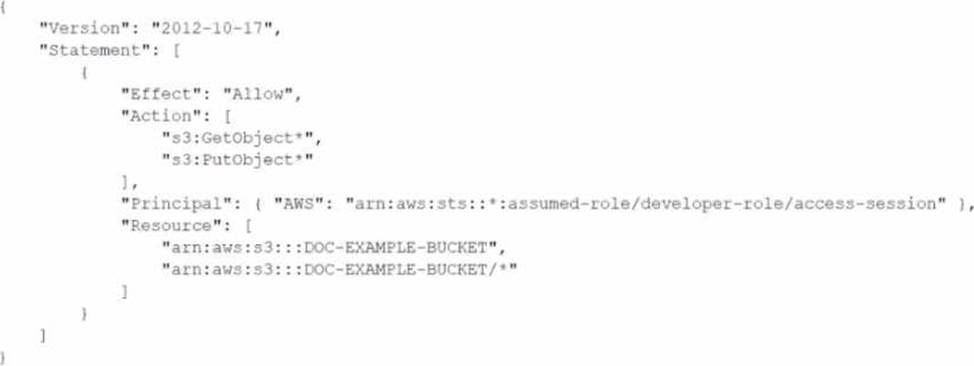
What should the DevOps engineer do to resolve this access issue?
- A . Modify the S3 bucket policy Turn off the S3 Block Public Access setting on the S3 bucket In the S3 policy, add the awsSourceAccount condition. Add the AWS account IDs of all developers who are experiencing the issue.
- B . Verify that no 1AM permissions boundaries are denying developers access to the S3 bucket Make the necessary changes to IAM permissions boundaries. Use an AWS Config recorder in the individual developer accounts that are experiencing the issue to revert any changes that are blocking access.
Commit the fix back into the CodeCommit repository. Invoke deployment through Cloud Formation to apply the changes. - C . Configure an SCP that stops anyone from modifying 1AM resources in developer OUs. In the S3 policy, add the awsSourceAccount condition. Add the AWS account IDs of all developers who are experiencing the issue Commit the fix back into the CodeCommit repository Invoke deployment through CloudFormation to apply the changes
- D . Ensure that no SCP is blocking access for developers to the S3 bucket Ensure that no 1AM policy permissions boundaries are denying access to developer 1AM users Make the necessary changes to the SCP and 1AM policy permissions boundaries in the CodeCommit repository Invoke deployment through CloudFormation to apply the changes
D
Explanation:
Verify No SCP Blocking Access:
Ensure that no Service Control Policy (SCP) is blocking access for developers to the S3 bucket. SCPs are applied at the organization or organizational unit (OU) level in AWS Organizations and can restrict what actions users and roles in the affected accounts can perform.
Verify No IAM Policy Permissions Boundaries Blocking Access:
IAM permissions boundaries can limit the maximum permissions that a user or role can have. Verify that these boundaries are not restricting access to the S3 bucket.
Make Necessary Changes to SCP and IAM Policy Permissions Boundaries:
Adjust the SCPs and IAM permissions boundaries if they are found to be the cause of the access issue. Make sure these changes are reflected in the code maintained in the AWS CodeCommit repository.
Invoke Deployment Through CloudFormation:
Commit the updated policies to the CodeCommit repository.
Use AWS CloudFormation to deploy the changes across the relevant accounts and resources to ensure that the updated permissions are applied consistently.
By ensuring no SCPs or IAM policy permissions boundaries are blocking access and making necessary
changes if they are, the DevOps engineer can resolve the access issue for developers trying to access
the S3 bucket.
Reference: AWS SCPs
IAM Permissions Boundaries
Deploying CloudFormation Templates
A company runs an application on Amazon EKS. The company needs comprehensive logging for control plane and nodes, analyze API requests, and monitor container performance with minimal operational overhead.
Which solution meets these requirements?
- A . Enable CloudTrail for control plane logging; deploy Logstash as a ReplicaSet on nodes; use OpenSearch to store and analyze logs.
- B . Enable control plane logging for EKS and send logs to CloudWatch; use CloudWatch Container Insights for node and container logs; use CloudWatch Logs Insights to query logs.
- C . Enable API server control plane logging and send to S3; deploy Kubernetes Event Exporter on nodes; send logs to S3; use Athena and QuickSight for analysis.
- D . Use AWS Distro for OpenTelemetry; stream logs to Firehose; analyze data in Redshift.
B
Explanation:
EKS supports control plane logging sent directly to CloudWatch Logs.
CloudWatch Container Insights provides metrics and logs collection for nodes and containers automatically with minimal setup.
CloudWatch Logs Insights offers powerful querying and visualization integrated in AWS without managing additional infrastructure.
Options A and C require deploying and managing additional components (Logstash, Event Exporter, S3, Athena).
Option D adds complexity with Open Telemetry and Redshift, which is more operationally heavy.
References:
Amazon EKS Control Plane Logging
CloudWatch Container Insights for EKS
A company is using AWS CodePipeline to automate its release pipeline. AWS CodeDeploy is being used in the pipeline to deploy an application to Amazon Elastic Container Service (Amazon ECS) using the blue/green deployment model. The company wants to implement scripts to test the green version of the application before shifting traffic. These scripts will complete in 5 minutes or less. If errors are discovered during these tests, the application must be rolled back.
Which strategy will meet these requirements?
- A . Add a stage to the CodePipeline pipeline between the source and deploy stages. Use AWS CodeBuild to create a runtime environment and build commands in the buildspec file to invoke test scripts. If errors are found, use the aws deploy stop-deployment command to stop the deployment.
- B . Add a stage to the CodePipeline pipeline between the source and deploy stages. Use this stage to invoke an AWS Lambda function that will run the test scripts. If errors are found, use the aws deploy stop-deployment command to stop the deployment.
- C . Add a hooks section to the CodeDeploy AppSpec file. Use the AfterAllowTestTraffic lifecycle event to invoke an AWS Lambda function to run the test scripts. If errors are found, exit the Lambda function with an error to initiate rollback.
- D . Add a hooks section to the CodeDeploy AppSpec file. Use the AfterAllowTraffic lifecycle event to invoke the test scripts. If errors are found, use the aws deploy stop-deployment CLI command to stop the deployment.